
好用到飞起的12个jupyter lab插件
1 简介
jupyter lab作为jupyter notebook的升级改造版,除了更加人性化的交互界面以及更多的用户自主定制功能之外,最吸引人的就是其丰富多样的拓展插件,使得每个使用jupyter lab的人都可以按照自己所需挑选安装插件,组合出自己心中的完美工作台。
 图1
图1
本文就将给大家介绍在我的日常工作中经常使用到的12个jupyter lab实用插件。
2 jupyter lab实用插件推荐
2.1 debugger
在jupyter notebook或jupyter lab中debug有多么蛋疼,尝试过的朋友们应该都有所体会。但随着jupyter lab官方插件debugger的横空出世,在jupyter lab中进行debug变得不再痛苦,充满了乐趣:
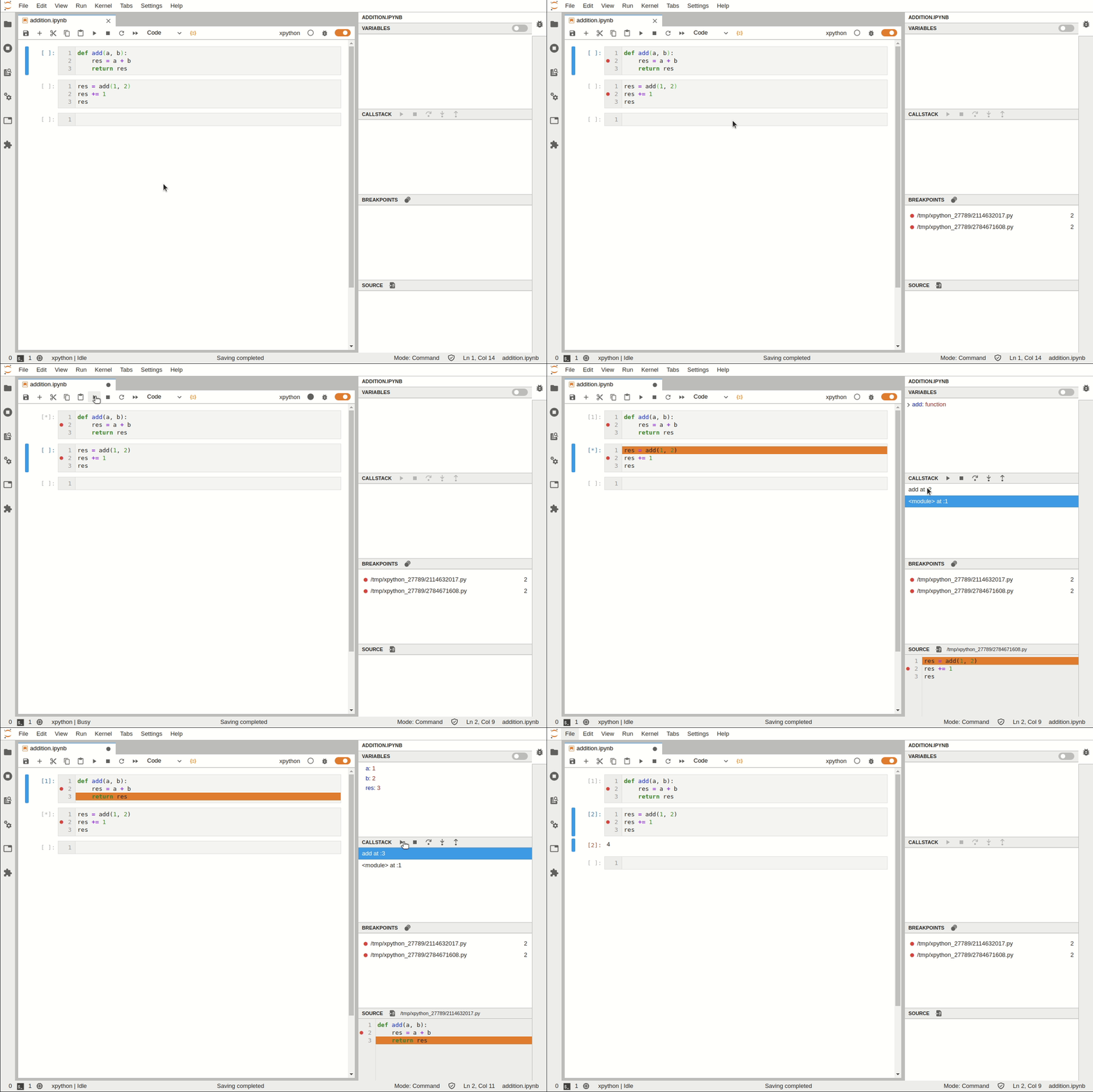 图2
图2
但要注意当前的debugger插件基于xeus内核,这是与我们平常使用的ipykernel内核不太一样,所以要想在jupyter lab中使用debugger插件,需要先安装xeus内核再进行debugger的安装,安装过程命令如下:
conda install xeus-python=0.8.0 -c conda-forge

jupyter labextension install @jupyterlab/debugger
官方文档:https://github.com/jupyterlab/debugger
2.2 geojson-extension
对于经常处理矢量数据的朋友而言,geojson格式的文件想必也是比较熟悉,而jupyter lab中的geojson-extension插件可以帮助我们在jupyter lab界面中以地图可视化的方式打开查看geojson文件:
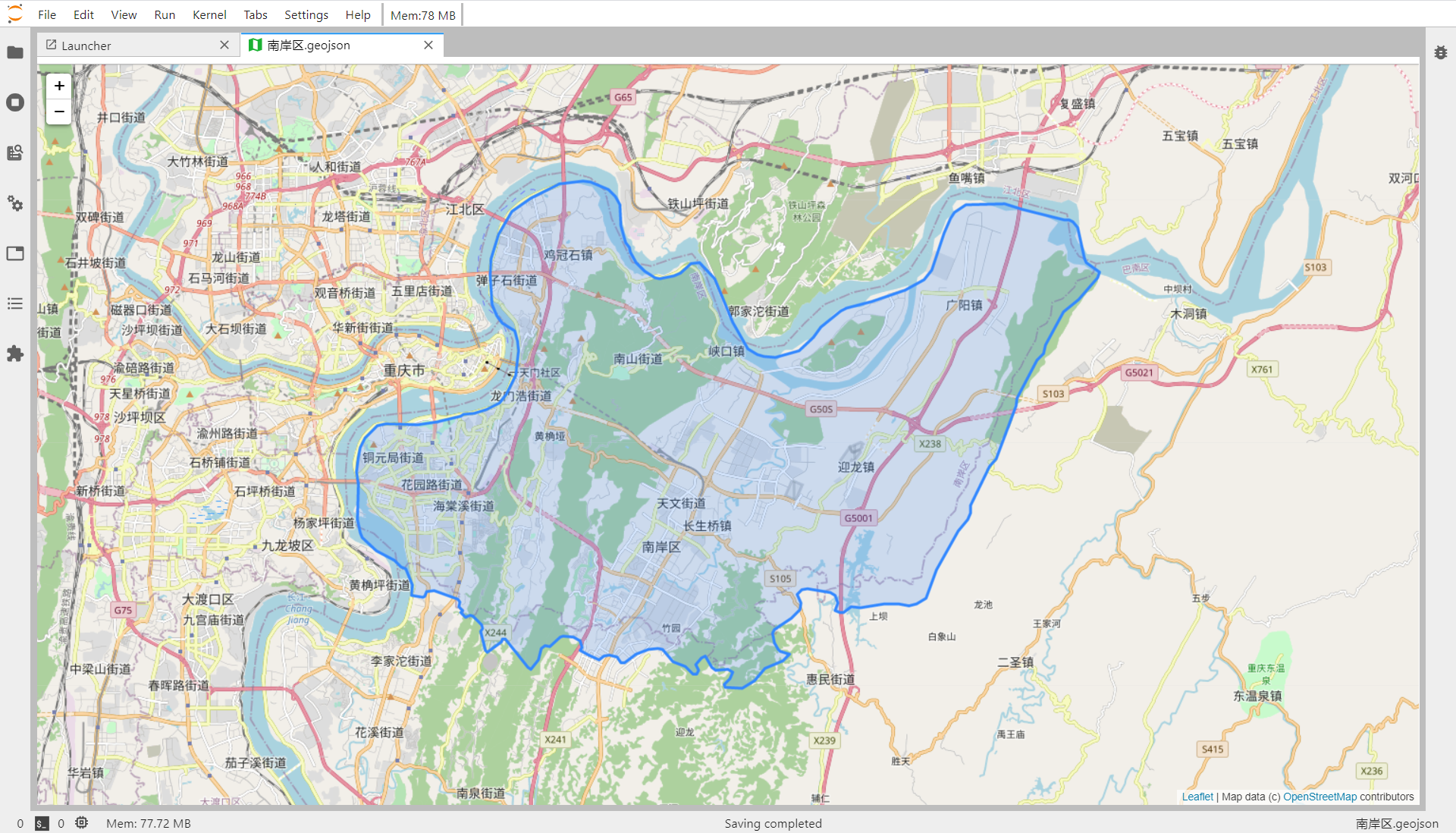 图3
图3
但要注意的是,因为是基于leaflet的界面,所以不要用这种方式来查看要素太多的geojson文件(不过应该没有人会用geojson格式存大量矢量信息吧)
安装命令:
jupyter labextension install @jupyterlab/geojson-extension
官方文档:https://github.com/jupyterlab/jupyter-renderers
2.3 jupyterlab-toc
jupyterlab-toc帮助我们在notebook界面利用markdown来创建目录,辅助我们更好地整合梳理数据分析工作流:
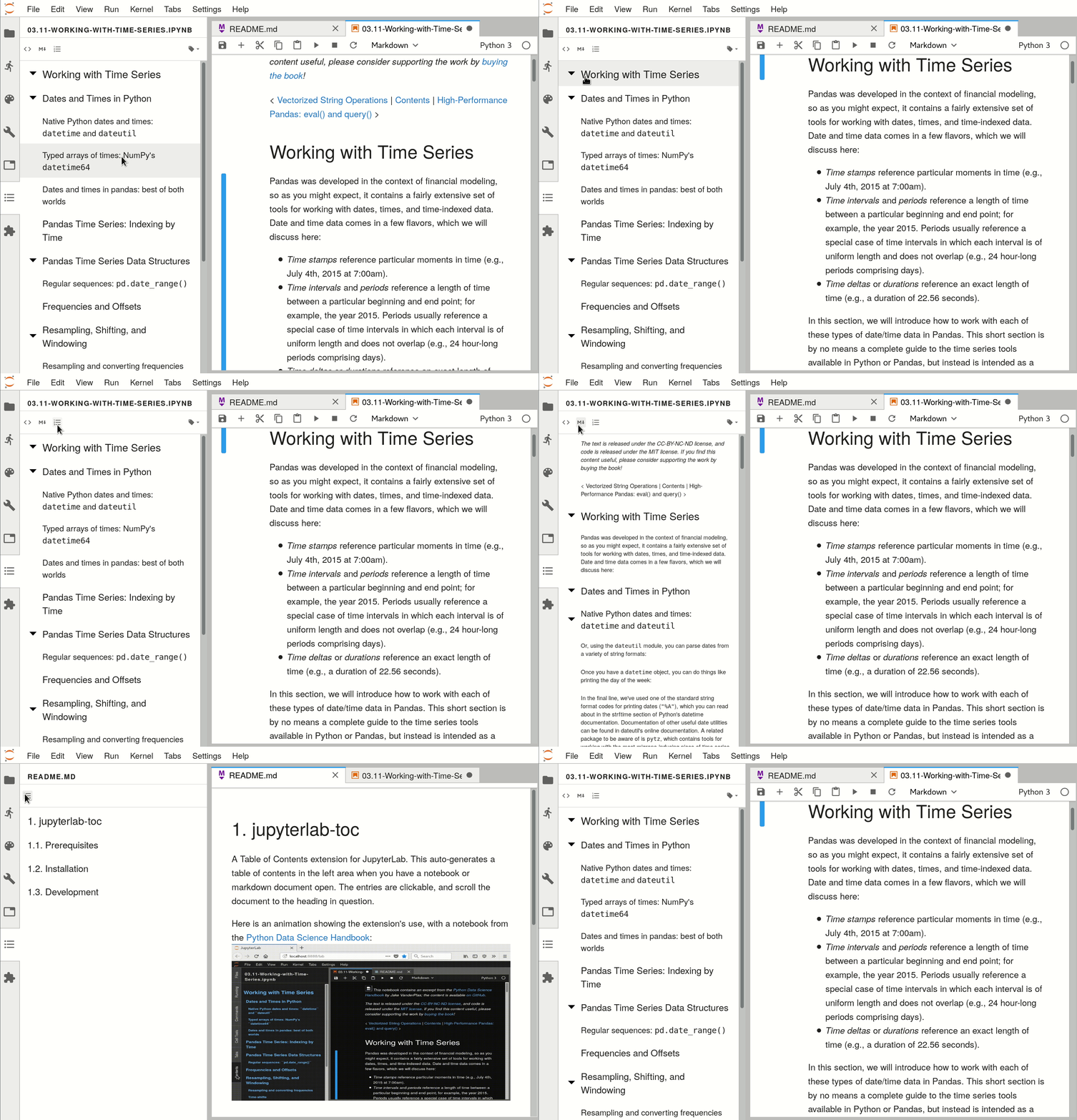 图4
图4
安装命令:
jupyter labextension install @jupyterlab/toc
官方文档:https://github.com/jupyterlab/jupyterlab-toc
2.4 jupyter-matplotlib
jupyter-matplotlib帮助我们在notebook界面配合matplotlib实现交互式的作图,只需要在绘图之前执行魔法命令%matplotlib widget,之后绘制的所有matplotlib图表即可自动转换为交互式的:
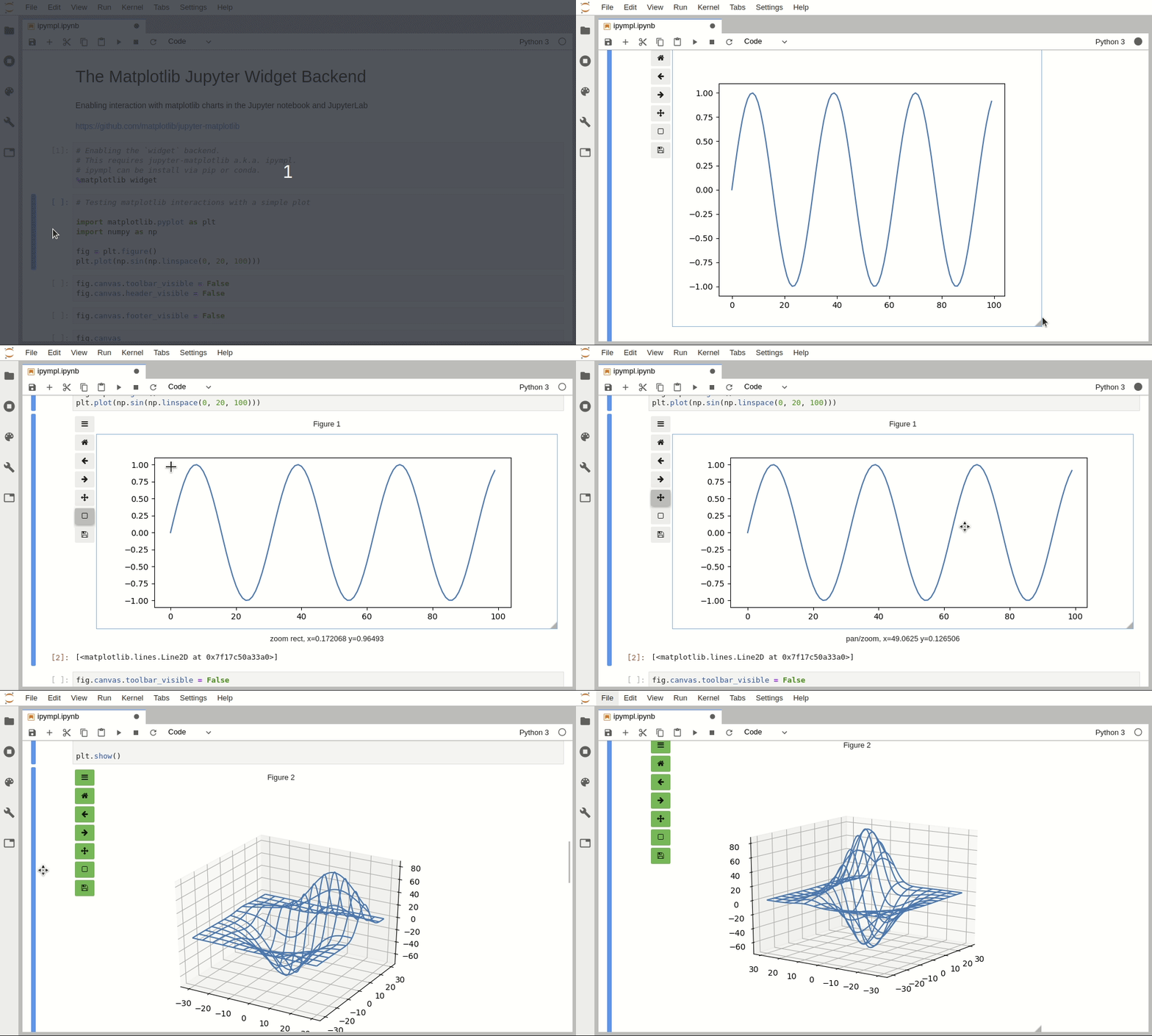 图5
图5
安装命令:
pip install ipympl

jupyter labextension install @jupyter-widgets/jupyterlab-manager jupyter-matplotlib
官方文档:https://github.com/matplotlib/ipympl
2.5 jupyterlab-drawio
jupyterlab-drawio是一个让我们可以在jupyter lab界面内基于drawio绘制流程图、思维导图等示意图的插件:
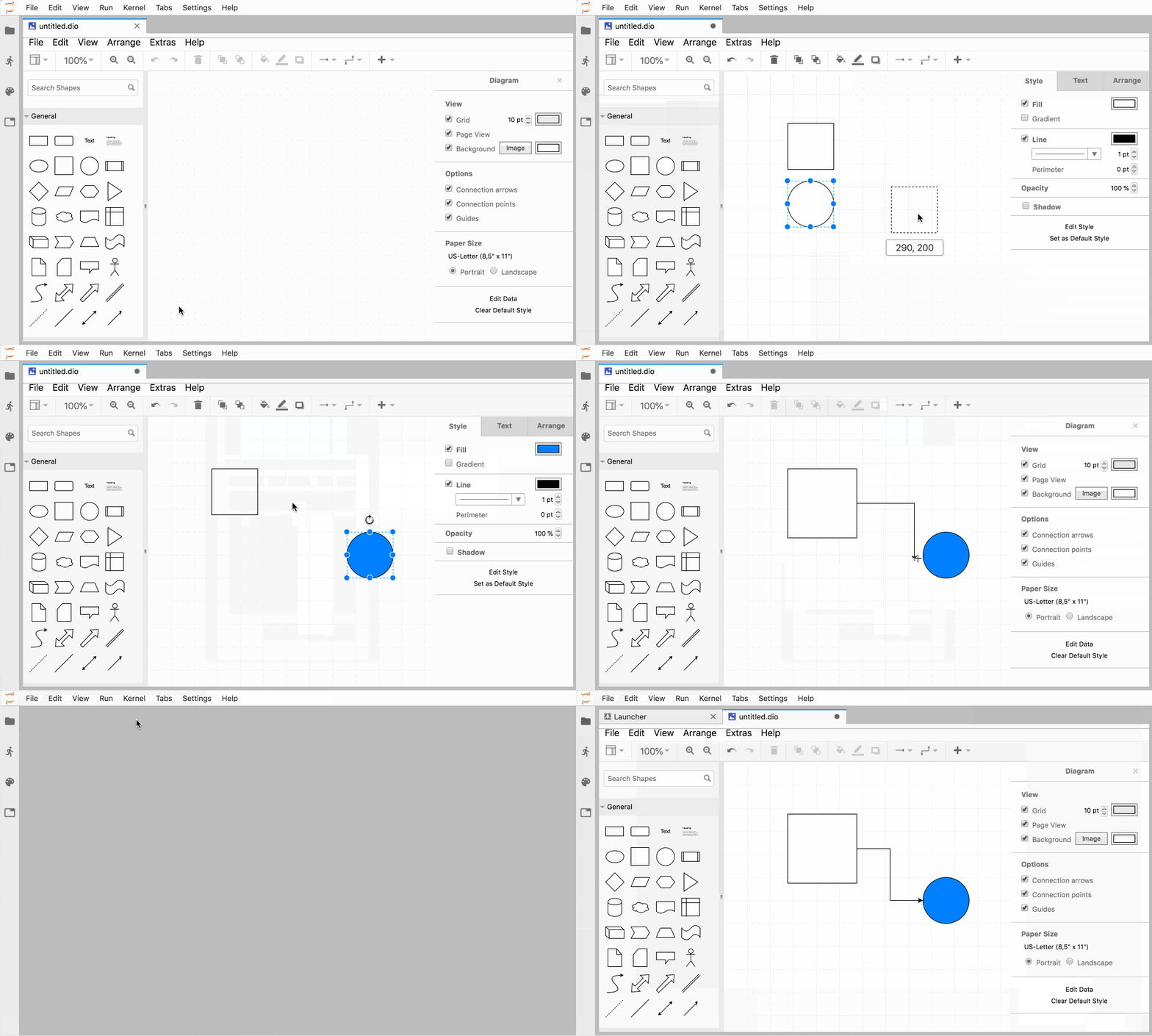 图6
图6
安装命令:
jupyter labextension install jupyterlab-drawio
官方文档:https://github.com/QuantStack/jupyterlab-drawio
2.6 jupyterlab-execute-time
jupyterlab-execute-time插件帮助我们在jupyter lab中记录每个单元cell的执行开始以及运行耗时:
 图7
图7
安装命令:
jupyter labextension install jupyterlab-execute-time
官方文档:https://github.com/deshaw/jupyterlab-execute-time
2.7 jupyterlab-plotly
jupyterlab-plotly是一款帮助plotly图像在jupyter lab中正常渲染的插件:
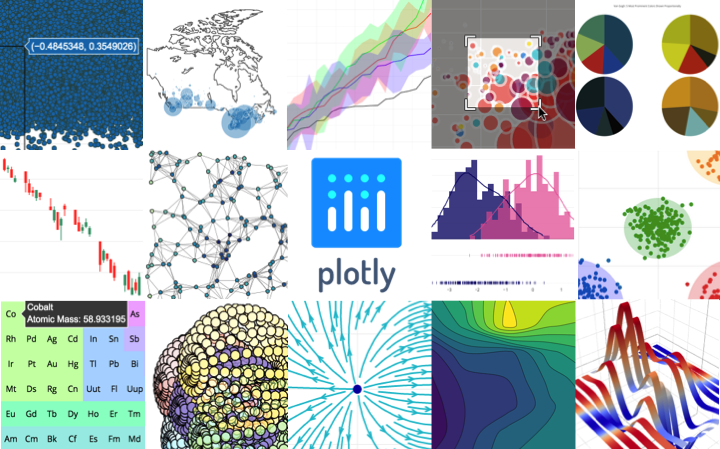 图8
图8
安装命令:
jupyter labextension install @jupyter-widgets/jupyterlab-manager plotlywidget@4.9.0
官方文档:https://github.com/plotly/plotly.py
2.8 jupyterlab-spreadsheet
jupyterlab-spreadsheet帮助我们在jupyter lab中查看表格类文件,特别是其支持查看多工作表的excel表格文件:
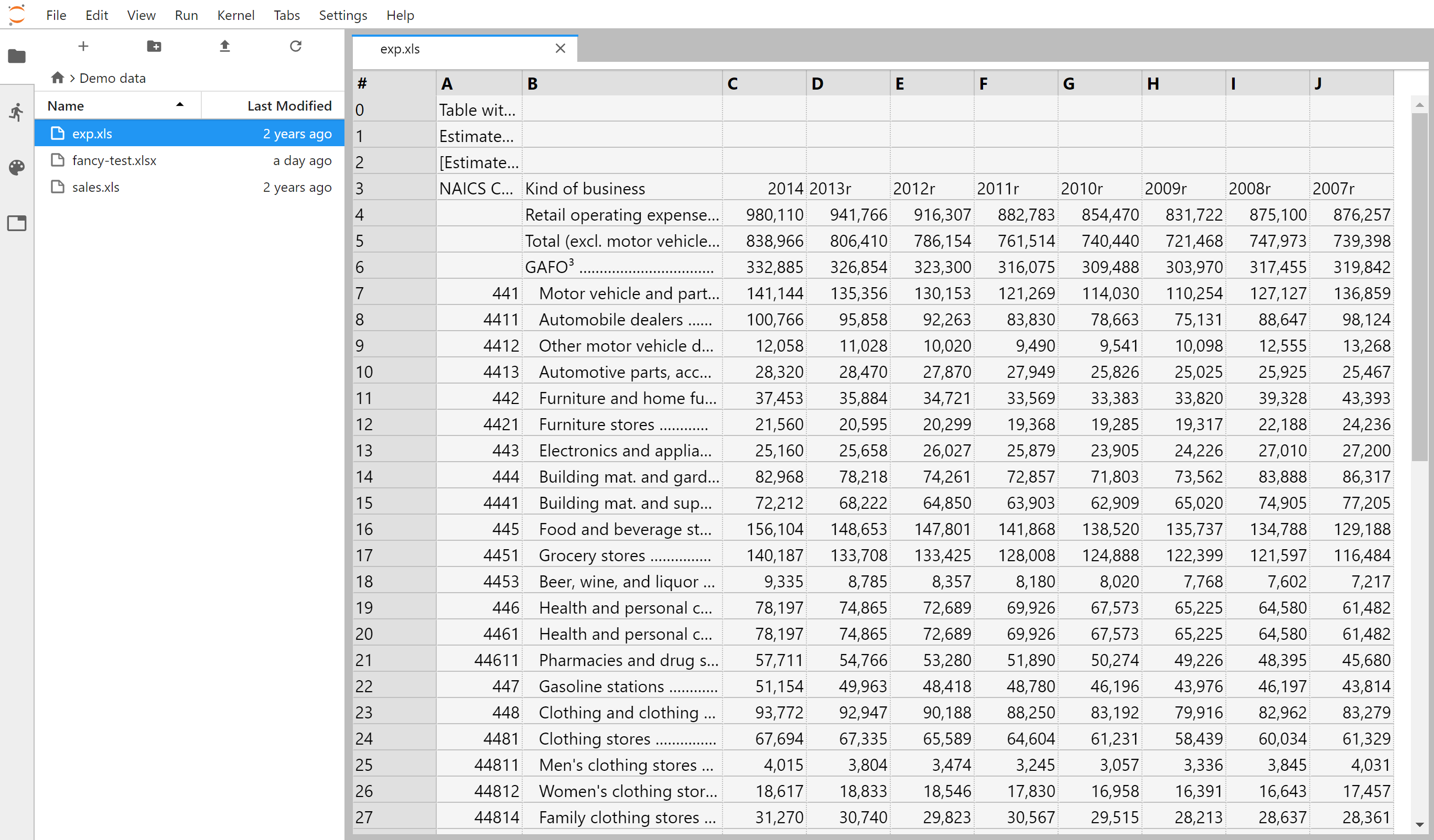 图9
图9
安装命令:
jupyter labextension install jupyterlab-spreadsheet
官方文档:https://github.com/quigleyj97/jupyterlab-spreadsheet
2.9 jupyterlab-system-monitor
jupyterlab-system-monitor通过在jupyter lab界面中添加资源监视器部件,能帮助我们在工作过程中方便的看到CPU、内存的实时占用情况:
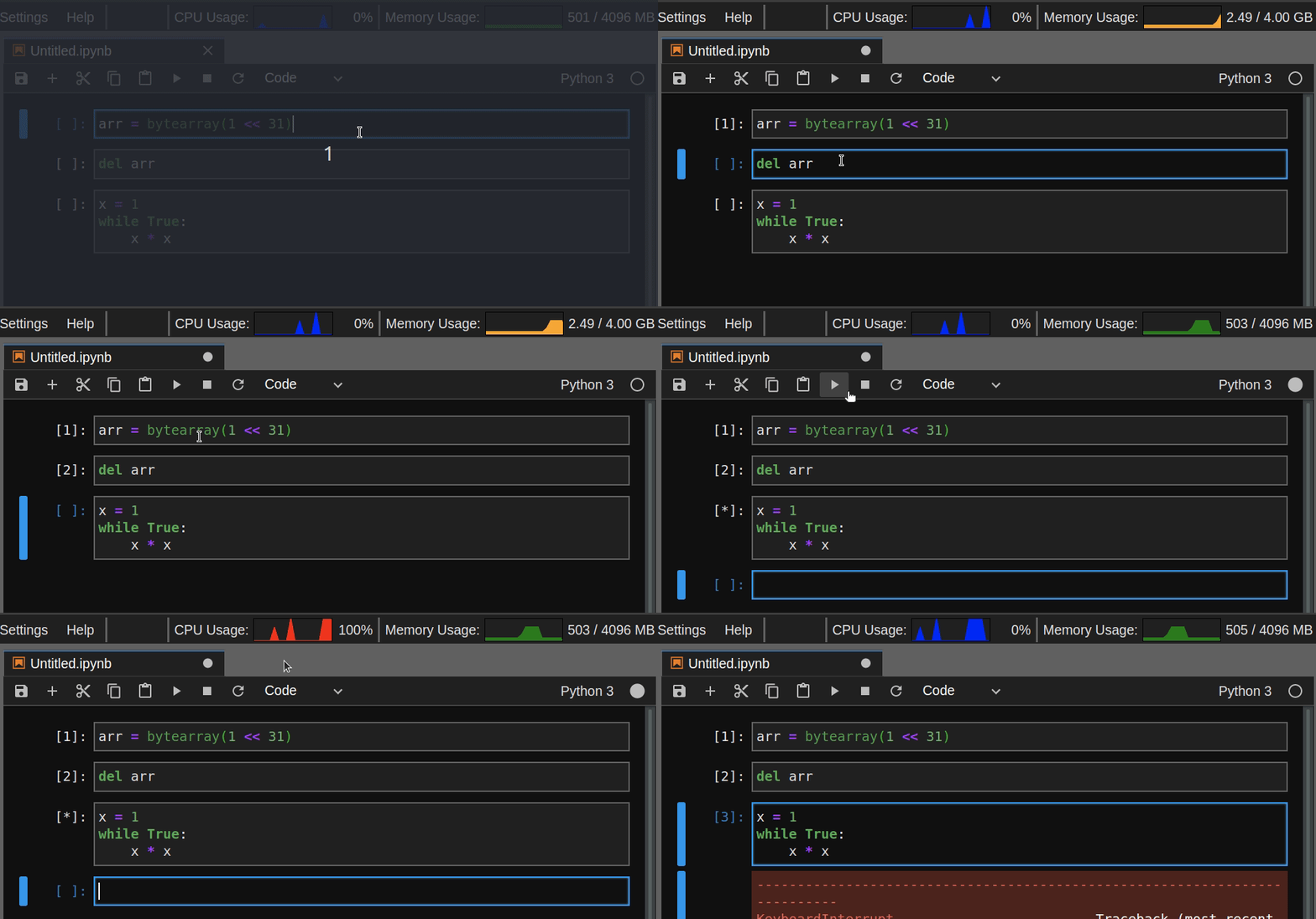 图10
图10
安装命令:
pip install nbresuse

jupyter labextension install jupyterlab-topbar-extension jupyterlab-system-monitor
官方文档:https://github.com/jtpio/jupyterlab-system-monitor
2.10 keplergl-jupyter
keplergl-jupyter是我使用非常频繁的jupyter lab插件,因为没有它就无法在jupyter lab中正常使用keplergl:
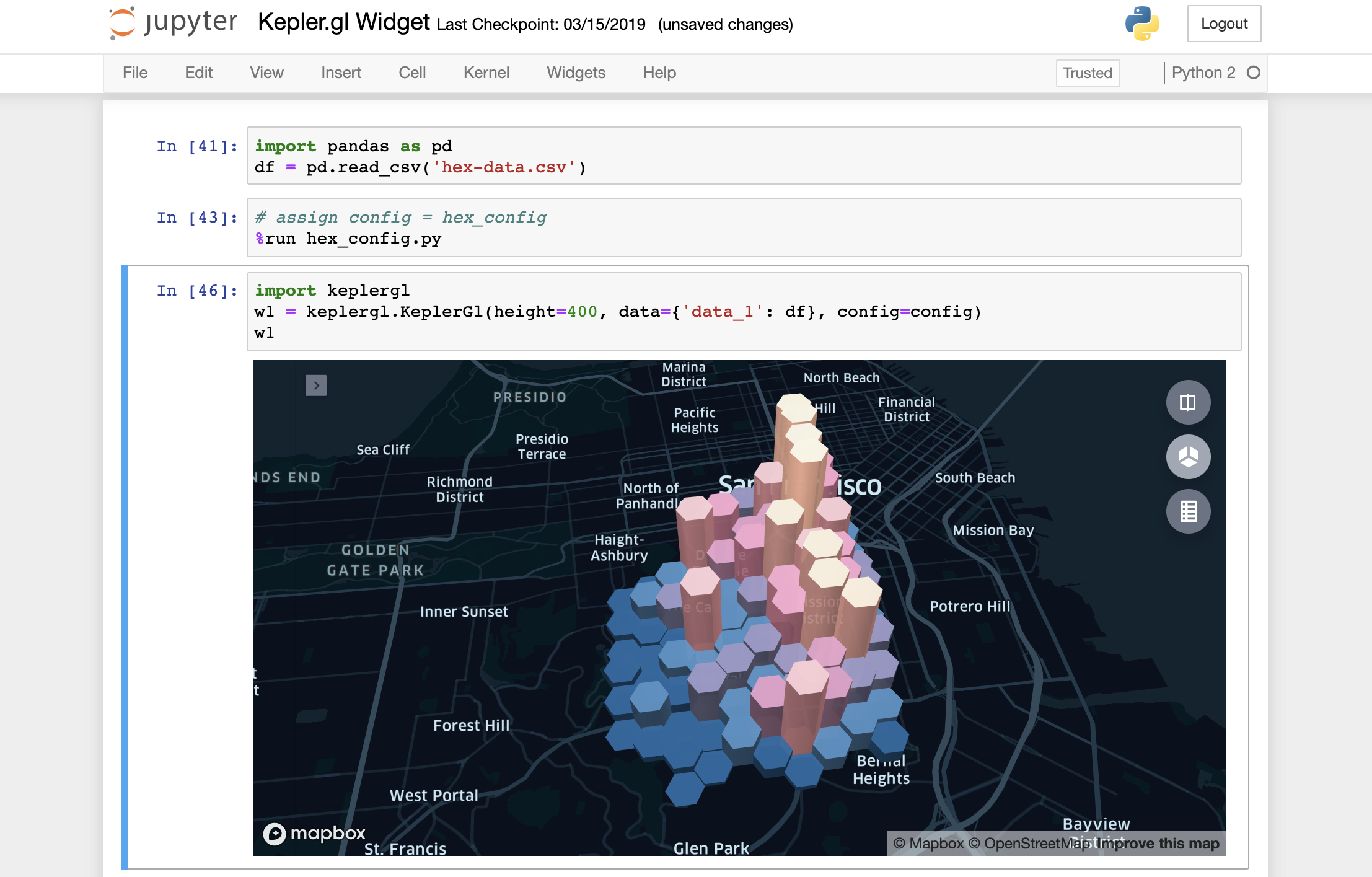 图11
图11
安装命令:
jupyter labextension install @jupyter-widgets/jupyterlab-manager keplergl-jupyter
官方文档:https://github.com/keplergl/kepler.gl/tree/master/bindings/kepler.gl-jupyter
2.11 jupyterlab-kite
这个插件我们之前的文章仔细介绍过,帮助我们建立代码补全神器kite与jupyter lab之间的通道,帮助我们在jupyter lab使用kite代码补全服务:
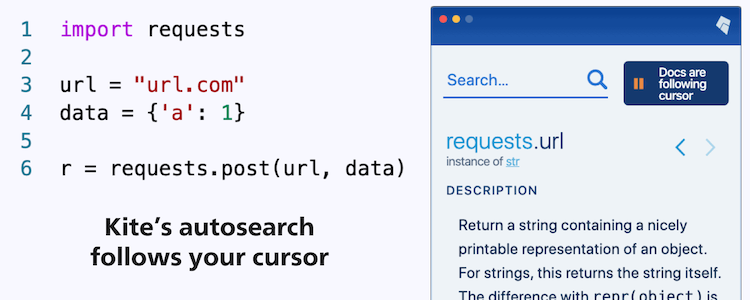 图12
图12
安装命令(需要jupyter lab版本大于等于2.2.0):
pip install jupyter-kite

jupyter labextension install @kiteco/jupyterlab-kite
官方文档:https://github.com/kiteco/jupyterlab-kite
2.12 jupyterlab-variableInspector
jupyterlab-variableInspector帮助我们在jupyter lab中查看当前环境中存在的变量相关信息,以美观的界面形式对多种类型的对象予以呈现:
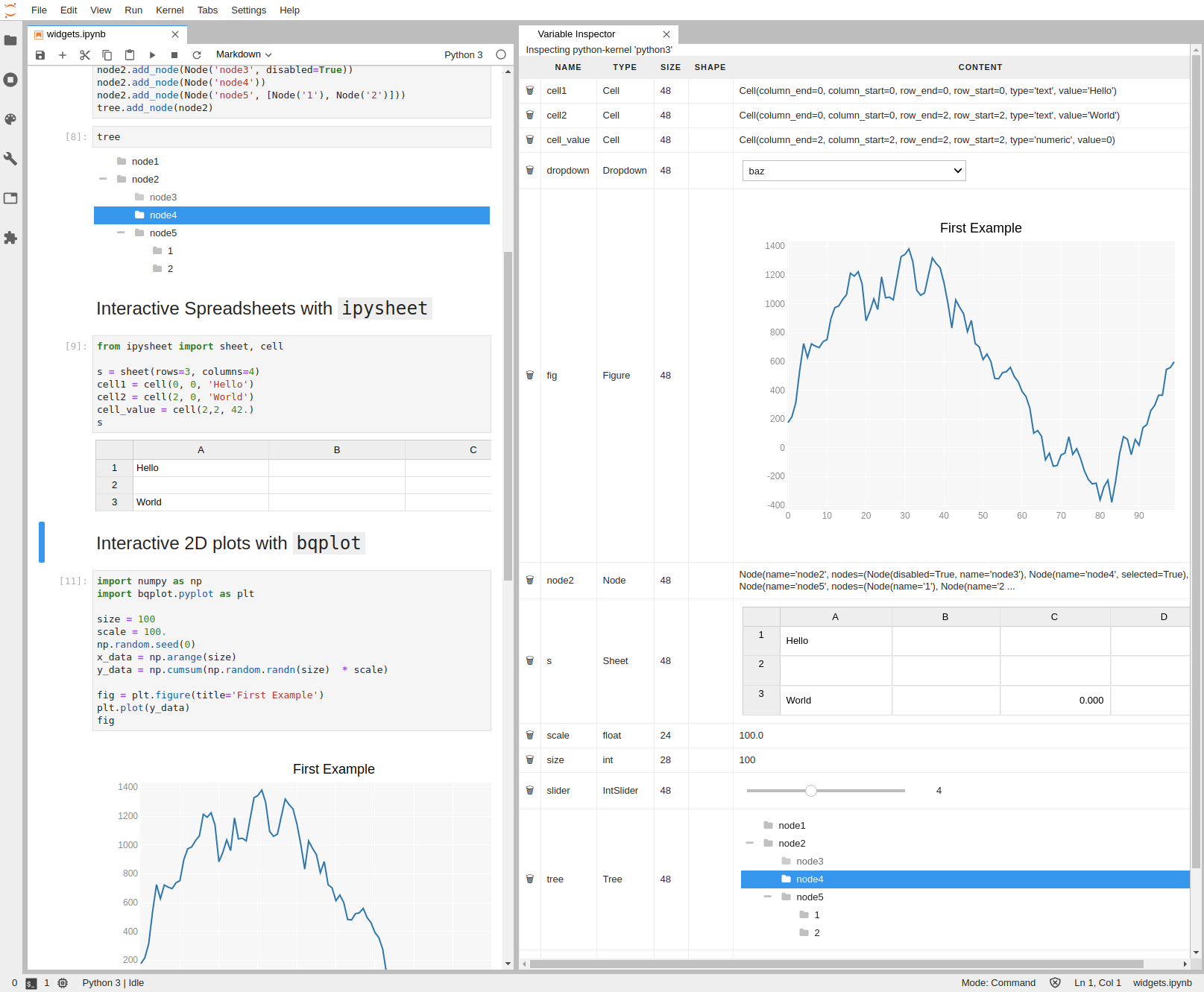 图13
图13
安装命令:
jupyter labextension install @lckr/jupyterlab_variableinspector
官方文档:https://github.com/lckr/jupyterlab-variableInspector
以上就是本文的全部内容,如有疑问欢迎在评论区与我进行讨论~
好用到飞起的12个jupyter lab插件的更多相关文章
- (数据科学学习手札95)elyra——jupyter lab最强插件
本文示例文件已上传至我的Github仓库https://github.com/CNFeffery/DataScienceStudyNotes 1 简介 jupyter lab是我最喜欢的编辑器,在过往 ...
- (数据科学学习手札95)elyra——jupyter lab平台最强插件集
本文示例文件已上传至我的Github仓库https://github.com/CNFeffery/DataScienceStudyNotes 1 简介 jupyter lab是我最喜欢的编辑器,在过往 ...
- 这款拓展让你的jupyter lab更高效
有一段时间没有分享过有关jupyter lab的内容了,今天给大家介绍一款实用的jupyter lab插件,可以帮助我们打造更灵活易用的jupyter lab. 图1 这款拓展的名称叫做jlab-en ...
- 基于jupyter lab搭建网页编程环境并添加自定义python kernel和matlab kernel以及plotly的使用
内容转载自我的博客 目录 说明 1. 创建虚拟环境jupyter 2. 安装nodejs(用于jupyterlab安装扩展) 3. 安装pip包 4. 使用jupyterlab 5. 配置jupyte ...
- 使用Jupyter lab前应该读的几篇文章
知乎上的一篇文章: 如何优雅的使用Jupyter? Jupyter Lab原来还有如下使用方式: 执行Shell命令 Hintland(提示命令).snippets(插入代码段).一键美化代码等功能( ...
- 【Python学习笔记】Jupyter Lab目录插件安装
Jupyter Lab目录插件安装 当然首先你得有python和已经安装了jupyter lab. 1 安装jupyter_contrib_nbextensions 首先先安装jupyter_cont ...
- 2017.12.25 Mybatis物理分页插件PageHelper的使用(二)
参考来自: 官方文档的说明:https://github.com/pagehelper/Mybatis-PageHelper/blob/master/wikis/zh/HowToUse.md 上篇博客 ...
- 机器学习中jupyter lab的安装方法以及使用的命令
安装JupyterLab使用pip安装: pip install jupyterlab# 必须将用户级目录添加 到环境变量才能启动pip install --userbinPATHjupyter la ...
- jupyter lab(notebook)相关配置
安装的是Anaconda3(Python 3.6.4),自带的版本较低,这里升级版本conda update jupyterlab 一.配置jupyter lab(notebook)远程访问 1.1 ...
随机推荐
- Java 将PDF/XPS转为Word/html /SVG/PS/PCL/PNG、PDF和XPS互转(基于Spire.Cloud.SDK for Java)
Spire.Cloud.SDK for Java提供了接口PdfConvertApi通过convert()方法将PDF文档以及XPS文档转为指定文档格式,如转PDF为Word(支持Docx.Doc). ...
- 新版MySQL开始使用时遇到的问题(时区、权限):
新版MySQL(本人Server version: 8.0.15)在刚开始使用时遇到的问题: 查看mysql安装版本:命令窗口 时区问题解决(The server time zone value 'Ö ...
- 【秒懂Java】【第1章_初识Java】01_编程语言
各位小伙伴们好哇!从今日起,我将开始更新<秒懂Java>系列文章,从0开始讲解Java的方方面面,后面也将推出配套的视频版,欢迎大家保持关注! 我会尽力办到:在保证通俗易懂的同时,不丢失知 ...
- js语法基础入门(2)
2.变量 2.1.变量的声明 声明变量的时候没有赋值,默认输出undefined //通过var 声明一个变量 var user: //默认输出undefined 可以同时声明多个变量 var use ...
- JavaScript手写new方法
1.看一下正常使用的new方法 function father(name){ this.name=name; this.sayname=function(){ console.log(this.nam ...
- Python之浅谈多态和封装
目录 组合 什么是组合 为什么使用组合 多态和多态性 多态 什么是多态? 多态性 好处 多态性 什么是多态性 封装 封装是什么意思? 隐藏 如何用代码实现隐藏 python 实际上是可以访问隐藏属性的 ...
- CentOS 的数字命令级别
1 user commands 2 system calls 3 library functions 4 special files 5 file formats 6 ...
- Docker中提交任务到Spark集群
1. 背景描述和需求 数据分析程序部署在Docker中,有一些分析计算需要使用Spark计算,需要把任务提交到Spark集群计算. 接收程序部署在Docker中,主机不在Hadoop集群上.与Spa ...
- 每日一题 - 剑指 Offer 41. 数据流中的中位数
题目信息 时间: 2019-06-30 题目链接:Leetcode tag: 大根堆 小根堆 难易程度:中等 题目描述: 如何得到一个数据流中的中位数?如果从数据流中读出奇数个数值,那么中位数就是所有 ...
- 6.26模拟赛(1)总结(T1:信息传递;T2:传染病控制;T3:排列;T4:最大数)
16:33:56 2020-06-26 当然可以先看一下成绩: 非常显然的成绩不能算有多好,当然其实这也可能是假期水课的报应 (额) 但是比我集训前想象的要好一点(集训时想象的是排名前30就可以,嗯 ...