
Hbase之过滤器的使用
一、过滤器概念
基础API中的查询操作在面对大量数据的时候是非常物无力的,这里Hbase提供了高级的查询方法:Filter(过滤器)。过滤器可以根据簇、列、版本等更多的条件来对数据进行过滤,基于Hbase本身提供的三维有序(主键有序、列有序、版本有序),这些Filter可以高效的完成查询过滤的任务。带有Filter条件的RPC查询请求会把Filter分发到各个RegionServer,是一个服务器端的过滤器,这样可以减少网络传输的压力。
二、数据准备

二、Hbase过滤器的分类
比较过滤器
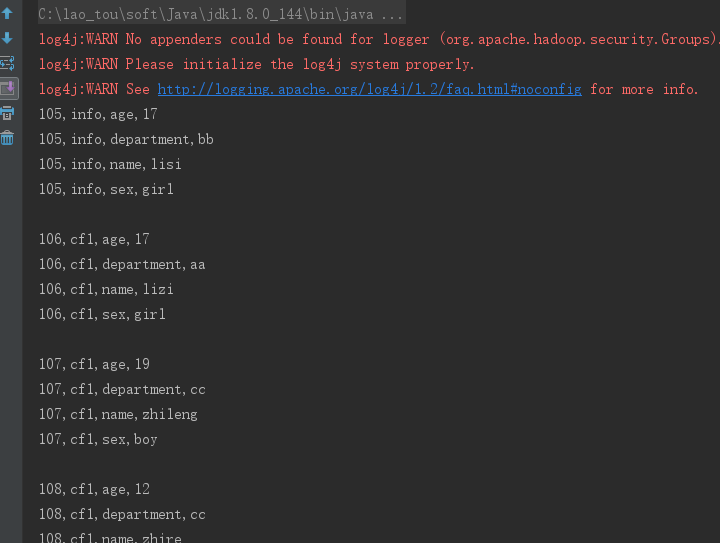
1、行键过滤器——Rowfilter,过滤rowkey=104以前的行
  Filter rowFilter = new RowFilter(CompareFilter.CompareOp.GREATER, new BinaryComparator("104".getBytes()));

  scan.setFilter(rowFilter);
package com.laotou;

import org.apache.hadoop.conf.Configuration;

import org.apache.hadoop.hbase.*;

import org.apache.hadoop.hbase.client.*;

import org.apache.hadoop.hbase.filter.BinaryComparator;

import org.apache.hadoop.hbase.filter.CompareFilter;

import org.apache.hadoop.hbase.filter.Filter;

import org.apache.hadoop.hbase.filter.RowFilter;

import org.apache.hadoop.hbase.util.Bytes;

/**

 * @Author:

 * @Date: 2019/5/17

 */

public class Test {

    private static final String ZK_CONNECT_KEY = "hbase.zookeeper.quorum";

    private static final String ZK_CONNECT_VALUE = "192.168.200.100,192.168.200.101,192.168.200.102";

    private static final String ZK_CONNECT_CLIENT = "hbase.zookeeper.property.clientPort";

    private static final String ZK_CONNECT_CLIENT_PORT = "2181";

    private static Configuration conf = new Configuration();

    private static Connection connection = null;

    public static void main(String[] args) throws Exception {

        conf.set(ZK_CONNECT_CLIENT,ZK_CONNECT_CLIENT_PORT);

        conf.set(ZK_CONNECT_KEY,ZK_CONNECT_VALUE);

        connection = ConnectionFactory.createConnection(conf);

        scanData();

    }

    private static void scanData() throws Exception {

        //拿到表

        Table table = connection.getTable(TableName.valueOf("filtertest"));

        Scan scan=new Scan();

        Filter rowFilter = new RowFilter(CompareFilter.CompareOp.GREATER, new BinaryComparator("104".getBytes()));

        scan.setFilter(rowFilter);

//        //调一次返回50的cell,可以减少请求次数

//        scan.setCaching(50);

        ResultScanner scanner = table.getScanner(scan);

        //是通过迭代器的方式,每调用 一次next,将光标向下移动一个,所以需要动态修改next对象的值

        Result next = scanner.next();

        while (next!=null){

            //将一个Result中的对象转为一个cell数组

            Cell[] cells = next.rawCells();

            for(Cell cell:cells){

                System.out.println(Bytes.toString(CellUtil.cloneRow(cell))+

                        ","+Bytes.toString(CellUtil.cloneFamily(cell))+

                        ","+ Bytes.toString(CellUtil.cloneQualifier(cell))+

                        ","+Bytes.toString(CellUtil.cloneValue(cell)));

            }

            System.out.println();

            //每循环一次,修改next的值一次

            next=scanner.next();

        }

        scanner.close();

        table.close();

    }

}
运行结果部分截图
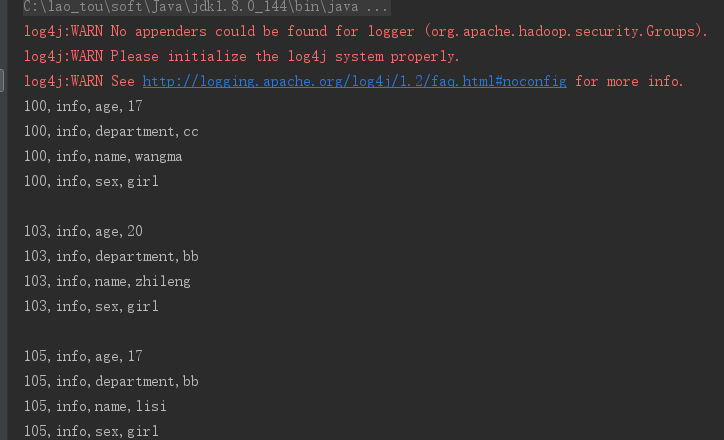
2、列簇过滤器 FamilyFilter (将列簇为info的行全部取出来)
Filter familyFilter = new FamilyFilter(CompareFilter.CompareOp.EQUAL, new BinaryComparator("info".getBytes()));
scan.setFilter(familyFilter);
package com.laotou;

import org.apache.hadoop.conf.Configuration;

import org.apache.hadoop.hbase.*;

import org.apache.hadoop.hbase.client.*;

import org.apache.hadoop.hbase.filter.*;

import org.apache.hadoop.hbase.util.Bytes;

/**

 * @Author:

 * @Date: 2019/5/17

 */

public class Test {

    private static final String ZK_CONNECT_KEY = "hbase.zookeeper.quorum";

    private static final String ZK_CONNECT_VALUE = "192.168.200.100,192.168.200.101,192.168.200.102";

    private static final String ZK_CONNECT_CLIENT = "hbase.zookeeper.property.clientPort";

    private static final String ZK_CONNECT_CLIENT_PORT = "2181";

    private static Configuration conf = new Configuration();

    private static Connection connection = null;

    public static void main(String[] args) throws Exception {

        conf.set(ZK_CONNECT_CLIENT,ZK_CONNECT_CLIENT_PORT);

        conf.set(ZK_CONNECT_KEY,ZK_CONNECT_VALUE);

        connection = ConnectionFactory.createConnection(conf);

        scanData();

    }

    private static void scanData() throws Exception {

        //拿到表

        Table table = connection.getTable(TableName.valueOf("filtertest"));

        Scan scan=new Scan();

        Filter familyFilter = new FamilyFilter(CompareFilter.CompareOp.EQUAL, new BinaryComparator("info".getBytes()));

        scan.setFilter(familyFilter);

//        //调一次返回50的cell,可以减少请求次数

        scan.setCaching(50);

        ResultScanner scanner = table.getScanner(scan);

        //是通过迭代器的方式,每调用 一次next,将光标向下移动一个,所以需要动态修改next对象的值

        Result next = scanner.next();

        while (next!=null){

            //将一个Result中的对象转为一个cell数组

            Cell[] cells = next.rawCells();

            for(Cell cell:cells){

                System.out.println(Bytes.toString(CellUtil.cloneRow(cell))+

                        ","+Bytes.toString(CellUtil.cloneFamily(cell))+

                        ","+ Bytes.toString(CellUtil.cloneQualifier(cell))+

                        ","+Bytes.toString(CellUtil.cloneValue(cell)));

            }

            System.out.println();

            //每循环一次,修改next的值一次

            next=scanner.next();

        }

        scanner.close();

        table.close();

    }

}
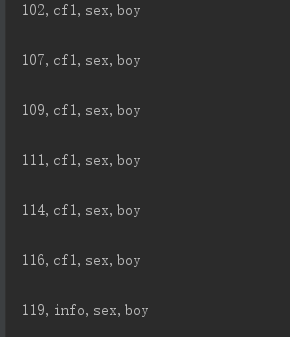
3、列过滤器 QualifierFilter
Filter valueFilter = new ValueFilter(CompareFilter.CompareOp.EQUAL, new SubstringComparator("boy"));
scan.setFilter(valueFilter);
 private static void scanData() throws Exception {

        //拿到表

        Table table = connection.getTable(TableName.valueOf("filtertest"));

        Scan scan=new Scan();

        Filter valueFilter = new ValueFilter(CompareFilter.CompareOp.EQUAL, new SubstringComparator("boy"));

        scan.setFilter(valueFilter);

//        //调一次返回50的cell,可以减少请求次数

        scan.setCaching(50);

        ResultScanner scanner = table.getScanner(scan);

        //是通过迭代器的方式,每调用 一次next,将光标向下移动一个,所以需要动态修改next对象的值

        Result next = scanner.next();

        while (next!=null){

            //将一个Result中的对象转为一个cell数组

            Cell[] cells = next.rawCells();

            for(Cell cell:cells){

                System.out.println(Bytes.toString(CellUtil.cloneRow(cell))+

                        ","+Bytes.toString(CellUtil.cloneFamily(cell))+

                        ","+ Bytes.toString(CellUtil.cloneQualifier(cell))+

                        ","+Bytes.toString(CellUtil.cloneValue(cell)));

            }

            System.out.println();

            //每循环一次,修改next的值一次

            next=scanner.next();

        }

        scanner.close();

        table.close();

    }
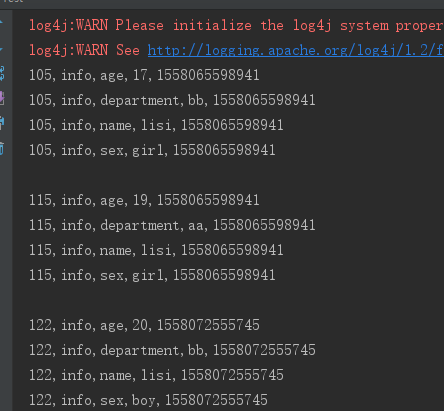
4、时间戳过滤器 TimestampsFilter
List<Long> list = new ArrayList<>();
list.add( Long.valueOf("1558072555745").longValue());
TimestampsFilter timestampsFilter = new TimestampsFilter(list);
scan.setFilter(timestampsFilter);
private static void scanData() throws Exception {

        //拿到表

        Table table = connection.getTable(TableName.valueOf("filtertest"));

        Scan scan=new Scan();

        List<Long> list = new ArrayList<>();

        list.add( Long.valueOf("1558072555745").longValue());

        TimestampsFilter timestampsFilter = new TimestampsFilter(list);

        scan.setFilter(timestampsFilter);

//        //调一次返回50的cell,可以减少请求次数

        scan.setCaching(50);

        ResultScanner scanner = table.getScanner(scan);

        //是通过迭代器的方式,每调用 一次next,将光标向下移动一个,所以需要动态修改next对象的值

        Result next = scanner.next();

        while (next!=null){

            //将一个Result中的对象转为一个cell数组

            Cell[] cells = next.rawCells();

            for(Cell cell:cells){

                System.out.println(Bytes.toString(CellUtil.cloneRow(cell))+

                        ","+Bytes.toString(CellUtil.cloneFamily(cell))+

                        ","+ Bytes.toString(CellUtil.cloneQualifier(cell))+

                        ","+Bytes.toString(CellUtil.cloneValue(cell))+

                        ","+cell.getTimestamp());

            }

            System.out.println();

            //每循环一次,修改next的值一次

            next=scanner.next();

        }

        scanner.close();

        table.close();

    }

专用过滤器
1、单列值过滤器 SingleColumnValueFilter ----会返回满足条件的整行
SingleColumnValueFilter singleColumnValueFilter = new SingleColumnValueFilter(
        "info".getBytes(), //列簇
        "name".getBytes(), //列
        CompareFilter.CompareOp.EQUAL,
        new SubstringComparator("lisi"));
 private static void scanData() throws Exception {

        //拿到表

        Table table = connection.getTable(TableName.valueOf("filtertest"));

        Scan scan=new Scan();

        SingleColumnValueFilter singleColumnValueFilter = new SingleColumnValueFilter(

                "info".getBytes(), //列簇

                "name".getBytes(), //列

                CompareFilter.CompareOp.EQUAL,

                new SubstringComparator("lisi"));

//如果不设置为 true,则那些不包含指定 column 的行也会返回

        singleColumnValueFilter.setFilterIfMissing(true);

        scan.setFilter(singleColumnValueFilter);

//        //调一次返回50的cell,可以减少请求次数

        scan.setCaching(50);

        ResultScanner scanner = table.getScanner(scan);

        //是通过迭代器的方式,每调用 一次next,将光标向下移动一个,所以需要动态修改next对象的值

        Result next = scanner.next();

        while (next!=null){

            //将一个Result中的对象转为一个cell数组

            Cell[] cells = next.rawCells();

            for(Cell cell:cells){

                System.out.println(Bytes.toString(CellUtil.cloneRow(cell))+

                        ","+Bytes.toString(CellUtil.cloneFamily(cell))+

                        ","+ Bytes.toString(CellUtil.cloneQualifier(cell))+

                        ","+Bytes.toString(CellUtil.cloneValue(cell))+

                        ","+cell.getTimestamp());

            }

            System.out.println();

            //每循环一次,修改next的值一次

            next=scanner.next();

        }

        scanner.close();

        table.close();

    }
2、单列值排除器 SingleColumnValueExcludeFilter
SingleColumnValueExcludeFilter singleColumnValueExcludeFilter = new SingleColumnValueExcludeFilter(

                "info".getBytes(),

                "name".getBytes(),

                CompareOp.EQUAL,

                new SubstringComparator("lisi"));

singleColumnValueExcludeFilter.setFilterIfMissing(true);

scan.setFilter(singleColumnValueExcludeFilter);
  private static void scanData() throws Exception {

        //拿到表

        Table table = connection.getTable(TableName.valueOf("filtertest"));

        Scan scan=new Scan();

        SingleColumnValueExcludeFilter singleColumnValueExcludeFilter = new SingleColumnValueExcludeFilter(

                "info".getBytes(),

                "name".getBytes(),

                CompareFilter.CompareOp.EQUAL,

                new SubstringComparator("lisi"));

        singleColumnValueExcludeFilter.setFilterIfMissing(true);

        scan.setFilter(singleColumnValueExcludeFilter);

//        //调一次返回50的cell,可以减少请求次数

        scan.setCaching(50);

        ResultScanner scanner = table.getScanner(scan);

        //是通过迭代器的方式,每调用 一次next,将光标向下移动一个,所以需要动态修改next对象的值

        Result next = scanner.next();

        while (next!=null){

            //将一个Result中的对象转为一个cell数组

            Cell[] cells = next.rawCells();

            for(Cell cell:cells){

                System.out.println(Bytes.toString(CellUtil.cloneRow(cell))+

                        ","+Bytes.toString(CellUtil.cloneFamily(cell))+

                        ","+ Bytes.toString(CellUtil.cloneQualifier(cell))+

                        ","+Bytes.toString(CellUtil.cloneValue(cell))+

                        ","+cell.getTimestamp());

            }

            System.out.println();

            //每循环一次,修改next的值一次

            next=scanner.next();

        }

        scanner.close();

        table.close();

    }
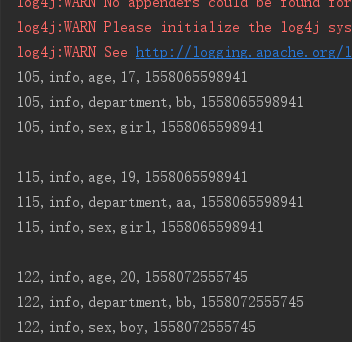
与上面单列值过滤器相比结果中排除了打印lisi这个字段和值
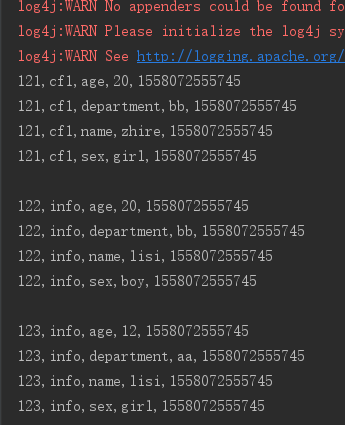
3、前缀过滤器 PrefixFilter----针对行键,将rowkey以12开头的打印出来
PrefixFilter prefixFilter = new PrefixFilter("12".getBytes());

scan.setFilter(prefixFilter);
package com.laotou;

import org.apache.hadoop.conf.Configuration;

import org.apache.hadoop.hbase.*;

import org.apache.hadoop.hbase.client.*;

import org.apache.hadoop.hbase.filter.*;

import org.apache.hadoop.hbase.util.Bytes;

import java.util.ArrayList;

import java.util.List;

/**

 * @Author:

 * @Date: 2019/5/17

 */

public class Test {

    private static final String ZK_CONNECT_KEY = "hbase.zookeeper.quorum";

    private static final String ZK_CONNECT_VALUE = "192.168.200.100,192.168.200.101,192.168.200.102";

    private static final String ZK_CONNECT_CLIENT = "hbase.zookeeper.property.clientPort";

    private static final String ZK_CONNECT_CLIENT_PORT = "2181";

    private static Configuration conf = new Configuration();

    private static Connection connection = null;

    public static void main(String[] args) throws Exception {

        conf.set(ZK_CONNECT_CLIENT,ZK_CONNECT_CLIENT_PORT);

        conf.set(ZK_CONNECT_KEY,ZK_CONNECT_VALUE);

        connection = ConnectionFactory.createConnection(conf);

        scanData();

    }

    private static void scanData() throws Exception {

        //拿到表

        Table table = connection.getTable(TableName.valueOf("filtertest"));

        Scan scan=new Scan();

        PrefixFilter prefixFilter = new PrefixFilter("12".getBytes());

        scan.setFilter(prefixFilter);

//        //调一次返回50的cell,可以减少请求次数

        scan.setCaching(50);

        ResultScanner scanner = table.getScanner(scan);

        //是通过迭代器的方式,每调用 一次next,将光标向下移动一个,所以需要动态修改next对象的值

        Result next = scanner.next();

        while (next!=null){

            //将一个Result中的对象转为一个cell数组

            Cell[] cells = next.rawCells();

            for(Cell cell:cells){

                System.out.println(Bytes.toString(CellUtil.cloneRow(cell))+

                        ","+Bytes.toString(CellUtil.cloneFamily(cell))+

                        ","+ Bytes.toString(CellUtil.cloneQualifier(cell))+

                        ","+Bytes.toString(CellUtil.cloneValue(cell))+

                        ","+cell.getTimestamp());

            }

            System.out.println();

            //每循环一次,修改next的值一次

            next=scanner.next();

        }

        scanner.close();

        table.close();

    }
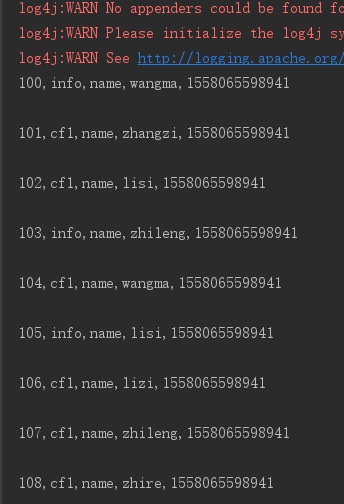
4、列前缀过滤器 ColumnPrefixFilter
ColumnPrefixFilter columnPrefixFilter = new ColumnPrefixFilter("name".getBytes());

scan.setFilter(columnPrefixFilter);
  private static void scanData() throws Exception {

        //拿到表

        Table table = connection.getTable(TableName.valueOf("filtertest"));

        Scan scan=new Scan();

        ColumnPrefixFilter columnPrefixFilter = new ColumnPrefixFilter("name".getBytes());

        scan.setFilter(columnPrefixFilter);

//        //调一次返回50的cell,可以减少请求次数

        scan.setCaching(50);

        ResultScanner scanner = table.getScanner(scan);

        //是通过迭代器的方式,每调用 一次next,将光标向下移动一个,所以需要动态修改next对象的值

        Result next = scanner.next();

        while (next!=null){

            //将一个Result中的对象转为一个cell数组

            Cell[] cells = next.rawCells();

            for(Cell cell:cells){

                System.out.println(Bytes.toString(CellUtil.cloneRow(cell))+

                        ","+Bytes.toString(CellUtil.cloneFamily(cell))+

                        ","+ Bytes.toString(CellUtil.cloneQualifier(cell))+

                        ","+Bytes.toString(CellUtil.cloneValue(cell))+

                        ","+cell.getTimestamp());

            }

            System.out.println();

            //每循环一次,修改next的值一次

            next=scanner.next();

        }

        scanner.close();

        table.close();

    }
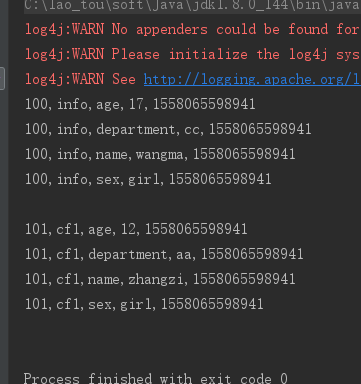
5、分页过滤器 PageFilter
每一页打印两条数据
Filter filter = new PageFilter(2);
private static void scanData() throws Exception {

        //拿到表

        Table table = connection.getTable(TableName.valueOf("filtertest"));

        Scan scan=new Scan();

        Filter filter = new PageFilter(2);

        scan.setFilter(filter);

//        //调一次返回50的cell,可以减少请求次数

        scan.setCaching(50);

        ResultScanner scanner = table.getScanner(scan);

        //是通过迭代器的方式,每调用 一次next,将光标向下移动一个,所以需要动态修改next对象的值

        Result next = scanner.next();

        while (next!=null){

            //将一个Result中的对象转为一个cell数组

            Cell[] cells = next.rawCells();

            for(Cell cell:cells){

                System.out.println(Bytes.toString(CellUtil.cloneRow(cell))+

                        ","+Bytes.toString(CellUtil.cloneFamily(cell))+

                        ","+ Bytes.toString(CellUtil.cloneQualifier(cell))+

                        ","+Bytes.toString(CellUtil.cloneValue(cell))+

                        ","+cell.getTimestamp());

            }

            System.out.println();

            //每循环一次,修改next的值一次

            next=scanner.next();

        }

        scanner.close();

        table.close();

    }
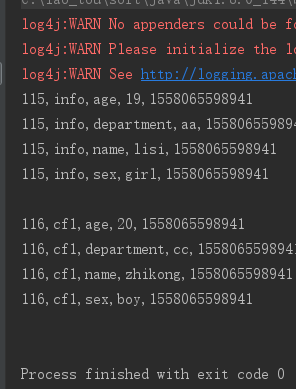
6、行键范围过滤 [startkey,endkey),结果为左闭右开
 scan.setStartRow(Bytes.toBytes("115"));

 scan.setStopRow(Bytes.toBytes("117"));
private static void scanData() throws Exception {

        //拿到表

        Table table = connection.getTable(TableName.valueOf("filtertest"));

        Scan scan=new Scan();

        scan.setStartRow(Bytes.toBytes("115"));

        scan.setStopRow(Bytes.toBytes("117"));

//        //调一次返回50的cell,可以减少请求次数

        scan.setCaching(50);

        ResultScanner scanner = table.getScanner(scan);

        //是通过迭代器的方式,每调用 一次next,将光标向下移动一个,所以需要动态修改next对象的值

        Result next = scanner.next();

        while (next!=null){

            //将一个Result中的对象转为一个cell数组

            Cell[] cells = next.rawCells();

            for(Cell cell:cells){

                System.out.println(Bytes.toString(CellUtil.cloneRow(cell))+

                        ","+Bytes.toString(CellUtil.cloneFamily(cell))+

                        ","+ Bytes.toString(CellUtil.cloneQualifier(cell))+

                        ","+Bytes.toString(CellUtil.cloneValue(cell))+

                        ","+cell.getTimestamp());

            }

            System.out.println();

            //每循环一次,修改next的值一次

            next=scanner.next();

        }

        scanner.close();

        table.close();

    }
Hbase之过滤器的使用的更多相关文章
- Hbase Filter过滤器查询详解
过滤器查询 引言:过滤器的类型很多,但是可以分为两大类——比较过滤器,专用过滤器 过滤器的作用是在服务端判断数据是否满足条件,然后只将满足条件的数据返回给客户端: hbase过滤器的比较运算符: LE ...
- HBase - Filter - 过滤器的介绍以及使用 | 那伊抹微笑
博文作者:那伊抹微笑 csdn 博客地址:http://blog.csdn.net/u012185296 itdog8 地址链接 : http://www.itdog8.com/thread-214- ...
- HBase之过滤器
filter ==> SQL 中的Where filter的执行流程: 过滤器在客户端创建,然后通过RPC发送到服务器上,由服务器执行 基础过滤器: 比较器: Comparator D ...
- HBase - Filter - 过滤器的介绍以及使用
1 过滤器HBase 的基本 API,包括增.删.改.查等.增.删都是相对简单的操作,与传统的 RDBMS 相比,这里的查询操作略显苍白,只能根据特性的行键进行查询(Get)或者根据行键的范围来查询( ...
- hbase 自定义过滤器
1.首先生成自定义过滤器,生成jar包,然后拷贝到服务器hbase目录的lib下. 1.1 自定义过滤器CustomFilter import com.google.protobuf.InvalidP ...
- Hbase(四) 过滤器查询
引言:过滤器的类型很多,但是可以分为两大类——比较过滤器,专用过滤器过滤器的作用是在服务端判断数据是否满足条件,然后只将满足条件的数据返回给客户端: 一.hbase过滤器的分类 1.比较过滤器 行键过 ...
- HBase之八--(3):Hbase 布隆过滤器BloomFilter介绍
布隆过滤器( Bloom filters) 数据块索引提供了一个有效的方法,在访问一个特定的行时用来查找应该读取的HFile的数据块.但是它的效用是有限的.HFile数据块的默认大小是64KB,这个大 ...
- 大数据笔记(十四)——HBase的过滤器与Mapreduce
一. HBase过滤器 1.列值过滤器 2.列名前缀过滤器 3.多个列名前缀过滤器 4.行键过滤器5.组合过滤器 package demo; import javax.swing.RowFilter; ...
- HBase Filter 过滤器概述
abc 过滤器介绍 HBase过滤器是一套为完成一些较高级的需求所提供的API接口. 过滤器也被称为下推判断器(push-down predicates),支持把数据过滤标准从客户端下推到服务器,带有 ...
随机推荐
- 第二十三章、 Model/View便利类表格部件QTableWidget详解
老猿Python博文目录 专栏:使用PyQt开发图形界面Python应用 老猿Python博客地址 一.引言 表格部件为应用程序提供标准的表格显示工具,在表格内可以管理基于行和列的数据项,表格中的最大 ...
- PyQt(Python+Qt)学习随笔:QTreeView树形视图的allColumnsShowFocus属性
老猿Python博文目录 专栏:使用PyQt开发图形界面Python应用 老猿Python博客地址 QTreeView树形视图的allColumnsShowFocus属性用于控制是否使视图中的所有列显 ...
- PyQt(Python+Qt)学习随笔:Qt Designer中部件的windowTitle和windowOpacity属性
windowOpacity 这个属性仅对window对象生效. windowOpacity为浮点数,表示透明度,为1完全不透明,为0完全透明,缺省是1. 可以通过windowOpacity().set ...
- 从零开始的pickle反序列化学习
前言 在XCTF高校战疫之中,我看到了一道pickle反序列化的题目,但因为太菜了花了好久才做出来,最近正好在学flask,直接配合pickle学一下. 找了半天终于找到一个大佬,这里就结合大佬的文章 ...
- 5、Spring Cloud Ribbon
1.Ribbon简介 (1).Ribbon介绍 Spring Cloud Ribbon是基于Netflix Ribbon实现的一套客户端负载均衡的工具. Ribbon是Netflix发布的开源项目,主 ...
- Intellij IDEA新导入项目运行出现Error:(60, 47) java: -source 1.5 中不支持 diamond 运算符 (请使用 -source 7 或更高版本以启用 diamond 运算符)
后台窗口报错如下: 问题原因 项目jdk版本配置不正确. 解决方案 ①File ->Project Structure ② ③之后还要检查一下这里 Settings-->Build,Exe ...
- Scrum冲刺_Day07
一.团队展示: 1.项目:light_note备忘录 2.队名:删库跑路队 3.团队成员 队员(不分先后) 项目角色 黄敦鸿 后端工程师.测试 黄华 后端工程师.测试 黄骏鹏 后端工程师.测试 黄源钦 ...
- 《深入理解计算机系统》实验二 —— Bomb Lab
这是CSAPP的第二个实验,主要让我们理解代码的机器级表示,最重要的是理解每个寄存器的作用以及如何使用这些寄存器.本次的实验内容有点晦涩难懂,对于这些内容多看下习惯就好了. 本次实验中的bomb文 ...
- 【APIO2018】选圆圈(平面分块 | CDQ分治 | KDT)
Description 给定平面上的 \(n\) 个圆,用三个参数 \((x, y, R)\) 表示圆心坐标和半径. 每次选取最大的一个尚未被删除的圆删除,并同时删除所有与其相切或相交的圆. 最后输出 ...
- Acwing 403. 平面
以一个这个环为基准,剩下的边可以放在圈外,也可以放在圈内,两种状态. 如果两条线段出现了环上意义的交叉即冲突,即不能同时放在圈外/内. 这是典型的 2-SAT 问题,因为关系传递是无向的,即逆命题与原 ...