
QT串口助手(三):数据接收
作者:zzssdd2
E-mail:zzssdd2@foxmail.com
一、前言
开发环境:Qt5.12.10 + MinGW
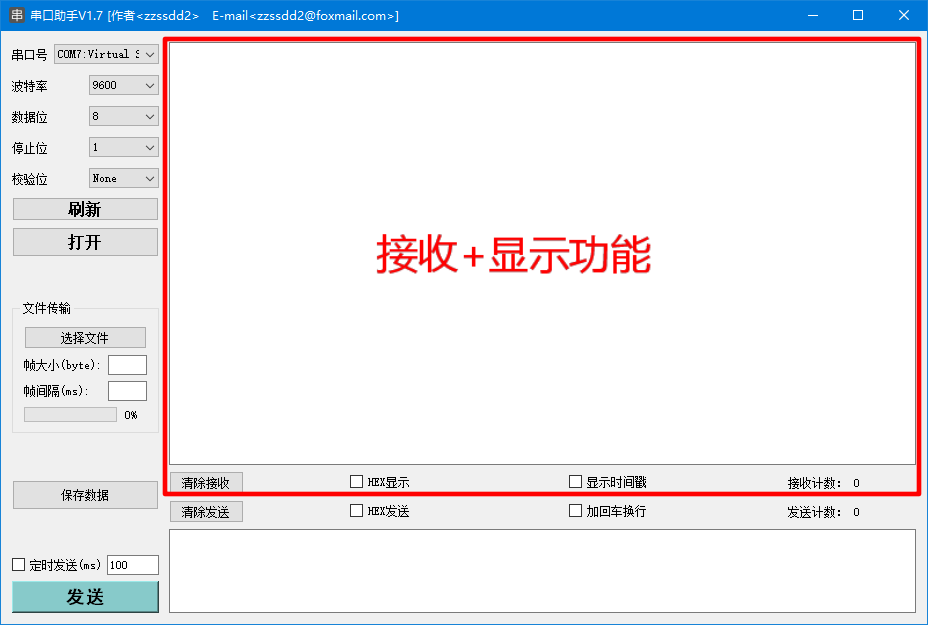
实现的功能
- 串口数据的接收
- ascii字符形式显示与hex字符形式显示
- 时间戳的显示
- 接收数据的统计与显示
- 接收清零
涉及的知识点
QSerialPort类的使用- 数据格式的转换
QTime类的使用- 控件
QTextEdit、QCheckBox、QPushButton、QLabel的使用
二、功能实现
下面开始逐步讲解以上列举的功能实现
2.1、数据读取
在《QT串口助手(二):参数配置》中已经实现了串口参数的配置,参数配置完成后就可以开启串口的数据接收功能了。在QT中的QSerialPort类继承自QIODevice类,所以可以使用QIODevice的readyRead()信号来触发数据的接收,在槽函数中实现数据的读取与处理。信号槽连接如下:
/* 接收数据信号槽 */

connect(serial, &QSerialPort::readyRead, this, &Widget::SerialPortReadyRead_slot);
补充:
[signal]void QIODevice::readyRead()This signal is emitted once every time new data is available for reading from the device's current read channel. It will only be emitted again once new data is available, such as when a new payload of network data has arrived on your network socket, or when a new block of data has been appended to your device.
readyRead() is not emitted recursively; if you reenter the event loop or call waitForReadyRead() inside a slot connected to the readyRead() signal, the signal will not be reemitted (although waitForReadyRead() may still return true).
Note for developers implementing classes derived from QIODevice: you should always emit readyRead() when new data has arrived (do not emit it only because there's data still to be read in your buffers). Do not emit readyRead() in other conditions.
当有收到新数据信号时,就会执行槽函数里面的数据读取功能:
/*读取串口收到的数据*/

QByteArray bytedata = serial->readAll();
补充:
QByteArray QIODevice::readAll()
Reads all remaining data from the device, and returns it as a byte array.
This function has no way of reporting errors; returning an empty QByteArray can mean either that no data was currently available for reading, or that an error occurred.
2.2、数据转换
若需要将接收到的数据以HEX格式显示,则需要对接收到的数据进行以下处理:
/*将数据转换为hex格式并以空格分隔->去掉头尾空白字符->转换为大写形式*/

framedata = bytedata.toHex(' ').trimmed().toUpper();
补充:
QByteArray QByteArray::toHex(char separator) const
This is an overloaded function.
Returns a hex encoded copy of the byte array. The hex encoding uses the numbers 0-9 and the letters a-f.
If separator is not '\0', the separator character is inserted between the hex bytes.
Example:
QByteArray macAddress = QByteArray::fromHex("123456abcdef");

macAddress.toHex(':'); // returns "12:34:56:ab:cd:ef"

macAddress.toHex(0);   // returns "123456abcdef"
This function was introduced in Qt 5.9.
QByteArray QByteArray::trimmed() const
Returns a byte array that has whitespace removed from the start and the end.
Whitespace means any character for which the standard C++
isspace()function returnstruein the C locale. This includes the ASCII characters '\t', '\n', '\v', '\f', '\r', and ' '.Example:
QByteArray ba("  lots\t of\nwhitespace\r\n ");

ba = ba.trimmed();

// ba == "lots\t of\nwhitespace";
Unlike simplified(), trimmed() leaves internal whitespace alone.
QByteArray QByteArray::toUpper() const
Returns an uppercase copy of the byte array. The bytearray is interpreted as a Latin-1 encoded string.
Example:
QByteArray x("Qt by THE QT COMPANY");

QByteArray y = x.toUpper();

// y == "QT BY THE QT COMPANY"
2.3、添加时间戳
有时为了便于观察数据收发时间,需要在数据前插入时间戳显示。使用QTime类中的方法可以获取当前系统的时间(精确到ms),对数据处理如下:
/*在数据前插入时间戳:[时:分:秒:毫秒]:RX -> 数据*/

framedata = QString("[%1]:RX -> %2").arg(QTime::currentTime().toString("HH:mm:ss:zzz")).arg(framedata);
补充:
[static]QTime QTime::currentTime()Returns the current time as reported by the system clock.
Note that the accuracy depends on the accuracy of the underlying operating system; not all systems provide 1-millisecond accuracy.
Furthermore, currentTime() only increases within each day; it shall drop by 24 hours each time midnight passes; and, beside this, changes in it may not correspond to elapsed time, if a daylight-saving transition intervenes.
2.4、接收计数
使用一个quint32类型数据对每次接收数据长度进行累加,记录接收数据总数,然后将数据更新到ui界面:
dataTotalRx += bytedata.length();

ui->RxCnt_label->setText(QString::number(dataTotalRx));
2.5、数据显示
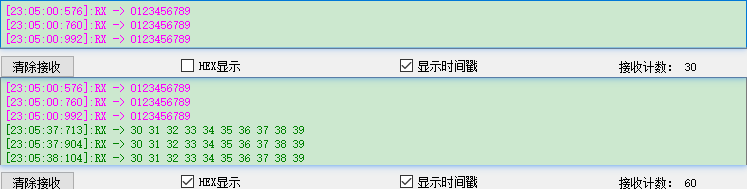
以上功能完成后将数据显示到接收框中(为了区分不同显示格式,做了不同的颜色显示)。完整的数据接收功能展示如下:
/*

    函   数:SerialPortReadyRead_slot

    描   述:readyRead()信号对应的数据接收槽函数

    输   入:无

    输   出:无

*/

void Widget::SerialPortReadyRead_slot()

{

    QString framedata;

    /*读取串口收到的数据*/

    QByteArray bytedata = serial->readAll();

    /*数据是否为空*/

    if (!bytedata.isEmpty())

    {

        if(ui->HexDisp_checkBox->isChecked())

        {

            /*hex显示*/

            framedata = bytedata.toHex(' ').trimmed().toUpper();

            ui->Receive_TextEdit->setTextColor(QColor(Qt::green));

        }

        else

        {

            /*ascii显示*/

            framedata = QString(bytedata);

            ui->Receive_TextEdit->setTextColor(QColor(Qt::magenta));

        }

        /*是否显示时间戳*/

        if (ui->TimeDisp_checkBox->isChecked())

        {

            framedata = QString("[%1]:RX -> %2").arg(QTime::currentTime().toString("HH:mm:ss:zzz")).arg(framedata);

            ui->Receive_TextEdit->append(framedata);

        }

        else

        {

            ui->Receive_TextEdit->insertPlainText(framedata);

        }

        /*更新接收计数*/

        dataTotalRxCnt += bytedata.length();

        ui->RxCnt_label->setText(QString::number(dataTotalRxCnt));

    }

}
演示效果如下:
补充:
QColor::QColor(Qt::GlobalColor color)
This is an overloaded function.
Constructs a new color with a color value of color.
enum Qt::GlobalColor
Qt's predefined QColor objects:
Constant Value Description Qt::white3White (#ffffff) Qt::black2Black (#000000) Qt::red7Red (#ff0000) Qt::darkRed13Dark red (#800000) Qt::green8Green (#00ff00) Qt::darkGreen14Dark green (#008000) Qt::blue9Blue (#0000ff) Qt::darkBlue15Dark blue (#000080) Qt::cyan10Cyan (#00ffff) Qt::darkCyan16Dark cyan (#008080) Qt::magenta11Magenta (#ff00ff) Qt::darkMagenta17Dark magenta (#800080) Qt::yellow12Yellow (#ffff00) Qt::darkYellow18Dark yellow (#808000) Qt::gray5Gray (#a0a0a4) Qt::darkGray4Dark gray (#808080) Qt::lightGray6Light gray (#c0c0c0) Qt::transparent19a transparent black value (i.e., QColor(0, 0, 0, 0)) Qt::color000 pixel value (for bitmaps) Qt::color111 pixel value (for bitmaps)
2.6、清除接收
当清除接收按键点击后,会清除接收框显示的内容以及接收计数。使用QPushButton的点击信号槽实现如下:
/*

    函   数:on_ClearRx_Bt_clicked

    描   述:清除接收按键点击信号对应的槽函数

    输   入:无

    输   出:无

*/

void Widget::on_ClearRx_Bt_clicked()

{

    ui->Receive_TextEdit->clear();

    ui->RxCnt_label->setText(QString::number(0));

    dataTotalRxCnt = 0;

}
三、总结
本篇文章主要是讲述如何对串口数据进行接收和显示。除了上面列出的主要功能外,还需要了解各个控件的操作方法,比如QTextEdit文本的添加、QLabel文本的设置等。还有就是QT中基本的数据类型的数据使用,比如QString、QBytArray等。
QT串口助手(三):数据接收的更多相关文章
- QT串口助手(四):数据发送
作者:zzssdd2 E-mail:zzssdd2@foxmail.com 一.前言 开发环境:Qt5.12.10 + MinGW 实现的功能 串口数据的发送 ascii字符与hex字符的相互转换 自 ...
- QT串口助手(五):文件操作
作者:zzssdd2 E-mail:zzssdd2@foxmail.com 一.前言 开发环境:Qt5.12.10 + MinGW 功能 文件的发送 数据的保存 知识点 QFile类的使用 QTime ...
- QT串口助手(二):参数配置
作者:zzssdd2 E-mail:zzssdd2@foxmail.com 一.前言 主要实现功能 串口参数的配置:波特率.数据位.停止位.校验位 本机串口设备的查询与添加显示 串口设备的手动更新与打 ...
- python串口助手
最近项目中要使用模拟数据源通过向外发送数据,以前都是用C#编写,最近在研究python,所以就用python写了一个串口助手,方便以后的测试. 在电脑上通过虚拟串口助手产生两个虚拟串口,运行编写的串口 ...
- 玩转X-CTR100 | STM32F4 l X-Assistant串口助手控制功能
我造轮子,你造车,创客一起造起来!塔克创新资讯[塔克社区 www.xtark.cn ][塔克博客 www.cnblogs.com/xtark/ ] X-CTR100控制器配套的X-Assis ...
- 玩转X-CTR100 | X-Assistant串口助手控制功能
更多塔克创新资讯欢迎登陆[塔克社区 www.xtark.cn ][塔克博客 www.cnblogs.com/xtark/ ] X-CTR100控制器配套的X-Assistant串口调试 ...
- 【转】QT 串口QSerialPort + 解决接收数据不完整问题
类:QSerialPort 例程:Examples\Qt-5.9.1\serialport\terminal,该例子完美展示了qt串口收发过程,直接在这上面修改就可以得到自己的串口软件.核心方法 // ...
- STM32移植RT-Thread后的串口在调试助手上出现:(mq != RT_NULL) assert failed at rt_mq_recv:2085和串口只发送数据不能接收数据问题
STM32移植RT-Thread后的串口在调试助手上出现:(mq != RT_NULL) assert failed at rt_mq_recv:2085的问题讨论:http://www.rt-thr ...
- python3 Serial 串口助手的接收读取数据
其实网上已经有许多python语言书写的串口,但大部分都是python2写的,没有找到一个合适的python编写的串口助手,只能自己来写一个串口助手,由于我只需要串口能够接收读取数据就可以了,故而这个 ...
随机推荐
- Numpy的学习3-索引
import numpy as np A = np.arange(3, 15) # array([3, 4, 5, 6, 7, 8, 9, 10, 11, 12, 13, 14]) print(A[3 ...
- Websocket---认识篇
为什么需要 WebSocket ? 了解计算机网络协议的人,应该都知道:HTTP 协议是一种无状态的.无连接的.单向的应用层协议.它采用了请求/响应模型.通信请求只能由客户端发起,服务端对请求做出应答 ...
- 【命令】ps命令
1.功用: <---用于报告当前系统的进程状态,实际是将/proc/目录下的各个进程的相关信息转换为我们易读的模式展现出来:可以搭配kill指令随时中断.删除不必要的程序---> 语法格式 ...
- 【Tomcat】手写迷你版Tomcat
目录 源码地址 一,分析 Mini版Tomcat需要实现的功能 二,开发--准备工作 2.1 新建Maven工程 2.2 定义编译级别 2.3 新建主类编写启动入口和端口 三,开发--1.0版本 3. ...
- 机器学习 第4篇:数据预处理(sklearn 插补缺失值)
由于各种原因,现实世界中的许多数据集都包含缺失值,通常把缺失值编码为空白,NaN或其他占位符.但是,此类数据集与scikit-learn估计器不兼容,这是因为scikit-learn的估计器假定数组中 ...
- shiro 拦截时序图
shiro 集成 web 1.第一个过滤器-AbstractShiroFilter subject 是后续动作的主体. 首先构造 subject: WebSubject DefaultSecurity ...
- 使用ajax请求上传多个或者多个附件
jsp页面 <%@ page language="java" pageEncoding="UTF-8"%> <!DOCTYPE HTML> ...
- Java基础之String中equals,声明方式,等大总结
无论你是一个编程新手还是老手,提到String你肯定感觉特别熟悉,因为String类我们在学习java基础的时候就已经学过,但是String类型有我们想象的那么简单吗?其实不然,String类型的知识 ...
- Lightweight Render Pipeline
(翻译) Lightweight Render Pipeline (LWRP),轻量级渲染管线,是一个Unity预制的Scriptable Render Pipeline (SRP).LWRP可以为移 ...
- python-scrapy爬取某招聘网站(二)
首先要准备python3+scrapy+pycharm 一.首先让我们了解一下网站 拉勾网https://www.lagou.com/ 和Boss直聘类似的网址设计方式,与智联招聘不同,它采用普通的页 ...