
Vue案例之todoLIst实现
使用Vue实现todolist案例,如有不对敬请大佬多多指教
功能:
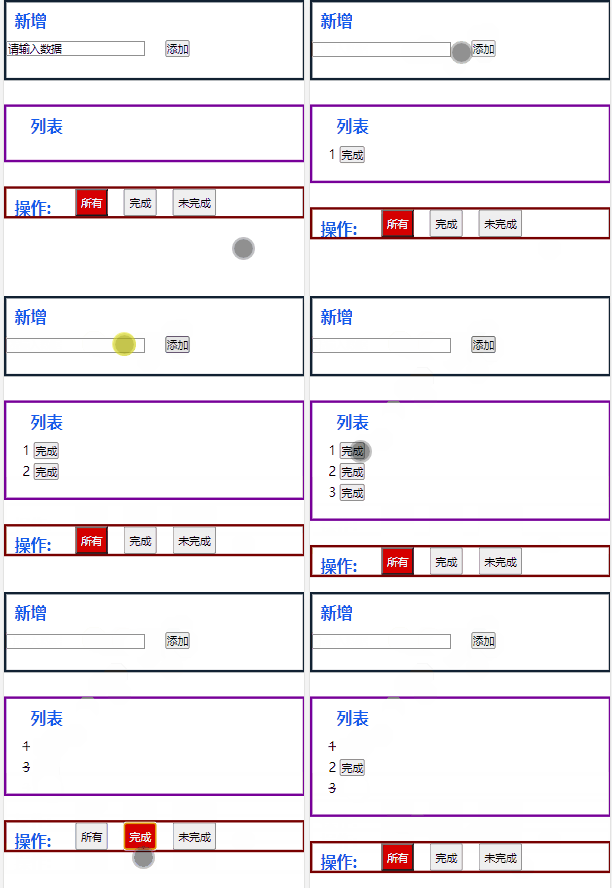
1、增加功能:在新增版块里面的输入框内输入数据,点击后面的“添加”按钮,将输入的数据添加到列表中,默认是未完成的
2、点击列表里面每一项后面的“完成”按钮,完成按钮会消失并且文字会出现删除线
3、在操作版块点击按钮,进行切换列表,在完成列表里面只显示已经完成的事项,在未完成的列表里面只显示未完成的事项
<!DOCTYPE html>

<html lang='en'>

<head>

    <meta charset='UTF-8'>

    <meta name='viewport' content='width=device-width, initial-scale=1.0'>

    <title>标题</title>

    </head>

    <style>

         * {

            margin: 0;

            padding: 0;

        }

        li {

            list-style: none;

            font-size: 16px;

            line-height: 26px;

        }

        .add {

            width: 100%;

            height: 100px;

            border: 3px solid #123;

            box-sizing: border-box;

        }

        .list {

            width: 100%;

            border: 3px solid #709;

            margin-top: 30px;

            margin-bottom: 30px;

            padding-bottom: 20px;

            padding-left: 20px;

            box-sizing: border-box;

        }

        .oper {

            display: flex;

            width: 100%;

            height: 40px;

            border: 3px solid #700;

            box-sizing: border-box;

        }

        .oper button {

            margin-left: 20px;

            padding: 5px

        }

        h2 {

            font-size: 20px;

            line-height: 26px;

            color: rgb(18, 87, 238);

            margin: 10px

        }

        input {

            margin-right: 20px

        }

        .act {

            background-color: rgb(213, 0, 0);

            color: aliceblue

        }

        .under {

            text-decoration: line-through;

        }

    </style>

<body>

    <div id='app'>

        <div class="add">

            <h2>新增</h2>

            <!-- 用户输入框 实现双向数据绑定-->

            <input type="text" v-model='value'>

            <!-- 添加按钮,点击这个按钮,数据会进行添加 -->

            <button @click="addLIstData">添加</button>

        </div>

        <ul class="list">

            <h2>列表</h2>

            <!-- 使用循环指令,对需要展示的数据进行循环 -->

            <!--每一个数据都是一个对象,对象里面具有三个值,分别是id唯一值 value显示的数据 isTodo是否完成 -->

            <li v-for="item in showList" :key="item.id">

                <!-- 显示列表数据 -->

                <!-- 绑定class,表达式成立进行显示-->

                    <span :class="{under:item.isTodo == 'true'}">  {{item.value}} </span>

                    <!-- 对按钮添加点击事件并将这一个数据的id进行传递 -->

                    <!-- 对按钮添加v-if判断,如果这项数据完成了就去掉按钮 -->

                    <button v-if="item.isTodo == 'false' " @click="finish(item.id)"> 完成 </button>

            </li>

        </ul>

        <div class="oper">

            <h2>操作</h2>

            <!-- 切换列表的按钮 -->

            <!-- 三个切换按钮使用数组进行存储,每一项都是一个对象,对象里面具有两个值,分别是 btn按钮上显示的内容  id唯一值 -->

            <!-- 对每一个按钮添加点击事件,并传递这个按钮的唯一值 -->

            <button v-for="item in oper" @click="cutList(item.id)" :class="{act:item.id === selected}"> {{item.btn}} </button>

        </div>

    </div>

    </body>

<script src='https://cdn.jsdelivr.net/npm/vue/dist/vue.js'></script>

<script>

    // 创建Vue实例

    new Vue({

        // 绑定区域

        el: '#app',

        // 创建数据

        data: {

            // 显示列表

            showList:[],

            // 所有的数据的列表,用户添加的数据会直接到达这里

            addList:[],

            // 输入框双向数据绑定

            value:'请输入数据',

            // 操作按钮上的数据

            oper:[

            {

                    btn: "所有",

                    id: 'all'

                },

                {

                    btn: "完成",

                    id: 'true'

                },

                {

                    btn: "未完成",

                    id: 'false'

                },

            ],

            // 点击的那个操作按钮,默认情况下所有

            selected: 'all'

        },

        // 添加方法

        methods:{

            //添加按钮的方法

            addLIstData(){

                // 将用户输入的内容插入到addList列表中

                this.addList.push({

                    id:new Date().getTime(),//数据的唯一值设置成时间戳

                    value:this.value,//用户输入的数据

                    isTodo:'false'//默认是未完成的

                })

                // 最后将输入框内的数据进行清空

                this.value = ''

                // 修改玩数据之后对列表重新渲染

                this.showList = this.addList.filter(item => (this.selected == 'all' || item.isTodo == this.selected))

            },

            // 完成按钮的方法

            finish(id){

                // 接受一个参数表示操作哪一个数据

                // 通过查找id确定操作的是第几个

                const index = this.showList.findIndex(item => item.id === id)

                // 查找到之后将这一个的isTodo尽心更改

                this.showList[index].isTodo = 'true'

                // 修改玩数据之后对列表重新渲染

                this.showList = this.addList.filter(item => (this.selected == 'all' || item.isTodo == this.selected))

            },

            // 切换列表的按钮的方法

            cutList(id){

                // 接受一个参数,确定是点击的哪一个

                // 将存储点击按钮的数据进行更改

                this.selected = id

                // 对列表进行操作

                this.showList = this.addList.filter(item => (id == 'all' || item.isTodo == id))

            }

        },

    })

 </script>

</html>
此代码在设置列表的时候使用了三次,造成了一定的内存浪费,可以通过计算属性进行更改优化
将每一个方法里面的“修改玩数据之后对列表重新渲染”,进行删除,将其写在计算属里面,并且将数据里面的“showList”删除。
需要注意的是在计算属性中需要使用return进行返回
Vue示例代码如下
  // 创建Vue实例

    new Vue({

        // 绑定区域

        el: '#app',

        // 创建数据

        data: {

            // 显示列表

            // showList:[],//此处删除

            // 所有的数据的列表,用户添加的数据会直接到达这里

            addList: [],

            // 输入框双向数据绑定

            value: '请输入数据',

            // 操作按钮上的数据

            oper: [{

                    btn: "所有",

                    id: 'all'

                },

                {

                    btn: "完成",

                    id: 'true'

                },

                {

                    btn: "未完成",

                    id: 'false'

                },

            ],

            // 点击的那个操作按钮,默认情况下所有

            selected: 'all'

        },

        // 添加方法

        methods: {

            //添加按钮的方法

            addLIstData() {

                // 将用户输入的内容插入到addList列表中

                this.addList.push({

                    id: new Date().getTime(), //数据的唯一值设置成时间戳

                    value: this.value, //用户输入的数据

                    isTodo: 'false' //默认是未完成的

                })

                // 最后将输入框内的数据进行清空

                this.value = ''

                // 修改玩数据之后对列表重新渲染

                // this.showList = this.addList.filter(item => (this.selected == 'all' || item.isTodo == this.selected))//此处删除

            },

            // 完成按钮的方法

            finish(id) {

                // 接受一个参数表示操作哪一个数据

                // 通过查找id确定操作的是第几个

                const index = this.showList.findIndex(item => item.id === id)

                // 查找到之后将这一个的isTodo尽心更改

                this.showList[index].isTodo = 'true'

                // 修改玩数据之后对列表重新渲染

                // this.showList = this.addList.filter(item => (this.selected == 'all' || item.isTodo == this.selected))//此处删除

            },

            // 切换列表的按钮的方法

            cutList(id) {

                // 接受一个参数,确定是点击的哪一个

                // 将存储点击按钮的数据进行更改

                this.selected = id

                // 对列表进行操作

                // this.showList = this.addList.filter(item => (id == 'all' || item.isTodo == id))//此处删除

            }

        },

        // 添加计算属性

        computed: {

            // 需要计算的数据

            showList() {

                //  一定要注意返回

                return this.addList.filter(item => (this.selected == 'all' || item.isTodo == this.selected))

            }

        }

    })
Vue案例之todoLIst实现的更多相关文章
- Vue编写的todolist小例子
Vue编写的todolist小例子 本篇博客主要包含一个内容: 1.第一个内容:使用Vue编写todolist例子,包含的主要知识是v-model,v-for,el表达式,以及Vue中使用method ...
- 黑马eesy_15 Vue:04.Vue案例(ssm环境搭建)
黑马eesy_15 Vue:02.常用语法 黑马eesy_15 Vue:03.生命周期 黑马eesy_15 Vue:04.Vue案例(ssm环境搭建) 黑马eesy_15 Vue:04.综合案例(前端 ...
- 通过Vue实现的todolist
和接口对接的todolist因为有后台的存在,todolist获取的数据会一直存在不丢失(不管你如何刷新页面),思路如下: 首先得先搞到接口: 通过这个接口地址可以获取整段的数据,成功err为0. 于 ...
- [vue案例的知识点]todo-list
文章的原材料来自于vue的官方示例:https://cn.vuejs.org/v2/examples/todomvc.html,我们在学习过程中,试着对其中的一些知识点进行记录: 一.浏览器数据存储, ...
- vue案例todolist备忘录
项目效果:https://cinderellastory.github.io/todolist/dist/index.html#/ 项目链接:https://github.com/Cinderella ...
- vue写的ToDoList
<!DOCTYPE html> <html lang="en"> <head> <meta charset="UTF-8&quo ...
- Vue入门到TodoList练手
学习资料 慕课网 - vue2.5入门 基础语法 示例代码1 <div id="root"> <h1>hello {{msg}}</h1> &l ...
- Vue学习之todolist删除功能
<!DOCTYPE html> <html lang="en"> <head> <meta charset="UTF-8&quo ...
- Vue学习之todolist组件拆分
<!DOCTYPE html> <html lang="en"> <head> <meta charset="UTF-8&quo ...
随机推荐
- js下 Day01、DOM对象,BOM浏览器对象模型
一.初识DOM 1.什么是DOM?为什么学习DOM 2.DOM是实现js在网页实现交互的关键环节,我们的js代码就是通过DOM的方法来实现对于html内容的操作. 3.认识DOM实现了js和网页结合的 ...
- 第 13 章 StringTable详解
目录 第 13 章 StringTable 1.String 的基本特性 1.1.String 概述 1.2.String 的基本特征 1.3.String 的底层结构 2.String 的内存分配 ...
- Python-其他-round()保留小数位时遇到的问题
最近有一个需求,原有整数计算,改成小数计算,保留一位小数. 于是按照需求,将数据结构由 int 改为 float ,计算时采用round()方法来保留小数位. 第一版代码如下: a = 0.10000 ...
- Python 爬虫进阶必备
关于新闻平台请求头加密参数逻辑分析 抓包与加密定位 先来看看加密的请求
- net core cap结合redis+数据库实现最终一致性
CAP 同时支持使用 RabbitMQ,Kafka,Azure Service Bus 等进行底层之间的消息发送. CAP 目前支持使用 Sql Server,MySql,PostgreSql,Mon ...
- 152. Maximum Product Subarray动态规划连乘最大子串
Find the contiguous subarray within an array (containing at least one number)which has the largest p ...
- RPC框架从0到10
RPC(Remote Procedure Call) 从单机走向分布式,产生了很多分布式的通信方式 最古老也是最有效,并且永不过时的,TCP/UDP的二进制传输,事实上所有的通信方式归根结底都是TCP ...
- Kafka知识总结及面试题
目录 概念 Kafka基础概念 命令行 Kafka 数据存储设计 kafka在zookeeper中存储结构 生产者 生产者设计 消费者 消费者设计 面试题 kafka设计 请说明什么是Apache K ...
- Spark的checkpoint源码讲解
一.Checkpoint相关源码分为四个部分 1.Checkpoint的基本使用:spark_core & spark_streaming 2.初始化的源码 3.Checkpoint的 ...
- .NET 云原生架构师训练营(模块二 基础巩固 消息队列 介绍与基础)--学习笔记
2.6.1 消息队列 -- 介绍 主要使用场景 队列的三种形式 消息队列的优点 主要使用场景 典型的异步处理 流量削锋 应用解耦 队列的三种形式 点对点 工作队列 发布与订阅 消息队列的优点 1.屏蔽 ...