
Java-Maven-Runoob:Maven 构建配置文件
| ylbtech-Java-Maven-Runoob:Maven 构建配置文件 |
| 1.返回顶部 |
Maven 构建配置文件
构建配置文件是一系列的配置项的值,可以用来设置或者覆盖 Maven 构建默认值。使用构建配置文件,你可以为不同的环境,比如说生产环境(Producation)和开发(Development)环境,定制构建方式。
配置文件在 pom.xml 文件中使用 activeProfiles 或者 profiles 元素指定,并且可以通过各种方式触发。配置文件在构建时修改 POM,并且用来给参数设定不同的目标环境(比如说,开发(Development)、测试(Testing)和生产环境(Producation)中数据库服务器的地址)。
构建配置文件的类型
构建配置文件大体上有三种类型:
| 类型 | 在哪定义 |
|---|---|
| 项目级(Per Project) | 定义在项目的POM文件pom.xml中 |
| 用户级 (Per User) | 定义在Maven的设置xml文件中 (%USER_HOME%/.m2/settings.xml) |
| 全局(Global) | 定义在 Maven 全局的设置 xml 文件中 (%M2_HOME%/conf/settings.xml) |
配置文件激活
Maven的构建配置文件可以通过多种方式激活。
- 使用命令控制台输入显式激活。
- 通过 maven 设置。
- 基于环境变量(用户或者系统变量)。
- 操作系统设置(比如说,Windows系列)。
- 文件的存在或者缺失。
配置文件激活实例
假定项目结构如下:
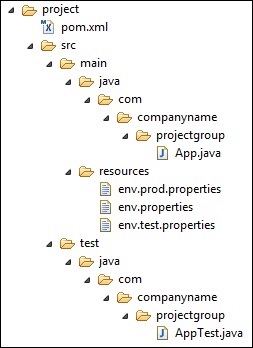
其中在src/main/resources文件夹下有三个用于测试文件:
| 文件名 | 描述 |
|---|---|
| env.properties | 如果未指定配置文件时默认使用的配置。 |
| env.test.properties | 当测试配置文件使用时的测试配置。 |
| env.prod.properties | 当生产配置文件使用时的生产配置。 |
注意:这三个配置文件并不是代表构建配置文件的功能,而是用于本次测试的目的;比如,我指定了构建配置文件为 prod 时,项目就使用 envprod.properties文件。
注意:下面的例子仍然是使用 AntRun 插件,因为此插件能绑定 Maven 生命周期阶段,并通过 Ant 的标签不用编写一点代码即可输出信息、复制文件等,经此而已。其余的与本次构建配置文件无关。
1、配置文件激活
profile 可以让我们定义一系列的配置信息,然后指定其激活条件。这样我们就可以定义多个 profile,然后每个 profile 对应不同的激活条件和配置信息,从而达到不同环境使用不同配置信息的效果。
以下实例,我们将 maven-antrun-plugin:run 目标添加到测试阶段中。这样我们可以在不同的 profile 中输出文本信息。我们将使用 pom.xml 来定义不同的 profile,并在命令控制台中使用 maven 命令激活 profile。
pom.xml 文件如下:
<project xmlns="http://maven.apache.org/POM/4.0.0" xmlns:xsi="http://www.w3.org/2001/XMLSchema-instance"

  xsi:schemaLocation="http://maven.apache.org/POM/4.0.0 http://maven.apache.org/maven-v4_0_0.xsd">

  <modelVersion>4.0.0</modelVersion>

  <groupId>com.jsoft.test</groupId>

  <artifactId>testproject</artifactId>

  <packaging>jar</packaging>

  <version>0.1-SNAPSHOT</version>

  <name>testproject</name>

  <url>http://maven.apache.org</url>

  <dependencies>

    <dependency>

      <groupId>junit</groupId>

      <artifactId>junit</artifactId>

      <version>3.8.1</version>

      <scope>test</scope>

    </dependency>

  </dependencies>

  <profiles>

      <profile>

          <id>test</id>

          <build>

              <plugins>

                 <plugin>

                    <groupId>org.apache.maven.plugins</groupId>

                    <artifactId>maven-antrun-plugin</artifactId>

                    <version>1.8</version>

                    <executions>

                       <execution>

                          <phase>test</phase>

                          <goals>

                             <goal>run</goal>

                          </goals>

                          <configuration>

                          <tasks>

                             <echo>Using env.test.properties</echo>

                             <copy file="src/main/resources/env.test.properties" tofile="${project.build.outputDirectory}/env.properties" overwrite="true"/>

                          </tasks>

                          </configuration>

                       </execution>

                    </executions>

                 </plugin>

              </plugins>

          </build>

      </profile>

      <profile>

          <id>normal</id>

          <build>

              <plugins>

                 <plugin>

                    <groupId>org.apache.maven.plugins</groupId>

                    <artifactId>maven-antrun-plugin</artifactId>

                    <version>1.8</version>

                    <executions>

                       <execution>

                          <phase>test</phase>

                          <goals>

                             <goal>run</goal>

                          </goals>

                          <configuration>

                          <tasks>

                             <echo>Using env.properties</echo>

                             <copy file="src/main/resources/env.properties" tofile="${project.build.outputDirectory}/env.properties" overwrite="true"/>

                          </tasks>

                          </configuration>

                       </execution>

                    </executions>

                 </plugin>

              </plugins>

          </build>

      </profile>

      <profile>

          <id>prod</id>

          <build>

              <plugins>

                 <plugin>

                    <groupId>org.apache.maven.plugins</groupId>

                    <artifactId>maven-antrun-plugin</artifactId>

                    <version>1.8</version>

                    <executions>

                       <execution>

                          <phase>test</phase>

                          <goals>

                             <goal>run</goal>

                          </goals>

                          <configuration>

                          <tasks>

                             <echo>Using env.prod.properties</echo>

                             <copy file="src/main/resources/env.prod.properties" tofile="${project.build.outputDirectory}/env.properties" overwrite="true"/>

                          </tasks>

                          </configuration>

                       </execution>

                    </executions>

                 </plugin>

              </plugins>

          </build>

      </profile>

   </profiles>

</project>
注意:构建配置文件采用的是 <profiles> 节点。
说明:上面新建了三个 <profiles>,其中 <id> 区分了不同的 <profiles> 执行不同的 AntRun 任务;而 AntRun 的任务可以这么理解,AntRun 监听 test 的 Maven 生命周期阶段,当 Maven 执行 test 时,就除了发 AntRun 的任务,任务里面为输出文本并复制文件到指定的位置;而至于要执行哪个 AntRun 任务,此时构建配置文件起到了传输指定的作用,比如,通过命令行参数输入指定的 <id>。
执行命令:
mvn test -Ptest
提示:第一个 test 为 Maven 生命周期阶段,第 2 个 test 为构建配置文件指定的 <id> 参数,这个参数通过 -P 来传输,当然,它可以是 prod 或者 normal 这些由你定义的<id>。
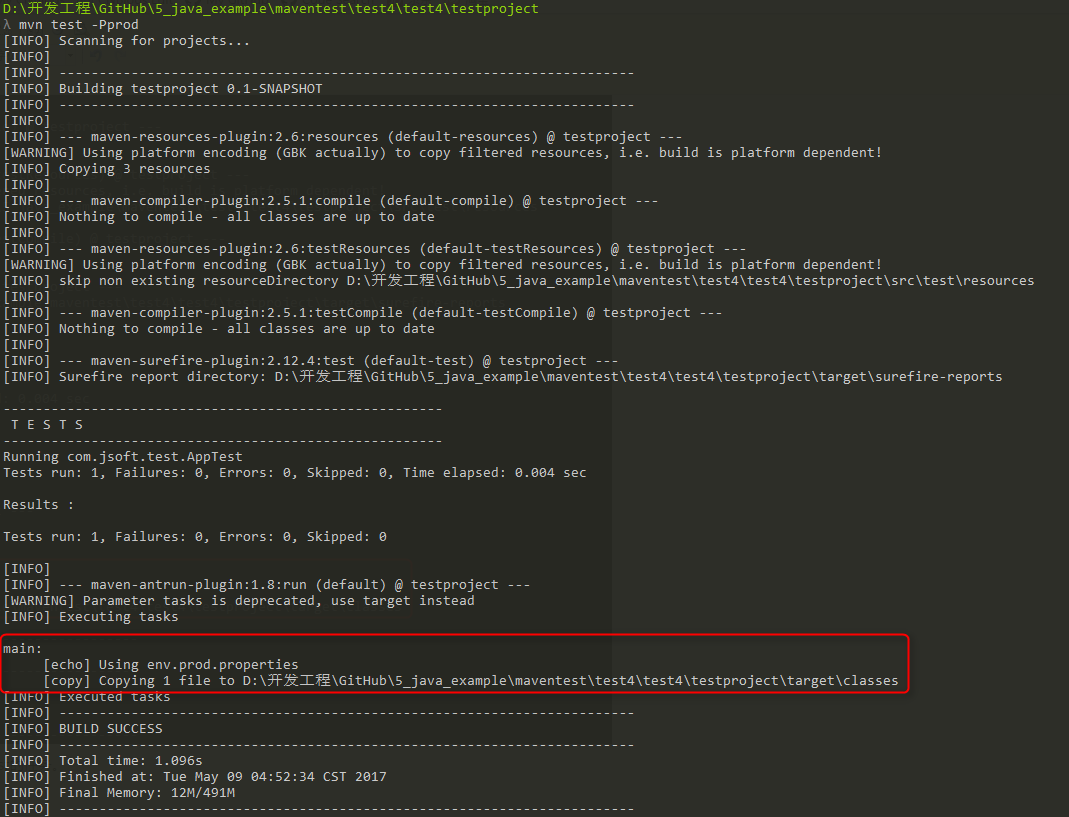
运行的结果如下:

可以看出成功的触发了AntRun的任务。并且是对应构建配置文件下的 <id> 为 test 的任务。
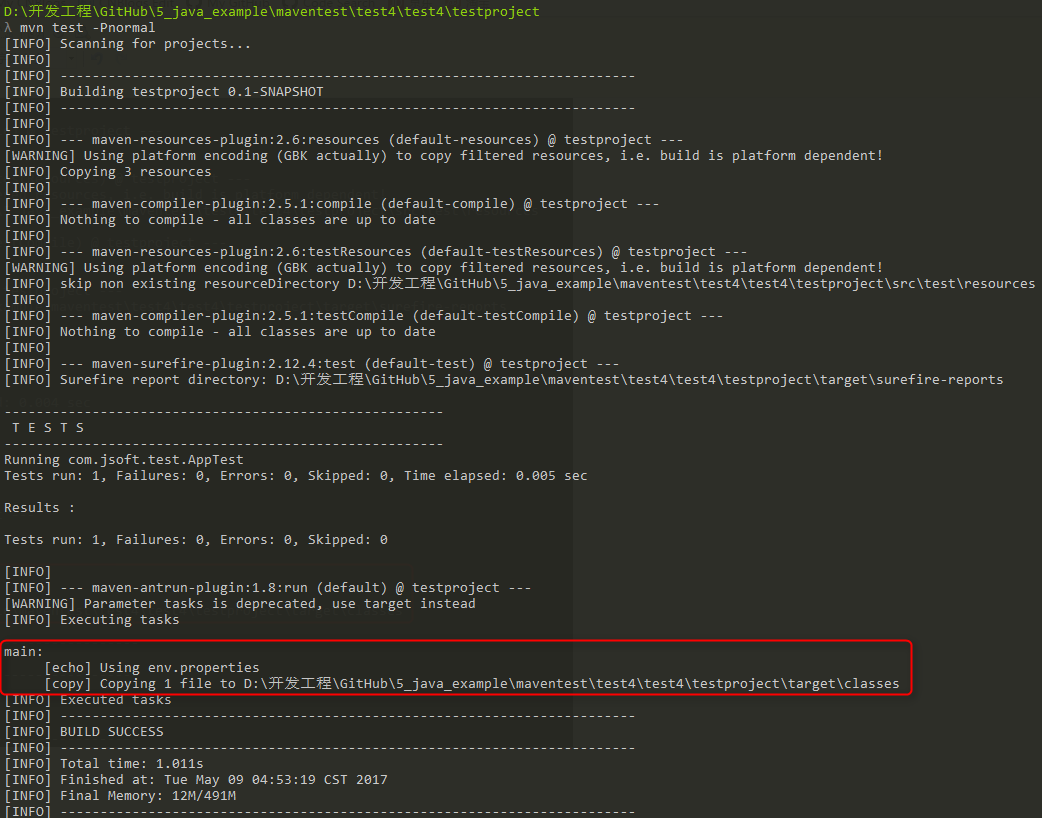
再测试其余两个命令,结果如下:
2、通过Maven设置激活配置文件
打开 %USER_HOME%/.m2 目录下的 settings.xml 文件,其中 %USER_HOME% 代表用户主目录。如果 setting.xml 文件不存在就直接拷贝 %M2_HOME%/conf/settings.xml 到 .m2 目录,其中 %M2_HOME% 代表 Maven 的安装目录。
配置 setting.xml 文件,增加 <activeProfiles>属性:
<settings xmlns="http://maven.apache.org/POM/4.0.0"

   xmlns:xsi="http://www.w3.org/2001/XMLSchema-instance"

   xsi:schemaLocation="http://maven.apache.org/POM/4.0.0

   http://maven.apache.org/xsd/settings-1.0.0.xsd">

   ...

   <activeProfiles>

      <activeProfile>test</activeProfile>

   </activeProfiles>

</settings>
执行命令:
mvn test
提示 1:此时不需要使用 -Ptest 来输入参数了,上面的 setting.xml 文件的 <activeprofile> 已经指定了 test 参数代替了。
提示 2:同样可以使用在 %M2_HOME%/conf/settings.xml 的文件进行配置,效果一致。
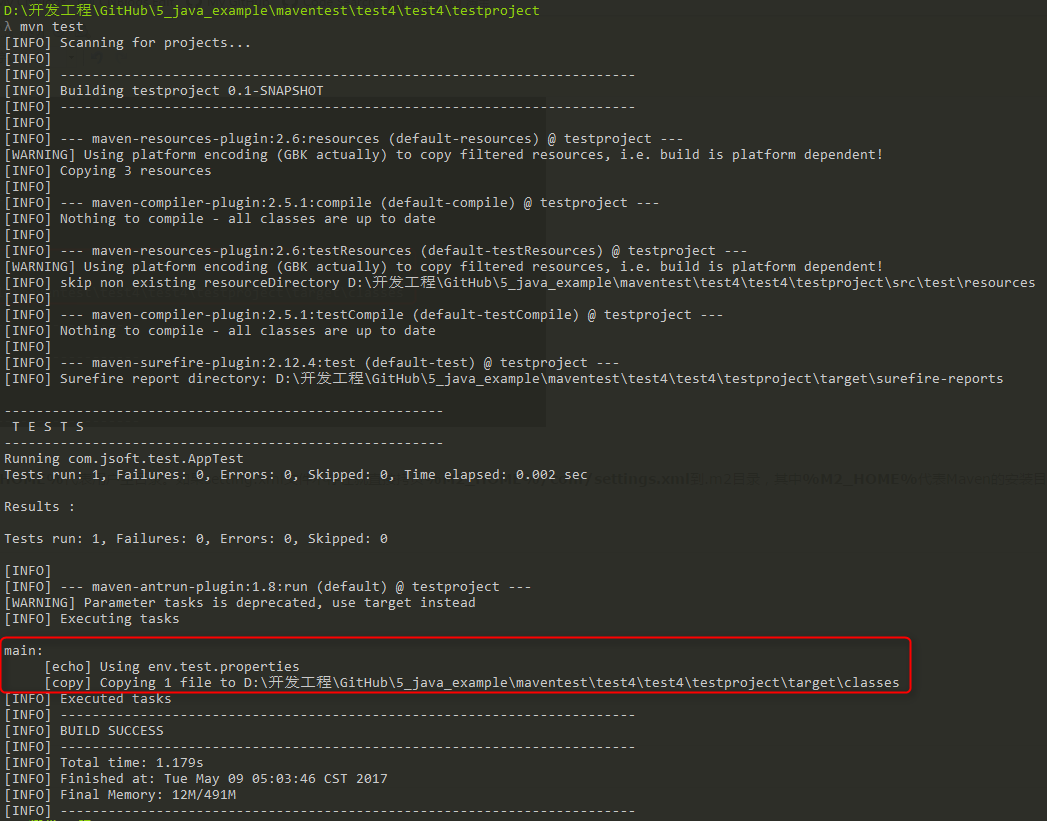
执行结果:
3、通过环境变量激活配置文件
先把上一步测试的 setting.xml 值全部去掉。
然后在 pom.xml 里面的 <id> 为 test 的 <profile> 节点,加入 <activation> 节点:
<project xmlns="http://maven.apache.org/POM/4.0.0" xmlns:xsi="http://www.w3.org/2001/XMLSchema-instance"

  xsi:schemaLocation="http://maven.apache.org/POM/4.0.0 http://maven.apache.org/maven-v4_0_0.xsd">

  <modelVersion>4.0.0</modelVersion>

  <groupId>com.jsoft.test</groupId>

  <artifactId>testproject</artifactId>

  <packaging>jar</packaging>

  <version>0.1-SNAPSHOT</version>

  <name>testproject</name>

  <url>http://maven.apache.org</url>

  <dependencies>

    <dependency>

      <groupId>junit</groupId>

      <artifactId>junit</artifactId>

      <version>3.8.1</version>

      <scope>test</scope>

    </dependency>

  </dependencies>

  <profiles>

      <profile>

          <id>test</id>

          <activation>

            <property>

               <name>env</name>

               <value>test</value>

            </property>

          </activation>

          <build>

              <plugins>

                 <plugin>

                    <groupId>org.apache.maven.plugins</groupId>

                    <artifactId>maven-antrun-plugin</artifactId>

                    <version>1.8</version>

                    <executions>

                       <execution>

                          <phase>test</phase>

                          <goals>

                             <goal>run</goal>

                          </goals>

                          <configuration>

                          <tasks>

                             <echo>Using env.test.properties</echo>

                             <copy file="src/main/resources/env.test.properties" tofile="${project.build.outputDirectory}/env.properties" overwrite="true"/>

                          </tasks>

                          </configuration>

                       </execution>

                    </executions>

                 </plugin>

              </plugins>

          </build>

      </profile>

      <profile>

          <id>normal</id>

          <build>

              <plugins>

                 <plugin>

                    <groupId>org.apache.maven.plugins</groupId>

                    <artifactId>maven-antrun-plugin</artifactId>

                    <version>1.8</version>

                    <executions>

                       <execution>

                          <phase>test</phase>

                          <goals>

                             <goal>run</goal>

                          </goals>

                          <configuration>

                          <tasks>

                             <echo>Using env.properties</echo>

                             <copy file="src/main/resources/env.properties" tofile="${project.build.outputDirectory}/env.properties" overwrite="true"/>

                          </tasks>

                          </configuration>

                       </execution>

                    </executions>

                 </plugin>

              </plugins>

          </build>

      </profile>

      <profile>

          <id>prod</id>

          <build>

              <plugins>

                 <plugin>

                    <groupId>org.apache.maven.plugins</groupId>

                    <artifactId>maven-antrun-plugin</artifactId>

                    <version>1.8</version>

                    <executions>

                       <execution>

                          <phase>test</phase>

                          <goals>

                             <goal>run</goal>

                          </goals>

                          <configuration>

                          <tasks>

                             <echo>Using env.prod.properties</echo>

                             <copy file="src/main/resources/env.prod.properties" tofile="${project.build.outputDirectory}/env.properties" overwrite="true"/>

                          </tasks>

                          </configuration>

                       </execution>

                    </executions>

                 </plugin>

              </plugins>

          </build>

      </profile>

   </profiles>

</project>
执行命令:
mvn test -Denv=test
提示 1:上面使用 -D 传递环境变量,其中 evn 对应刚才设置的 <name> 值,test 对应<value>。
提示 2:在 Windows 10 上测试了系统的环境变量,但是不生效,所以,只能通过 -D 传递。
执行结果:

4、通过操作系统激活配置文件
activation 元素包含下面的操作系统信息。当系统为 windows XP 时,test Profile 将会被触发。
<profile>

   <id>test</id>

   <activation>

      <os>

         <name>Windows XP</name>

         <family>Windows</family>

         <arch>x86</arch>

         <version>5.1.2600</version>

      </os>

   </activation>

</profile>
现在打开命令控制台,跳转到 pom.xml 所在目录,并执行下面的 mvn 命令。不要使用 -P 选项指定 Profile 的名称。Maven 将显示被激活的 test Profile 的结果。
mvn test
5、通过文件的存在或者缺失激活配置文件
现在使用 activation 元素包含下面的操作系统信息。当 target/generated-sources/axistools/wsdl2java/com/companyname/group 缺失时,test Profile 将会被触发。
<profile>

   <id>test</id>

   <activation>

      <file>

         <missing>target/generated-sources/axistools/wsdl2java/

         com/companyname/group</missing>

      </file>

   </activation>

</profile>
现在打开命令控制台,跳转到 pom.xml 所在目录,并执行下面的 mvn 命令。不要使用 -P 选项指定 Profile 的名称。Maven 将显示被激活的 test Profile 的结果。
mvn test
参考:https://www.cnblogs.com/EasonJim/p/6828743.html
| 2.返回顶部 |
| 3.返回顶部 |
| 4.返回顶部 |
| 5.返回顶部 |
| 6.返回顶部 |
 |
作者:ylbtech 出处:http://ylbtech.cnblogs.com/ 本文版权归作者和博客园共有,欢迎转载,但未经作者同意必须保留此段声明,且在文章页面明显位置给出原文连接,否则保留追究法律责任的权利。 |
Java-Maven-Runoob:Maven 构建配置文件的更多相关文章
- IDEA + maven 零基础构建 java agent 项目
200316-IDEA + maven 零基础构建 java agent 项目 Java Agent(java 探针)虽说在 jdk1.5 之后就有了,但是对于绝大多数的业务开发 javaer 来说, ...
- 从零构建Java项目(Maven+SpringBoot+Git) #02 奥斯丁项目
前两天我说要写个项目来持续迭代,有好多小伙伴都表示支持和鼓励,项目的第一篇这不就来了么~我给项目取了个名字,英文名叫做:austin,中文名叫做:奥斯丁 名字倒没有什么特别的含义,我单纯觉得这个名字好 ...
- Maven 构建配置文件
什么是构建配置文件? 生成配置文件是一组可以用来设置或覆盖 Maven 构建配置值的默认值.使用生成配置文件,你可以针对不同的环境,如:生产V/S开发环境自定义构建. 配置文件中指定 pom.xml ...
- Maven学习(十四)-----Maven 构建配置文件
Maven 构建配置文件 什么是构建配置文件? 生成配置文件是一组可以用来设置或覆盖 Maven 构建配置值的默认值.使用生成配置文件,你可以针对不同的环境,如:生产V/S开发环境自定义构建. 配置文 ...
- Maven的构建配置文件(Build Profiles)
在命令行使用构建配置文件时,是-P,比如:mvn -Pinput 注意:这里的构建配置文件并不是一个真正的文件,而是通过指定参数来做特定的事. 以下内容引用自https://ayayui.gitboo ...
- maven 学习---Maven 构建配置文件
什么是构建配置文件? 构建配置文件是一组配置的集合,用来设置或者覆盖 Maven 构建的默认配置.使用构建配置文件,可以为不同的环境定制构建过程,例如 Producation 和 Developmen ...
- 【第五篇】-Maven 构建配置文件之Spring Cloud直播商城 b2b2c电子商务技术总结
Maven 构建配置文件 构建配置文件是一系列的配置项的值,可以用来设置或者覆盖 Maven 构建默认值. 使用构建配置文件,你可以为不同的环境,比如说生产环境(Production)和开发(Deve ...
- JAVA学习:maven开发环境快速搭建
转自:http://tech.it168.com/a2011/1204/1283/000001283307.shtml 最近,开发中要用到maven,所以对maven进行了简单的学习.因为有个mave ...
- 用 Maven 做项目构建
转自:http://www.ibm.com/developerworks/cn/java/j-lo-maven/index.html 本文将介绍基于 Apache Maven 3 的项目构建的基本概念 ...
随机推荐
- Python连接MongoDB操作
1.安装PyMongo 注意:请勿安装“bson”软件包. PyMongo配有自己的bson包; 执行“pip install bson”或“easy_install bson”则会安装与PyMong ...
- Pandas统计函数
统计方法有助于理解和分析数据的行为.现在我们将学习一些统计函数,可以将这些函数应用到Pandas的对象上. pct_change()函数 系列,DatFrames和Panel都有pct_change( ...
- Pandas日期功能
日期功能扩展了时间序列,在财务数据分析中起主要作用.在处理日期数据的同时,我们经常会遇到以下情况 - 生成日期序列 将日期序列转换为不同的频率 创建一个日期范围 通过指定周期和频率,使用date.ra ...
- JavaScript 打印控件
JavaScript 打印控件 github地址 https://github.com/DoersGuild/jQuery.print 使用前需要引入jQuery $("#mapDiv&qu ...
- sass基础篇
scss的语法非常简单: $color: red; div{ color: $color; } 这就是一个简单的scss代码. 但是,使用 Sass 进行开发,那么是不是直接通过“<link&g ...
- Node.js小白开路(一)-- events篇
时间或许可以说是以JS来理解世界的基础,针对于某一个情况对象会做出何种反应,反应之后会做出何种处理,以及这一事件衍生出来了哪一些变化. 大多数 Node.js 核心 API 都采用惯用的异步事件驱动架 ...
- 初识Linux(四)--系统常用命令
这里记录一下基础的系统常用命令,都是日常可能用到的,需要记住的一些命令.主要分为5个模块:关于时间,输出/查看,关机/重启,压缩归档和查找. 时间: date :查看设置当前系统时间,dat ...
- 解放内存之搭建自己的 R Server
学校的课五门有四门需要跑R程序,有一些长长长的代码实在是占用了太多的内存,果断决定搭个R的服务器放着自己跑. 愉快的是,R studio server 的搭建真心简单快捷~这个从前被我忽略的东东终于排 ...
- bzoj 3124 直径
Written with StackEdit. Description 小\(Q\)最近学习了一些图论知识.根据课本,有如下定义. 树:无回路且连通的无向图,每条边都有正整数的权值来表示其长度.如果一 ...
- vue前端开发那些事——vue组件开发
vue的学习曲线不是很陡(相比其它框架,如anglarjs),官方文档比较全面,分为基础篇和高级篇.我们刚开始学习的时候,肯定像引用jquery那样,先把vue的js引进来,然后学习基础内容.如果仅仅 ...