
Maven的构建配置文件(Build Profiles)
在命令行使用构建配置文件时,是-P,比如:mvn -Pinput
注意:这里的构建配置文件并不是一个真正的文件,而是通过指定参数来做特定的事。
以下内容引用自https://ayayui.gitbooks.io/tutorialspoint-maven/content/book/maven_build_profiles.html:
当时此教程的例子是在2.0版本,而新的3.0版本只是增加了一点,具体可以参考官网http://maven.apache.org/guides/introduction/introduction-to-profiles.html
什么是构建配置文件?
构建配置文件(A Build profile) 是一系列的配置项的值,可以用来设置或者覆盖Maven构建默认值。使用构建配置文件,你可以为不同的环境,比如说生产环境(Producation)和开发(Development)环境,定制构建方式。
配置文件在pom.xml文件中使用activeProfiles或者profiles元素指定,并且可以通过各种方式触发。配置文件在构建时修改POM,并且用来给参数设定不同的目标环境(比如说,开发(Development)、测试(Testing)和生产环境(Producation)中数据库服务器的地址)。
构建配置文件的类型
构建配置文件大体上有三种类型
| 类型 | 在哪定义 |
|---|---|
| 项目级(Per Project) | 定义在项目的POM文件pom.xml中 |
| 用户级 (Per User) | 定义在Maven的设置xml文件中 (%USER_HOME%/.m2/settings.xml) |
| 全局(Global) | 定义在Maven全局的设置xml文件中 (%M2_HOME%/conf/settings.xml) |
配置文件激活
Maven的构建配置文件可以通过多种方式激活。
- 使用命令控制台输入显式激活。
- 通过maven设置。
- 基于环境变量(用户或者系统变量)。
- 操作系统设置(比如说,Windows系列)。
- 文件的存在或者缺失。
官方配置文件激活示例
http://maven.apache.org/guides/introduction/introduction-to-profiles.html
http://maven.apache.org/ref/2.2.1/maven-profile/profiles.html
实践配置文件激活示例
新建的项目结构如下:
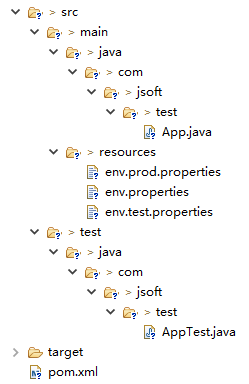
其中在src/main/resources文件夹下有三个用于测试文件:
| 文件名 | 描述 |
|---|---|
| env.properties | 如果未指定配置文件时默认使用的配置。 |
| env.test.properties | 当测试配置文件使用时的测试配置。 |
| env.prod.properties | 当生产配置文件使用时的生产配置。 |
注意:这三个配置文件并不是代表构建配置文件的功能,而是用于本次测试的目的;比如,我指定了构建配置文件为prod时,项目就使用envprod.properties文件。
注意:下面的例子仍然是使用AntRun插件,因为此插件能绑定Maven生命周期阶段,并通过Ant的标签不用编写一点代码即可输出信息、复制文件等,经此而已。其余的与本次构建配置文件无关。
1、显示配置文件激活
pom.xml配置如下:
<project xmlns="http://maven.apache.org/POM/4.0.0" xmlns:xsi="http://www.w3.org/2001/XMLSchema-instance"

  xsi:schemaLocation="http://maven.apache.org/POM/4.0.0 http://maven.apache.org/maven-v4_0_0.xsd">

  <modelVersion>4.0.0</modelVersion>

  <groupId>com.jsoft.test</groupId>

  <artifactId>testproject</artifactId>

  <packaging>jar</packaging>

  <version>0.1-SNAPSHOT</version>

  <name>testproject</name>

  <url>http://maven.apache.org</url>

  <dependencies>

    <dependency>

      <groupId>junit</groupId>

      <artifactId>junit</artifactId>

      <version>3.8.1</version>

      <scope>test</scope>

    </dependency>

  </dependencies>

  <profiles>

      <profile>

          <id>test</id>

          <build>

              <plugins>

                 <plugin>

                    <groupId>org.apache.maven.plugins</groupId>

                    <artifactId>maven-antrun-plugin</artifactId>

                    <version>1.8</version>

                    <executions>

                       <execution>

                          <phase>test</phase>

                          <goals>

                             <goal>run</goal>

                          </goals>

                          <configuration>

                          <tasks>

                             <echo>Using env.test.properties</echo>

                             <copy file="src/main/resources/env.test.properties" tofile="${project.build.outputDirectory}/env.properties" overwrite="true"/>

                          </tasks>

                          </configuration>

                       </execution>

                    </executions>

                 </plugin>

              </plugins>

          </build>

      </profile>

      <profile>

          <id>normal</id>

          <build>

              <plugins>

                 <plugin>

                    <groupId>org.apache.maven.plugins</groupId>

                    <artifactId>maven-antrun-plugin</artifactId>

                    <version>1.8</version>

                    <executions>

                       <execution>

                          <phase>test</phase>

                          <goals>

                             <goal>run</goal>

                          </goals>

                          <configuration>

                          <tasks>

                             <echo>Using env.properties</echo>

                             <copy file="src/main/resources/env.properties" tofile="${project.build.outputDirectory}/env.properties" overwrite="true"/>

                          </tasks>

                          </configuration>

                       </execution>

                    </executions>

                 </plugin>

              </plugins>

          </build>

      </profile>

      <profile>

          <id>prod</id>

          <build>

              <plugins>

                 <plugin>

                    <groupId>org.apache.maven.plugins</groupId>

                    <artifactId>maven-antrun-plugin</artifactId>

                    <version>1.8</version>

                    <executions>

                       <execution>

                          <phase>test</phase>

                          <goals>

                             <goal>run</goal>

                          </goals>

                          <configuration>

                          <tasks>

                             <echo>Using env.prod.properties</echo>

                             <copy file="src/main/resources/env.prod.properties" tofile="${project.build.outputDirectory}/env.properties" overwrite="true"/>

                          </tasks>

                          </configuration>

                       </execution>

                    </executions>

                 </plugin>

              </plugins>

          </build>

      </profile>

   </profiles>

</project>
注意:构建配置文件采用的是<profiles>节点。
说明:上面新建了三个<profiles>,其中<id>区分了不同的<profiles>执行不同的AntRun任务;而AntRun的任务可以这么理解,AntRun监听test的Maven生命周期阶段,当Maven执行test时,就除了发AntRun的任务,任务里面为输出文本并复制文件到指定的位置;而至于要执行哪个AntRun任务,此时构建配置文件起到了传输指定的作用,比如,通过命令行参数输入指定的<id>。
执行命令:
mvn test -Ptest
提示:第一个test为Maven生命周期阶段,第2个test为为构建配置文件指定的<id>参数,这个参数通过-P来传输,当然,它可以是prod或者normal这些由你定义的<id>。
运行的结果如下:
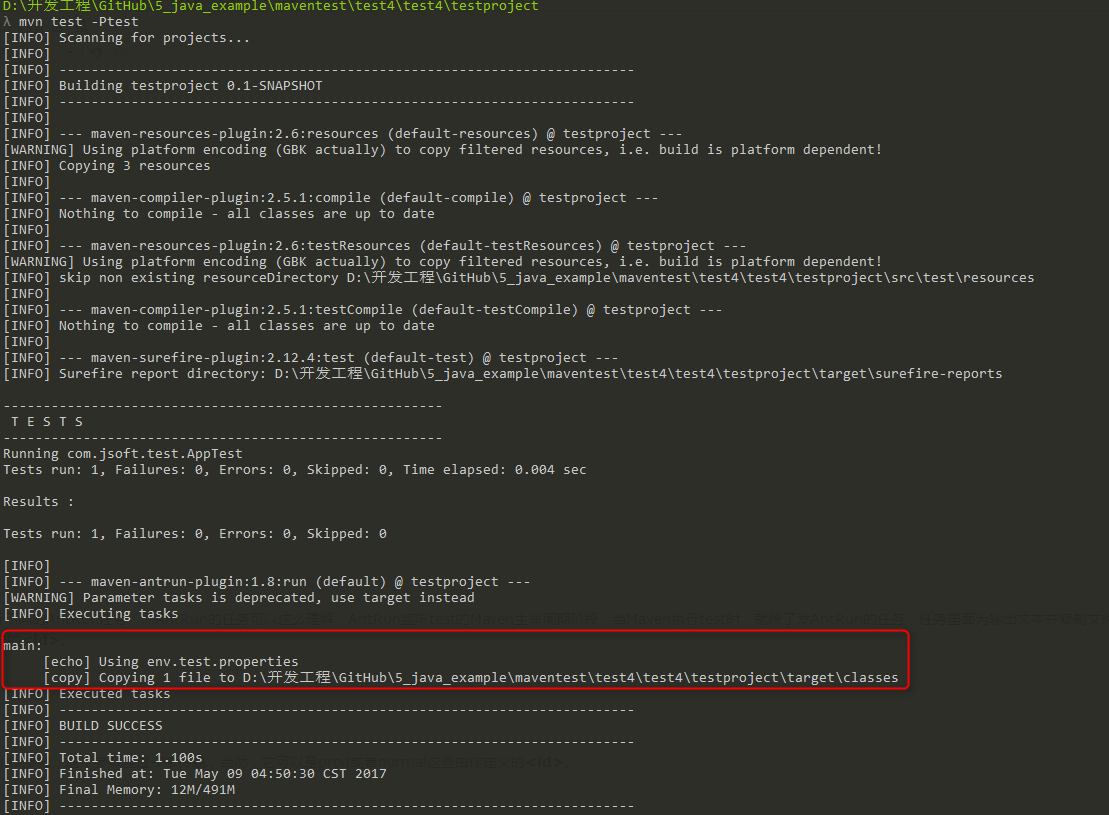
可以看出成功的触发了AntRun的任务。并且是对应构建配置文件下的<id>为test的任务。
再测试其余两个命令,结果如下:
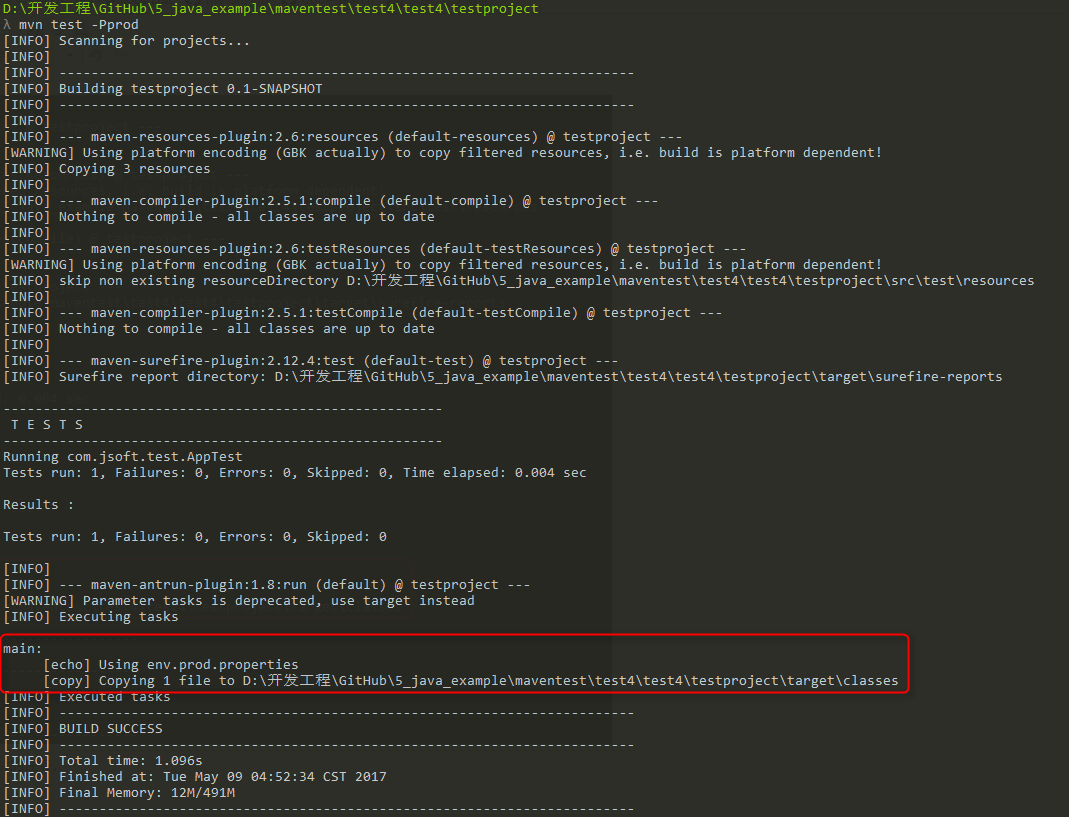
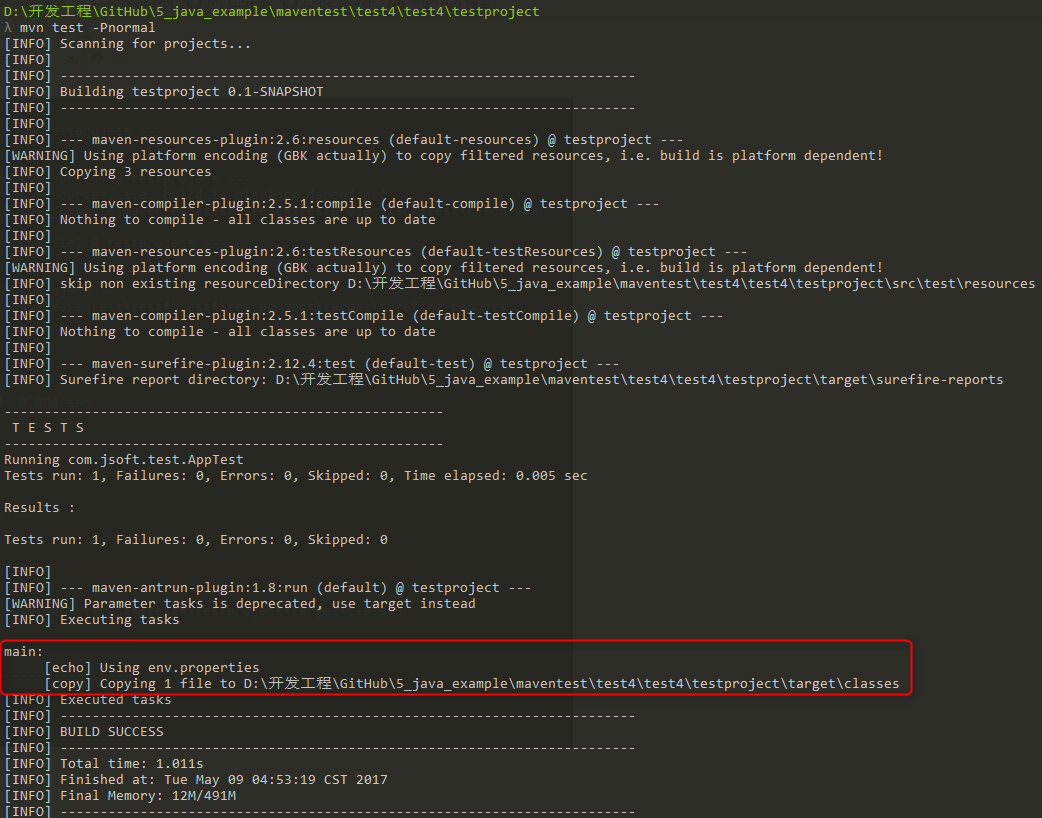
2、通过Maven设置激活配置文件
打开%USER_HOME%/.m2目录下的settings.xml文件,其中%USER_HOME%代表用户主目录。如果setting.xml文件不存在就直接拷贝%M2_HOME%/conf/settings.xml到.m2目录,其中%M2_HOME%代表Maven的安装目录。对于为什么可以这样做,参考:http://www.cnblogs.com/EasonJim/p/6827058.html
配置setting.xml文件,增加<activeProfiles>属性:
<settings xmlns="http://maven.apache.org/POM/4.0.0"

   xmlns:xsi="http://www.w3.org/2001/XMLSchema-instance"

   xsi:schemaLocation="http://maven.apache.org/POM/4.0.0

   http://maven.apache.org/xsd/settings-1.0.0.xsd">

   ...

   <activeProfiles>

      <activeProfile>test</activeProfile>

   </activeProfiles>

</settings>
执行命令:
mvn test
提示:此时不需要使用-Ptest来输入参数了,上面的setting.xml文件的<activeprofile>已经指定了test参数,代替了。
提示2:同样可以使用在%M2_HOME%/conf/settings.xml的文件进行配置,效果一致。
执行结果:
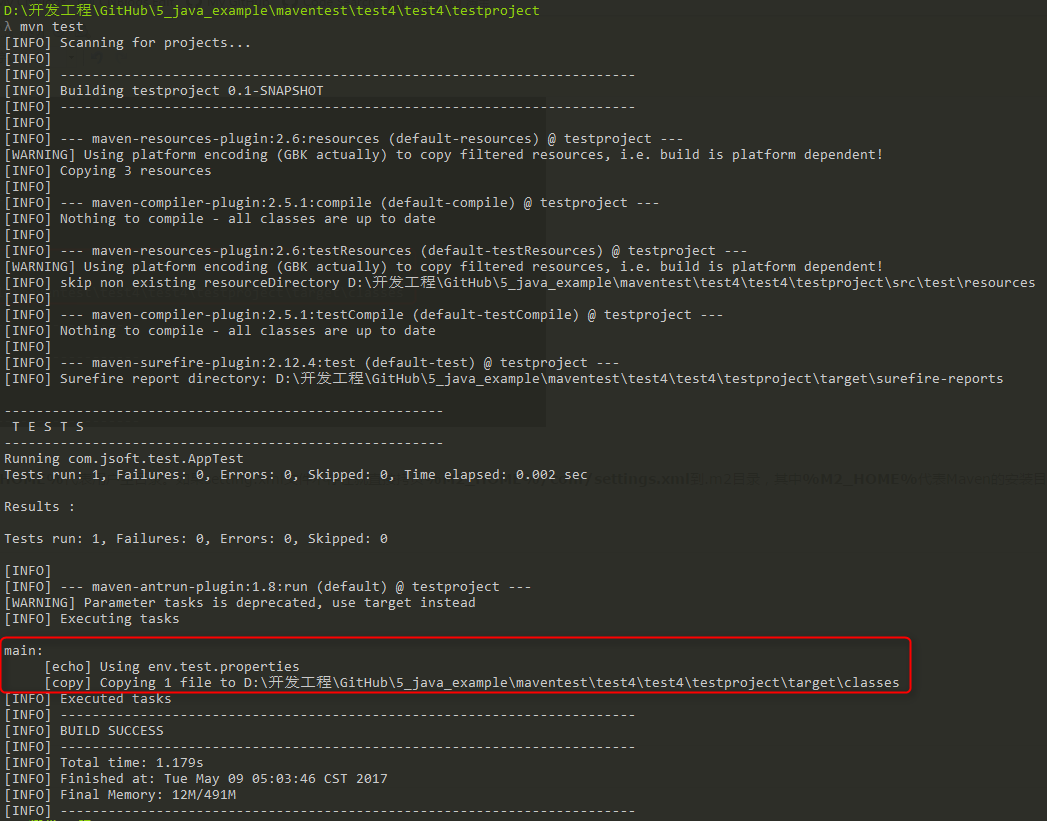
3、通过环境变量激活配置文件
先把上一步测试的setting.xml值全部去掉。
然后在pom.xml里面的<id>为test的<profile>节点,加入<activation>节点:
<project xmlns="http://maven.apache.org/POM/4.0.0" xmlns:xsi="http://www.w3.org/2001/XMLSchema-instance"

  xsi:schemaLocation="http://maven.apache.org/POM/4.0.0 http://maven.apache.org/maven-v4_0_0.xsd">

  <modelVersion>4.0.0</modelVersion>

  <groupId>com.jsoft.test</groupId>

  <artifactId>testproject</artifactId>

  <packaging>jar</packaging>

  <version>0.1-SNAPSHOT</version>

  <name>testproject</name>

  <url>http://maven.apache.org</url>

  <dependencies>

    <dependency>

      <groupId>junit</groupId>

      <artifactId>junit</artifactId>

      <version>3.8.1</version>

      <scope>test</scope>

    </dependency>

  </dependencies>

  <profiles>

      <profile>

          <id>test</id>

          <activation>

            <property>

               <name>env</name>

               <value>test</value>

            </property>

          </activation>

          <build>

              <plugins>

                 <plugin>

                    <groupId>org.apache.maven.plugins</groupId>

                    <artifactId>maven-antrun-plugin</artifactId>

                    <version>1.8</version>

                    <executions>

                       <execution>

                          <phase>test</phase>

                          <goals>

                             <goal>run</goal>

                          </goals>

                          <configuration>

                          <tasks>

                             <echo>Using env.test.properties</echo>

                             <copy file="src/main/resources/env.test.properties" tofile="${project.build.outputDirectory}/env.properties" overwrite="true"/>

                          </tasks>

                          </configuration>

                       </execution>

                    </executions>

                 </plugin>

              </plugins>

          </build>

      </profile>

      <profile>

          <id>normal</id>

          <build>

              <plugins>

                 <plugin>

                    <groupId>org.apache.maven.plugins</groupId>

                    <artifactId>maven-antrun-plugin</artifactId>

                    <version>1.8</version>

                    <executions>

                       <execution>

                          <phase>test</phase>

                          <goals>

                             <goal>run</goal>

                          </goals>

                          <configuration>

                          <tasks>

                             <echo>Using env.properties</echo>

                             <copy file="src/main/resources/env.properties" tofile="${project.build.outputDirectory}/env.properties" overwrite="true"/>

                          </tasks>

                          </configuration>

                       </execution>

                    </executions>

                 </plugin>

              </plugins>

          </build>

      </profile>

      <profile>

          <id>prod</id>

          <build>

              <plugins>

                 <plugin>

                    <groupId>org.apache.maven.plugins</groupId>

                    <artifactId>maven-antrun-plugin</artifactId>

                    <version>1.8</version>

                    <executions>

                       <execution>

                          <phase>test</phase>

                          <goals>

                             <goal>run</goal>

                          </goals>

                          <configuration>

                          <tasks>

                             <echo>Using env.prod.properties</echo>

                             <copy file="src/main/resources/env.prod.properties" tofile="${project.build.outputDirectory}/env.properties" overwrite="true"/>

                          </tasks>

                          </configuration>

                       </execution>

                    </executions>

                 </plugin>

              </plugins>

          </build>

      </profile>

   </profiles>

</project>
执行命令:
mvn test -Denv=test
提示:上面使用-D传递环境变量,其中evn对应刚才设置的<name>值,test对应<value>。
提示2:在Windows 10上测试了系统的环境变量,但是不生效,所以,只能通过-D传递。
执行结果:

4、通过操作系统激活配置文件
5、通过文件的存在或者缺失激活配置文件
6、通过JDK的版本激活配置文件
...
更多激活配置,可以参考官方的例子:http://maven.apache.org/guides/introduction/introduction-to-profiles.html
测试工程:https://github.com/easonjim/5_java_example/tree/master/maventest/test4/test4/testproject
Maven的构建配置文件(Build Profiles)的更多相关文章
- Java-Maven-Runoob:Maven 构建配置文件
ylbtech-Java-Maven-Runoob:Maven 构建配置文件 1.返回顶部 1. Maven 构建配置文件 构建配置文件是一系列的配置项的值,可以用来设置或者覆盖 Maven 构建默认 ...
- 【第五篇】-Maven 构建配置文件之Spring Cloud直播商城 b2b2c电子商务技术总结
Maven 构建配置文件 构建配置文件是一系列的配置项的值,可以用来设置或者覆盖 Maven 构建默认值. 使用构建配置文件,你可以为不同的环境,比如说生产环境(Production)和开发(Deve ...
- Maven 构建配置文件
什么是构建配置文件? 生成配置文件是一组可以用来设置或覆盖 Maven 构建配置值的默认值.使用生成配置文件,你可以针对不同的环境,如:生产V/S开发环境自定义构建. 配置文件中指定 pom.xml ...
- Maven学习(十四)-----Maven 构建配置文件
Maven 构建配置文件 什么是构建配置文件? 生成配置文件是一组可以用来设置或覆盖 Maven 构建配置值的默认值.使用生成配置文件,你可以针对不同的环境,如:生产V/S开发环境自定义构建. 配置文 ...
- maven 学习---Maven 构建配置文件
什么是构建配置文件? 构建配置文件是一组配置的集合,用来设置或者覆盖 Maven 构建的默认配置.使用构建配置文件,可以为不同的环境定制构建过程,例如 Producation 和 Developmen ...
- Maven的pom配置文件
1.1 Maven的pom配置文件 1.1.1 pom文件内容和作用 Pom.xml文件用来设置项目的项目依赖.插件.项目版本等信息,其中必须的是xml的根元 ...
- 使用Eclipse+Maven+Jetty构建Java Web开发环境(几个教程综合集成2014发行)
工作需要使用Jetty由于web集装箱,得知Eclipse+Maven+Jetty该组合是非常好的,因此,要在网上找了很多教程,但不写或多或少特定的或过时的内容而导致最终的配置失败,易于配置为未来的同 ...
- 【Maven】构建war包时排除web.xml
在使用maven构建项目的war包时,有时并不需要src/webapp/WEB-INF/下的一些文件. 这时可以通过maven-war-plugin创建配置来排除这些文件.下面贴出我平时使用的pom. ...
- maven 单独构建多模块项目中的单个模块
maven 单独构建多模块项目中的单个模块, maven选项说明 -pl, --projects Build specified reactor projects instead of all pro ...
随机推荐
- IAR生成bin,HEX文件
1.生成bin,hex文件 options->output converter->output format binary:.bin文件:intel extended:hex文件. 生成的 ...
- foreach ($users as $key=>$value)
1: foreach(array_name as $value) { statement; } 这里的array_name是你要遍历的数组名,每次循环中,array_name数组的当前元素的值被赋给$ ...
- Java中对象方法的调用过程&动态绑定(Dynamic Binding)
Java面向对象的最重要的一个特点就是多态, 而多态当中涉及到了一个重要的机制是动态绑定(Dynamic binding). 之前只有一个大概的概念, 没有深入去了解动态绑定的机理, 直到很多公司都问 ...
- 2019年北航OO第四次博客总结<完结撒花>
一.UML单元架构设计 1. 类图解析器架构设计 1.1 UML类图 这次作业的目标是要解析一个UML类图,首先为了解耦,我新建了一个类UmTree进行解析工作,而Interaction类仅仅作为实现 ...
- luogu2455 [SDOI2006]线性方程组 高斯消元法
#include <iostream> #include <cstdio> #include <cmath> using namespace std; int n, ...
- 常见python快捷键
http://www.cnblogs.com/toutou/p/4778818.html Ctrl+/注释(取消注释)选择的行 Shift + Enter开始新行 Ctrl + Enter智能换行 T ...
- python闭包函数、装饰器
闭包函数的传值方式: 方式1:通过参数传值 def func(x): print(x)func(1) 方式2:闭包函数传值 def outter(x): def inner(): print(x) r ...
- jQuery 样式操作、文档操作、属性操作的方法总结
文档操作: addClass() 向匹配的元素添加指定的类名.after() 在匹配的元素之后插入内容.append() ...
- 九度oj 题目1085:求root(N, k) 清华2010年机试题目
题目描述: N<k时,root(N,k) = N,否则,root(N,k) = root(N',k).N'为N的k进制表示的各位数字之和.输入x,y,k,输出root(x^y,k)的值 (这里^ ...
- centos的iptables设置
首先先说一下iptables是什么东西,可以简单把它理解成一个软件防火墙,一个访问控制列表,规定好哪个端口可以进来东西,哪个端口可以送出东西. 那如果不配置iptables或者iptables配置出错 ...