
静态实现AOP(翻译自MSDN)
在.net实现AOP
本文通过一个简单的例子实现静态AOP.改例子主要实现客户的增删改查,突然有一天你的老板需要在程序上跟踪每个方法操作的运行日志。
主要分为5个步骤。
第一步:创建接口IRepository<T>,代码定义如下:
public interface IRepository<T>
{
void Add(T entity);
void Delete(T entity);
void Update(T entity);
IEnumerable<T> GetAll();
T GetById(int id);
}
第2步: 创建Repository<T>类,实现代码IRepository<T>,代码如下:
public class Repository<T> : IRepository<T>
{
public void Add(T entity)
{
Console.WriteLine("Adding {0}", entity);
}
public void Delete(T entity)
{
Console.WriteLine("Deleting {0}", entity);
}
public void Update(T entity)
{
Console.WriteLine("Updating {0}", entity);
}
public IEnumerable<T> GetAll()
{
Console.WriteLine("Getting entities");
return null;
}
public T GetById(int id)
{
Console.WriteLine("Getting entity {0}", id);
return default(T);
}
}
第3步,用Repository<T>实现Customer 的增删改查,Customer 定义如下:
public class Customer
{
public int Id { get; set; }
public string Name { get; set; }
public string Address { get; set; }
}
第4步,在控制台程序,运行,代码看起来如下:
static void Main(string[] args)
{
Console.WriteLine("***\r\n Begin program - no logging\r\n");
IRepository<Customer> customerRepository =new Repository<Customer>();
var customer = new Customer
{
Id = 1,
Name = "Customer 1",
Address = "Address 1"
};
customerRepository.Add(customer);
customerRepository.Update(customer);
customerRepository.Delete(customer);
Console.WriteLine("\r\nEnd program - no logging\r\n***");
Console.ReadLine();
}
按F5运行,运行结果如下图:
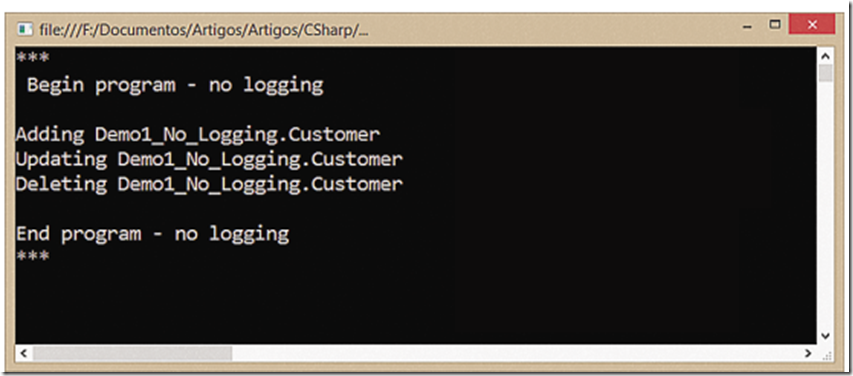
现在假如你的老板,需要在类中增加日志功能,你可以新建一个LoggerRepository<T>类,让他同样实现IRepository<T>,代码如下:
public class LoggerRepository<T> : IRepository<T>
{
private readonly IRepository<T> _decorated;
public LoggerRepository(IRepository<T> decorated)
{
_decorated = decorated;
}
private void Log(string msg, object arg = null)
{
Console.ForegroundColor = ConsoleColor.Red;
Console.WriteLine(msg, arg);
Console.ResetColor();
}
public void Add(T entity)
{
Log("In decorator - Before Adding {0}", entity);
_decorated.Add(entity);
Log("In decorator - After Adding {0}", entity);
}
public void Delete(T entity)
{
Log("In decorator - Before Deleting {0}", entity);
_decorated.Delete(entity);
Log("In decorator - After Deleting {0}", entity);
}
public void Update(T entity)
{
Log("In decorator - Before Updating {0}", entity);
_decorated.Update(entity);
Log("In decorator - After Updating {0}", entity);
}
public IEnumerable<T> GetAll()
{
Log("In decorator - Before Getting Entities");
var result = _decorated.GetAll();
Log("In decorator - After Getting Entities");
return result;
}
public T GetById(int id)
{
Log("In decorator - Before Getting Entity {0}", id);
var result = _decorated.GetById(id);
Log("In decorator - After Getting Entity {0}", id);
return result;
}
}
这个新类,已经包装了包装类,实现日志记录功能,现在需要做小的改动,代码实现如下:
static void Main(string[] args)
{
Console.WriteLine("***\r\n Begin program - logging with decorator\r\n");
// IRepository<Customer> customerRepository =
// new Repository<Customer>();
IRepository<Customer> customerRepository =
new LoggerRepository<Customer>(new Repository<Customer>());
var customer = new Customer
{
Id = 1,
Name = "Customer 1",
Address = "Address 1"
};
customerRepository.Add(customer);
customerRepository.Update(customer);
customerRepository.Delete(customer);
Console.WriteLine("\r\nEnd program - logging with decorator\r\n***");
Console.ReadLine();
}
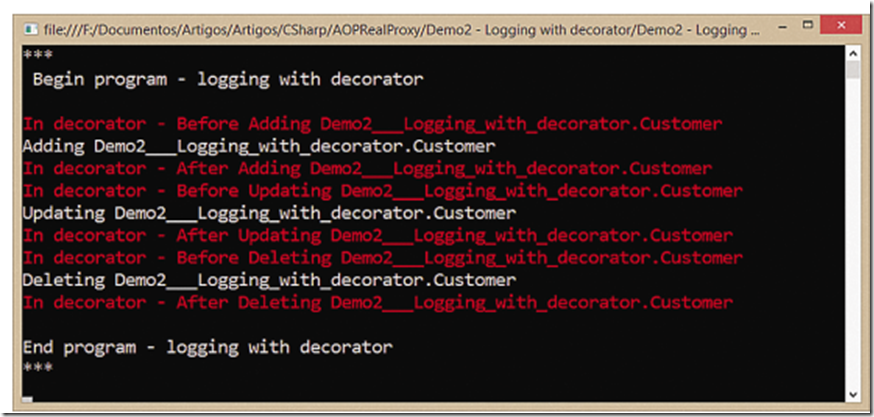
继续运行,运行结果如下:
到此为止,你可能会想:OK,这个想法是好的,但它仍然需要做很多工作:我必须实现所有的类和添加方面的所有方法。这将是难以维护。
有另一种方式去做吗?.net框架,您可以使用反射来得到所有方法和执行它们。基类库(BCL)甚至有RealProxy类(bit.ly/18MfxWo),为你实现。
答案:是的有的就是我们所讲的动态代理实现AOP; 我们将在下一节讲
AOP参考
本文翻译自 :https://msdn.microsoft.com/en-us/magazine/dn574804.aspx(面向切面编程)
静态实现AOP(翻译自MSDN)的更多相关文章
- AOP(面向切面编程,翻译自MSDN)
目录 AOP的概念 静态实现AOP .Net 框架实现AOP(动态代理实现AOP) 动态代理AOP实现方法过滤 AOP参考 本文翻译自 :https://msdn.microsoft.com/en-u ...
- Creating Icon Overlay Handlers / 创建图标标记 Handlers (翻译自MSDN) / VC++, Windows, DLL, ATL, COM
创建图标标记 Handlers Creating Icon Overlay Handlers 图标标记是放在代表着某个 Shell 对象的图标之左下角的小图像.它们通常被加在一个对象的图标的身上来提供 ...
- 【原创翻译】链接DLL至可执行文件---翻译自MSDN
可执行文件.exe链接(或加载)DLL有以下两种形式: 隐式链接 显式链接 隐式链接是指静态加载或在程序加载时动态链接. 通过隐式链接,在使用DLL时,可执行文件链接到一个由生成DLL的人提供的导入函 ...
- HTML(Open Method)翻译自MSDN
Open Method Opens a new window and loads the document specified by a given URL. Navigates the app wi ...
- .Net 框架实现AOP(动态代理实现AOP,本文为翻译)
在上一节,我们将静态实现AOP,但是对于一个大型项目,要想为每个类,每个方法都去实现AOP ,进行日志记录和权限验证似乎是不可能的. 即使可能对于成百上千个类维护,也是很难维护.所以今天的主题就是如标 ...
- Spring AOP——Spring 中面向切面编程
前面两篇文章记录了 Spring IOC 的相关知识,本文记录 Spring 中的另一特性 AOP 相关知识. 部分参考资料: <Spring实战(第4版)> <轻量级 JavaEE ...
- 漫谈AOP开发之初探AOP及AspectJ的用法
一.为什么需要AOP技术 AOP 是一个很成熟的技术. 假如项目中有方法A.方法B.方法C……等多个方法, 如果项目需要为方法A.方法B.方法C……这批方法增加具有通用性质的横切处理. 下图可以形 ...
- Attribute(特性)与AOP
提到特性,好多人都会疑惑特性(attribute),和注释有什么区别,简单来说,特性是给机器看的,而注释是给人看的. 特性不仅可以影响编译还可以影响运行,而注释只是为了让人更加容易理解.看懂代码而特别 ...
- angular2 学习笔记 ( translate, i18n 翻译 )
更新 : 2017-06-17 <h1 i18n="site header|An introduction header for this sample">Hello ...
随机推荐
- selenium学习笔记(selenium下载安装)
博主自己捣鼓的接口框架先到这里 等工作上正式开始使用再后续完善需求 还是继续学习python.学编程就直接动手写 就想看看python+selenium的组合 什么都不多说.先下载安装 博主这里已经安 ...
- 交换机上的trunk,hybrid,access配置和应用(转)
交换机上的trunk,hybrid,access配置和应用 以太网端口的链路类型: Access类型:端口只能属于一个vlan,一般用于连接计算机. Trunk类型:端口可以属于端个vlan,可以接收 ...
- 51nod 1640 MST+二分
http://www.51nod.com/onlineJudge/questionCode.html#!problemId=1640 1640 天气晴朗的魔法 题目来源: 原创 基准时间限制:1 秒 ...
- 0 与 “0" 与 '\0' 与 '0'相互之间的区别
1. '\0'和‘0’都是字符,对应的ASCII值分别是0和48. 2. 0表示一个数字.也可以表示ASCII值,对应字符'\0'. 3. “0”表示字符串,第一个字符是'0'.
- WCF基础:绑定(一)
WCF中的终结点(ServiceEndpoint)包含有三要素:地址(EndpointAddress),绑定(Binding),契约描述(ContractDescription)三要素:其中绑定的在整 ...
- 5天不再惧怕多线程——第一天 尝试Thread
随笔 - 218 文章 - 1 评论 - 3819 5天不再惧怕多线程——第一天 尝试Thread 原本准备在mongodb之后写一个lucene.net系列,不过这几天用到多线程时才发现自己 ...
- DRF 用户频率限制
DRF 用户频率限制 为什么要限流 1 防爬虫 匿名用户 无法限制,代理 已登录,用户名限制:买代理 2 提供服务(接口--不同用户的访问次数不一样) vip 限制访问次数 BaseThrottle ...
- [ASP.NET] 修改web站点的默认编程语言
当你点右键新建web窗体或者新建类的时候,默认编程语言是什么?有时候是C#,有时候是VB. 你找遍了所有配置,从web.config到iis express配置到sln文件,硬是没找到vs如何决定编程 ...
- Android预安装可卸载程序
/***************************************************************************** * Android预安装可卸载程序 * 说 ...
- 定时框架quartz的一些问题总结
1 什么是Quartz Quartz是OpenSymphony开源组织在Job scheduling领域的开源项目,它可以与J2EE与J2SE应用程序相结合也可以单独使用.Quartz可以用来创建简单 ...