
kibana.yml(中文配置详解)
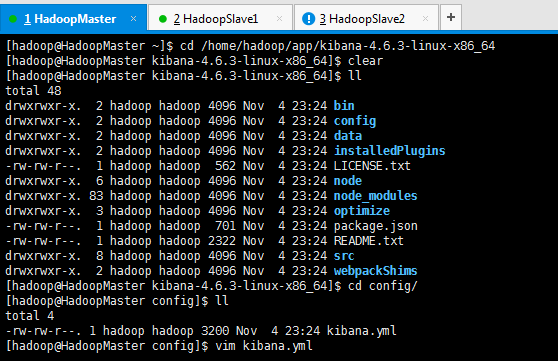
# Kibana is served by a back end server. This controls which port to use.

# server.port: 5601

# The host to bind the server to.

# server.host: "0.0.0.0"

# If you are running kibana behind a proxy, and want to mount it at a path,

# specify that path here. The basePath can't end in a slash.

# server.basePath: ""

# The maximum payload size in bytes on incoming server requests.

# server.maxPayloadBytes: 1048576

# The Elasticsearch instance to use for all your queries.

# elasticsearch.url: "http://localhost:9200"

# preserve_elasticsearch_host true will send the hostname specified in `elasticsearch`. If you set it to false,

# then the host you use to connect to *this* Kibana instance will be sent.

# elasticsearch.preserveHost: true

# Kibana uses an index in Elasticsearch to store saved searches, visualizations

# and dashboards. It will create a new index if it doesn't already exist.

# kibana.index: ".kibana"

# The default application to load.

# kibana.defaultAppId: "discover"

# If your Elasticsearch is protected with basic auth, these are the user credentials

# used by the Kibana server to perform maintenance on the kibana_index at startup. Your Kibana

# users will still need to authenticate with Elasticsearch (which is proxied through

# the Kibana server)

# elasticsearch.username: "user"

# elasticsearch.password: "pass"

# SSL for outgoing requests from the Kibana Server to the browser (PEM formatted)

# server.ssl.cert: /path/to/your/server.crt

# server.ssl.key: /path/to/your/server.key

# Optional setting to validate that your Elasticsearch backend uses the same key files (PEM formatted)

# elasticsearch.ssl.cert: /path/to/your/client.crt

# elasticsearch.ssl.key: /path/to/your/client.key

# If you need to provide a CA certificate for your Elasticsearch instance, put

# the path of the pem file here.

# elasticsearch.ssl.ca: /path/to/your/CA.pem

# Set to false to have a complete disregard for the validity of the SSL

# certificate.

# elasticsearch.ssl.verify: true

# Time in milliseconds to wait for elasticsearch to respond to pings, defaults to

# request_timeout setting

# elasticsearch.pingTimeout: 1500

# Time in milliseconds to wait for responses from the back end or elasticsearch.

# This must be > 0

# elasticsearch.requestTimeout: 30000

# Header names and values that are sent to Elasticsearch. Any custom headers cannot be overwritten

# by client-side headers.

# elasticsearch.customHeaders: {}

# Time in milliseconds for Elasticsearch to wait for responses from shards.

# Set to 0 to disable.

# elasticsearch.shardTimeout: 0

# Time in milliseconds to wait for Elasticsearch at Kibana startup before retrying

# elasticsearch.startupTimeout: 5000

# Set the path to where you would like the process id file to be created.

# pid.file: /var/run/kibana.pid

# If you would like to send the log output to a file you can set the path below.

# logging.dest: stdout

# Set this to true to suppress all logging output.

# logging.silent: false

# Set this to true to suppress all logging output except for error messages.

# logging.quiet: false

# Set this to true to log all events, including system usage information and all requests.

# logging.verbose: false
继续,更新
kibana.yml(中文配置详解)的更多相关文章
- elasticsearch-.yml(中文配置详解)
此elasticsearch-.yml配置文件,是在$ES_HOME/config/下 elasticsearch-.yml(中文配置详解) # ======================== El ...
- filebeat.yml(中文配置详解)
################### Filebeat Configuration Example ######################### ####################### ...
- maven setting.xml 中文配置详解(全配置)
春节假期在家养病,乘有时间整理了下之前的知识——知识贵在归纳总结. 参照了官方文档,针对其中的一些未描述详尽的内容翻查了不少资料,补充到了配置文件中,同时再加上一些说明.例子,方便查阅. 内容虽然比较 ...
- Kibana安装(图文详解)(多节点的ELK集群安装在一个节点就好)
对于Kibana ,我们知道,是Elasticsearch/Logstash/Kibana的必不可少成员. 前提: Elasticsearch-2.4.3的下载(图文详解) Elasticsearch ...
- 日志分析工具ELK配置详解
日志分析工具ELK配置详解 一.ELK介绍 1.1 elasticsearch 1.1.1 elasticsearch介绍 ElasticSearch是一个基于Lucene的搜索服务器.它提供了一个分 ...
- 【转】logback logback.xml常用配置详解(三) <filter>
原创文章,转载请指明出处:http://aub.iteye.com/blog/1110008, 尊重他人即尊重自己 详细整理了logback常用配置, 不是官网手册的翻译版,而是使用总结,旨在更快更透 ...
- 【转】logback logback.xml常用配置详解(二)<appender>
原创文章,转载请指明出处:http://aub.iteye.com/blog/1101260, 尊重他人即尊重自己 详细整理了logback常用配置, 不是官网手册的翻译版,而是使用总结,旨在更快更透 ...
- 【转】logback logback.xml常用配置详解(一)<configuration> and <logger>
原创文章,转载请指明出处:http://aub.iteye.com/blog/1101260, 尊重他人即尊重自己 详细整理了logback常用配置, 不是官网手册的翻译版,而是使用总结,旨在更快更透 ...
- 【转】logback 常用配置详解(序)logback 简介
原创文章,转载请指明出处:http://aub.iteye.com/blog/1101222, 尊重他人即尊重自己 详细整理了logback常用配置, 不是官网手册的翻译版,而是使用总结,旨在更快更透 ...
随机推荐
- webservice SOAP WSDL UDDI简介
WebServices简介 先给出一个概念 SOA ,即Service Oriented Architecture ,中文一般理解为面向服务的架构, 既然说是一种架构的话,所以一般认为 SOA 是包含 ...
- linux简单介绍,helloworld,vi使用,用户管理
linux特点1.免费的.开源的2.支持多线程.多用户的3.安全性好4.对内存和文件管理优越 缺点:操作相对困难 linux最小只需要4m -> 嵌入式开发 我们使用 vm[虚拟机] 虚拟了一个 ...
- 当导用模块与包的import与from的问题(模块与包的调用)
当在views.py里写impor models会不会报错呢? 1.Python里面的py文件都是每一行的代码. 2.Python解释器去找一个模块的时候,只去sys.path的路径里找 3.djan ...
- Android tcpdump 使用
/************************************************************************** * Android tcpdump 使用 * 说 ...
- 通用线程:POSIX 线程详解,第 3 部分
通用线程:POSIX 线程详解,第 3 部分 使用条件变量提高效率 Daniel Robbins, 总裁兼 CEO, Gentoo Technologies, Inc. 简介: 本文是 POSIX 线 ...
- (六)HTML5立方体动画设置
<!doctype html> <html lang="en"> <head> <meta charset="UTF-8&quo ...
- linux 压缩文件 上传下载 直接弹出
yum -y install lrzsz rz -y 上传 sz -y 下载 -y 是替换了直接,不加的话,如果目录下有同名文件,会提示
- JSONP学习笔记
1. 实现跨域请求的三种方法 本地代理.Flash.Script标签(img,iframe,link也可以,具有src属性) 2. JSONP全称:JSON With Padding(使用内嵌的方式把 ...
- kali视频(26-30)学习
第七周 kali视频(26-30)学习 26.KaliSecurity漏洞利用之检索与利用 27.KaliSecurity漏洞利用之Metasploit基础 28.KaliSecurity漏洞利用之M ...
- Hibernate HQL查询(1)
1. 查询整个映射对象所有字段 //直接from查询出来的是一个映射对象,即:查询整个映射对象所有字段 String hql ="from Users"; ...