
Properties读取properties配置文件
 package cn.rocker.readProperties;

 import java.io.IOException;

 import java.io.InputStream;

 import java.net.URL;

 import java.util.Properties;

 import org.junit.Test;

 import org.springframework.core.io.support.PropertiesLoaderUtils;

 /**

 * @ClassName: PropertiesRead

 * @Description: Properties读取配置文件

 * @author 112

 * @date 2018年3月28日 下午12:46:07

 */

 public class PropertiesRead {

     @Test

     /**

      * @Description:  第一种方式:根据文件名使用spring中的工具类PropertiesLoaderUtils进行解析

      *                filePath是相对路径,文件需在classpath目录下

      *                此处为:cn/rocker/readProperties/test/properties/cas.properties

      * @author czc

      * @date 2018年3月28日 下午1:19:57

      * @version V1.0

      */

     public void PropertiesLoaderUtilsReadProperties(){

         Properties prop = null;

         String propertiesPath = "cn/rocker/readProperties/test/properties/cas.properties";

         try {

             prop = PropertiesLoaderUtils.loadAllProperties(propertiesPath);

             String url = prop.getProperty("UnifyUserManager_URL");

             System.out.println(url);

             //输出:http://139.199.20:8080/sso/UnifyUserManager

         } catch (IOException e) {

             e.printStackTrace();

         }

     }

     @Test

     /**

      * @Description: 这里贴一下getResourceAsStream方法的源码注释

      * Before delegation, an absolute resource name is constructed from

      * the given resource name using this algorithm:

        • If the name begins with a '/' ('\u002f'), then

        the absolute name of the resource is the portion of the name following the '/'.

        • Otherwise, the absolute name is of the following form: modified_package_name/name

              如果getResourceAsStream的参数以"/"开始,则文件的绝对路径就是/后面的部分

              如果getResourceAsStream的参数没有以"/"开始,则文件的路径跟操作文件的类在同一包路径下

      * @author czc

      * @date 2018年3月28日 下午1:36:34

      * @version V1.0

      */

     public void ResoueceStreamReadProperties(){

         Properties prop = new Properties();

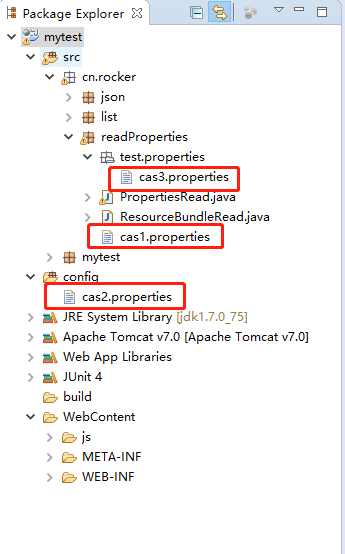
         String propertiesPath1 = "cas1.properties";

         String propertiesPath2 = "/cas2.properties";

         String propertiesPaht3 = "/cn/rocker/readProperties/test/properties/cas3.properties";

         try {

             InputStream inputStream1 = PropertiesRead.class.getResourceAsStream(propertiesPath1);

             prop.load(inputStream1);

             String url1 = prop.getProperty("UnifyUserManager_URL");

             System.out.println("url1:" + url1);

             InputStream inputStream2 = PropertiesRead.class.getResourceAsStream(propertiesPath2);

             prop.load(inputStream2);

             String url2 = prop.getProperty("UnifyUserManager_URL");

             System.out.println("url2:" + url2);

             InputStream inputStream3 = PropertiesRead.class.getResourceAsStream(propertiesPaht3);

             prop.load(inputStream3);

             String url3 = prop.getProperty("UnifyUserManager_URL");

             System.out.println("url3:" + url3);

             //输出:url1:http://139.199.20:8080/sso/UnifyUserManager

             //     url2:http://139.199.20:8080/sso/UnifyUserManager

             //     url3:http://139.199.20:8080/sso/UnifyUserManager

         } catch (IOException e) {

             e.printStackTrace();

         }

     }

 }
Properties读取properties配置文件的更多相关文章
- java使用java.util.Properties读取properties文件的九种方法
直接上代码: package com.test.test; import java.io.BufferedInputStream; import java.io.FileInputStream; im ...
- java分享第十六天( java读取properties文件的几种方法&java配置文件持久化:static块的作用)
java读取properties文件的几种方法一.项目中经常会需要读取配置文件(properties文件),因此读取方法总结如下: 1.通过java.util.Properties读取Propert ...
- ResourceBundle与Properties读取配置文件
ResourceBundle与Properties的区别在于ResourceBundle通常是用于国际化的属性配置文件读取,Properties则是一般的属性配置文件读取. ResourceBundl ...
- Java读取properties配置文件工具类
1. PropertyUtils.java package javax.utils; import java.io.InputStream; import java.util.Properties ...
- 中阶d03.2 JDBC联合properties使用,通过读取本地配置文件为代码传递参数
* 使用properties读取本地配置文件为代码传递参数 * url.用户名.密码.驱动地址等配置可以在配置文件中使用 main package zj_1_JDBC.properties; impo ...
- java properties读取与设值
import java.io.FileInputStream;import java.io.FileNotFoundException;import java.io.FileOutputStream; ...
- java读取properties文件的几种方法
一.项目中经常会需要读取配置文件(properties文件),因此读取方法总结如下: 1.通过java.util.Properties读取 Properties p=new Properties(); ...
- 读取.properties配置信息
package com.ctcti.webcallcenter.utils; import java.io.FileInputStream;import java.io.FileNotFoundExc ...
- java读取Properties文件
方法一.通过java.util.Properties读取 Properties p=new Properties(); //p需要InputStream对象进行读取文件,而获取InputStream有 ...
随机推荐
- 解决面板里没有network manager图标的问题 ,也就是在桌面环境下,没有那个网络图标
在安装好了桌面之后,竟然发现没有那个连接网络的图标,本来想连接无限网络.可是.......如果去手动命令行下去配置这个连接wifi有些麻烦,所以我还是去找解决办法了 我执行了一条命令就解决了 gcon ...
- Codeforces Round #419 Div. 1
A:暴力枚举第一列加多少次,显然这样能确定一种方案. #include<iostream> #include<cstdio> #include<cmath> #in ...
- 学习Android过程中遇到的问题及解决方法——AS为xutils添加依赖
在使用xutils时遇到不能添加以来的问题,花了很长时间终于解决,网上添加依赖的方法很多,在此针对个人出现的问题作下笔记. 我本想使用jar包,因为在使用smartImageView时是用的jar包来 ...
- luogu P2680 运输计划 (二分答案+树上差分)
题目背景 公元 20442044 年,人类进入了宇宙纪元. 题目描述 公元20442044 年,人类进入了宇宙纪元. L 国有 nn 个星球,还有 n-1n−1 条双向航道,每条航道建立在两个星球之间 ...
- Python_sys.argv 命令行参数获取使用方法
import sys print(sys.argv) """ 获取命令行参数 输入 python3 sys.argv_demo.py 输出: ['argv.py'] 输入 ...
- C/C++ 程序库
C/C++ 程序库 // --------------------------------------------- 来几个不常见但是很变态的库吧: bundle: 把几乎所有常见的压缩库封装成了一个 ...
- 七牛云 qshell 使用
七牛云 qshell 控制台工具上传 命令:qshell fput another1 demo.txt /users/tianyang/demo.txt ======================= ...
- portainer图形化监控
步骤1,在Swarm集群中创建一个新的覆盖网络:$ docker network create --driver overlay --attachable portainer_agent_networ ...
- Ubuntu18.04下给Jupyter-NoteBook设置默认工作路径(附Win设置)
上一篇Jupyter的文章:https://www.cnblogs.com/dotnetcrazy/p/9201976.html Linux 生成配置文件:jupyter-notebook --gen ...
- Spring Data JPA Batch Insertion
转自:https://www.jeejava.com/spring-data-jpa-batch-insertion/ Spring Data JPA Batch Insertion will sho ...