
Cannot retrieve metalink for repository: epel/x86_64. Please verify its path and try again
虚拟机恢复快照后,使用yum安装软件,提示下面的信息,开始以为是yum源的问题或者DNS的问题,但是无果,最后再看一下服务器的时间,坑了,还原快照,时间变成以前的了。
[root@localhost yum.repos.d]# yum install lrzsz -y

已加载插件:fastestmirror

Loading mirror speeds from cached hostfile

 One of the configured repositories failed (未知),

 and yum doesn't have enough cached data to continue. At this point the only

 safe thing yum can do is fail. There are a few ways to work "fix" this:

     . Contact the upstream for the repository and get them to fix the problem.

     . Reconfigure the baseurl/etc. for the repository, to point to a working

        upstream. This is most often useful if you are using a newer

        distribution release than is supported by the repository (and the

        packages for the previous distribution release still work).

     . Run the command with the repository temporarily disabled

            yum --disablerepo=<repoid> ...

     . Disable the repository permanently, so yum won't use it by default. Yum

        will then just ignore the repository until you permanently enable it

        again or use --enablerepo for temporary usage:

            yum-config-manager --disable <repoid>

        or

            subscription-manager repos --disable=<repoid>

     . Configure the failing repository to be skipped, if it is unavailable.

        Note that yum will try to contact the repo. when it runs most commands,

        so will have to try and fail each time (and thus. yum will be be much

        slower). If it is a very temporary problem though, this is often a nice

        compromise:

            yum-config-manager --save --setopt=<repoid>.skip_if_unavailable=true

Cannot retrieve metalink for repository: epel/x86_64. Please verify its path and try again

[root@localhost yum.repos.d]#
修改时间的界面

再yum
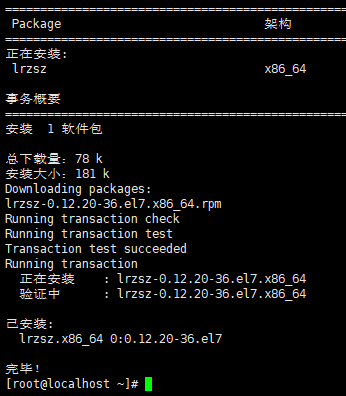
看结果就正常了。
Cannot retrieve metalink for repository: epel/x86_64. Please verify its path and try again的更多相关文章
- Cannot retrieve metalink for repository: epel/x86_64. Please verify its path and try again 问题分析
Cannot retrieve metalink for repository: epel/x86_64. Please verify its path and try again Loaded pl ...
- Cannot retrieve metalink for repository: epel/x86_64. Please verify its path and try again 解决方法
vim /etc/yum.repos.d/epel.repo 1 [epel] 2 name=Extra Packages for Enterprise Linux 7 - $basearch 3 # ...
- CentOS7 yum报 Cannot retrieve metalink for repository: epel/x86_64. Please verify its path解决方法
打开/etc/yum.repos.d/epel.repo,将 [epel] name=Extra Packages for Enterprise Linux 6 – $basearch baseurl ...
- yum安装时出现:Cannot retrieve metalink for repository: epel. Please verify its path and try again
在CentOS 6.3 x86_64下安装php-mcrypt的时候出现了问题:Error: Cannot retrieve metalink for repository: epel. Please ...
- yum报错: Error: Cannot retrieve metalink for repository: epel. Please verify its path and try again
在Centos 5.x或6.x上安装RHEL EPEL Repo repository,资源库,源的意思.RHEL EPEL(Extra Packages for Enterprise Linux) ...
- 运行yum报错Error: Cannot retrieve metalink for repository: epel. Please verify its path and try again
今天给Centos通过rpm -Uvh装了个epel的扩展后,执行yum就开始报错: Error: Cannot retrieve metalink for repository: epel. Ple ...
- Cannot retrieve metalink for repository: epel. Please verify its path and try again
今天在测试环境使用yum安装,遇到一个问题: Error: Cannot retrieve metalink for repository: epel. Please verify its path ...
- 运行yum报错:Error: Cannot retrieve metalink for repository: epel. Please verify its path
Error: Cannot retrieve metalink for repository: epel. Please verify its path and try again 当我们安装第三方扩 ...
- Cannot retrieve metalink for repository: epel.
Error: Cannot retrieve metalink for repository: epel. Please verify its path and ...
随机推荐
- Django:学习笔记
学习视频:链接:https://pan.baidu.com/s/1KzKUYVLQOlagMfSzq1MEDw 密码:y3qq Django 版本对应的 Python 版本: Djang ...
- linux下使用nmon工具对服务器性能进行检测
1.nmon工具介绍: nmon工具是linux系统下可以对服务器及系统性能进行监测,CPU信息.CPU占用.内存使用.网卡使用等.最大的好处是此工具会将结果以列表的形式或者是模拟图形化的方式展示,不 ...
- loadrunner-关联
1.什么是关联? 将服务器动态返回的值,保存成一个参数,供后面需要使用到 此参数的地方使用 PS:1.一定是服务器返回的 2.动态变化的,静态不需要关联 3.服务器需要校验的 4.保存成一个参数 5. ...
- Kafka(3)--kafka消息的存储及Partition副本原理
消息的存储原理: 消息的文件存储机制: 前面我们知道了一个 topic 的多个 partition 在物理磁盘上的保存路径,那么我们再来分析日志的存储方式.通过 [root@localhost ~]# ...
- html页面嵌套两个iframe页面导致第二个iframe页面高度失效的问题
1:这是因为最里面嵌套的iframe页面html和body高度无法设置问题,我的解决办法是js去控制iframe高度 2:js获取最子页面(content内容区域)的高度 var ifremHeigh ...
- sql day2
-- 数据的准备 -- 创建一个数据库 create database python_test charset=utf8; -- 使用一个数据库 use python_test; -- 显示使用的当前 ...
- 系统设计与架构笔记:ETL工具开发和设计的建议
最近项目组里想做一个ETL数据抽取工具,这是一个研发项目,但是感觉公司并不是特别重视,不重视不是代表它不重要,而是可能不会对这个项目要求太高,能满足我们公司的小需求就行,想从这个项目里衍生出更多的东西 ...
- python3 里安装cv2
电脑上同时有python2 和python3,python2 里有cv2,Python3里没有. 用pip3 install opencv-python 安装,提示: You are using pi ...
- activiti官网实例项目activiti-explorer之获取流程节点
如上图在保存步骤中添加获取节点信息方法nodes(); 方法如下: //获取所有节点 JsonNode modelNode = new ObjectMapper().readTree(repos ...
- mybatis mapper.xml的特殊操作符
select * from test where id<>1; 但是mybatis报错 <> 应该转义 <> select * from test where i ...