
hadoop 管理命令dfsadmin
hadoop 管理命令dfsadmin
dfsadmin 命令用于管理HDFS集群,这些命令常用于管理员。
1. (Safemode)安全模式
| 动作 | 命令 |
| 把集群切换到安全模式 | bin/hdfs dfsadmin -safemode [enter/get/leave] |
| 数据节点状态列表 | bin/hadoop dfsadmin -report |
| 添加或删除数据节点 | bin/hadoop dfsadmin -refreshNodes |
| 打印网络拓扑 | bin/hadoop dfsadmin -printTopology |
| 官当网站 | http://hadoop.apache.org/docs/r2.8.3/hadoop-project-dist/hadoop-hdfs/HDFSCommands.html#dfsadmin |
- [hadoop@master bin]$ ./hdfs dfsadmin -safemode enter #进入安全模式
- Safe mode is ON
- [hadoop@master bin]$ ./hdfs dfsadmin -safemode get #获取当前状态
- Safe mode is ON
- [hadoop@master bin]$ ./hdfs dfsadmin -safemode leave #离开safemode状态
- Safe mode is OFF
- [hadoop@master bin]$
安全模式:On startup, the NameNode enters a special state called Safemode. Replication of data blocks does not occur when the NameNode is in the Safemode state. The NameNode receives Heartbeat and Blockreport messages from the DataNodes. A Blockreport contains the list of data blocks that a DataNode is hosting. Each block has a specified minimum number of replicas. A block is considered safely replicated when the minimum number of replicas of that data block has checked in with the NameNode. After a configurable percentage of safely replicated data blocks checks in with the NameNode (plus an additional 30 seconds), the NameNode exits the Safemode state. It then determines the list of data blocks (if any) that still have fewer than the specified number of replicas. The NameNode then replicates these blocks to other DataNodes.
hadoop启动时,会处于一种特殊的状态称做安全模式,这种模式下,数据块的复制是不能发生的,主节点会收到各数据节点的心跳(Heartbeat)和块报告(Blockreport)信息。块报告信息包含该数据节点包含的块信息,每一个数据块都有一个最小被副本数,当一个块最小副本数与NN记录的相符合时就被认为是安全的复制,在配置一个安全副本百分数与NN相符后(再加30s)(意思就是副本数*N%后与NN记录的相符就认为是安全,N可配置),NN就退出Safemode状态。之后(safemode 时是不能发生数据复制的)如果列表中仍然有少数的副本数比已备份少,NN将会把这些块复制到其他数据节点。
根据上面说明:
1.Safemode 主要是校验数据节点的块信息。
2.safemode 不能发生块复制(Replication )。
3.hadoop 的维护工作是在模式下进行的。
Safemode状态时创建目录报错:
Cannot create directory /hxw. Name node is in safe mode. It was turned on manually. Use "hdfs dfsadmin -safemode leave" to turn safe mode off.2.集群信息状态报告
以及集群资源占用情况,以及各数据节点信息。
- [hadoop@master logs]$ hadoop dfsadmin -report
- DEPRECATED: Use of this script to execute hdfs command is deprecated.
- Instead use the hdfs command for it.
- Configured Capacity: 37492883456 (34.92 GB)
- Present Capacity: 22908968960 (21.34 GB)
- DFS Remaining: 21126250496 (19.68 GB)
- DFS Used: 1782718464 (1.66 GB)
- DFS Used%: 7.78%
- Under replicated blocks: 18
- Blocks with corrupt replicas: 0
- Missing blocks: 0
- Missing blocks (with replication factor 1): 0
- Pending deletion blocks: 0
- -------------------------------------------------
- Live datanodes (2):
- Name: 10.0.1.226:50010 (slave-2)
- Hostname: slave-2
- Decommission Status : Normal
- Configured Capacity: 18746441728 (17.46 GB)
- DFS Used: 891359232 (850.07 MB)
- Non DFS Used: 7806763008 (7.27 GB)
- DFS Remaining: 10048319488 (9.36 GB)
- DFS Used%: 4.75%
- DFS Remaining%: 53.60%
- Configured Cache Capacity: 0 (0 B)
- Cache Used: 0 (0 B)
- Cache Remaining: 0 (0 B)
- Cache Used%: 100.00%
- Cache Remaining%: 0.00%
- Xceivers: 1
- Last contact: Wed Jan 17 17:09:23 CST 2018
- Name: 10.0.1.227:50010 (slave-1)
- Hostname: slave-1
- Decommission Status : Normal
- Configured Capacity: 18746441728 (17.46 GB)
- DFS Used: 891359232 (850.07 MB)
- Non DFS Used: 6777151488 (6.31 GB)
- DFS Remaining: 11077931008 (10.32 GB)
- DFS Used%: 4.75%
- DFS Remaining%: 59.09%
- Configured Cache Capacity: 0 (0 B)
- Cache Used: 0 (0 B)
- Cache Remaining: 0 (0 B)
- Cache Used%: 100.00%
- Cache Remaining%: 0.00%
- Xceivers: 1
- Last contact: Wed Jan 17 17:09:24 CST 2018
3.节点刷新
当集群有新增或删除节点时使用。
- [hadoop@master bin]$ ./hdfs dfsadmin -refreshNodes
- Refresh nodes successful
- [hadoop@slave-1 sbin]$ ./hadoop-daemon.sh stop datanode
- stopping datanode
- [hadoop@master bin]$ hadoop dfsadmin -report
- DEPRECATED: Use of this script to execute hdfs command is deprecated.
- Instead use the hdfs command for it.
- Configured Capacity: 37492883456 (34.92 GB)
- Present Capacity: 22914383872 (21.34 GB)
- DFS Remaining: 21131665408 (19.68 GB)
- DFS Used: 1782718464 (1.66 GB)
- DFS Used%: 7.78%
- Under replicated blocks: 18
- Blocks with corrupt replicas: 0
- Missing blocks: 0
- Missing blocks (with replication factor 1): 0
- Pending deletion blocks: 0
- -------------------------------------------------
- Live datanodes (2):
- Name: 10.0.1.226:50010 (slave-2)
- Hostname: slave-2
- Decommission Status : Normal
- Configured Capacity: 18746441728 (17.46 GB)
- DFS Used: 891359232 (850.07 MB)
- Non DFS Used: 7801290752 (7.27 GB)
- DFS Remaining: 10053791744 (9.36 GB)
- DFS Used%: 4.75%
- DFS Remaining%: 53.63%
- Configured Cache Capacity: 0 (0 B)
- Cache Used: 0 (0 B)
- Cache Remaining: 0 (0 B)
- Cache Used%: 100.00%
- Cache Remaining%: 0.00%
- Xceivers: 1
- Last contact: Wed Jan 17 18:16:06 CST 2018
- Name: 10.0.1.227:50010 (slave-1)
- Hostname: slave-1
- Decommission Status : Normal
- Configured Capacity: 18746441728 (17.46 GB)
- DFS Used: 891359232 (850.07 MB)
- Non DFS Used: 6777208832 (6.31 GB)
- DFS Remaining: 11077873664 (10.32 GB)
- DFS Used%: 4.75%
- DFS Remaining%: 59.09%
- Configured Cache Capacity: 0 (0 B)
- Cache Used: 0 (0 B)
- Cache Remaining: 0 (0 B)
- Cache Used%: 100.00%
- Cache Remaining%: 0.00%
- Xceivers: 1
- Last contact: Wed Jan 17 18:13:43 CST 2018
- [hadoop@master bin]$ ./hdfs dfsadmin -refreshNodes
- Refresh nodes successful
- [hadoop@master bin]$ ./hdfs dfsadmin -refreshNodes
- Refresh nodes successful
- [hadoop@master bin]$ hadoop dfsadmin -report
- DEPRECATED: Use of this script to execute hdfs command is deprecated.
- Instead use the hdfs command for it.
- Configured Capacity: 37492883456 (34.92 GB)
- Present Capacity: 22914379776 (21.34 GB)
- DFS Remaining: 21131661312 (19.68 GB)
- DFS Used: 1782718464 (1.66 GB)
- DFS Used%: 7.78%
- Under replicated blocks: 18
- Blocks with corrupt replicas: 0
- Missing blocks: 0
- Missing blocks (with replication factor 1): 0
- Pending deletion blocks: 0
- -------------------------------------------------
- Live datanodes (2):
- Name: 10.0.1.226:50010 (slave-2)
- Hostname: slave-2
- Decommission Status : Normal
- Configured Capacity: 18746441728 (17.46 GB)
- DFS Used: 891359232 (850.07 MB)
- Non DFS Used: 7801294848 (7.27 GB)
- DFS Remaining: 10053787648 (9.36 GB)
- DFS Used%: 4.75%
- DFS Remaining%: 53.63%
- Configured Cache Capacity: 0 (0 B)
- Cache Used: 0 (0 B)
- Cache Remaining: 0 (0 B)
- Cache Used%: 100.00%
- Cache Remaining%: 0.00%
- Xceivers: 1
- Last contact: Wed Jan 17 18:18:54 CST 2018
- Name: 10.0.1.227:50010 (slave-1)
- Hostname: slave-1
- Decommission Status : Normal
- Configured Capacity: 18746441728 (17.46 GB)
- DFS Used: 891359232 (850.07 MB)
- Non DFS Used: 6777208832 (6.31 GB)
- DFS Remaining: 11077873664 (10.32 GB)
- DFS Used%: 4.75%
- DFS Remaining%: 59.09%
- Configured Cache Capacity: 0 (0 B)
- Cache Used: 0 (0 B)
- Cache Remaining: 0 (0 B)
- Cache Used%: 100.00%
- Cache Remaining%: 0.00%
- Xceivers: 1
- Last contact: Wed Jan 17 18:13:43 CST 2018
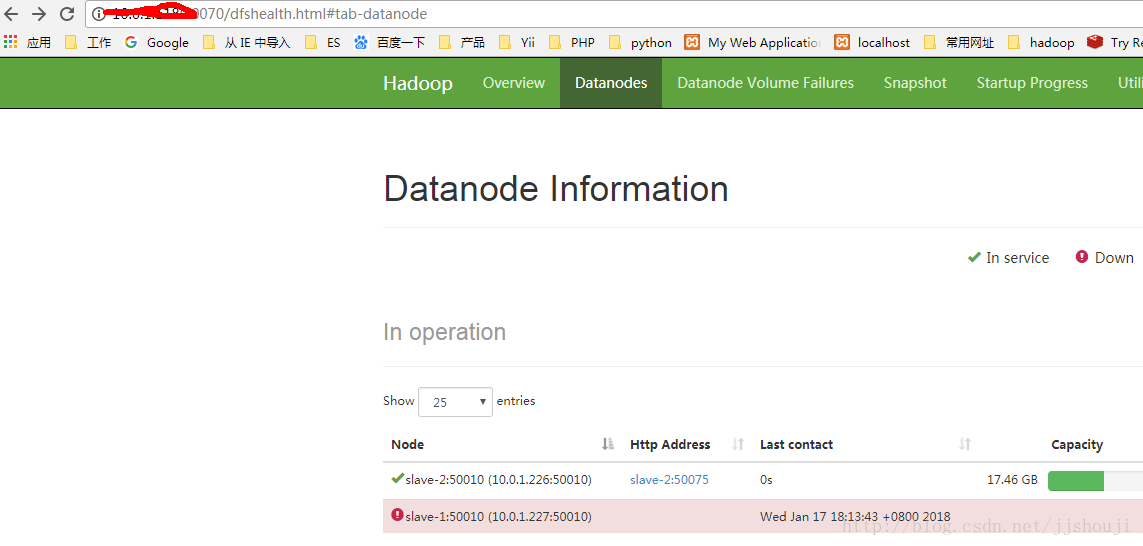
说明:在停止某个数据节点后,刷新节点信息仍然能看到该节点信息,状态noraml 状态,界面上看到last contact 时间是560+s。
在Namenode 的配置文件slaves 中删除该节点,然后重新刷新节点信息,则后台显示:
- [hadoop@master bin]$ ./hdfs dfsadmin -refreshNodes
- Refresh nodes successful
- [hadoop@master bin]$ hadoop dfsadmin -report
- DEPRECATED: Use of this script to execute hdfs command is deprecated.
- Instead use the hdfs command for it.
- Configured Capacity: 18746441728 (17.46 GB)
- Present Capacity: 10945093632 (10.19 GB)
- DFS Remaining: 10053734400 (9.36 GB)
- DFS Used: 891359232 (850.07 MB)
- DFS Used%: 8.14%
- Under replicated blocks: 161
- Blocks with corrupt replicas: 0
- Missing blocks: 0
- Missing blocks (with replication factor 1): 0
- Pending deletion blocks: 0
- -------------------------------------------------
- Live datanodes (1):
- Name: 10.0.1.226:50010 (slave-2)
- Hostname: slave-2
- Decommission Status : Normal
- Configured Capacity: 18746441728 (17.46 GB)
- DFS Used: 891359232 (850.07 MB)
- Non DFS Used: 7801348096 (7.27 GB)
- DFS Remaining: 10053734400 (9.36 GB)
- DFS Used%: 4.75%
- DFS Remaining%: 53.63%
- Configured Cache Capacity: 0 (0 B)
- Cache Used: 0 (0 B)
- Cache Remaining: 0 (0 B)
- Cache Used%: 100.00%
- Cache Remaining%: 0.00%
- Xceivers: 1
- Last contact: Wed Jan 17 18:26:36 CST 2018
- Dead datanodes (1):
- Name: 10.0.1.227:50010 (slave-1)
- Hostname: slave-1
- Decommission Status : Normal
- Configured Capacity: 0 (0 B)
- DFS Used: 0 (0 B)
- Non DFS Used: 6777208832 (6.31 GB)
- DFS Remaining: 0 (0 B)
- DFS Used%: 100.00%
- DFS Remaining%: 0.00%
- Configured Cache Capacity: 0 (0 B)
- Cache Used: 0 (0 B)
- Cache Remaining: 0 (0 B)
- Cache Used%: 100.00%
- Cache Remaining%: 0.00%
- Xceivers: 0
- Last contact: Wed Jan 17 18:13:43 CST 2018
4.网络拓扑
- [hadoop@master ~]$ hadoop dfsadmin -printTopology
- DEPRECATED: Use of this script to execute hdfs command is deprecated.
- Instead use the hdfs command for it.
- Rack: /default-rack
- 10.0.1.226:50010 (slave-2)
- 10.0.1.227:50010 (slave-1)
总结:
- [hadoop@master bin]$ ./hdfs dfsadmin -safemode enter #进入Safemode模式
- [hadoop@master bin]$ ./hdfs dfsadmin -safemode get #获取当前运行模式
- [hadoop@master bin]$ ./hdfs dfsadmin -safemode leave #退出Safemode模式
- [hadoop@master bin]$ hadoop dfsadmin -report #当前hadoop集群状态信息
- [hadoop@master bin]$ ./hdfs dfsadmin -refreshNodes #新增删除节点更新集群信息
- [hadoop@master sbin]$ ./hadoop-daemon.sh stop datanode #停止单个数据节点
- [hadoop@master ~]$ hadoop dfsadmin -printTopology #打印集群网络拓扑
hadoop 管理命令dfsadmin的更多相关文章
- hadoop管理命令
-help 功能:输出这个命令参数手册 -ls 功能:显示目录信息 示例: hadoop fs -ls hdfs://hadoop-server01:9000/ 备注:这些参数中,所有的hdfs ...
- hadoop管理
hadoop管理工具: 一,dfsadmin工具 dfsadmin 工具用途比较广,既可以查找HDFS状态信息,又可以在HDFS上执行管理操作,以hdfs dfsadmin形式调用,且需要超级用户权限 ...
- Hadoop进阶命令使用介绍
hadoop生产环境的使用是很复杂的,有些公司是CDH或者Ambari等管理工具运维的,有些是原生的集群俗称裸奔,前者优缺点是运维,查看监控等容易,对于底层理解不友好:裸奔集群反之,裸奔集群的很多东西 ...
- 【Hadoop篇】--Hadoop常用命令总结
一.前述 分享一篇hadoop的常用命令的总结,将常用的Hadoop命令总结如下. 二.具体 1.启动hadoop所有进程start-all.sh等价于start-dfs.sh + start-yar ...
- Hadoop常用命令总结
一.前述 分享一篇hadoop的常用命令的总结,将常用的Hadoop命令总结如下. 二.具体 1.启动hadoop所有进程start-all.sh等价于start-dfs.sh + start-yar ...
- 17 RAID与mdadm管理命令
在"14 磁盘及文件系统管理详解"中,我们详细介绍了磁盘的工作原理,但是,有一点我们一定要明白,作为现在存储数据的主要设备,机械磁盘早就是上个世纪的产品,而它的读写速度与内存.CP ...
- hadoop基础----hadoop实战(七)-----hadoop管理工具---使用Cloudera Manager安装Hadoop---Cloudera Manager和CDH5.8离线安装
hadoop基础----hadoop实战(六)-----hadoop管理工具---Cloudera Manager---CDH介绍 简介 我们在上篇文章中已经了解了CDH,为了后续的学习,我们本章就来 ...
- 大数据之路week06--day07(Hadoop常用命令)
一.前述 分享一篇hadoop的常用命令的总结,将常用的Hadoop命令总结如下. 二.具体 1.启动hadoop所有进程start-all.sh等价于start-dfs.sh + start-yar ...
- Hadoop Shell命令大全
hadoop支持命令行操作HDFS文件系统,并且支持shell-like命令与HDFS文件系统交互,对于大多数程序猿/媛来说,shell-like命令行操作都是比较熟悉的,其实这也是Hadoop的极大 ...
随机推荐
- CSDN社区之星专訪:我的蜕变之路
摘要:社区之星第49期採訪了爱奇艺研发总监陆其明.他分享了个人生涯.管理和程序猿素质等方面的看法.管理上他觉得对人要领导.要管的是事.而在程序猿素质上.他则引用Jeff Atwood的话称,成为优秀程 ...
- UVA1152-4 Values whose Sum is 0(分块)
Problem UVA1152-4 Values whose Sum is 0 Accept: 794 Submit: 10087Time Limit: 9000 mSec Problem Desc ...
- Hive窗口函数
参考地址:https://cwiki.apache.org/confluence/display/Hive/LanguageManual+WindowingAndAnalytics 环境准备: CRE ...
- leetcode 153. Find Minimum in Rotated Sorted Array 、154. Find Minimum in Rotated Sorted Array II 、33. Search in Rotated Sorted Array 、81. Search in Rotated Sorted Array II 、704. Binary Search
这4个题都是针对旋转的排序数组.其中153.154是在旋转的排序数组中找最小值,33.81是在旋转的排序数组中找一个固定的值.且153和33都是没有重复数值的数组,154.81都是针对各自问题的版本1 ...
- 使用docker Registry快速搭建私有镜像仓库
当我们执行docker pull xxx的时候,docker默认是从registry.docker.com这个地址上去查找我们所需要的镜像文件,然后执行下载操作.这类的镜像仓库就是docker默认的公 ...
- Windows Community Toolkit 4.0 - DataGrid - Part03
概述 在上面一篇 Windows Community Toolkit 4.0 - DataGrid - Part02 中,我们针对 DataGrid 控件的 Utilities 部分做了详细分享.而在 ...
- RabbitMQ 惰性队列Lazy Queue
RabbitMQ 队列分为几种类型,按照不同维度来分,可以分为排他性队列.普通队列.延迟队列.惰性队列.发布订阅队列等. 今天我们讨论的主角是惰性队列 Lazy Queue.众所周知,队列可以存储消息 ...
- 字典 dict
# --------------------------我愿作一叶小舟,驶向远方.----------------------------------------------------------- ...
- Python遇到问题总结
1.list的集合 循环删除一个list数据时,会遇到一丢丢问题,详情看Python的list循环遍历中,删除数据的正确方法 但是,里面说的要反转一下list集合,可以用a[::-1]这种方法. &g ...
- python中读取文件的read、readline、readlines方法区别
#读取文件所有内容,返回字符串对象,python默认以文本方式读取文件,遇到结束符读取结束. fr = open('lenses.txt')read = fr.read()print(type(rea ...