
SAP Grid control( ALV Grid 列表 自定义 按钮)
ALV 列表和按钮
效果
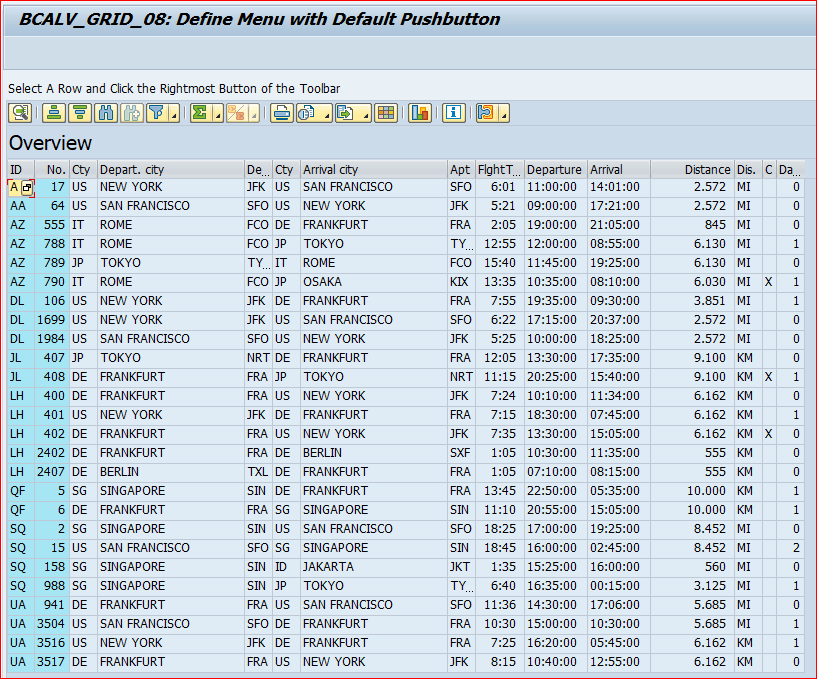
源代码
PROGRAM bcalvc_tb_menu_with_def_but.

*&&&&&&&&&&&&&&&&&&&&&&&&&&&&&&&&&&&&&&&&&&&&&&&&&&&&&&&&&&&&&&&&

* Purpose:

* ~~~~~~~~

* Append a menu with default button to the standard toolbar.

* It is exactly the same as BCALVC_TB_WITH_MENU except for

* methods HANDLE_MENU_BUTTON and HANDLE_TOOLBAR.

*-----------------------------------------------------------------

* To check program behavior

* ~~~~~~~~~~~~~~~~~~~~~~~~~

* Select a line and click on the rightmost menu button of the

* toolbar. Select 'Flights' to switch to the 'Flights'-Table.

* You may switch back by using the same menu.

* Remark:

*   Although the report uses one ALV instance per table, the menu

*   button is generated by the same event handler. This is

*   possible by defining it as a CLASS-METHOD.

*-----------------------------------------------------------------

* Essential steps

* ~~~~~~~~~~~~~~~

* 1.Apply steps for event handling for events TOOLBAR, MENU_BUTTON

*   and USER_COMMAND (see example with print events).

* 2.At event TOOLBAR define a toolbar element of type 1 by using

*   event paramenter E_OBJECT. Remember its function code.

* 3.At event MENU_BUTTON query your function code and define a

*   menu in the same way as a context menu.

*     3a.) choose a default function and define the same function code

*          as used for the menu.

* 4.At event USER_COMMAND query the function code of each function

*   defined in step 3.

*&&&&&&&&&&&&&&&&&&&&&&&&&&&&&&&&&&&&&&&&&&&&&&&&&&&&&&&&&&&&&&&&&

*********

* Predefine a local class for event handling to allow the

* declaration of a reference variable before the class is defined.

CLASS lcl_event_receiver DEFINITION DEFERRED.

*

*********

INCLUDE <icon>.

DATA: ok_code LIKE sy-ucomm,

      gt_spfli   TYPE TABLE OF spfli,

      gt_sflight TYPE TABLE OF sflight,

      g_repid LIKE sy-repid,

      g_max type i value 100,

      gs_layout   TYPE lvc_s_layo,

      gs_toolbar  TYPE stb_button,

      cont_on_100   TYPE scrfname VALUE 'BCALVC_TOOLBAR_D100_C1',

      cont_on_200   TYPE scrfname VALUE 'BCALVC_TOOLBAR_D200_C1',

      grid1  TYPE REF TO cl_gui_alv_grid,

      grid2  TYPE REF TO cl_gui_alv_grid,

      custom_container1 TYPE REF TO cl_gui_custom_container,

      custom_container2 TYPE REF TO cl_gui_custom_container.

* Set initial dynpro

SET SCREEN 100.

****************************************************************

* LOCAL CLASSES: Definition

****************************************************************

*===============================================================

* class lcl_event_receiver: local class to

*                         define and handle own functions.

*

* Definition:

* ~~~~~~~~~~~

CLASS lcl_event_receiver DEFINITION.

  PUBLIC SECTION.

    CLASS-METHODS:

    handle_toolbar

        FOR EVENT toolbar OF cl_gui_alv_grid

            IMPORTING e_object e_interactive,

    handle_menu_button

        FOR EVENT menu_button OF cl_gui_alv_grid

            IMPORTING e_object e_ucomm,

    handle_user_command

        FOR EVENT user_command OF cl_gui_alv_grid

            IMPORTING e_ucomm.

  PRIVATE SECTION.

ENDCLASS.

*

* lcl_event_receiver (Definition)

*===============================================================

****************************************************************

* LOCAL CLASSES: Implementation

****************************************************************

*===============================================================

* class lcl_event_receiver (Implementation)

*

*

CLASS lcl_event_receiver IMPLEMENTATION.

  METHOD handle_toolbar.

* § 2.At event TOOLBAR define a toolbar element of type 1 by using

*     event paramenter E_OBJECT. Remember its function code.

*.......

* Part I: Define a menu button including a function code that

*         is evaluated in 'handle_MENU_BUTTON

*.......

* append a separator to normal toolbar

    CLEAR gs_toolbar.

    MOVE 3 TO gs_toolbar-butn_type.

    APPEND gs_toolbar TO e_object->mt_toolbar.

*...................

* append a menu with default button (Type 1)

* The function code of the default button is the same as

* the one for the menu.

* If the user klicks on the default button ALV raises

* directly event BEFORE_USER_COMMAND

* (then USER_COMMAND, AFTER_USER_COMMAND).

* If the user klicks on the menu button ALV raises event MENU_BUTTON.

    CLEAR gs_toolbar.

    MOVE 'TO_SFLIGHT' TO gs_toolbar-function.

* --> This function code is evaluated in 'handle_menu_button'

    MOVE icon_detail TO gs_toolbar-icon.

    MOVE 'Flights'(200) TO gs_toolbar-quickinfo.

    MOVE 1 TO gs_toolbar-butn_type.

    MOVE space TO gs_toolbar-disabled.

    APPEND gs_toolbar TO e_object->mt_toolbar.

  ENDMETHOD.

*--------------------------------------------------------------------

  METHOD handle_menu_button.

* § 3.At event MENU_BUTTON query your function code and define a

*     menu in the same way as a context menu.

*..........

* Part II: Evaluate 'e_ucomm' to see which menu button of the toolbar

*          has been clicked on.

*          Define then the corresponding menu.

*          The menu contains function codes that are evaluated

*          in 'handle_user_command'.

*...........

*  query e_ucomm to find out which menu button has been clicked on

    IF e_ucomm = 'TO_SFLIGHT'.

      CALL METHOD e_object->add_function

                  EXPORTING fcode   = 'TO_SPFLI'

                            text    = text-100. "Overview

*  § 3a.) choose a default function and define the same function code

*         as used for the menu.

      CALL METHOD e_object->add_function

                  EXPORTING fcode   = 'TO_SFLIGHT'

                            text    = text-200. "Flights

    ENDIF.

  ENDMETHOD.

*---------------------------------------------------------------------

  METHOD handle_user_command.

* § 4.At event USER_COMMAND query the function code of each function

*     defined in step 3.

*.........

* Part III : Evaluate user command to invoke the corresponding

*                   function.

*.........

    DATA: lt_rows TYPE lvc_t_row.

* get selected row

    CALL METHOD grid1->get_selected_rows

             IMPORTING et_index_rows = lt_rows.

    CALL METHOD cl_gui_cfw=>flush.

    IF sy-subrc ne 0.

* add your handling, for example

      CALL FUNCTION 'POPUP_TO_INFORM'

           EXPORTING

                titel = g_repid

                txt2  = sy-subrc

                txt1  = 'Error in Flush'(500).

    ENDIF.

* go to other table

    CASE e_ucomm.

      WHEN 'TO_SPFLI'.

        LEAVE TO SCREEN 100.

      WHEN 'TO_SFLIGHT'.

        PERFORM load_sflight_table TABLES lt_rows.

        CALL SCREEN 200.

    ENDCASE.

  ENDMETHOD.                           "handle_user_command

ENDCLASS.

*

* lcl_event_receiver (Implementation)

*===================================================================

*---------------------------------------------------------------------*

*       FORM EXIT_PROGRAM                                             *

*---------------------------------------------------------------------*

FORM exit_program.

* The instance custom_container2 is freed not until the program

* exits from the main screen.

* (It is created only once during the first selection of SFLIGHT,

* no matter how many times the second window is called).

*

  CALL METHOD custom_container1->free.

  IF not custom_container2 is initial.

    CALL METHOD custom_container2->free.

  ENDIF.

  CALL METHOD cl_gui_cfw=>flush.

  IF sy-subrc ne 0.

* add your handling, for example

    CALL FUNCTION 'POPUP_TO_INFORM'

         EXPORTING

              titel = g_repid

              txt2  = sy-subrc

              txt1  = 'Error in Flush'(500).

  ENDIF.

  LEAVE PROGRAM.

ENDFORM.

*&---------------------------------------------------------------------*

*&      Module  PBO_100  OUTPUT

*&---------------------------------------------------------------------*

*       text

*----------------------------------------------------------------------*

MODULE pbo_100 OUTPUT.

  SET PF-STATUS 'MAIN100'.

  set titlebar 'MAIN100'.

  g_repid = sy-repid.

  IF custom_container1 is initial.

* select data from table SPFLI

    PERFORM select_table_spfli CHANGING gt_spfli.

* select data from table SFLIGHT

*    PERFORM SELECT_TABLE_SFLIGHT CHANGING GT_SFLIGHT.

* create a custom container control for our ALV Control

    CREATE OBJECT custom_container1

        EXPORTING

            container_name = cont_on_100.

* create an instance of alv control

    CREATE OBJECT grid1

           EXPORTING i_parent = custom_container1.

*

* Set a titlebar for the grid control

*

    gs_layout-grid_title = text-100.

    CALL METHOD grid1->set_table_for_first_display

         EXPORTING i_structure_name = 'SPFLI'

                   is_layout        = gs_layout

         CHANGING  it_outtab        = gt_spfli.

********

* ->Create Object to receive events and link them to handler methods.

* When the ALV Control raises the event

* the corresponding method is automatically called FOR ALL INSTANCES.

* (Complies to their definition as CLASS-METHODS).

*

    SET HANDLER lcl_event_receiver=>handle_user_command

                lcl_event_receiver=>handle_menu_button

                lcl_event_receiver=>handle_toolbar FOR ALL INSTANCES.

*

********

* raise event TOOLBAR:

    CALL METHOD grid1->set_toolbar_interactive.

  ENDIF.

  CALL METHOD cl_gui_control=>set_focus EXPORTING control = grid1.

ENDMODULE.                             " PBO_100  OUTPUT

*&---------------------------------------------------------------------*

*&      Module  PAI_100  INPUT

*&---------------------------------------------------------------------*

*       text

*----------------------------------------------------------------------*

MODULE pai_100 INPUT.

  CASE ok_code.

    WHEN 'EXIT'.

      PERFORM exit_program.

  ENDCASE.

  CLEAR ok_code.

ENDMODULE.                             " PAI_100  INPUT

*&---------------------------------------------------------------------*

*&      Module  PBO_200  OUTPUT

*&---------------------------------------------------------------------*

*       text

*----------------------------------------------------------------------*

MODULE pbo_200 OUTPUT.

  SET PF-STATUS 'MAIN100'.

  g_repid = sy-repid.

  IF custom_container2 is initial.

* data of sflight is already selected!

* create a custom container control for our ALV Control

    CREATE OBJECT custom_container2

        EXPORTING

            container_name = cont_on_200.

* create an instance of alv control

    CREATE OBJECT grid2

           EXPORTING i_parent = custom_container2.

*

* Set a titlebar for the grid control

*

    gs_layout-grid_title = text-200.

    CALL METHOD grid2->set_table_for_first_display

         EXPORTING i_structure_name = 'SFLIGHT'

                   is_layout        = gs_layout

         CHANGING  it_outtab        = gt_sflight.

    CALL METHOD grid2->set_toolbar_interactive.

  ELSE.

* Since new data has been selected, 'grid2' must be refreshed!

    CALL METHOD grid2->refresh_table_display.

  ENDIF.

  CALL METHOD cl_gui_control=>set_focus EXPORTING control = grid2.

ENDMODULE.                             " PBO_200  OUTPUT

*&---------------------------------------------------------------------*

*&      Module  PAI_200  INPUT

*&---------------------------------------------------------------------*

*       text

*----------------------------------------------------------------------*

MODULE pai_200 INPUT.

  CASE ok_code.

    WHEN 'EXIT'.

      PERFORM exit_program.

  ENDCASE.

  CLEAR ok_code.

ENDMODULE.                             " PAI_200  INPUT

*&---------------------------------------------------------------------*

*&      Form  SELECT_TABLE_SFLIGHT

*&---------------------------------------------------------------------*

*       text

*----------------------------------------------------------------------*

*      <--P_GT_SFLIGHT  text

*----------------------------------------------------------------------*

FORM select_table_sflight USING    p_ls_spfli LIKE LINE OF gt_spfli

                          CHANGING p_gt_sflight LIKE gt_sflight[].

  SELECT * FROM sflight INTO TABLE p_gt_sflight up to g_max rows

              WHERE carrid = p_ls_spfli-carrid

              AND   connid = p_ls_spfli-connid.

ENDFORM.                               " SELECT_TABLE_SFLIGHT

*&---------------------------------------------------------------------*

*&      Form  SELECT_TABLE_SPFLI

*&---------------------------------------------------------------------*

*       text

*----------------------------------------------------------------------*

*      <--P_GT_SPFLI  text

*----------------------------------------------------------------------*

FORM select_table_spfli CHANGING p_gt_spfli LIKE gt_spfli[].

  SELECT * FROM spfli INTO TABLE p_gt_spfli.

ENDFORM.                               " SELECT_TABLE_SPFLI

*&---------------------------------------------------------------------*

*&      Form  load_sflight_table

*&---------------------------------------------------------------------*

*       text

*----------------------------------------------------------------------*

*      -->P_LT_ROWS  text

*----------------------------------------------------------------------*

FORM load_sflight_table TABLES p_et_index_rows STRUCTURE lvc_s_row.

  DATA: ls_selected_line LIKE lvc_s_row,

        lf_row_index TYPE lvc_index,

        ls_spfli LIKE LINE OF gt_spfli.

  CLEAR gt_sflight[].

  READ TABLE p_et_index_rows INDEX 1 INTO ls_selected_line.

  IF sy-subrc eq 0.

    lf_row_index = ls_selected_line-index.

* read selected row from internal table gt_sflight

    READ TABLE gt_spfli INDEX lf_row_index INTO ls_spfli.

* select corresponding lines of table sflight

    PERFORM select_table_sflight USING ls_spfli

                               CHANGING gt_sflight.

  ENDIF.

ENDFORM.                               " load_sflight_table
打印
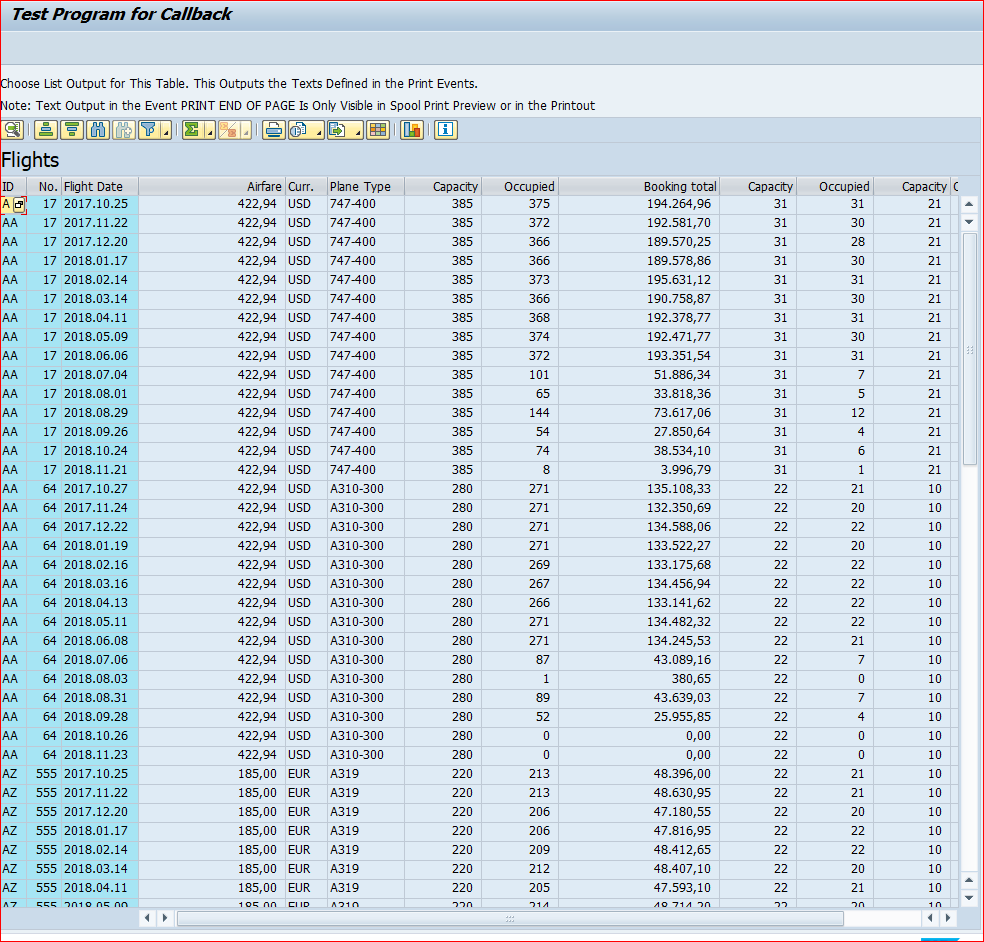
源代码
program bcalvc_print.

*&&&&&&&&&&&&&&&&&&&&&&&&&&&&&&&&&&&&&&&&&&&&&&&&&&&&&&&&&&&&&&&&

* Purpose:

* ~~~~~~~~

* This program illustrates how the events for print processing

*   - PRINT_TOP_OF_PAGE

*   - PRINT_END_OF_PAGE

*   - PRINT_TOP_OF_LIST

*   - PRINT_END_OF_LIST

*

* are handled. The corresponding handler methods control the

* appearance of the list printed.

*-----------------------------------------------------------------

* To check program behavior

* ~~~~~~~~~~~~~~~~~~~~~~~~~

* Print the list shown (It has got only three pages).

* Remark: If you choose "Druckansicht" (preview?!) before printing,

*         the output for event PRINT_END_OF_PAGE is left out due

*         to scrolling.

*         Create a spool entry and preview your printout by calling

*         TA sp01 to reduce paper output please.

*-----------------------------------------------------------------

* Essential steps (Search for '§')

* ~~~~~~~~~~~~~~~

* 1. Define a (local) class for event handling

* 2. Define a method for each print event you need.

* 3. Implement your event handler methods. Use WRITE to provide output.

* 4. Link used print events and event handler methods.

* 5. In case of PRINT_END_OF_PAGE, you must set 'reservelns' to

*    the number of reserved lines at the end of a page.

*&&&&&&&&&&&&&&&&&&&&&&&&&&&&&&&&&&&&&&&&&&&&&&&&&&&&&&&&&&&&&&&&&

*********

* Predefine a local class for event handling to allow the

* declaration of a reference variable.

class lcl_event_receiver definition deferred.

*

*********

data: ok_code like sy-ucomm,

      g_max type i value 100,

      gt_sflight type table of sflight,

      g_repid like sy-repid,

      gs_print    type lvc_s_prnt,

      gs_layout   type lvc_s_layo,

      mycontainer type scrfname value 'BCALVC_EVENT1_CONT1',

* reference to custom container: neccessary to bind ALV Control

  custom_container type ref to cl_gui_custom_container,

      grid1  type ref to cl_gui_alv_grid,

      event_receiver type ref to lcl_event_receiver.

* § Step 1. Define a (local) class for event handling

****************************************************************

* LOCAL CLASSES: Definition

****************************************************************

*===============================================================

* class c_event_receiver: local class to handle print events...

*    - PRINT_TOP_OF_PAGE (page header)

*    - PRINT_END_OF_PAGE (page footer)

*    - PRINT_TOP_OF_LIST (list header)

*    - PRINT_END_OF_LIST (list footer)

*

* Definition:

* ~~~~~~~~~~~

class lcl_event_receiver definition.

  public section.

* § 2. Define a method for each print event you need.

    methods:

    handle_top_of_page

        for event print_top_of_page of cl_gui_alv_grid,

    handle_end_of_page

        for event print_end_of_page of cl_gui_alv_grid,

    handle_top_of_list

        for event print_top_of_list of cl_gui_alv_grid,

    handle_end_of_list

        for event print_end_of_list of cl_gui_alv_grid.

  private section.

    data: pagenum type i.

endclass.

*

* c_event_receiver (Definition)

*===============================================================

****************************************************************

* LOCAL CLASSES: Implementation

****************************************************************

*===============================================================

* class c_event_receiver (Implementation)

*

class lcl_event_receiver implementation.

*§ 3. Implement your event handler methods. Use WRITE to provide output.

  method handle_top_of_page.

    data: tablename(30) type c.

    perform get_tablename changing tablename.

    write: /,'Event: PRINT_TOP_OF_PAGE'(001),

             'Table: '(002),tablename.

  endmethod.                           "handle_top_of_page

*-------------------------------------------

  method handle_end_of_page.

    data: tablename(30) type c.

    perform get_tablename changing tablename.

    add 1 to pagenum.

    write: /,'Event: PRINT_END_OF_PAGE'(003),

             text-002,tablename,

             'Number of pages so far: '(004), pagenum.

  endmethod.                           "handle_end_of_page

*-------------------------------------------

  method handle_top_of_list.

    data: tablename(30) type c.

    clear pagenum.

    perform get_tablename changing tablename.

    write: /,'Event: PRINT_TOP_OF_LIST'(005),

             text-002,tablename.

  endmethod.                           "handle_top_of_list

*-------------------------------------------

  method handle_end_of_list.

    data: tablename(30) type c.

    perform get_tablename changing tablename.

    write: /,'Event: PRINT_END_OF_LIST'(006),

             text-002,tablename.

  endmethod.                           "handle_end_of_list

*-------------------------------------------

endclass.

*

* c_event_receiver (Implementation)

*===================================================================

start-of-selection.

  select * from sflight into table gt_sflight up to g_max rows.

*

end-of-selection.

  g_repid = sy-repid.

  call screen 100.

*---------------------------------------------------------------------*

*       MODULE PBO OUTPUT                                             *

*---------------------------------------------------------------------*

module pbo output.

  set pf-status 'MAIN100'.

  set titlebar 'MAIN100'.

  if custom_container is initial.

* create a custom container control for our ALV Control

    create object custom_container

        exporting

            container_name = mycontainer

        exceptions

            cntl_error = 1

            cntl_system_error = 2

            create_error = 3

            lifetime_error = 4

            lifetime_dynpro_dynpro_link = 5.

    if sy-subrc ne 0.

* add your handling, for example

      call function 'POPUP_TO_INFORM'

           exporting

                titel = g_repid

                txt2  = sy-subrc

                txt1  = 'The control could not be created'(010).

    endif.

* create an instance of alv control

    create object grid1

          exporting i_parent = custom_container.

*

* Set a titlebar for the grid control

*

    gs_layout-grid_title = 'Flights'(100).

* § 5. In case of PRINT_END_OF_PAGE, you must set 'reservelns' to

*      the number of reserved lines at the end of a page.

*

* reserve two lines for the PRINT_END_OF_PAGE event

*

    gs_print-reservelns = 2.

********

* ->Create Object to receive events and link them to handler methods.

* When the ALV Control raises the event for the specified instance

* the corresponding method is automatically called.

*

********

* § 4. Link used print events and event handler methods.

    create object event_receiver.

    set handler event_receiver->handle_top_of_list for grid1.

    set handler event_receiver->handle_top_of_page for grid1.

    set handler event_receiver->handle_end_of_list for grid1.

    set handler event_receiver->handle_end_of_page for grid1.

*

  call method grid1->set_table_for_first_display

         exporting i_structure_name = 'SFLIGHT'

                   is_print         = gs_print

                   is_layout        = gs_layout

         changing  it_outtab        = gt_sflight.

  endif.

* Controls are not integrated into the TAB-Order

* Call "set_focus" if you want to make sure that 'the cursor'

* is active in your control.

  call method cl_gui_control=>set_focus exporting control = grid1.

* Control Framework flushes at the end of PBO automatically!

endmodule.

*---------------------------------------------------------------------*

*       MODULE PAI INPUT                                              *

*---------------------------------------------------------------------*

module pai input.

  case ok_code.

    when 'EXIT'.

      perform exit_program.

  endcase.

  clear ok_code.

endmodule.

*---------------------------------------------------------------------*

*       FORM EXIT_PROGRAM                                             *

*---------------------------------------------------------------------*

form exit_program.

  call method custom_container->free.

  call method cl_gui_cfw=>flush.

  if sy-subrc ne 0.

* add your handling, for example

    call function 'POPUP_TO_INFORM'

         exporting

              titel = g_repid

              txt2  = sy-subrc

              txt1  = 'Error in Flush'(009).

  endif.

  leave program.

endform.

*&---------------------------------------------------------------------*

*&      Form  GET_TABLENAME

*&---------------------------------------------------------------------*

*       text

*----------------------------------------------------------------------*

*      <--P_TABLENAME  text

*----------------------------------------------------------------------*

form get_tablename changing p_tablename.

  data: lt_fieldcat type standard table of lvc_s_fcat,

        ls_fieldcat type lvc_s_fcat.

  call method grid1->get_frontend_fieldcatalog

                importing et_fieldcatalog = lt_fieldcat.

  call method cl_gui_cfw=>flush.

  if sy-subrc <> 0.

    p_tablename = 'No tablename in fieldcatalog!'(008).

    call function 'POPUP_TO_INFORM'

         exporting

              titel = g_repid

              txt2  = p_tablename

              txt1  = 'Error in Flush'(011).

  else.

    read table lt_fieldcat index 1 into ls_fieldcat.

    p_tablename = ls_fieldcat-ref_table.

  endif.

endform.                               " GET_TABLENAME
SAP Grid control( ALV Grid 列表 自定义 按钮)的更多相关文章
- em grid control网格控制
网格控制 必须管理许多的数据库.应用服务器.web服务器和其他构件的企业可以采用em grid control Em grid control是一个基于web的用户界面,它与oracle企业内所有构件 ...
- 实例:ABAP Tree Control 使用与ALV Grid对象关联
Tree Control 是最常用的Windows控件之一,在其他语言中成为"Tree View"等,ABAP的 Tree Contiol 能实现类似的功能. 本文主要介绍一下内容 ...
- Yii框架zii.widgets.grid自定义按钮,ajax触发事件并提示
相关类手册: http://www.yiichina.com/api/CButtonColumn buttons 属性 public array $buttons; the configurati ...
- 一百、SAP中ALV事件之十三,给ALV的自定义按钮添加事件
一.我们查看定义的按钮,有一个名字是ZADD的自定义按钮 二.代码如下,用于判断点击了哪个按钮 三.点击测试按钮之后,会弹出一个弹窗 完美
- OO方式下,ALV TREE和ALV GRID的不同之处
作为大部分报表程序的基础,ALV GRID差不多是每个ABAP开发者必须了解和掌握的内容,因此网上也不乏相关资料,而ALV TREE的应用相对较少,中文资料也就比较少见了.实际上,ALV TREE和A ...
- Access Grid Control Properties 访问网格控件属性
In this lesson, you will learn how to access the properties of a list form's Grid Control in WinForm ...
- GRID方式ALV导出数据到本地丢掉最后一位的问题
这是SAP的一个Bug,FM方式ALV Grid和Class ALV Grid都会出现,但是ALV List好像没有这个BUG. 在以下几个条件满足的时候就会出现这个问题: 1.字段对应的域Con ...
- ME5xN(x:1-2): custom column is editable in Subscreen Item but not in ALV grid
FM MEMFS_BUILD_MAPPING_PO_VIEWS->LMEMFSF0Z enhancement 14 zenhance_alvg_rid_editable. "activ ...
- Oracle Grid control 11g及Active DataGuard 11g安装部署
Oracle Grid control 11g及Active DataGuard 11g安装部署(一) 原贴 http://blog.csdn.net/lichangzai/article/detai ...
随机推荐
- python中faker模块的使用
Faker 安装 pip install Faker 基本使用 from faker import Faker #创建对象,默认生成的数据为为英文,使用zh_CN指定为中文 fake = Faker( ...
- echarts饼图禁止鼠标悬浮区块突出
禁止悬浮突出,在series内添加hoverAnimation:false即可 代码如下: option = { color:['#3498db','#EEEEEE'], series: [ { na ...
- Source Generator实战
前言 最近刷B站的时候浏览到了老杨的关于Source Generator的简介视频.其实当初.Net 6刚发布时候看到过微软介绍这个东西,但并没有在意.因为粗看觉得这东西限制蛮多的,毕竟C#是强类型语 ...
- react实战系列 —— 起步(mockjs、第一个模块、docusaurus)
其他章节请看: react实战 系列 起步 本篇我们首先引入 mockjs ,然后进入 spug 系统,接着模仿"任务计划"模块实现一个类似的一级导航页面("My任务计划 ...
- 你不知道的下划线属性-text-decoration
大家好,我是半夏,一个刚刚开始写文的沙雕程序员.如果喜欢我的文章,可以关注 点赞 加我微信:frontendpicker,一起学习交流前端,成为更优秀的工程师-关注公众号:搞前端的半夏,了解更多前端知 ...
- Python GDAL矢量转栅格详解
前言:挺久没有更新博客了,前段时间课程实验中需要用代码将矢量数据转成栅格,常见的点栅格化方法通过计算将点坐标(X,Y)转换到格网坐标(I,J),线栅格化方法主要有DDA算法.Bresenham算法等, ...
- Asp.Net在线预览Word文档的解决方案与思路
前几天有个老项目找到我,有多老呢?比我工作年限都长,见到这个项目我还得叫一声前辈. 这个项目目前使用非常稳定,十多年了没怎么更新过,现在客户想加一个小功能:在线预览Word文档. 首先想到的是用第三方 ...
- gcc版本切换 Linux环境下
先看看我们系统用的gcc和g++是什么版本:gcc -v 可能会出现安装失败(E: 软件包gcc还没有可供安装的候选者): 1.使用如下命令修改源 sudo gedit /etc/apt/source ...
- 痞子衡嵌入式:大话双核i.MXRT1170之在线联合调试双核工程的三种方法(IAR篇)
大家好,我是痞子衡,是正经搞技术的痞子.今天痞子衡给大家分享的是i.MXRT1170下在线联合调试双核工程的方法(基于IAR). 前段时间痞子衡写过一篇<双核i.MXRT1170之单独在线调试从 ...
- ElasticSearch7.3学习(二十二)----Text字段排序、Scroll分批查询场景解析
1.Text字段排序 场景:数据库中按照某个字段排序,sql只需写order by 字段名即可,如果es对一个text field进行排序,es中无法排序.因为文档入倒排索引表时,分词存入,es无法知 ...