
Source Generator实战
前言
最近刷B站的时候浏览到了老杨的关于Source Generator的简介视频。其实当初.Net 6刚发布时候看到过微软介绍这个东西,但并没有在意。因为粗看觉得这东西限制蛮多的,毕竟C#是强类型语言,有些动态的东西不好操作,而且又有Fody、Natasha这些操作IL的库。
最近写前端比较多,看到这个和这个,都是自动引入相关包,极大的提高了我开发前端的舒适度。又联想到隔壁Java的有Lombok,用起来都很香。搜了一下也没看到C#有相关的东西,于是决定自己动手开发一个,提高C#开发体验。
实现一个Source Generator
这里不对Source Generator做基本的使用介绍,直接实操。如果需要了解相关信息,建议直接看官方文档或者去搜索相关文章。
首先我们看一下效果,假如我的代码是
namespace SourceGenerator.Demo

{

    public partial class UserClass

    {

        [Property]

        private string _test;

    }

}
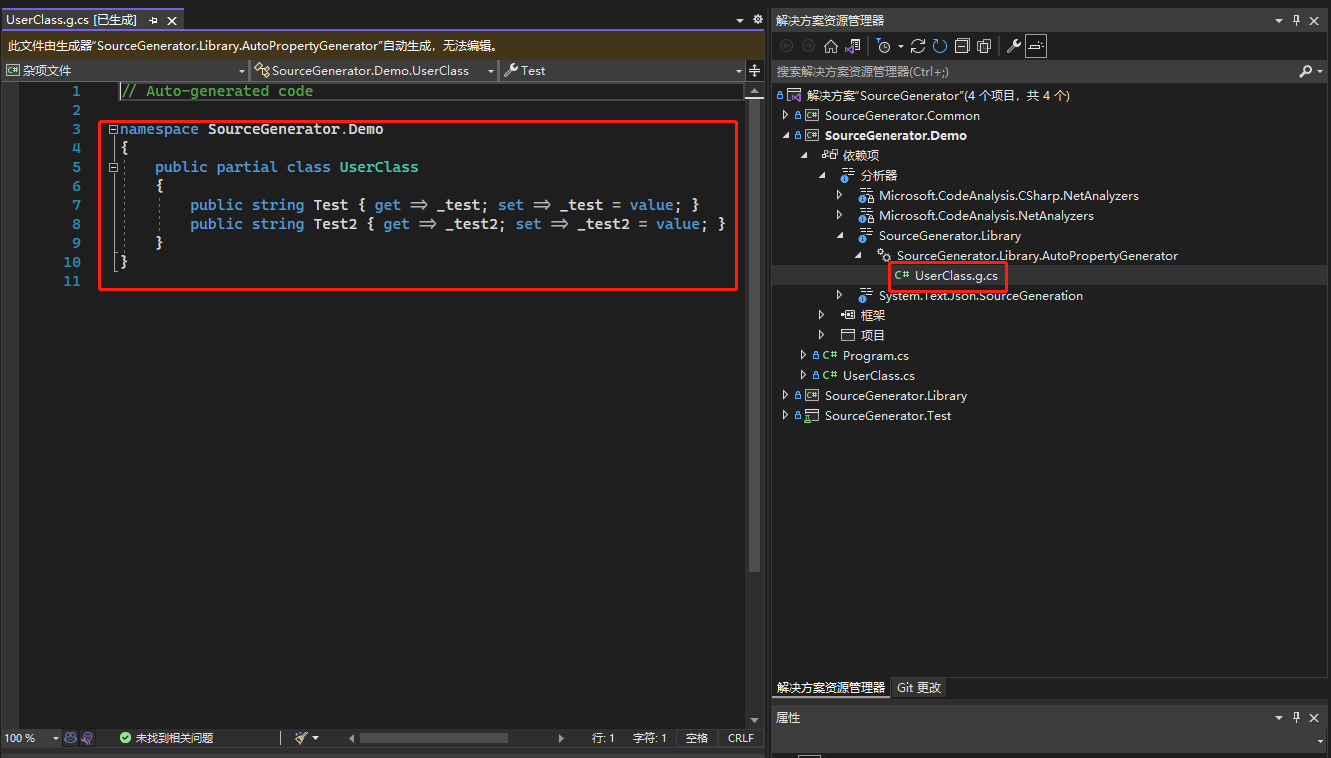
那么,最终生成的应该是
// Auto-generated code

namespace SourceGenerator.Demo

{

    public partial class UserClass

    {

        public string Test { get => _test; set => _test = value; }

    }

}
我们按最简单的实现来考虑,那么只需要
- 在语法树中找到field
- 找到字段的class、namespace
- 生成代码
第一步
首先我们来看第一步。第一步需要找到field,这个我们借助Attribute的特性,能够很快的找到,在SourceGenerator中只需要判断一下Attribute的名字即可
定义一个SyntaxReciver,然后在SourceGenerator中注册一下
// file: PropertyAttribute.cs

using System;

namespace SourceGenerator.Common

{

    [AttributeUsage(AttributeTargets.Field)]

    public class PropertyAttribute : Attribute

    {

        public const string Name = "Property";

    }

}

// file: AutoPropertyReceiver.cs

public class AutoPropertyReceiver : ISyntaxReceiver

{

    public List<AttributeSyntax> AttributeSyntaxList { get; } = new List<AttributeSyntax>();

    public void OnVisitSyntaxNode(SyntaxNode syntaxNode)

    {

        if (syntaxNode is AttributeSyntax cds && cds.Name is IdentifierNameSyntax identifierName &&

            (

                identifierName.Identifier.ValueText == PropertyAttribute.Name ||

                identifierName.Identifier.ValueText == nameof(PropertyAttribute))

           )

        {

            AttributeSyntaxList.Add(cds);

        }

    }

}

// file: AutoPropertyGenerator.cs

[Generator]

public class AutoPropertyGenerator : ISourceGenerator

{

    public void Initialize(GeneratorInitializationContext context)

    {

        context.RegisterForSyntaxNotifications(() => new AutoPropertyReceiver());

    }

    // other code

    ...

}
第二步
第二步就是SyntaxTree的查找,熟悉SyncaxTree的话比较容易完成
public void Execute(GeneratorExecutionContext context)

{

    var syntaxReceiver = (AutoPropertyReceiver)context.SyntaxReceiver;

    var attributeSyntaxList = syntaxReceiver.AttributeSyntaxList;

    if (attributeSyntaxList.Count == 0)

    {

        return;

    }

    // 保存一下类名,因为一个类中可能有有多个字段生成,这里去掉重复

    var classList = new List<string>();

    foreach (var attributeSyntax in attributeSyntaxList)

    {

        // 找到class,并且判断一下是否有parital字段

        var classDeclarationSyntax = attributeSyntax.FirstAncestorOrSelf<ClassDeclarationSyntax>();

        if (classDeclarationSyntax == null ||

            !classDeclarationSyntax.Modifiers.Any(m => m.IsKind(SyntaxKind.PartialKeyword)))

        {

            continue;

        }

        // 找到namespace

        var namespaceDeclarationSyntax =

            classDeclarationSyntax.FirstAncestorOrSelf<BaseNamespaceDeclarationSyntax>();

        if (classList.Contains(classDeclarationSyntax.Identifier.ValueText))

        {

            continue;

        }

        // 找到field

        var fieldDeclarationList = classDeclarationSyntax.Members.OfType<FieldDeclarationSyntax>().ToList();

        if (fieldDeclarationList.Count == 0)

        {

            continue;

        }

        // 其他代码

        ...

    }

}
第三步
第三步就是简单粗暴的根据第二步中拿到的信息,拼一下字符串。
当然其实拼字符串是很不好的行为,最好是用模板去实现,其次就算是拼字符串也理应用StringBuilder,但这里只是做一个Demo,无所谓了
public void Execute(GeneratorExecutionContext context)

{

        ...

        // 上面是第二步的代码

        // 拼源代码字符串

        var source = $@"// Auto-generated code

namespace {namespaceDeclarationSyntax.Name.ToString()}

{{

public partial class {classDeclarationSyntax.Identifier}

{{";

        var propertyStr = "";

        foreach (var fieldDeclaration in fieldDeclarationList)

        {

            var variableDeclaratorSyntax = fieldDeclaration.Declaration.Variables.FirstOrDefault();

            var fieldName = variableDeclaratorSyntax.Identifier.ValueText;

            var propertyName = GetCamelCase(fieldName);

            propertyStr += $@"

public string {propertyName} {{ get => {fieldName}; set => {fieldName} = value; }}";

        }

        source += propertyStr;

        source += @"

}

}

";

        // 添加到源代码,这样IDE才能感知

        context.AddSource($"{classDeclarationSyntax.Identifier}.g.cs", source);

        // 保存一下类名,避免重复生成

        classList.Add(classDeclarationSyntax.Identifier.ValueText);

    }

}
使用
写一个测试类
using SourceGenerator.Common;

namespace SourceGenerator.Demo;

public partial class UserClass

{

    [Property] private string _test = "test";

    [Property] private string _test2;

}
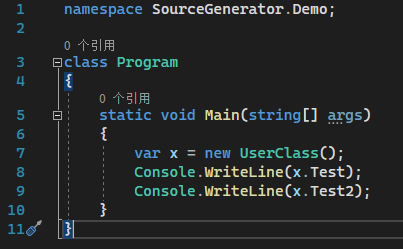
然后重启IDE,可以看到效果,并且直接调用属性是不报错的
结尾
这里仅演示了最基本的Source Generator的功能,限于篇幅也无法深入讲解,上面的代码可以在这里查看,目前最新的代码还实现了字段生成构造函数,appsettings.json生成AppSettings常量字段类。
如果你只是想使用,可以直接nuget安装SourceGenerator.Library。
以下为个人观点
Source Generator在我看来最大的价值在于提供开发时的体验。至于性能,可以用Fody等库Emit IL代码,功能更强大更完善,且没有分部类的限制。但此类IL库最大的问题在Design-Time时无法拿到生成后的代码,导致需要用一些奇奇怪怪的方法去用生成代码。
Source Generator未来可以做的事情有很多,比如
- ORM实体映射
如果数据库是Code First,那么其实还好。但如果说是Db First,主流的ORM库都是通过命令去生成Model的,但命令通常我记不住,因为用的频率并不高。
如果后期加字段,要么我重新生成一次,我又得去找这个命令。要么我手动去C#代码中加这个字段,我能保证自己可以写正确,但是团队其他成员呢? - 结合Emit IL技术
上面其实说了Emit是无法在Design-Time中使用的,但如果我们使用Source Generator创建一些空的方法,然后用IL去改写,应该可以解决这个问题 - 依赖注入
目前而言我们在Asp.net Core中创建了服务,那么我们需要AddSingleton等方法添加进去,这个其实很痛苦,因为首先会显得代码很长,其次这个操作很无聊且容易遗漏。
现在主流的框架都是通过Assembly扫描的方式去动态注册,避免手动去添加服务。但如果通过Source Generator扫码这些类,就可以在编译时添加进DI容器 - 对象映射
Java里面有个库叫做MapStruct,原理是用maven插件生成静态的java代码,然后按字段赋值。C#里面我好像没有看到这种方法,目前我用过的Automapper和Tinymapper都是先去做Bind,然后再使用。(插个题外话,Tinymapper以前的版本是不需要Bind,直接用的,但后来就要了,似乎是为了解决多线程的问题)
Bind其实很痛苦,我很讨厌写这种样板代码,以至于我根本就不想用这类Mapper,直接Json Copy。
Source Generator实战的更多相关文章
- Error:Android Source Generator: [sdk] Android SDK is not specified.
有时候使用intellij idea 带入android 项目,运行提示Error:Android Source Generator: [sdk] Android SDK is not specifi ...
- .NET初探源代码生成(Source Generators)
前言 Source Generators顾名思义代码生成器,可进行创建编译时代码,也就是所谓的编译时元编程,这可让一些运行时映射的代码改为编译时,同样也加快了速度,我们可避免那种昂贵的开销,这是有价值 ...
- 使用 MVVM Toolkit Source Generators
关于 MVVM Toolkit 最近 .NET Community Toolkit 发布了 8.0.0 preview1,它包含了从 Windows Community Toolkit 迁移过来的以下 ...
- sass sourcemap详细使用
新发布的Sass 3.3版本,将Source Maps正式纳入了Sass中.这也成为Sass新版本的一大亮点,一大新功能.让广大Sass爱好者可以直接在浏览器中更容易调试自己的代码和Debug相关操作 ...
- 【Android测试】【第七节】Monkey——源码浅谈
◆版权声明:本文出自胖喵~的博客,转载必须注明出处. 转载请注明出处:http://www.cnblogs.com/by-dream/p/4713466.html 前言 根据上一篇我们学会了Monke ...
- Java 螺纹第三版 第三章数据同步 读书笔记
多线程间共享数据问题 一.Synchronizedkeyword atomic一词与"原子"无关,它以前被觉得是物质的最小的单元,不能再被拆解成更小的部分. 当 ...
- Atomic变量和Thread局部变量
Atomic变量和Thread局部变量 前面我们已经讲过如何让对象具有Thread安全性,让它们能够在同一时间在两个或以上的Thread中使用.Thread的安全性在多线程设计中非常重要,因为race ...
- 【Android应用开发】Android Studio 错误集锦 -- 将所有的 AS 错误集合到本文
. 一. 编译错误 1. "AndroidManifest.xml file not found" 错误 (1) 报错信息 报错信息 : -- Message Make : Inf ...
- k8s tensorflow
Online learning github source Kubeflow实战系列 Prepare 了解ksonnet初探Google之Kubeflow (采用的是0.8.0)install dep ...
随机推荐
- 网关中间件-Nginx(二)
网关中间件-Nginx(一) 第一部分我们主要介绍如下几点: 1.nginx的基本概念 2.nginx结合业务场景实现负载均衡 3.常见问题的举例 这一部分主要介绍Nginx中限流,缓存,动静分离,以 ...
- 解决Hadoop集群hdfs无法启动DataNode的问题
问题描述: 在hadoop启动hdfs的之后,使用jps命令查看运行情况时发现hdfs的DataNode并没有打开. 笔者出现此情况前曾使用hdfs namenode -format格式化了hdfs ...
- Ubuntu下交换Alt和Ctrl (适用于任何按键修改)
在 Ubuntu 下交换Alt和Ctrl键: sudo vim /usr/share/X11/xkb/keycodes/evdev 或者用系统默认编辑器打开: sudo xdg-open /usr/s ...
- 数据结构 - 顺序表 C++ 实现
顺序表 此处实现的顺序表为**第一个位置为 data[0] **的顺序表 顺序表的定义为 const int MAX = 50; typedef int ElemType; typedef struc ...
- 记-Windows环境下Prometheus+alertmanager+windows_exporter+mtail监控部署
1.概述 最近因项目需要统计服务的负载情况及机器的负载情况,但是项目里面却没有相关统计而服务所在的机器也没有相关的监控,因为工期原因就选择了相对轻量级的prometheus方案.其中windows_e ...
- dfs:10元素取5个元素的组合数
#include "iostream.h" #include "string.h" #include "stdlib.h" int sele ...
- 写clone()方法时,通常都有一行代码,是什么?
clone 有缺省行为,super.clone();因为首先要把父类中的成员复制到位,然后才是复制自己的成员.
- 为什么需要消息系统,mysql 不能满足需求吗?
1.解耦: 允许你独立的扩展或修改两边的处理过程,只要确保它们遵守同样的接口约束. 2.冗余: 消息队列把数据进行持久化直到它们已经被完全处理,通过这一方式规避了数据 丢失风险.许多消息队列所采用的& ...
- Azure DevOps 中 Dapr项目自动部署流程实践
注:本文中主要讨论 .NET6.0项目在 k8s 中运行的 Dapr 的持续集成流程, 但实际上不是Dapr的项目部署到K8s也是相同流程,只是k8s的yaml配置文件有所不同 流程选择 基于 Dap ...
- Top 15 - Material Design框架和类库(译)
_Material design_是Google开发的,目的是为了统一公司的web端和手机端的产品风格.它是基于很多的原则,比如像合适的动画,响应式,以及颜色和阴影的使用.完整的指南详情请看这里(ht ...