
Containerd-1.6.5 镜像容器操作
一、Containerd 镜像操作
1 基本参数
[root@ecs-65685 ~]# ctr c

NAME:

   ctr containers - manage containers

USAGE:

   ctr containers command [command options] [arguments...]

COMMANDS:

   create                   create container

   delete, del, remove, rm  delete one or more existing containers

   info                     get info about a container

   list, ls                 list containers

   label                    set and clear labels for a container

   checkpoint               checkpoint a container

   restore                  restore a container from checkpoint

OPTIONS:

   --help, -h  show help
2 镜像操作
在containerd中拉取docker的相关镜像也需要补全。
containerd支持oci标准的镜像,所以可以直接使用docker官方或dockerfile构建的镜像。
--platform 选项指定对应平台的镜像。当然对应的也有推送镜像的命令 ctr image push,如果是私有镜像则在推送的时候可以通过 --user 来自定义仓库的用户名和密码。
拉取镜像添加了--all-platforms会将所有平台都下载下来(amd64 、arm、386 、ppc64le ),否则默认下载当前平台。
拉取镜像可以使用 ctr image pull 来完成,比如拉取 Docker Hub 官方镜像 nginx:alpine,需要注意的是镜像地址需要加上 docker.io Host 地址。
ctr i pull docker.io/library/nginx:alpine --all-platforms3 查看镜像
查看镜像可以使用 i 或者image
-q 只打印镜像名称
ctr i ls

ctr i ls -q
4 检测本地镜像
[root@ecs-65685 ~]# ctr image check

REF                            TYPE                                                      DIGEST                                                                  STATUS         SIZE            UNPACKED

docker.io/library/nginx:alpine application/vnd.docker.distribution.manifest.list.v2+json sha256:b87c350e6c69e0dc7069093dcda226c4430f3836682af4f649f2af9e9b5f1c74 complete (7/7) 9.7 MiB/9.7 MiB true
主要查看其中的 STATUS,complete 表示镜像是完整可用的状态。
5 tag重新打标签
[root@ecs-65685 ~]# ctr i tag docker.io/library/nginx:alpine docker.io/library/nginx:nginxxyz

docker.io/library/nginx:nginxxyz

[root@ecs-65685 ~]# ctr i ls -q

docker.io/library/nginx:alpine

docker.io/library/nginx:nginxxyz # 新增tag
6 删除镜像
使用:delete, del, remove, rm remove one or more images by reference。都可以进行删除。
[root@ecs-65685 ~]# ctr i rm docker.io/library/nginx:nginxxyz

docker.io/library/nginx:nginxxyz

[root@ecs-65685 ~]# ctr i ls -q

docker.io/frps9/tools:SynologyNAS

docker.io/library/nginx:alpine
7 mount镜像
mount镜像实际上将镜像中的文件,挂载到宿主机的目录中去。
mount参数系统为只读状态,只可以读取,不可以写入数据。
使用--rw Enable write support on the mount 可以开启只读。
[root@ecs-65685 ~]# mkdir /home/xyz

[root@ecs-65685 ~]# ctr i ls -q

docker.io/library/nginx:alpine

[root@ecs-65685 ~]# ctr i mount  docker.io/library/nginx:alpine /home/xyz/

sha256:26bec62cc7fc1f93f810d51c3f51291dae2d0f9e192e054cc61d1914365003d8

/home/xyz/

[root@ecs-65685 ~]# ls /home/xyz

bin  docker-entrypoint.d   etc   lib    mnt  proc  run   srv  tmp  var

dev  docker-entrypoint.sh  home  media  opt  root  sbin  sys  usr
mount卸载
[root@ecs-65685 ~]# ctr i unmount /home/xyz

/home/xyz

[root@ecs-65685 ~]# ls /home/xyz
8 推送镜像
[root@ecs-65685 ~]# ctr i push -k docker.io/library/nginx:alpine

index-sha256:b87c350e6c69e0dc7069093dcda226c4430f3836682af4f649f2af9e9b5f1c74: waiting        |--------------------------------------|

elapsed: 0.1 s                                                                 total:   0.0 B (0.0 B/s)

ctr: content digest sha256:36f21d30317cff60a6ab8328cca93dbe554020ba0320c78e964040512d0f27a0: not found
跳过ssl验证--skip-verify, -k skip SSL certificate validation。
9 导入导出
- import
- export
- 默认export导出的为OCI tar,只要我们容器支持OCI,基本上都是可以使用的
- 同时导出可以使用--platform导出其它平台的(例如arm)
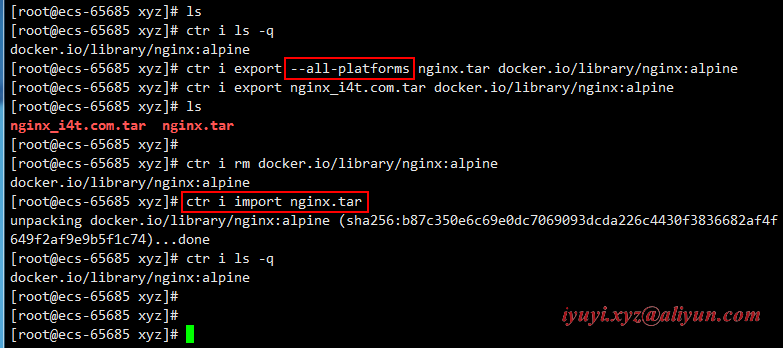
- --all-platforms为导出所有平台
[root@ecs-65685 xyz]# ls

[root@ecs-65685 xyz]# ctr i ls -q

docker.io/library/nginx:alpine

[root@ecs-65685 xyz]# ctr i export --all-platforms nginx.tar docker.io/library/nginx:alpine

[root@ecs-65685 xyz]# ctr i export nginx_i4t.com.tar docker.io/library/nginx:alpine

[root@ecs-65685 xyz]# ls

nginx_i4t.com.tar  nginx.tar

[root@ecs-65685 xyz]#

[root@ecs-65685 xyz]# ctr i rm docker.io/library/nginx:alpine

docker.io/library/nginx:alpine

[root@ecs-65685 xyz]# ctr i import nginx.tar

unpacking docker.io/library/nginx:alpine (sha256:b87c350e6c69e0dc7069093dcda226c4430f3836682af4f649f2af9e9b5f1c74)...done

[root@ecs-65685 xyz]# ctr i ls -q

docker.io/library/nginx:alpine
二、Containerd 容器操作
1 基本参数
[root@ecs-65685 ~]# ctr c create -h

NAME:

   ctr containers create - create container

USAGE:

   ctr containers create [command options] [flags] Image|RootFS CONTAINER [COMMAND] [ARG...]

OPTIONS:

   --snapshotter value               snapshotter name. Empty value stands for the default value. [$CONTAINERD_SNAPSHOTTER]

   --snapshotter-label value         labels added to the new snapshot for this container.

   --config value, -c value          path to the runtime-specific spec config file

   --cwd value                       specify the working directory of the process

   --env value                       specify additional container environment variables (e.g. FOO=bar)

   --env-file value                  specify additional container environment variables in a file(e.g. FOO=bar, one per line)

   --label value                     specify additional labels (e.g. foo=bar)

   --mount value                     specify additional container mount (e.g. type=bind,src=/tmp,dst=/host,options=rbind:ro)

   --net-host                        enable host networking for the container

   --privileged                      run privileged container

   --read-only                       set the containers filesystem as readonly

   --runtime value                   runtime name (default: "io.containerd.runc.v2")

   --runtime-config-path value       optional runtime config path

   --tty, -t                         allocate a TTY for the container

   --with-ns value                   specify existing Linux namespaces to join at container runtime (format '<nstype>:<path>')

   --pid-file value                  file path to write the task's pid

   --gpus value                      add gpus to the container

   --allow-new-privs                 turn off OCI spec's NoNewPrivileges feature flag

   --memory-limit value              memory limit (in bytes) for the container (default: 0)

   --device value                    file path to a device to add to the container; or a path to a directory tree of devices to add to the container

   --cap-add value                   add Linux capabilities (Set capabilities with 'CAP_' prefix)

   --cap-drop value                  drop Linux capabilities (Set capabilities with 'CAP_' prefix)

   --seccomp                         enable the default seccomp profile

   --seccomp-profile value           file path to custom seccomp profile. seccomp must be set to true, before using seccomp-profile

   --apparmor-default-profile value  enable AppArmor with the default profile with the specified name, e.g. "cri-containerd.apparmor.d"

   --apparmor-profile value          enable AppArmor with an existing custom profile

   --rdt-class value                 name of the RDT class to associate the container with. Specifies a Class of Service (CLOS) for cache and memory bandwidth management.

   --rootfs                          use custom rootfs that is not managed by containerd snapshotter

   --no-pivot                        disable use of pivot-root (linux only)

   --cpu-quota value                 Limit CPU CFS quota (default: -1)

   --cpu-period value                Limit CPU CFS period (default: 0)

   --rootfs-propagation value        set the propagation of the container rootfs
2 创建一个nginx容器
- -n 指定命名空间
- c 是简写 containers, c, container manage containers
- create 创建容器
- --net-host 使用宿主机网络
- docker.io/xx/xxx:xxx 镜像地址
- nginx 容器名称
ctr -n xyz c create --net-host docker.io/library/nginx:alpine nginx3 查看容器列表
[root@ecs-65685 ~]# ctr -n xyz c ls

CONTAINER    IMAGE                             RUNTIME

nginx        docker.io/library/nginx:alpine    io.containerd.runc.v2

nginx1       docker.io/library/nginx:alpine    io.containerd.runc.v2
4 只获取容器名称
[root@ecs-65685 ~]# ctr -n xyz c ls -q

nginx

nginx1
5 通过info参数查看容器的相关信息(类似于 docker inspect 功能)
ctr -n xyz c info nginx|less6 删除容器
[root@ecs-65685 ~]# ctr -n xyz c ls -q

nginx

nginx1

[root@ecs-65685 ~]# ctr -n xyz container rm nginx1

[root@ecs-65685 ~]# ctr -n xyz c ls -q

nginx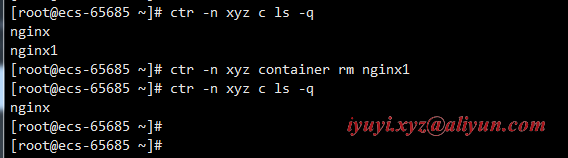
除了使用 rm 子命令之外也可以使用 delete 或者 del 删除容器。
三、报错
ctr export导出或者import导入提示:ctr: content digest sha256:xxxxx: not found。
[root@ecs-65685 ~]# ctr image export --all-platforms nginx.tar docker.io/library/nginx:alpine

ctr: content digest sha256:36f21d30317cff60a6ab8328cca93dbe554020ba0320c78e964040512d0f27a0: not found
2 现象:
- 直接导入某个镜像可能会出现类似于 ctr: content digest sha256:xxxxx: not found
解决办法:
- 删除下载好的镜像
- 拉取镜像、导出镜像时,都加上--all-platforms 时
- 再次import和export,不需要添加
--all-platforms
四、Containerd-1.6.5 命名空间和task使用
https://www.cnblogs.com/huaxiayuyi/p/16790210.html
Containerd-1.6.5 镜像容器操作的更多相关文章
- Docker:镜像操作和容器操作
镜像操作 列出镜像: $ sudo docker images REPOSITORY TAG IMAGE ID CREATED VIRTUAL SIZE hello-world latest 0a6b ...
- 二、docker 镜像容器常用操作(让我们用docker 溜得飞起)
前言 上篇讲了我们如何安装docker,现在该我们一展拳脚的时候了.接下来让我们一起学习一下docker常见的操作,让我们能够会使用 docker. 基本概念 在讲使用之前,还是先将一下docker ...
- docker学习笔记2--对镜像/容器的命令操作
Docker启动一个Centos镜像 我们下载完成一个Centos镜像之后,开始启动 docker run -d -i -t <imageID> /bin/bash 这样就能启动一个一直停 ...
- 关于 Docker 镜像的操作,看完这篇就够啦 !(下)
紧接着上篇<关于 Docker 镜像的操作,看完这篇就够啦 !(上)>,奉上下篇 !!! 镜像作为 Docker 三大核心概念中最重要的一个关键词,它有很多操作,是您想学习容器技术不得不掌 ...
- 004-docker命令-容器生命周期管理、容器操作
1.容器生命周期管理 docker run :创建一个新的容器并运行一个命令 语法:docker run [OPTIONS] IMAGE [COMMAND] [ARG...] OPTIONS说明: - ...
- Docker镜像文件操作
1什么是Docker镜像 Docker镜像是由文件系统叠加而成(是一种文件的存储形式).最底端是一个文件引导系统,即bootfs,这很像典型的Linux/Unix的引导文件系统.Docker用户几乎永 ...
- docker 容器操作( 以 tomcat 为例 )
一.容器操作 一个镜像可以启动多个容器.比如一个 tomcat 镜像,可以启动多个tomcat 容器,启动后的这些 tomcat 都是各自独立的 二.步骤 1.搜索镜像 [root@localhost ...
- Minikube之Win10单机部署Kubernetes(k8s)自动化容器操作的开源平台
Minikube之Win10单机部署 Kubernetes(k8s)是自动化容器操作的开源平台,基于这个平台,你可以进行容器部署,资源调度和集群扩容等操作.如果你曾经用过Docker部署容器,那么可以 ...
- Docker 镜像/容器操作命令
一.镜像操作 1.拉取镜像 # docker pull tomcat # docker pull tomcat:8.0.21-jre8 # docker pull 192.168.220.150: ...
随机推荐
- PHP及相关服务器防盗链
服务器防盗链 假设域名为www.localhost.com 1.apache配置httpd.conf SetEnvIfNoCase Referer "^http://www.localhos ...
- Java开发学习(二十一)----Spring事务简介与事务角色解析
一.Spring事务简介 1.1 相关概念介绍 事务作用:在数据层保障一系列的数据库操作同成功同失败 Spring事务作用:在数据层或业务层保障一系列的数据库操作同成功同失败 数据层有事务我们可以理解 ...
- 关于又拍云免费cdn全网加速服务的长期评测(各种踩坑)
原文转载自「刘悦的技术博客」 ( https://v3u.cn/a_id_128 ) 妇孺皆知,前端优化中最重要的优化手段之一就是cdn加速,所谓cdn加速就是采用更多的缓存服务器(CDN边缘节点), ...
- ARC129E Yet Another Minimization 题解 【网络流笔记】
超神的建模,极其有借鉴意义/cy 注:该建模对应于最小割建模 对于 \(n\) 个数,每个数有 \(m\) 种取值的技巧 \(\forall i=1,2,\dots,n\),令 \(S=V_{i,0} ...
- 选择结构——嵌套 if 控制语句
1.嵌套 if 控制语句 概念: 在 if 控制语句中又包含一个或多个 if 控制语句的简称为嵌套 if 控制语句.嵌套 if 控制语句可以通过外层语句和内层语句的协作,来增强程序的灵活性. 语法格式 ...
- C++ 练气期之函数探幽
1. 函数基础 一个C++程序中,往往需要包含若干个函数,可以说函数是C++程序的基础组成元件,是程序中的头等公民. 如果要理解程序中使用函数的具体意义,则需要了解语言发展过程中致力要解决的 2 问题 ...
- 倒计时0日!Apache DolphineScheduler4月 Meetup 大佬手把手教你大数据开发,离线调度
随着互联网技术和信息技术的发展,信息的数据化产生了许多无法用常规工具量化.处理和捕捉的数字信息.面对多元的数据类型,海量的信息价值,如何有效地对大数据进行挖掘分析,对大数据工作流进行调度,是保障企业大 ...
- 羽夏看Linux内核——引导启动(上)
写在前面 此系列是本人一个字一个字码出来的,包括示例和实验截图.如有好的建议,欢迎反馈.码字不易,如果本篇文章有帮助你的,如有闲钱,可以打赏支持我的创作.如想转载,请把我的转载信息附在文章后面,并 ...
- Luogu2986 [USACO10MAR]伟大的奶牛聚集 (树形DP)
有点权的重心,拆掉点dfs不就是了吗 //#include <iostream> #include <cstdio> #include <cstring> //#i ...
- Redis 01 概述
参考源 https://www.bilibili.com/video/BV1S54y1R7SB?spm_id_from=333.999.0.0 版本 本文章基于 Redis 6.2.6 简介 NoSQ ...