
elasticsearch 之 histogram 直方图聚合
1. 简介
直方图聚合是一种基于多桶值聚合,可从文档中提取的数值或数值范围值来进行聚合。它可以对参与聚合的值来动态的生成固定大小的桶。
2. bucket_key如何计算
假设我们有一个值是32,并且桶的大小是5,那么32四舍五入后变成30,因此文档将落入与键30关联的存储桶中。下面的算式可以精确的确定每个文档的归属桶
bucket_key = Math.floor((value - offset) / interval) * interval + offset
offset:的值默认是从0开始。并且offset的值必须在[0, interval)之间。且需要是一个正数。value:值的参与计算的值,比如某个文档中的价格字段等。
3. 有一组数据,如何确定是落入到那个桶中
此处是我自己的一个理解,如果错误欢迎指出。
存在的数据: [3, 8, 15]
offset = 0
interval = 5
那么可能会分成如下几个桶 [0,5) [5,10) [10, 15) [15,+∞)
- 数字3落入的桶 buket_key=
Math.floor((3 - 0) / 5) * 5 + 0 = 0,即落入[0,5)这个桶中 - 数字8落入的桶 buket_key=
Math.floor((8 - 0) / 5) * 5 + 0 = 5,即落入[5,10)这个桶中 - 数字15落入的桶 buket_key=
Math.floor((15 - 0) / 5) * 5 + 0 = 15,即落入[15,+∞)这个桶中
4、需求
我们有一组api响应时间数据,根据这组数据进行histogram聚合统计
4.1 准备mapping
PUT /index_api_response_time

{

  "settings": {

    "number_of_shards": 1

  },

  "mappings": {

    "properties": {

      "id": {

        "type": "long"

      },

      "api": {

        "type": "keyword"

      },

      "response_time": {

        "type": "integer"

      }

    }

  }

}
此处的mapping比较简单,就3个字段id,api和response_time。
4.2 准备数据
PUT /index_api_response_time/_bulk

{"index":{"_id":1}}

{"api":"/user/infos","response_time": 3}

{"index":{"_id":2}}

{"api":"/user/add"}

{"index":{"_id":3}}

{"api":"/user/update","response_time": 8}

{"index":{"_id":4}}

{"api":"/user/list","response_time": 15}

{"index":{"_id":5}}

{"api":"/user/export","response_time": 30}

{"index":{"_id":6}}

{"api":"/user/detail","response_time": 32}
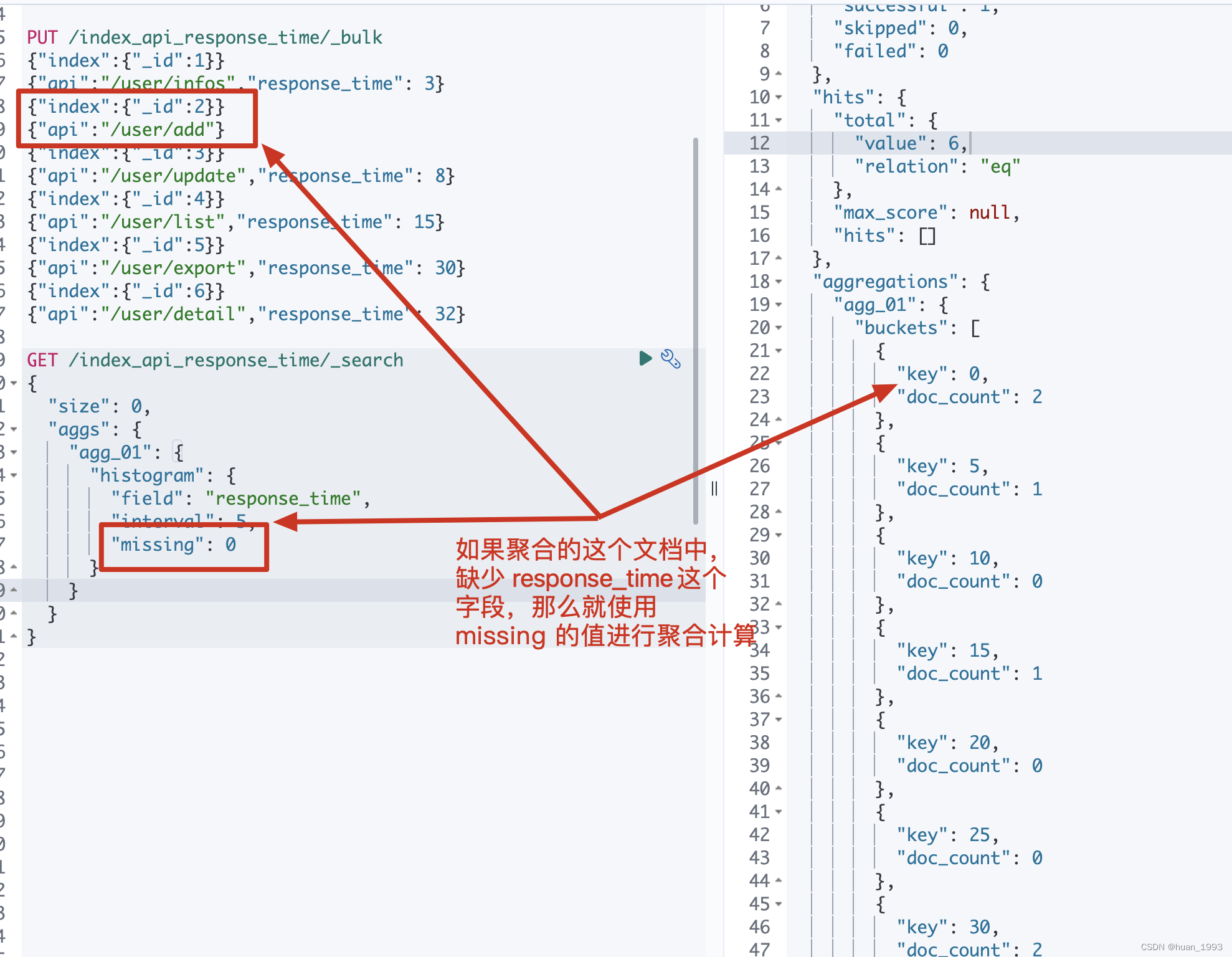
此处先记录 id=2的数据,这个是没有response_time的,后期聚合时额外处理。
5、histogram聚合操作
5.1、根据response_time聚合,间隔为5
5.1.1 dsl
GET /index_api_response_time/_search

{

  "size": 0,

  "aggs": {

    "agg_01": {

      "histogram": {

        "field": "response_time",

        "interval": 5

      }

    }

  }

}
5.1.2 java代码
@Test

@DisplayName("根据response_time聚合,间隔为5")

public void test01() throws IOException {

    SearchRequest request = SearchRequest.of(search ->

            search

                    .index("index_api_response_time")

                    .size(0)

                    .aggregations("agg_01", agg -> agg.histogram(histogram -> histogram.field("response_time")

                    .interval(5D))));

    System.out.println("request: " + request);

    SearchResponse<String> response = client.search(request, String.class);

    System.out.println("response: " + response);

}
5.1.3 运行结果
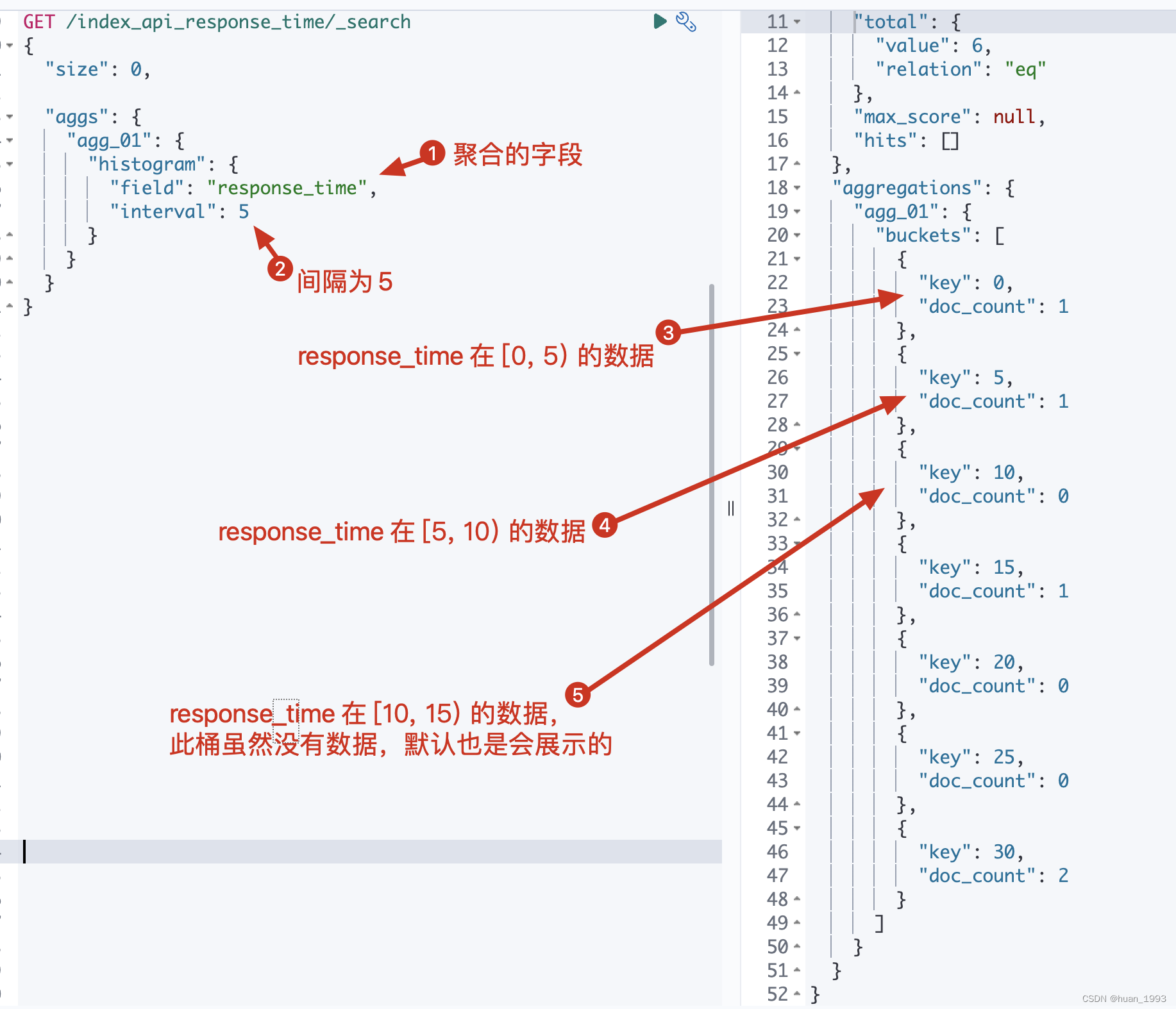
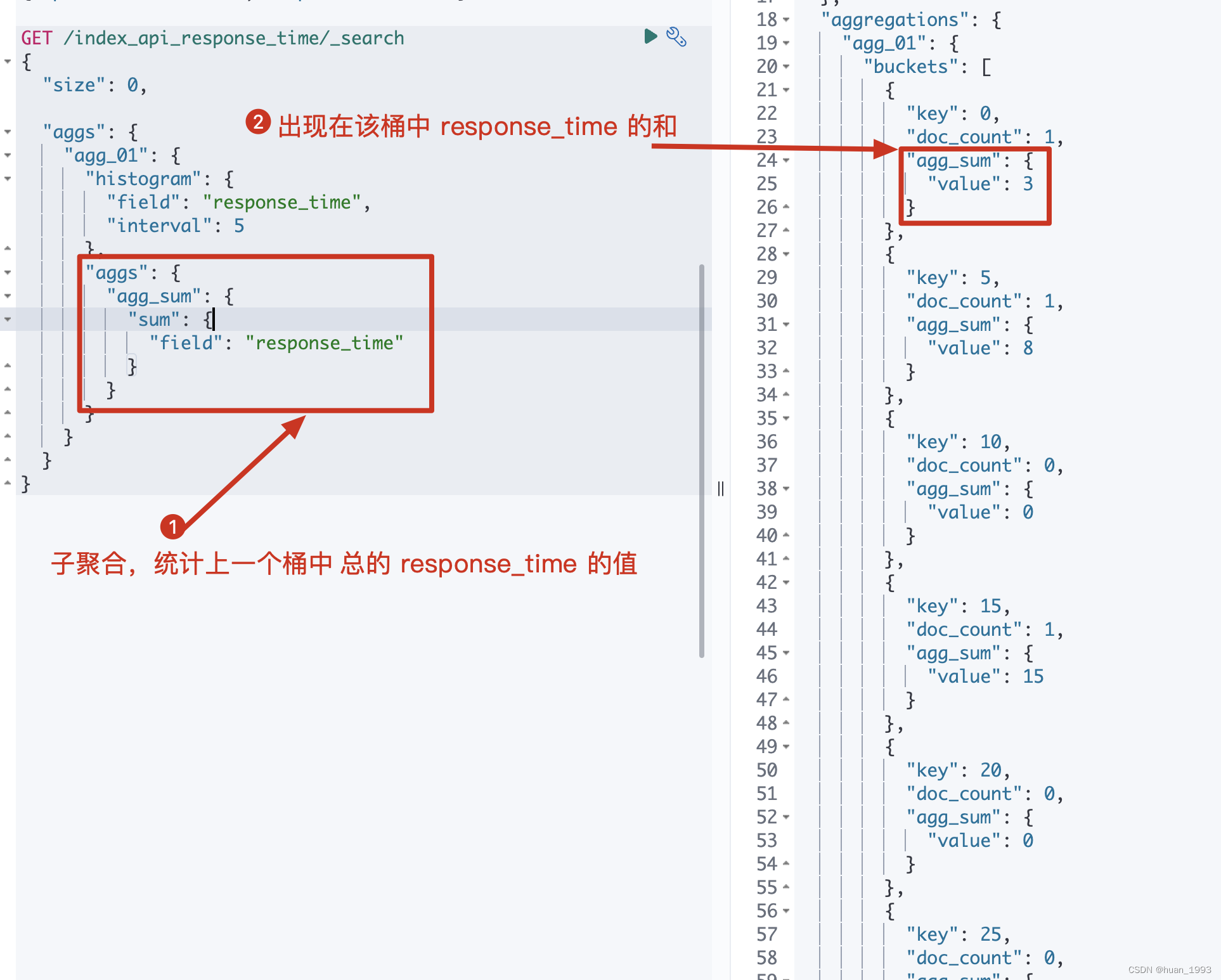
5.2 在5.1基础上聚合出每个桶总的响应时间
此处聚合一下是为了结合已有的数据,看看每个数据是否落入到了相应的桶中
5.2.1 dsl
GET /index_api_response_time/_search

{

  "size": 0,

  "aggs": {

    "agg_01": {

      "histogram": {

        "field": "response_time",

        "interval": 5

      },

      "aggs": {

        "agg_sum": {

          "sum": {

            "field": "response_time"

          }

        }

      }

    }

  }

}
5.2.2 java代码
@Test

@DisplayName("在test01基础上聚合出每个桶总的响应时间")

public void test02() throws IOException {

    SearchRequest request = SearchRequest.of(search ->

            search

                    .index("index_api_response_time")

                    .size(0)

                    .aggregations("agg_01", agg ->

                            agg.histogram(histogram -> histogram.field("response_time").interval(5D))

                               .aggregations("agg_sum", aggSum -> aggSum.sum(sum -> sum.field("response_time")))

                    ));

    System.out.println("request: " + request);

    SearchResponse<String> response = client.search(request, String.class);

    System.out.println("response: " + response);

}
5.2.3 运行结果
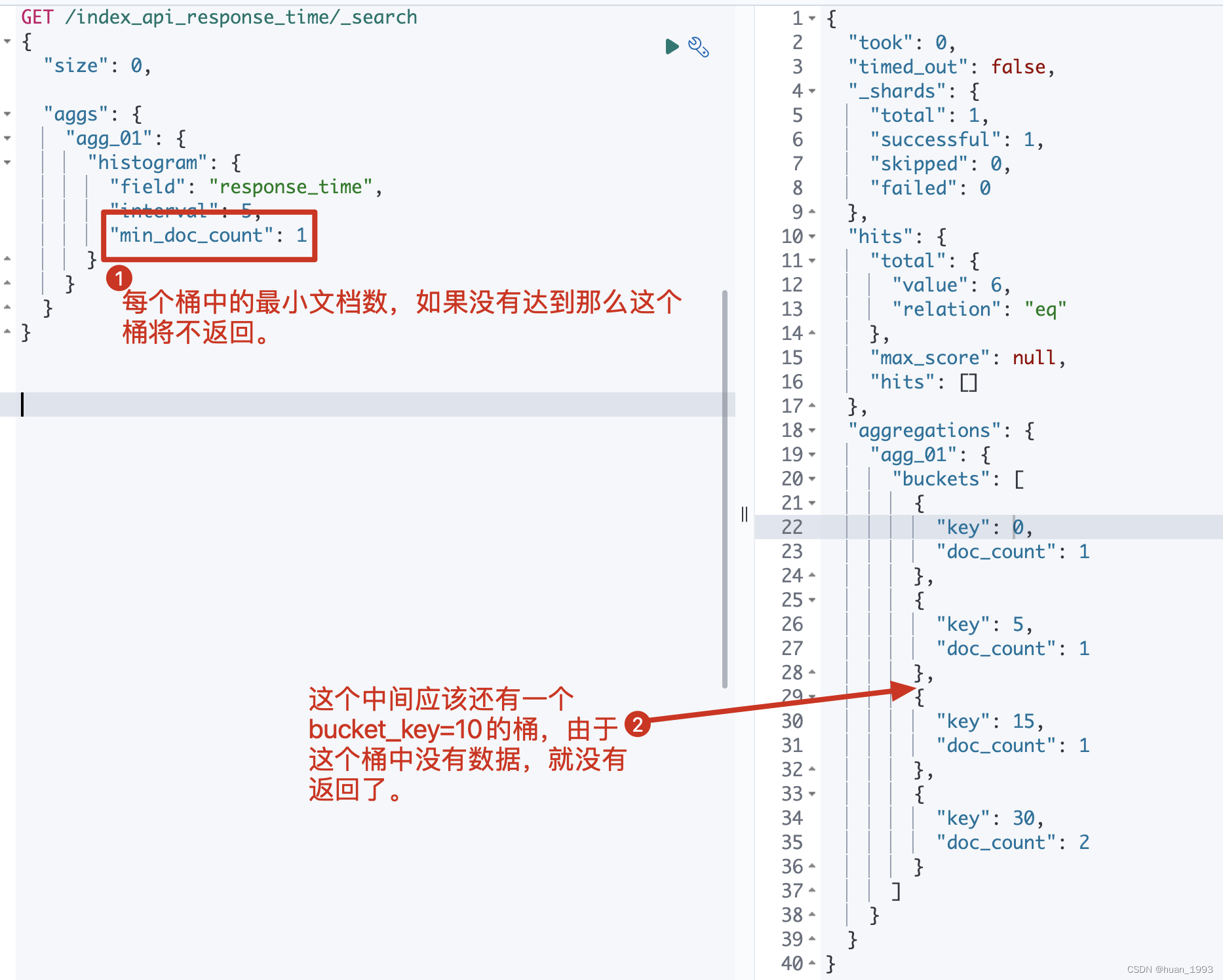
5.3 每个桶中必须存在1个文档的结果才返回-min_doc_count
从5.1中的结果我们可以知道,不管桶中是否存在数据,我们都返回了,即返回了很多空桶。 简单理解就是返回的 桶中存在 doc_count=0 的数据,此处我们需要将这个数据不返回
5.3.1 dsl
GET /index_api_response_time/_search

{

  "size": 0,

  "aggs": {

    "agg_01": {

      "histogram": {

        "field": "response_time",

        "interval": 5,

        "min_doc_count": 1

      }

    }

  }

}
5.3.2 java代码
@Test

@DisplayName("每个桶中必须存在1个文档的结果才返回-min_doc_count")

public void test03() throws IOException {

    SearchRequest request = SearchRequest.of(search ->

            search

                    .index("index_api_response_time")

                    .size(0)

                    .aggregations("agg_01", agg -> agg.histogram(

                            histogram -> histogram.field("response_time").interval(5D).minDocCount(1)

                            )

                    )

    );

    System.out.println("request: " + request);

    SearchResponse<String> response = client.search(request, String.class);

    System.out.println("response: " + response);

}
5.3.3 运行结果
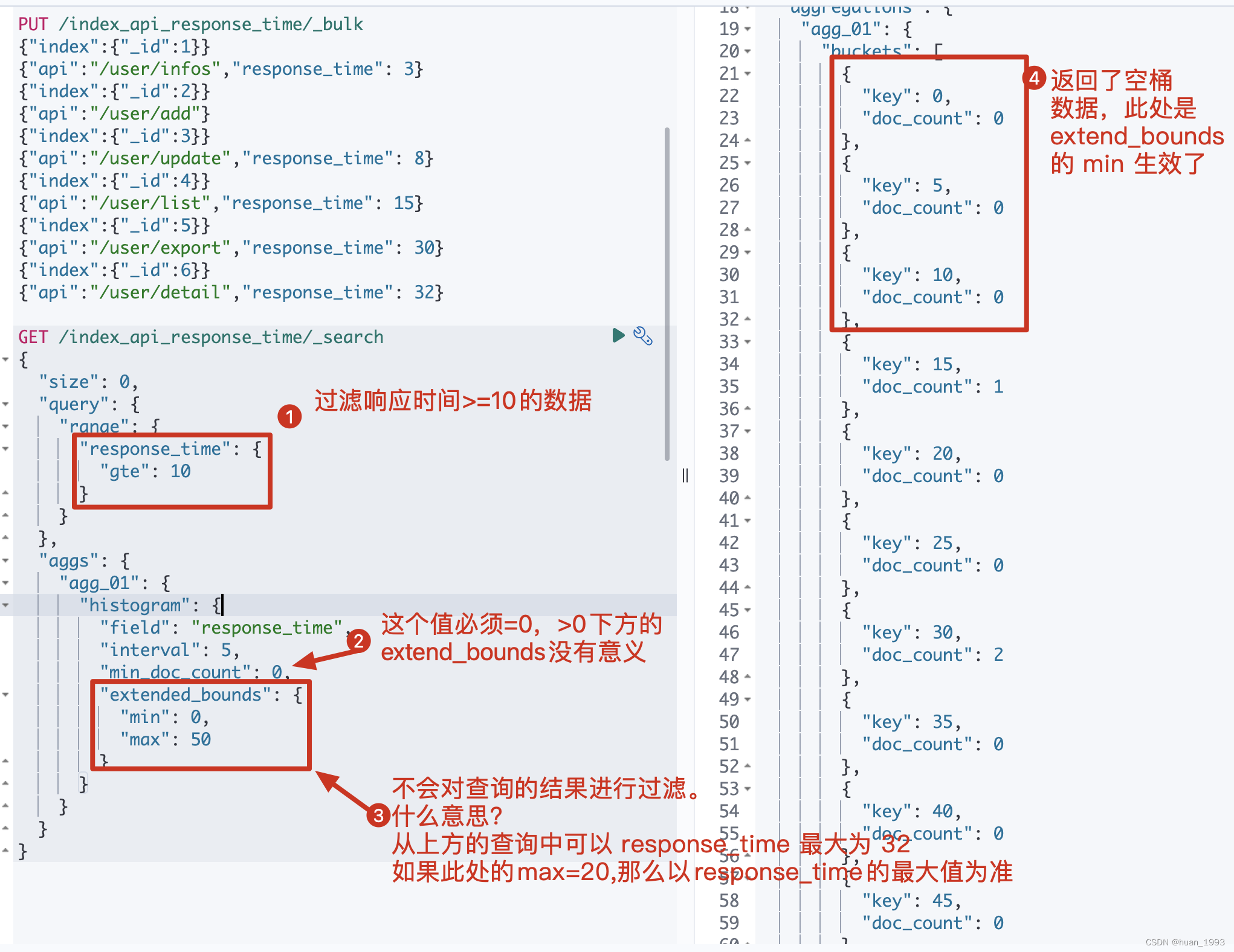
5.4 补充空桶数据-extended_bounds
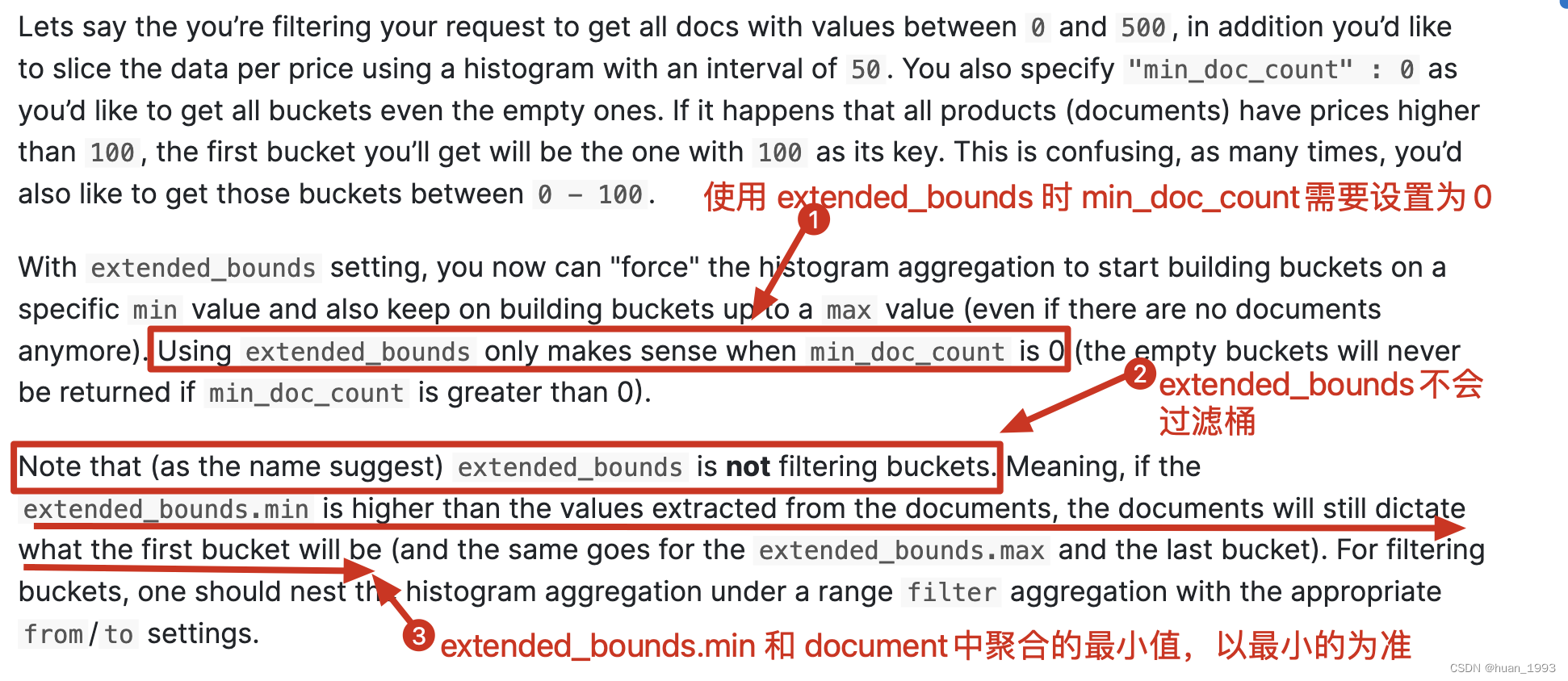
这个是什么意思?假设我们通过 response_time >= 10 进行过滤,并且 interval=5 那么es默认情况下就不会返回 bucket_key =0,5,10的桶,那么如果我想返回那么该如何处理呢?可以通过 extended_bounds 来实现。
使用extended_bounds时,min_doc_count=0时才有意义。 extended_bounds不会过滤桶。
5.4.1 dsl
GET /index_api_response_time/_search

{

  "size": 0,

  "query": {

    "range": {

      "response_time": {

        "gte": 10

      }

    }

  },

  "aggs": {

    "agg_01": {

      "histogram": {

        "field": "response_time",

        "interval": 5,

        "min_doc_count": 0,

        "extended_bounds": {

          "min": 0,

          "max": 50

        }

      }

    }

  }

}
5.4.2 java代码
@Test

@DisplayName("补充空桶数据-extended_bounds")

public void test04() throws IOException {

    SearchRequest request = SearchRequest.of(search ->

            search

                    .index("index_api_response_time")

                    .size(0)

                    .query(query-> query.range(range -> range.field("response_time").gte(JsonData.of(10))))

                    .aggregations("agg_01", agg -> agg.histogram(

                            histogram -> histogram.field("response_time").interval(5D).minDocCount(0)

                                    .extendedBounds(bounds -> bounds.min(1D).max(50D))

                            )

                    )

    );

    System.out.println("request: " + request);

    SearchResponse<String> response = client.search(request, String.class);

    System.out.println("response: " + response);

}
5.4.3 运行结果
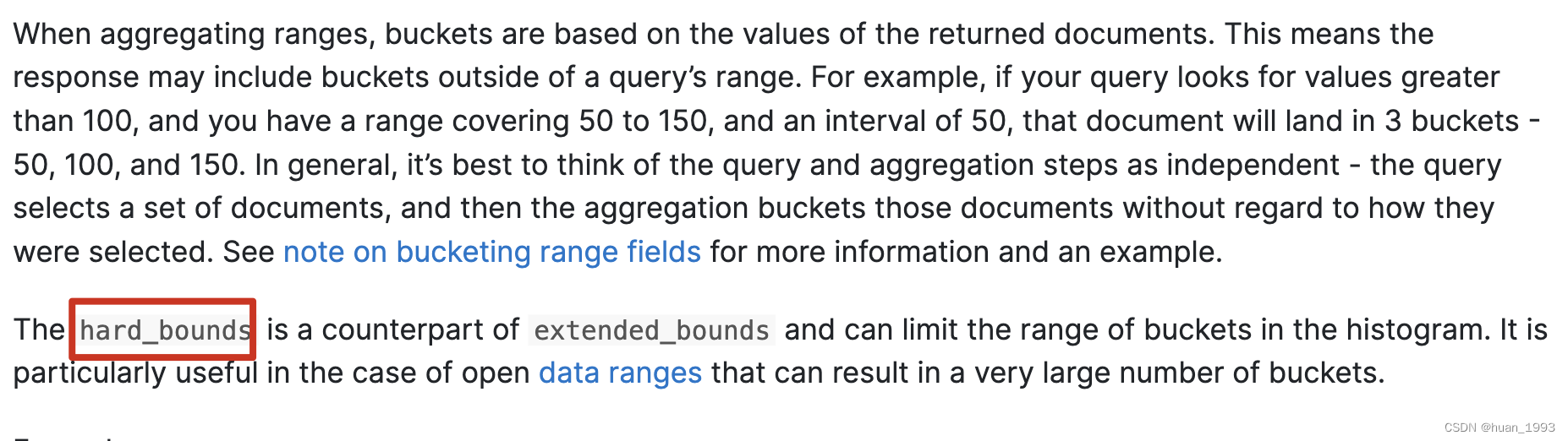
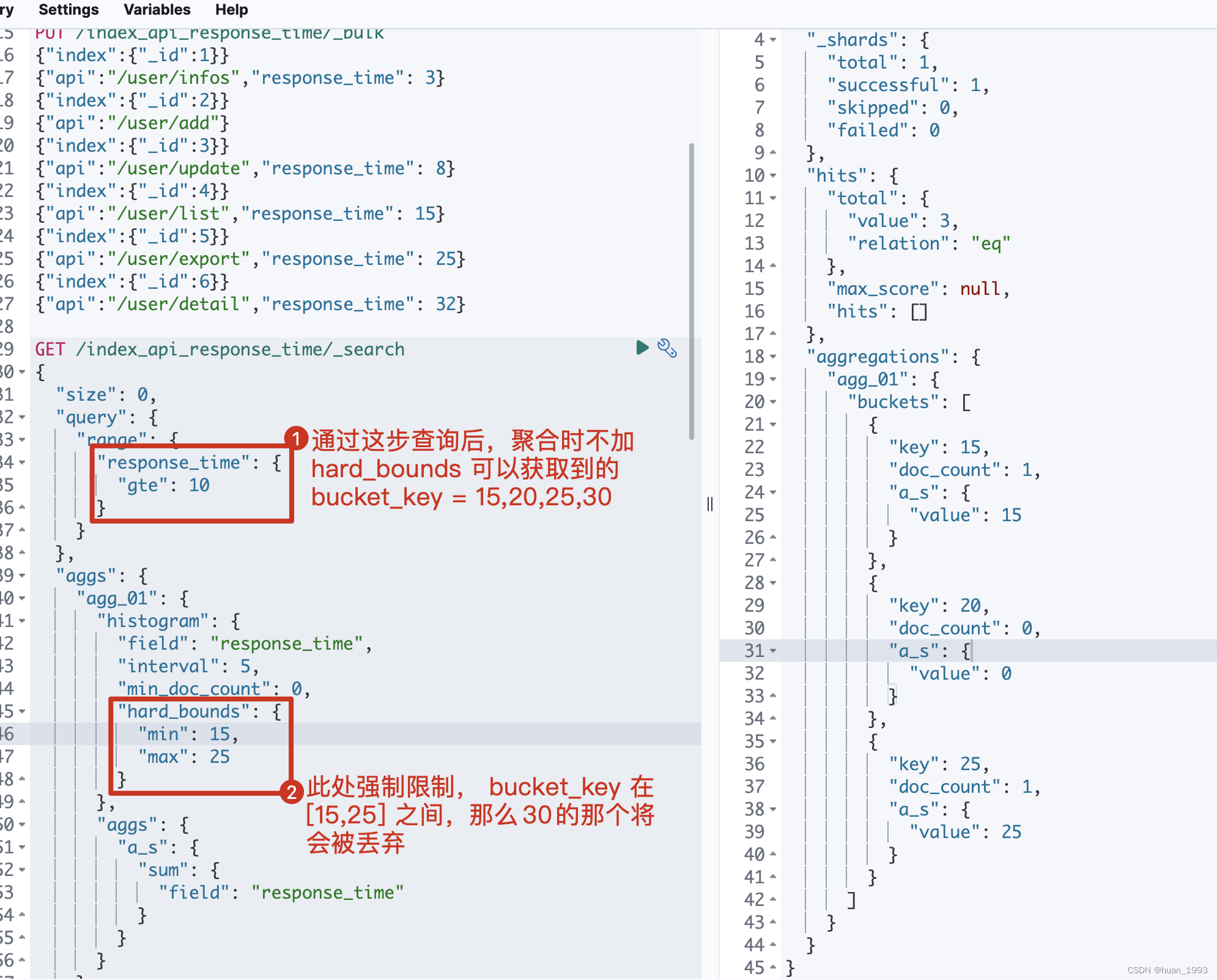
5.5 只展示min-max之间的桶-hard_bounds
此处的数据:
PUT /index_api_response_time/_bulk

{"index":{"_id":1}}

{"api":"/user/infos","response_time": 3}

{"index":{"_id":2}}

{"api":"/user/add"}

{"index":{"_id":3}}

{"api":"/user/update","response_time": 8}

{"index":{"_id":4}}

{"api":"/user/list","response_time": 15}

{"index":{"_id":5}}

{"api":"/user/export","response_time": 25}

{"index":{"_id":6}}

{"api":"/user/detail","response_time": 32}
5.5.1 dsl
GET /index_api_response_time/_search

{

  "size": 0,

  "query": {

    "range": {

      "response_time": {

        "gte": 10

      }

    }

  },

  "aggs": {

    "agg_01": {

      "histogram": {

        "field": "response_time",

        "interval": 5,

        "min_doc_count": 0,

        "hard_bounds": {

          "min": 15,

          "max": 25

        }

      },

      "aggs": {

        "a_s": {

          "sum": {

            "field": "response_time"

          }

        }

      }

    }

  }

}
5.5.2 java代码
@Test

@DisplayName("只展示min-max之间的桶-hard_bounds")

public void test05() throws IOException {

    SearchRequest request = SearchRequest.of(search ->

            search

                    .index("index_api_response_time")

                    .size(0)

                    .query(query-> query.range(range -> range.field("response_time").gte(JsonData.of(10))))

                    .aggregations("agg_01", agg ->

                            agg.histogram(

                                histogram -> histogram.field("response_time").interval(5D).minDocCount(0)

                                        .hardBounds(bounds -> bounds.min(1D).max(50D))

                            )

                               .aggregations("a_s", sumAgg -> sumAgg.sum(sum -> sum.field("response_time")))

                    )

    );

    System.out.println("request: " + request);

    SearchResponse<String> response = client.search(request, String.class);

    System.out.println("response: " + response);

}
5.5.3 运行结果
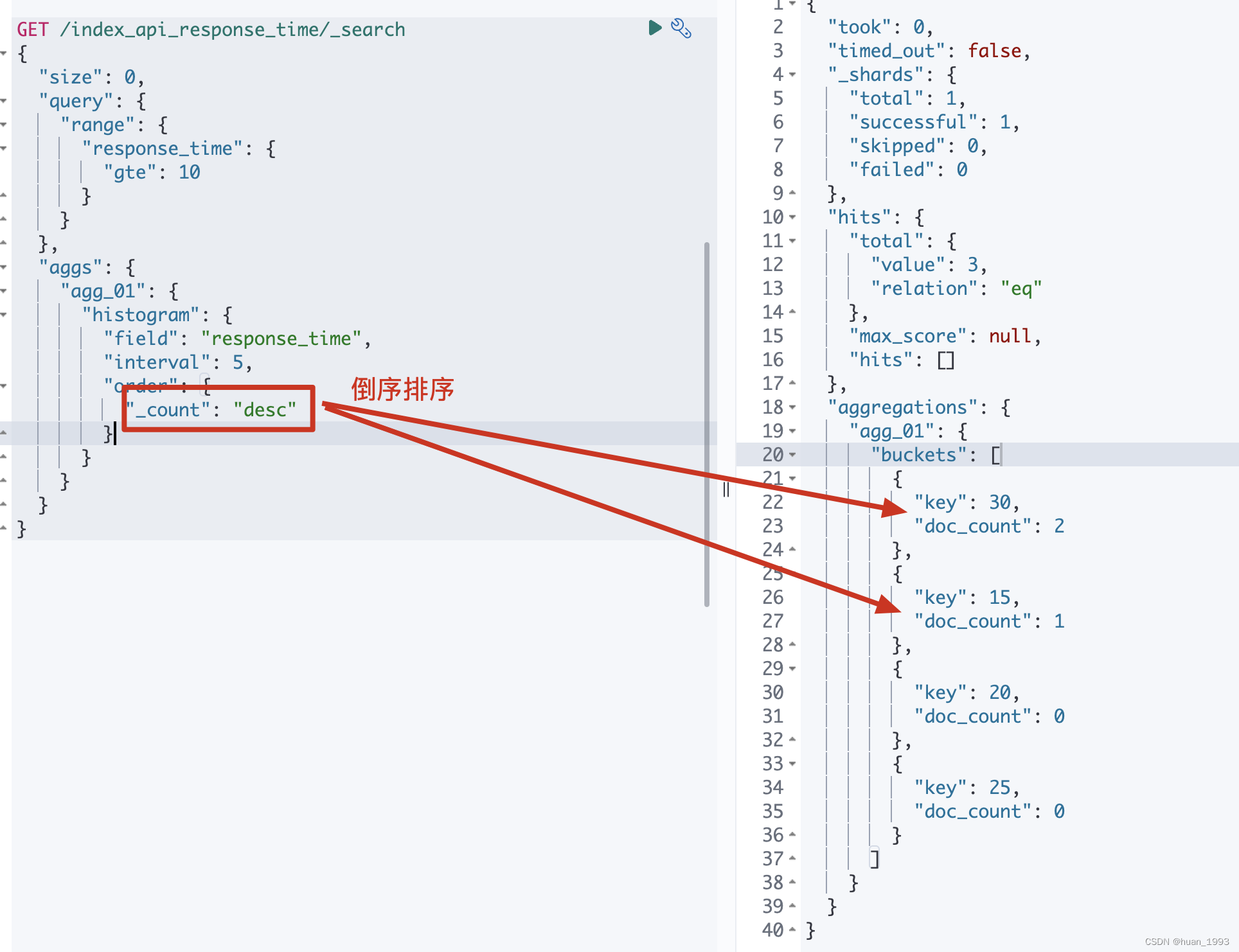
5.6 排序-order
By default the returned buckets are sorted by their key ascending, though the order behaviour can be controlled using the order setting. Supports the same order functionality as the Terms Aggregation.
5.6.1 dsl
GET /index_api_response_time/_search

{

  "size": 0,

  "query": {

    "range": {

      "response_time": {

        "gte": 10

      }

    }

  },

  "aggs": {

    "agg_01": {

      "histogram": {

        "field": "response_time",

        "interval": 5,

        "order": {

          "_count": "desc"

        }

      }

    }

  }

}
5.6.2 java代码
@Test

@DisplayName("排序order")

public void test06() throws IOException {

    SearchRequest request = SearchRequest.of(search ->

            search

                    .index("index_api_response_time")

                    .size(0)

                    .query(query-> query.range(range -> range.field("response_time").gte(JsonData.of(10))))

                    .aggregations("agg_01", agg ->

                            agg.histogram(

                                histogram -> histogram.field("response_time").interval(5D)

                                        .order(NamedValue.of("_count", SortOrder.Desc))

                            )

                    )

    );

    System.out.println("request: " + request);

    SearchResponse<String> response = client.search(request, String.class);

    System.out.println("response: " + response);

}
5.6.3 运行结果
5.7 文档中缺失聚合字段时如何处理-missing

5.7.1 dsl
GET /index_api_response_time/_search

{

  "size": 0,

  "aggs": {

    "agg_01": {

      "histogram": {

        "field": "response_time",

        "interval": 5,

        "missing": 0

      }

    }

  }

}
5.7.2 java代码
@Test

@DisplayName("文档中缺失聚合字段时如何处理-missing")

public void test07() throws IOException {

    SearchRequest request = SearchRequest.of(search ->

            search

                    .index("index_api_response_time")

                    .size(0)

                    .query(query-> query.range(range -> range.field("response_time").gte(JsonData.of(10))))

                    .aggregations("agg_01", agg ->

                            agg.histogram(

                                histogram -> histogram.field("response_time").interval(5D) .missing(0D)

                            )

                    )

    );

    System.out.println("request: " + request);

    SearchResponse<String> response = client.search(request, String.class);

    System.out.println("response: " + response);

}
5.7.3 运行结果
6、完整代码
7、参考文档
elasticsearch 之 histogram 直方图聚合的更多相关文章
- Elasticsearch聚合 之 Histogram 直方图聚合
Elasticsearch支持最直方图聚合,它在数字字段自动创建桶,并会扫描全部文档,把文档放入相应的桶中.这个数字字段既可以是文档中的某个字段,也可以通过脚本创建得出的. 桶的筛选规则 举个例子,有 ...
- ElasticSearch 2 (37) - 信息聚合系列之内存与延时
ElasticSearch 2 (37) - 信息聚合系列之内存与延时 摘要 控制内存使用与延时 版本 elasticsearch版本: elasticsearch-2.x 内容 Fielddata ...
- ElasticSearch 2 (34) - 信息聚合系列之多值排序
ElasticSearch 2 (34) - 信息聚合系列之多值排序 摘要 多值桶(terms.histogram 和 date_histogram)动态生成很多桶,Elasticsearch 是如何 ...
- ElasticSearch 2 (31) - 信息聚合系列之时间处理
ElasticSearch 2 (31) - 信息聚合系列之时间处理 摘要 如果说搜索是 Elasticsearch 里最受欢迎的功能,那么按时间创建直方图一定排在第二位.为什么需要使用时间直方图? ...
- ElasticSearch 2 (30) - 信息聚合系列之条形图
ElasticSearch 2 (30) - 信息聚合系列之条形图 摘要 版本 elasticsearch版本: elasticsearch-2.x 内容 聚合还有一个令人激动的特性就是能够十分容易地 ...
- ElasticSearch 2 (38) - 信息聚合系列之结束与思考
ElasticSearch 2 (38) - 信息聚合系列之结束与思考 摘要 版本 elasticsearch版本: elasticsearch-2.x 内容 本小节涵盖了许多基本理论以及很多深入的技 ...
- ElasticSearch 2 (36) - 信息聚合系列之显著项
ElasticSearch 2 (36) - 信息聚合系列之显著项 摘要 significant_terms(SigTerms)聚合与其他聚合都不相同.目前为止我们看到的所有聚合在本质上都是简单的数学 ...
- ElasticSearch 2 (35) - 信息聚合系列之近似聚合
ElasticSearch 2 (35) - 信息聚合系列之近似聚合 摘要 如果所有的数据都在一台机器上,那么生活会容易许多,CS201 课商教的经典算法就足够应付这些问题.但如果所有的数据都在一台机 ...
- ElasticSearch 2 (33) - 信息聚合系列之聚合过滤
ElasticSearch 2 (33) - 信息聚合系列之聚合过滤 摘要 聚合范围限定还有一个自然的扩展就是过滤.因为聚合是在查询结果范围内操作的,任何可以适用于查询的过滤器也可以应用在聚合上. 版 ...
- ElasticSearch 2 (32) - 信息聚合系列之范围限定
ElasticSearch 2 (32) - 信息聚合系列之范围限定 摘要 到目前为止我们看到的所有聚合的例子都省略了搜索请求,完整的请求就是聚合本身. 聚合与搜索请求同时执行,但是我们需要理解一个新 ...
随机推荐
- Netty 学习(二):服务端与客户端通信
Netty 学习(二):服务端与客户端通信 作者: Grey 原文地址: 博客园:Netty 学习(二):服务端与客户端通信 CSDN:Netty 学习(二):服务端与客户端通信 说明 Netty 中 ...
- 关于thinkphp5.1(tp5.1)中sum计算结果不精确、不准确的问题
使用sprintf函数处理,虽然原理没搞懂,但是问题解决了 复现: test表中有两列,值分别是-0.33和10,数据类型是float SELECT SUM(`val`) AS tp_sum FROM ...
- 5.第四篇 Etcd存储组件高可用部署
文章转载自:https://mp.weixin.qq.com/s?__biz=MzI1MDgwNzQ1MQ==&mid=2247483792&idx=1&sn=b991443c ...
- Beats:通过Metricbeat实现外部对Elastic Stack的监控
- Beats: 使用 Filebeat 进行日志json结构化 - Python
文章转载自:https://elasticstack.blog.csdn.net/article/details/106688240
- Java程序设计(二)作业
题目1:输入一个三位十进制数,对其每一位进行筛选,逆序组合后输出. package test; import java.util.*; public class test2{ public stati ...
- DateSet的应用
一.知识描述 1.什么是DataSet? DataSet为一个数据集,可以看做是一个内存中的数据库,包括表.数据行.数据列以及表与表之间的关系. 创建一个DataSet后,它可以单独存在,不需要一直保 ...
- 关于vmware虚拟机的ova/ovf转换成aws上的AMI镜像
很多时候,我们会有这样的需求,需要将DC中vmware虚拟化的服务器,迁移到aws上,我们就得先将vmware虚拟机导出,然后转换 关于vmvare虚拟的导出备份,一般有ova(Open Virtua ...
- P1084 [NOIP2012 提高组] 疫情控制 (二分答案、贪心)
因为若一个时间限制满足题意,则所有比它大的时间限制一定都满足题意,因此本题答案具有单调性,可以想到二分答案求解. 本题思路不是很难,但细节和代码实现比较复杂. 见牛人博客:https://www.lu ...
- Servlet(处理乱码,重定向与转发的区别)
//处理请求乱码 req.setCharacterEncoding("utf-8"); //处理响应乱码 resp.setContentType("text/html;c ...