
Spring boot MyBatis基本操作
XML 配置方式
目录结构
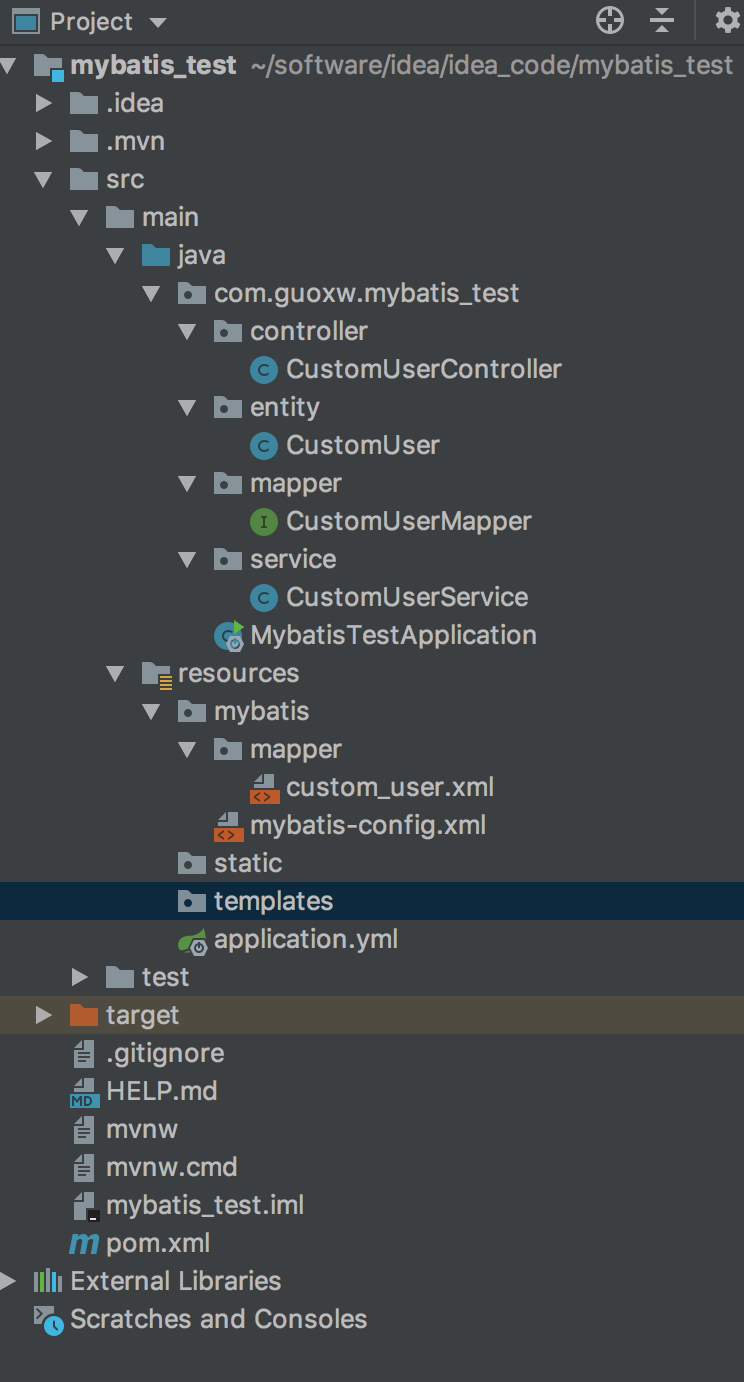
数据库信息:
数据库student -> 表名 custom_user -> 主键-> custom_id ,其他字段 cusotm_name,custom_age
1.加入依赖
 <dependency>

            <groupId>org.mybatis.spring.boot</groupId>

            <artifactId>mybatis-spring-boot-starter</artifactId>

            <version>2.0.1</version>

</dependency>
pom.xml如下
<?xml version="1.0" encoding="UTF-8"?>

<project xmlns="http://maven.apache.org/POM/4.0.0" xmlns:xsi="http://www.w3.org/2001/XMLSchema-instance"

         xsi:schemaLocation="http://maven.apache.org/POM/4.0.0 http://maven.apache.org/xsd/maven-4.0.0.xsd">

    <modelVersion>4.0.0</modelVersion>

    <parent>

        <groupId>org.springframework.boot</groupId>

        <artifactId>spring-boot-starter-parent</artifactId>

        <version>2.1.5.RELEASE</version>

        <relativePath/> <!-- lookup parent from repository -->

    </parent>

    <groupId>com.guoxw</groupId>

    <artifactId>mybatis_test</artifactId>

    <version>0.0.1-SNAPSHOT</version>

    <name>mybatis_test</name>

    <description>Demo project for Spring Boot</description>

    <properties>

        <java.version>1.8</java.version>

    </properties>

    <dependencies>

        <dependency>

            <groupId>org.springframework.boot</groupId>

            <artifactId>spring-boot-starter-web</artifactId>

        </dependency>

        <dependency>

            <groupId>mysql</groupId>

            <artifactId>mysql-connector-java</artifactId>

            <scope>runtime</scope>

        </dependency>

        <dependency>

            <groupId>org.springframework.boot</groupId>

            <artifactId>spring-boot-starter-test</artifactId>

            <scope>test</scope>

        </dependency>

        <dependency>

            <groupId>org.mybatis.spring.boot</groupId>

            <artifactId>mybatis-spring-boot-starter</artifactId>

            <version>2.0.1</version>

        </dependency>

    </dependencies>

    <build>

        <plugins>

            <plugin>

                <groupId>org.springframework.boot</groupId>

                <artifactId>spring-boot-maven-plugin</artifactId>

            </plugin>

        </plugins>

    </build>

</project>
2.mybatis-config.xml (暂时没有配置具体信息)
<?xml version="1.0" encoding="UTF-8"?>

<!DOCTYPE configuration

        PUBLIC "-//mybatis.org//DTD Config 3.0//EN"

        "http://mybatis.org/dtd/mybatis-3-config.dtd">

<configuration>

</configuration>
3. mapper/custom_user.xml
<?xml version="1.0" encoding="UTF-8"?>

<!DOCTYPE mapper

        PUBLIC "-//mybatis.org//DTD Mapper 3.0//EN"

        "http://mybatis.org/dtd/mybatis-3-mapper.dtd">

<mapper namespace="com.guoxw.mybatis_test.mapper.CustomUserMapper">

    <select id="findById" parameterType="Integer" resultType="com.guoxw.mybatis_test.entity.CustomUser">

    select * from custom_user where custom_id =#{ value }

    </select>

    <!-- 如果这里没有传入参数,不需要定义parameter ,如果是查询涉及多表,返回类型可以直接使用map 键值对-->

    <!--  使用LinkedHashMap 可以将map中的数据按照插入顺序进行排序 -->

    <!--  #{custom_id}   传入参数,custom_id 是和map的key值对应-->

    <!-- 可以加入if 语句 -->

    <select id="findAll"  parameterType="java.util.Map" resultType="java.util.Map">

        select * from  custom_user where custom_id > #{custom_id}

        <if test="custom_age !=null">

        and  custom_age > #{custom_age}

        </if>

        <!-- select *  from custom_user1 p ,custom_user2 d where p.nage=d.name -->

    </select>

    <insert id="create" parameterType="com.guoxw.mybatis_test.entity.CustomUser">

    insert into   custom_user ( custom_name,custom_age)

    values (#{custom_name},#{custom_age})

    <!-- selectKEY 用于回填数据 keyProperty 主键  keycolume是字段名  resultType 是字段类型 order 是指定在执行sql前或后返回数据-->

    <selectKey keyProperty="custom_id" keyColumn="custom_id" resultType="Integer" order="AFTER">

        select Last_INSERT_ID()

    </selectKey>

    </insert>

    <update id="update" parameterType="com.guoxw.mybatis_test.entity.CustomUser">

    update  custom_user set custom_age = #{custom_age} where custom_id=2

    </update>

    <delete id="del" parameterType="Integer">

        delete from custom_user where custom_id=#{custom_id}

    </delete>

</mapper>
4.CustomUserMapper
public interface CustomUserMapper {

    public CustomUser findById(Integer id);

    public List<Map> findAll(Map params);

    public void create(CustomUser user);

    public void update(CustomUser user);

    public void del(Integer custom_id);

}
5.CustomUserService
@Service

public class CustomUserService {

    @Resource

    private CustomUserMapper customUserMapper;

    public CustomUser findById(Integer id){

        return customUserMapper.findById(id);

    }

    /***

     *

     * @return

     */

    public List<Map> findAll(Integer id,Integer age){

        Map params=new HashMap();

        params.put("custom_id",id);

        params.put("custom_age",age);

        return  customUserMapper.findAll(params);

    }

    @Transactional

    public void create(CustomUser user){

        customUserMapper.create(user);

    }

    @Transactional

    public void update(CustomUser user){

        customUserMapper.update(user);

    }

    @Transactional

    public void del(Integer custom_id){

        customUserMapper.del(custom_id);

    }

}
6. entity/CustomUser
public class CustomUser {

    private  Integer custom_id;

    private String custom_name;

    private Integer custom_age;

    public Integer getCustom_id() {

        return custom_id;

    }

    public void setCustom_id(Integer custom_id) {

        this.custom_id = custom_id;

    }

    public String getCustom_name() {

        return custom_name;

    }

    public void setCustom_name(String custom_name) {

        this.custom_name = custom_name;

    }

    public Integer getCustom_age() {

        return custom_age;

    }

    public void setCustom_age(Integer custom_age) {

        this.custom_age = custom_age;

    }

}
7. CustomUserController
@RestController

@RequestMapping(path = "/get")

public class CustomUserController {

    @Resource

    CustomUserService customUserService;

    @RequestMapping(path = "/user/{id}")

    public CustomUser findById(@PathVariable("id") int id){

      return   customUserService.findById(id);

    }

    @RequestMapping(path = "/user/all",method = RequestMethod.GET)

    public List<Map>findAll(@RequestParam("custom_id") Integer custom_id, Integer custom_age){

       List<Map> list=customUserService.findAll(custom_id,custom_age);

       return list;

    }

    @RequestMapping(path = "/user/insert",method = RequestMethod.GET)

    public CustomUser  create(){

        CustomUser user=new CustomUser();

        user.setCustom_age(31);

        user.setCustom_name("guoxw_4");

        customUserService.create(user);

        return  user;

    }

    @RequestMapping(path = "/user/update",method = RequestMethod.GET)

    public CustomUser  update(){

        CustomUser user=customUserService.findById(2);

        user.setCustom_age(user.getCustom_age()*2);

        customUserService.update(user);

        return  user;

    }

    @RequestMapping(path = "/user/del",method = RequestMethod.GET)

    public String  del(Integer id){

        customUserService.del(id);

        return  "ok";

    }

}
8.yml
spring:

  datasource:

    driver-class-name: com.mysql.jdbc.Driver

    url: jdbc:mysql://localhost:3306/student?useUnicode=true&characterEncoding=utf-8

    username: root

    password: 12345678

#  jackson:

#    deserialization: true

mybatis:

  config-location: classpath:/mybatis/mybatis-config.xml

  mapper-locations: classpath:/mybatis/mapper/*.xml

logging:

  level:

    com.guoxw.mybatis_test: debug
9. code :mybatis_test
链接:https://pan.baidu.com/s/1NTf_H-n2Ch0Wwe878I84ig 密码:49ak
注解方式
: 不再需要配置mybatis下的mapper.xml 和mybatis.config.xml 文件
yml配置文件
spring:

  datasource:

    driver-class-name: com.mysql.cj.jdbc.Driver

    username: root

    password: 123456

    url: jdbc:mysql://localhost:3306/test?useUnicode=true&useJDBCCompliantTimezoneShift=true&useLegacyDatetimeCode=false&serverTimezone=UTC

mybatis:

  configuration:

    map-underscore-to-camel-case: true

logging:

  level:

    com.gail.mybatis2: debug

    root: info
Mapper
@Mapper

public interface UserMapper {

    @Insert("insert into user(username,password) values(#{username},#{password})")

    int addUser(@Param("username") String name, @Param("password") String password);

   //  @Result 里面的property对应的是返回值User对象里面的字段, column 是指对应的数据库字段

    @Results({

            @Result(property = "id",column = "id"),

            @Result(property = "name" ,column = "username"),

            @Result(property = "pwd" ,column = "password")

    })

    @Select("select * from user where id =#{id}")

    User findById(@Param("id") String id);

    @Update("update user set username=#{name} where id=#{id}")

    void updateById(@Param("id") String id, @Param("username") String username);

    @Delete("delete from user where id=#{id}")

    void deleteById(@Param("id") String id);

    @Results({

            @Result(property = "id",column = "id"),

            @Result(property = "name" ,column = "username"),

            @Result(property = "pwd" ,column = "password")

    })

    @Select("select * from user")

    List<User> findAllUser();

}
Service
@Service

public class UserService {

    @Resource

    protected UserMapper userMapper;

    public User findById(String id) {

        return userMapper.findById(id);

    }

    public void addUser(String username, String pwd) {

        userMapper.addUser(username, pwd);

    }

    public void updataById(String id, String username) {

        userMapper.updateById(id,username);

    }

    public void deleteById(String id) {

        userMapper.deleteById(id);

    }

    public List<User> findAllUser() {

        return userMapper.findAllUser();

    }

}
entity
public class User {

    private  Integer id;

    private String  name;

    private String pwd;

    public Integer getId() {

        return id;

    }

    public void setId(Integer id) {

        this.id = id;

    }

    public String getName() {

        return name;

    }

    public void setName(String name) {

        this.name = name;

    }

    public String getPwd() {

        return pwd;

    }

    public void setPwd(String pwd) {

        this.pwd = pwd;

    }

}
Controller测试
@RestController

public class MyController {

    @Autowired

    private UserService service;

    @RequestMapping(path = "/user/{id}")

    public User finById(@PathVariable("id") String id){

        return  service.findById(id);

    }

    @RequestMapping(path = "/user/add", method = RequestMethod.POST)

    public void  addUser(@RequestParam("name") String name, @RequestParam("pwd") String pwd){

        service.addUser(name,pwd);

    }

    @RequestMapping(path = "/get/all", method = RequestMethod.GET)

    public List<User>findAllUser(){

        return  service.findAllUser();

    }

}
Spring boot MyBatis基本操作的更多相关文章
- spring boot + mybatis + druid
因为在用到spring boot + mybatis的项目时候,经常发生访问接口卡,服务器项目用了几天就很卡的甚至不能访问的情况,而我们的项目和数据库都是好了,考虑到可能时数据库连接的问题,所以我打算 ...
- Spring Boot入门教程2-1、使用Spring Boot+MyBatis访问数据库(CURD)注解版
一.前言 什么是MyBatis?MyBatis是目前Java平台最为流行的ORM框架https://baike.baidu.com/item/MyBatis/2824918 本篇开发环境1.操作系统: ...
- spring boot + mybatis + druid配置实践
最近开始搭建spring boot工程,将自身实践分享出来,本文将讲述spring boot + mybatis + druid的配置方案. pom.xml需要引入mybatis 启动依赖: < ...
- spring boot+mybatis+quartz项目的搭建完整版
1. 利用spring boot提供的工具(http://start.spring.io/)自动生成一个标准的spring boot项目架构 2. 因为这里我们是搭建spring boot+mybat ...
- 快速搭建一个Spring Boot + MyBatis的开发框架
前言:Spring Boot的自动化配置确实非常强大,为了方便大家把项目迁移到Spring Boot,特意总结了一下如何快速搭建一个Spring Boot + MyBatis的简易文档,下面是简单的步 ...
- spring boot mybatis 打成可执行jar包后启动UnsatisfiedDependencyException异常
我的spring boot + mybatis项目在idea里面执行正常,但发布测试环境打成可执行jar包后就启动失败,提示错误如下: [ ERROR] [2018-08-30 17:23:48] o ...
- Spring Boot + Mybatis + Redis二级缓存开发指南
Spring Boot + Mybatis + Redis二级缓存开发指南 背景 Spring-Boot因其提供了各种开箱即用的插件,使得它成为了当今最为主流的Java Web开发框架之一.Mybat ...
- Spring Boot + Mybatis 实现动态数据源
动态数据源 在很多具体应用场景的时候,我们需要用到动态数据源的情况,比如多租户的场景,系统登录时需要根据用户信息切换到用户对应的数据库.又比如业务A要访问A数据库,业务B要访问B数据库等,都可以使用动 ...
- Spring boot Mybatis 整合(完整版)
个人开源项目 springboot+mybatis+thymeleaf+docker构建的个人站点开源项目(集成了个人主页.个人作品.个人博客) 朋友自制的springboot接口文档组件swagge ...
随机推荐
- mac上使用gitlab拉项目报错Permissions 0644 for ...
解决办法:执行命令sudo chmod 0600 /Users/***(电脑名)/.ssh/id_rsa
- 分布式系统session一致性解决方案
在单机系统中,不存在Session共享问题,但是在分布式系统中,我们必须实现session共享机制,使得多台应用服务器之间会话统一,如果不进行Session共享会出现数据不一致,比如:会导致请求落到不 ...
- 用户在浏览器输入URL回车之后,浏览器都做了什么
在直接列出执行的步骤之前先来普及几个知识,相信了解完这些知识之后会对前后端的交互有更深入的理解. 1.TCP连接 TCP:Transmission Control Protocol, 传输控制协议,是 ...
- vuex页面刷新数据丢失的解决办法
在vue项目中用vuex来做全局的状态管理, 发现当刷新网页后,保存在vuex实例store里的数据会丢失. 原因: 因为store里的数据是保存在运行内存中的,当页面刷新时,页面会重新加载vue实例 ...
- Oracle 多表插入
多表插入 作用:一条INSERT语句可以完成向多张表的插入任务(Multitable insert).有两种形式:insert all与insert first,准备测试环境:1.创建表T并初始化测试 ...
- 1、[python] PyMouse、PyKeyboard用python操作鼠标和键盘
[python] PyMouse.PyKeyboard用python操作鼠标和键盘 1.PyUserInput 简介 PyUserInput是一个使用python的跨平台的操作鼠标和键盘的模块,非常方 ...
- 【转】常见的tcp/ip协议的知识
1.tcp/ip协议的层数 左图是osi 7层模型,右图是tcp/ip 4层模型.二者对应关系如上. 2.socket中TCP的三次握手建立连接详解 我们知道tcp建立连接要进行“三次握手”,即交换三 ...
- [lambda] newbies of haskell
site: https://www.haskell.org/ tutorial: http://learnyouahaskell.com/chapters 只言片语 Recursion is impo ...
- ssmtp脚本发中文邮件的笔记
( echo "From:<test@abc.com>"; \ echo "TO:def@abc.com"; \ echo "Subjec ...
- GCC使用总结
概念 GCC一开始是linux系统集成的用来编译C程序的编译器(GNU C Compiler),目前GCC已经不仅仅支持C语言了,因而其缩写名单意义也变成(GNU Compiler Collectio ...