
K8s的api gateway---ambassador实操
对于api gateway,以前总是认知感觉和proxy差不多。
最近几天,撸完了ambassador的官方文档,才比较系统的了解了gateway的功能。
它和传统的nginx proxy或是k8s里的ingress还是有一定差别的。
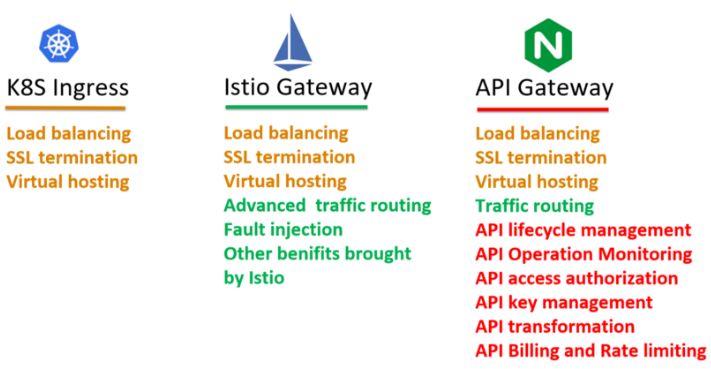
近期准备在公司用起来。
一,Ambassador 是什么?
ambassador是datawire开源的服务网关,很好的支持kubernetes。具体详细介绍参考官网:https://www.getambassador.io/about/why-ambassador
Ambassador is an open source, Kubernetes-native API Gateway built on Envoy Proxy.
二,为什么先把Ambassador ?
网上关于K8S Ingress的比较文档:
http://tuohuang.info/ambassador-jwt-istio#.XVP-KfluaM8
https://juejin.im/post/5d4919ce5188251dff55b08f
https://www.lijiaocn.com/%E9%A1%B9%E7%9B%AE/2019/05/21/apigateway-base-envoy-compare.html
https://zhuanlan.zhihu.com/p/61364466
https://blog.csdn.net/hxpjava1/article/details/79375452
https://juejin.im/post/5bacb35b5188255c9e02dc71
http://www.sohu.com/a/314009713_465944
http://tuohuang.info/ambassador-jwt-istio#.XVtCjPkzbRY
三,安装过程
1, 预先下载好镜像,应用如下yaml文件
https://getambassador.io/yaml/ambassador/ambassador-rbac.yaml
2, 针对实际情况,启动nodePort作为service。
---
apiVersion: v1
kind: Service
metadata:
  name: ambassador
spec:
  type: NodePort
  ports:
   - port: 80
     targetPort: 8080
  selector:
    service: ambassador
3, 测试nginx跳转
nginx.yaml内容如下(使用annotations 来进行声明式配置,方便分散管理。如果是default的命名空间,mapping中对应服务可省略.namespace后缀):
apiVersion: apps/v1
kind: Deployment
metadata:
  name: nginx-deploy
spec:
  replicas: 1
  selector:
    matchLabels:
      name: nginx
  template:
    metadata:
      labels:
        name: nginx
    spec:
      containers:
        - name: nginx
          image: harbor.xxx.com.cn/base/middleware/nginx:1.13-alpine
          imagePullPolicy: IfNotPresent
          ports:
            - containerPort: 80
---
apiVersion: v1
kind: Service
metadata:
  name: nginx-service
  annotations:
    getambassador.io/config: |
      ---
      apiVersion: ambassador/v1
      kind: Mapping
      name: ngnix_mapping
      prefix: /
      service: nginx-service:80
      ---
      apiVersion: ambassador/v1
      kind: Mapping
      name: nginx-backend_mapping
      prefix: /backend/
      service: nginx-service:80
      labels:
        ambassador:
          - request_label:
            - nginx

spec:
  ports:
    - name: nginx
      port: 80
      targetPort: 80
      protocol: TCP
  selector:
    name: nginx
4, 测试tomcat跳转(request_label其实是在service多个port中来作过滤选择的)
---
apiVersion: apps/v1
kind: Deployment
metadata:
  name: tomcat-deploy
spec:
  replicas: 2
  selector:
    matchLabels:
      app: tomcat-deploy
  template:
    metadata:
      labels:
        app: tomcat-deploy
    spec:
      containers:
      - name: tomcat
        image: harbor.xxx.com.cn/official_hub/tomcat:8.5.23.0
        imagePullPolicy: IfNotPresent
        ports:
            - containerPort: 8080

---
apiVersion: v1
kind: Service
metadata:
    name: tomcat-svc
    annotations:
      getambassador.io/config: |
        ---
        apiVersion: ambassador/v1
        kind: Mapping
        name: tomcat_mapping
        prefix: /tomcat-svc
        service: tomcat-svc.default:8080
        ---
        apiVersion: ambassador/v1
        kind: Mapping
        name: tomcat-backend_mapping
        prefix: /tomcat/
        service: tomcat-svc.default:8080
        labels:
          ambassador:
            - request_label:
              - tomcat
spec:
  ports:
    - name: tomcat
      port: 8080
      targetPort: 8080
  selector:
    app: tomcat-deploy
5, 验证
根据几节的内容,分别访问如下几个url,检测其生效。
http://3.2.10.1:xxxx/ambassador/v0/diag/
http://3.2.10.1:30080/backend/hello.html
http://3.2.10.1:30080/tomcat/
四,ambassador性能监控
1, zipkin作api调用性能分析
参考url:https://www.getambassador.io/user-guide/tracing-tutorial
---
apiVersion: v1
kind: Service
metadata:
  name: zipkin
  annotations:
    getambassador.io/config: |
      ---
      apiVersion: ambassador/v1
      kind: TracingService
      name: tracing
      service: zipkin:9411
      driver: zipkin
spec:
  selector:
    app: zipkin
  ports:
  - port: 9411
    name: http
    targetPort: http
    nodePort: 32764
  type: NodePort
---
apiVersion: extensions/v1beta1
kind: Deployment
metadata:
  name: zipkin
spec:
  replicas: 1
  strategy:
    type: RollingUpdate
  template:
    metadata:
      labels:
        app: zipkin
    spec:
      containers:
      - name: zipkin
        image: harbor.xxx.com.cn/3rd_part/openzipkin/zipkin:2.16
        imagePullPolicy: IfNotPresent
        ports:
        - name: http
          containerPort: 9411
http://3.3.10.5:xxx/zipkin
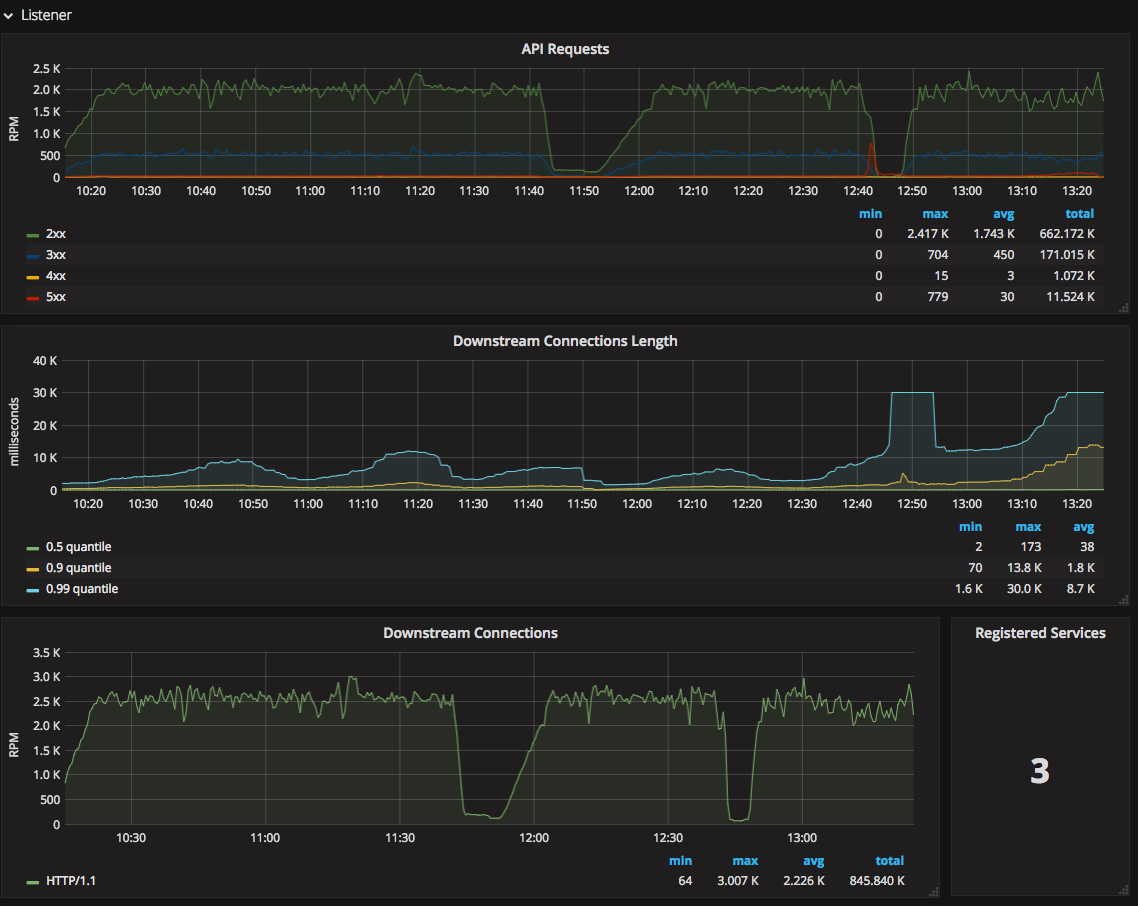
2, Prometheus,grafana作api的性能展示
参考URL:https://www.getambassador.io/user-guide/monitoring
【这是基于prometheus operator安装的,可能要和现在整合】
K8s的api gateway---ambassador实操的更多相关文章
- 第7章使用请求测试-测试API . Rspec: everyday-rspec实操。
测试应用与非人类用户的交互,涵盖外部 API 7.1request test vs feature test 对 RSpec 来说,这种专门针 对 API 的测试最好放在 spec/requests ...
- ambassador kubernetes native api gateway
github 上的介绍: Ambassador is an open source Kubernetes-native API Gateway built on Envoy, designed for ...
- 动手实操(一):如何用七牛云 API 实现相片地图?
实操玩家: 在苹果手机上,我们只要打开定位服务,拍照后便能在相簿中找到地图,地图上显示着在各地拍摄的相片.网站上这种显示方式也并不少见,例如 Flickr.即将关闭的 Panoramio 等. 作为地 ...
- Appium常用Api实操
本文是基于python语言在android上实操的,仅记录(忽略排版~~~) 会不时更新的: from appium import webdriver from selenium.webdriver. ...
- Istio的流量管理(实操一)(istio 系列三)
Istio的流量管理(实操一)(istio 系列三) 使用官方的Bookinfo应用进行测试.涵盖官方文档Traffic Management章节中的请求路由,故障注入,流量迁移,TCP流量迁移,请求 ...
- Istio的流量管理(实操二)(istio 系列四)
Istio的流量管理(实操二)(istio 系列四) 涵盖官方文档Traffic Management章节中的inrgess部分. 目录 Istio的流量管理(实操二)(istio 系列四) Ingr ...
- Istio的流量管理(实操三)
Istio的流量管理(实操三) 涵盖官方文档Traffic Management章节中的egress部分.其中有一小部分问题(已在下文标注)待官方解决. 目录 Istio的流量管理(实操三) 访问外部 ...
- [转载] 构建微服务:使用API Gateway
原文: http://mp.weixin.qq.com/s?__biz=MzA5OTAyNzQ2OA==&mid=206889381&idx=1&sn=478ccb35294c ...
- 微服务实战(二):使用API Gateway
微服务实战(一):微服务架构的优势与不足 微服务实战(二):使用API Gateway 微服务实战(三):深入微服务架构的进程间通信 微服务实战(四):服务发现的可行方案以及实践案例 微服务实践(五) ...
随机推荐
- excel制作田字格,excel行高磅,列宽1/10英寸;
打开一个excel表格,发现列宽是行高的4倍: 开始-格式中查看,发现行高14.25磅,列宽8.38*1/10英寸: 网上百度,了解1英寸=72磅: 那么列宽8.38=60.336磅: 60.336英 ...
- c# 第40节 密封类、密封方法
本节内容: 1:密封的存在意义 2:密封方法的实现 1:密封的存在意义 2:密封方法的实现 class2::父类 class Class2 { public virtual void show() { ...
- 攻防世界web之PHP2
题目 御剑扫描无果,源码也无发现 但是在url后面添加index.phps发现代码泄露 右击查看源码 审计代码 首先不能admin等于get传过来的值 又要使admin等于get传值 在get传值之前 ...
- CF455C Civilization 树的直径
问题描述 LG-CF455C 题解 首先,题目给出了 \(m\) 条边,对这 \(n\) 个点, \(m\) 条边组成的森林,跑出每棵树的直径,同时使用并查集维护树的连通性. 考虑合并两棵树的情况:设 ...
- asp.net mvc 系统操作日志设计
第一步.系统登录日志 通过signalr来管理用户的登录情况,并保存用户的登录记录. 第二步 通过mvc过滤器,来横切路由访问记录. 保存方式:通过httpclient异步请求webapi 数据通过m ...
- [LOJ 6432][PKUSC 2018]真实排名
[LOJ 6432][PKUSC 2018]真实排名 题意 给定 \(n\) 个选手的成绩, 选中其中 \(k\) 个使他们的成绩翻倍. 对于每个选手回答有多少种方案使得他的排名不发生变化. \(n\ ...
- RSA加密与解密
/// <summary> /// RSA 公钥加密 /// </summary> /// <param name="content">要加密的 ...
- 剑指offer:对称的二叉树(镜像,递归,非递归DFS栈+BFS队列)
1. 题目描述 /** 请实现一个函数,用来判断一颗二叉树是不是对称的. 注意,如果一个二叉树同此二叉树的镜像是同样的,定义其为对称的 */ 2. 递归 思路: /** 1.只要pRoot.left和 ...
- redis-5.0.5.tar.gz 安装
参考5.0安装,地址:https://my.oschina.net/u/3367404/blog/2979102 前言 安装Redis需要知道自己需要哪个版本,有针对性的安装. 比如如果需要redis ...
- netstat查看端口状态
netstat netstat -tunlp 用于显示 tcp,udp 的端口和进程等相关情况. netstat 查看端口占用语法格式: netstat -tunlp | grep 端口号 -t (t ...