
OpenSSL创建证书
使用OpenSSL创建证书。采用的OS为CentOS7.
1. 修改OpenSSL的配置文件
vim /etc/pki/tls/openssl.cnf
[ CA_default ]

dir             = /etc/pki/CA           # Where everything is kept

certs           = $dir/certs            # Where the issued certs are kept

crl_dir         = $dir/crl              # Where the issued crl are kept

database        = $dir/index.txt        # database index file.

#unique_subject = no                    # Set to 'no' to allow creation of

                                        # several ctificates with same subject.

new_certs_dir   = $dir/newcerts         # default place for new certs.

certificate     = $dir/my-ca.crt        # The CA certificate

serial          = $dir/serial           # The current serial number

crlnumber       = $dir/crlnumber        # the current crl number

                                        # must be commented out to leave a V1 CRL

crl             = $dir/crl.pem          # The current CRL

private_key     = $dir/private/my-ca.key # The private key

RANDFILE        = $dir/private/.rand    # private random number file

x509_extensions = usr_cert              # The extentions to add to the cert
2. 准备文件目录
cd /etc/pki/CA

rm -rf *

cd /etc/pki/tls/misc

./CA -newca
ctrl-c
创建Serial文件
cd /etc/pki/CA
echo 00 > serial

3. 生成根密钥
cd /etc/pki/CA

openssl genrsa -out private/my-ca.key
or
( umask 077; openssl genrsa -out private/cakey.pem )
4. 生成根证书
openssl req -new -x509 -key private/my-ca.key -out my-ca.crt
5. 创建用户证书密钥和证书请求文件
cd /root

openssl genrsa -out nginx.key

openssl req -new -key nginx.key -out nginx.csr
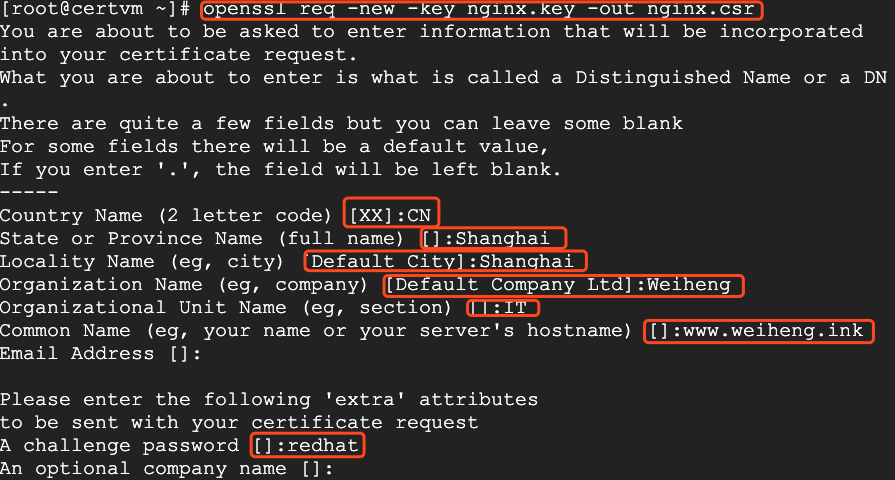
6. 用CA签署证书
openssl ca -in nginx.csr -out nginx.crt
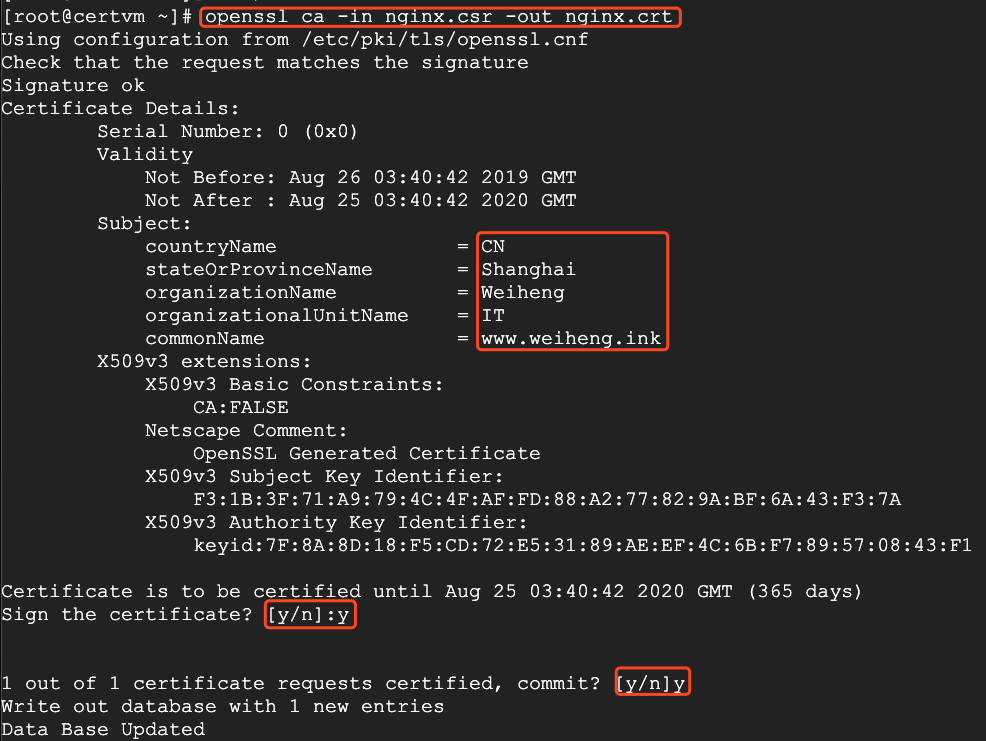
这样,证书就创建成功了。
OpenSSL创建证书的更多相关文章
- 使用Openssl创建证书
概述 SSL证书通过在客户端浏览器和Web服务器之间建立一条SSL安全通道(Secure socketlayer(SSL),SSL安全协议主要用来提供对用户和服务器的认证:对传送的数据进行加密和隐藏: ...
- openssl 创建证书的总结和注意事项
1.该文章从网上看了好多博客,并经过实践形成.环境为ubuntu12和ubuntu14 "========================================大纲提要和注意事项= ...
- 使用openssl创建自签名证书及部署到IIS教程
概要 本文讲解三个部分:1. 创建自签名证书2. 创建自己的证书颁发机构3. 以及如何配置IIS 创建自签名证书 首先,创建一个私钥文件: openssl genrsa -out myselfsign ...
- 使用 OpenSSL 创建私有 CA:3 用户证书
OpenSSL 创建私有 CA 三部曲:使用 OpenSSL 创建私有 CA:1 根证书使用 OpenSSL 创建私有 CA:2 中间证书使用 OpenSSL 创建私有 CA:3 用户证书 在前文&l ...
- 使用 OpenSSL 创建私有 CA:2 中间证书
OpenSSL 创建私有 CA 三部曲:使用 OpenSSL 创建私有 CA:1 根证书使用 OpenSSL 创建私有 CA:2 中间证书使用 OpenSSL 创建私有 CA:3 用户证书 本文将在前 ...
- 使用 OpenSSL 创建私有 CA:1 根证书
OpenSSL 创建私有 CA 三部曲:使用 OpenSSL 创建私有 CA:1 根证书使用 OpenSSL 创建私有 CA:2 中间证书使用 OpenSSL 创建私有 CA:3 用户证书 OpenS ...
- centos 配置Openssl并创建证书
具体详情参考:http://wiki.centos.org/HowTos/Https 一.安装软件 yum install mod_ssl openssl 二.创建证书: # Generate pri ...
- [转帖]用 OpenSSL 创建可以用于 https 的证书
用 OpenSSL 创建可以用于 https 的证书 开会时 说到了安全问题 就简单鼓捣了一下 以后还是用nginx 转发比较好一些. https://blog.csdn.net/joyous/art ...
- RSA非对称加密,使用OpenSSL生成证书,iOS加密,java解密
最近换了一份工作,工作了大概一个多月了吧.差不多得有两个月没有更新博客了吧.在新公司自己写了一个iOS的比较通用的可以架构一个中型应用的不算是框架的一个结构,并已经投入使用.哈哈 说说文章标题的相关的 ...
随机推荐
- JavaScript 加减危机——为什么会出现这样的结果?
在日常工作计算中,我们如履薄冰,但是 JavaScript 总能给我们这样那样的 surprise~ 0.1 + 0.2 = ? 1 - 0.9 = ? 如果小伙伴给出内心的结果: 0.1 + 0.2 ...
- Java 线程的基本使用
GitHub Page: http://blog.cloudli.top/posts/Java-线程的基本使用/ 创建线程 创建线程的方式有两种: 继承 Thread 类 实现 Runnable 接口 ...
- 剑指Offer_Java_顺时针打印矩阵(二维数组)
顺(逆)时针打印矩阵 算法思想: 简单来说,就是不断地收缩矩阵的边界 定义四个变量代表范围,up(初始0).down(初始-行高).left(初始-0).right(初始-列宽), 向右走存入整行的值 ...
- C# 调用打印机打印文件
C# 调用打印机打印文件,通常情况下,例如Word.Excel.PDF等可以使用一些对应的组件进行打印,另一个通用的方式是直接启用一个打印的进程进行打印.示例代码如下: using System.Di ...
- linux教程:[3]配置Zookeeper开机启动
ZooKeeper是Hadoop的正式子项目: Hadoop是一个分布式系统基础架构,由Apache基金会所开发: Zookeeper能够用来leader选举:也就是你有N+1台同样的服务器的时候又z ...
- 手机网页唤醒支付宝APP发送加好友验证
手机网页唤醒支付宝APP发送加好友验证 <!DOCTYPE html> <html> <head> <meta charset="utf-8&quo ...
- qt 操作串口
第三方类下载 https://sourceforge.net/projects/qextserialport/files/ 目录介绍 搭建工程 拷贝qextserialbase.cpp.qextser ...
- ASP.NET Core 2.2 和之前版本区别: 可以在IIS上进行ASP.NET核心进程托管 (翻译)
原文链接: https://weblog.west-wind.com/posts/2019/Mar/16/ASPNET-Core-Hosting-on-IIS-with-ASPNET-Core-22 ...
- 使用vnc远程操控Centos7.6
安装vncserver [root@elegant-snap-3 ~]# yum install tigervnc-server -y Loaded plugins: fastestmirror De ...
- javascript之BOM对象(二location对象)
一.location对象提供和当前加载的文档相关的信息还有一些导航功能.location对象是window对象的属性,同时也是document对象的属性.window.location和documen ...