
How to do SSH Tunneling (Port Forwarding)
How to do SSH Tunneling (Port Forwarding)
In this post we will see how ssh works?, what is SSH tunneling? what is important of ssh tunnels and how to setup the ssh tunnel.
When SSH server is installed in machine then by default its allowed ssh tunneling.
SSH Tunneling (Port Forwarding)
Tunneling is the concept to encapsulate the network protocol to another protocol. here we put into SSH. so all network communication are encrypted. It also called Port Forwarding. because in ssh tunneling we are going to bind one local port. so what are the packet we are going to send that particular port, all packets are transparently encrypt and delivered to remote system.
What is the need for SSH Tunneling?
SSH is enough to administrate the remote system. its not enough to access the all services which are available in remote system.
let i describe in the following scenario,

now lets consider the scenario, System (192.168.56.101) is my system its connected to internet and server its called PrivateServer (192.168.56.102) machine have two Ethernet interfaces. one is connected to Internet. and another is connected to 10.10.1.0/24 local network. Intranet (10.10.1.11) machine is part of 10.10.1.0/24 sub network.
Note : here i mentioned local system(192.168.56.101) and remote system(192.168.56.102) are looking like local sub-net IP address. For VM purpose i used these IP address. But reality is it should be any public IP address.
Important Note : SSH Server daemon service is running in port 22 in all these three system and firewall is allowed to connect these system using SSH client.
now System (192.168.56.101) can communicate to PrivateServer (192.168.56.102), because both system are connected to internet directly. But System (192.168.56.101) can't communicate to Intranet (10.10.1.11) machine, because from System (192.168.56.101) perspective 10.10.1.11 is non route able IP address. 10.10.1.11 is not public IP address, its local IP address. so we can't route the packets directly.
Now the situation like that from System(192.168.56.101) i want to access the Intranet (10.10.1.11) machine. without modifying IP tables, redirect, like tools/services in intermediate (or) target machine. Because i m not sys-admin, so i don't have root privilege.
One of the possible solution is first use ssh to log in into PrivateServer(192.168.56.102) and then again (nested) log in to Intranet(10.10.1.11). Yes its good idea, its works, now i can remotely administrate the Intranet(10.10.1.11). but if Intranet(10.10.1.11) offer some services like VNC, Apache httpd, smtp, pop3, squid proxy then how we can access these services from System(192.168.56.101)?
here its not strictly Intranet(10.10.1.11) offer these service, it may be 10.10.1.0/24 sub net any one of the machine can offer these services. Even in 10.10.1.0/24 sub-net have one intranet-website. how we can access these site from System(192.168.56.101) machine Firefox?
The solution is SSH Tunneling or SSH Port Forwarding
How SSH Works
In terminal when we type ssh ramki@Private-Server.org then terminal application invoke the ssh client, ssh client connect to Private-Server.org's SSH server in port 22. then both client and server exchange the identity, public keys, cipher suite information and create one shell process in server side. then secure channel is established between client and server. then future all commands from 192.168.101 are go through this secure channel to server (192.168.56.102) and execute the command and the response are come back in same secure channel.
For example after establish ssh, i will issue the ls command. the ls command goes to SSH client then that command encapsulate and encrypted then send to server. Server decrypt and extract the command and execute the command in shell (which is created when ssh is established), the output of ls command is not printed in shell. Its redirect the output to SSH client in same secure channel and follow the same procedure (encapsulate and encrypt) . and finally Terminal application shows the output of ls command.
I think here all command is encoded to Base64 encoding before send to server and before encrypt.(But i am not sure)
here very important note that SSH is not disturb the port other than 22 (or which port ssh server is running).
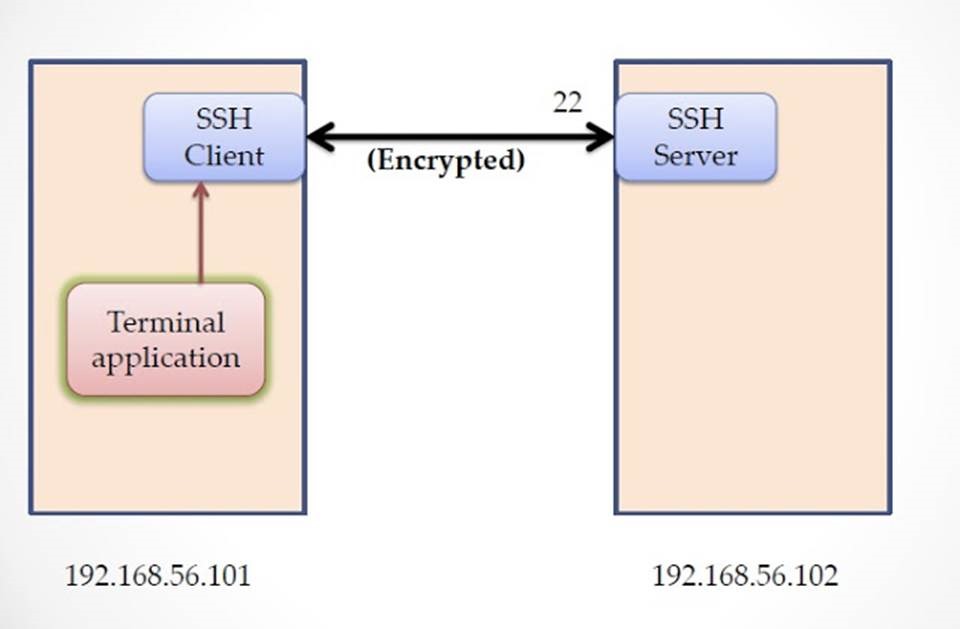
SSH Tunneling
SSH can work many channel's simultaneously. In normal case we use shell channel. But now we are going to use data channel. so base concept is, in 192.168.56.101 machine ssh client bind one port and establish secure connection with server (192.168.56.102). and create one data channel and shell channel. (we can omit shell channel using -N option in ssh command).
Now In system machine ( 192.168.56.101) any application send data to that port (which one ssh client is bind), then ssh client transparently receive the data and encrypt and sent to server machine. In server ( 192.168.56.102) receive and decrypt it and make the local call. (we discuss later)
SSH Tunneling types
SSH offers three types of tunneling
Dynamic Tunneling (SOCKS Proxy)
Local Port Forwarding
Remote Port Forwarding
Dynamic Tunneling
Command : ssh -D 8080 ramki@192.168.56.102
here -D 8080 is mention SOCKS v5 Proxy bind 8080 port in client side
Now ssh client in 192.168.56.101 machine create one SOCKS proxy server in client side and bind one local port.then connect to 192.168.56.102 remote machine and establish secure channel.
Now all client application like Firefox, chrome,... need to configure the proxy setting to SOCKS proxy server localhost and port number. (check video for reference below the post)
Note : consider server (192.168.56.102) and Intranet (10.10.1.11) both machines run Apache httpd server and bind port 80
After configuration is completes,
in Firefox now type http://localhost/ , we know that in client machine (192.168.56.101) there is no service is running in port 80. but when we hit enter in browser, we can see the website of server machine (192.168.56.102).
How we can access server website using http://localhost/ in client machine?
we configure the proxy in browser. so browser send all HTTP request (even localhost anf 127.0.0.1) to port 8080, here SOCKS proxy is running in that port. Then socks proxy server packs our HTTP request to ssh client and encrypt and send to server. Server decrypt and extract the HTTP Request. Now in server side the HTTP request http://localhost/ is point to server machine itself. so server invoke the request. If any service is running in port 80, is called and response is send back to client using same secure channel. so browser shows server webpage in client side.

We know that from client machine (192.168.56.101) , the IP address 10.10.1.11 is non routable. but now if we issue http://10.10.1.11/ in Firefox browser, its shows the 10.10.1.11 Apache server webpage.
Advantage :
One proxy server is enough to access the all services of remote machine and its sub-net services
Disadvantage:
We need to configure the Proxy settings in client application, If application doesn't support the proxy then we can't access the service.
Local Port Forwarding
Command : ssh -L 8000:localhost:80 ramki@192.168.56.102
here syntax is -L <local port> : <remote hostname> : <remote service port>
so when we execute the command, its bind port 8000 in client side. now what are request send to port 6000 its redirect to ssh client, then encrypt and send to server machine. now server directly delivered the data to port 80.
In dynamic tunnel, server checks the packet and decide where we need to send the packet, for example http://localhost/ then its send to 80, smtp then send to 25. But in local port it always send to single port which one we mention during setup the local port forwarding <remote hostname> : <remote service port>
this time in Firefox no need to configure the proxy, clear the proxy(if its present)
and type in address bar http://localhost:8000/
then HTTP request is going to local port 8000, then its redirect and send to server. server directly send to port 80. (Its based on <remote hostname> : <remote service port>, here nowlocalhost:80)

If u want to access the 10.10.1.11 machine http service then we need to setup new local port forwarding.
we can't use prior port forwarding. because old one always pointing to localhost:80.
Command : ssh -L 8000:10.10.1.11:80 ramki@192.168.56.102
now client side local port 8000 is redirected to 10.10.1.11:80 machine via 192.168.56.102.
In Firefox using http://localhost:8080/ we can access the 10.10.1.11 machine http service.
(For further reference check the video below. in video i show the how to access remote desktop using VNC)

Advantage:
no need to configure the proxy setting
Disadvantage:
Each service we need to setup different local port forwarding, (i.e for example, 2 port forwarding is needed to get 192.168.56.102 and 10.10.1.11 http services)
Remote Port Forwarding
Remote port forwarding is same like local port forwarding. but this time we need to set the port forwarding in server side(192.168.56.102), not client side
Command : ssh -R 8000:localhost:80 ramki@192.168.56.101
here very important changes is from server we going to connect client, so ramki@192.168.56.101 here its 192.168.56.101 not 102.
when we execute this command its connect to client and create 8000 port in client side(not server side).
as usual client use its local port 8000 to connect server. like local port forwarding.
Why Remote Port Forwarding is Important?
Its rarely used, when we worked the machine. that machine is inside the NAT. so from outside no one can access it. that kind of situation physically access the machine and connect back to our client system (192.168.56.101) using remote port forward. then from client machine we can access the services.(Its seems to be little bit confusing, but its simple)
In Windows Machine
In windows machine if want to run ssh server then there is lots of ssh servers are available WinSSHDfreeSSHd, openssh. If we want only ssh client then we can use Putty.
suppose in System(192.168.56.101) i am using Windows then how we access the ssh tunneling.
open the putty and type the host ramki@192.168.56.102 and select Connection->SSH->Tunnels (see the image), then type 8080 in source port and select Dynamic, if u want dynamic tunnel (Its equal to -D 8080 in command option)
|
|

If we want local port forwarding then put any unused port 6000 in source port and destination islocalhost:80 and select Local. (Its equal to -L 6000:localhost:80)

If u want to access 10.10.1.11 machine the remote desktop then make local port forward (check above image) and Destination is 10.10.1.11:5900 here 5900 is the port used by vnc server. then using any vnc client (here i used tightvnc client) to connect ur local port 6000
so mention localhost::6000, here we need to mention double colon ::, because in vnc client port no is specified in this manner. (Check the video )

Bypass Firewall
This SSH Tunnel concept can be use to bypass firewall. lets consider the scenario. In server side its enable firewall and some service are running and these services are can access through localhost or same machine. but u can't access through remote machine. because firewall block the all the port except ssh port (22).
this kind of situation we use tunnel and almost all services can be accessed from outside. because firewall is rule based. In firewall perspective all traffic is goes through port 22. so its allowed. but internally we made tunnel and access all services.
How to prevent SSH Tunnel
Open the ssh server config file /etc/ssh/sshd_config then set the parameter
AllowTcpForwarding no
then restart ssh service. then they not allow the ssh tunnel service, but still we can access ssh shell service.
But in ssh man page they clearly mentioned
" Note that disabling TCP forwarding does not improve security unless users are also denied shell access, as they can always install their own forwarders. "
so still we can use use ssh tunnel even though we set AllowTcpForwarding no. (I will show in my next post)
I hope everything is clear. If any misunderstanding please let me know.
How to do SSH Tunneling (Port Forwarding)的更多相关文章
- 使用MobaXterm配置ssh隧道(port forwarding)
背景描述:如图所示,本地与远程服务器之间存在防火墙,防火墙只允许SSH端口通过,为访问远程服务器,我们可以借助MobaXterm来与SSH服务器建立隧道,使得防火墙外的用户能够访问远程服务器 具体配置 ...
- ssh port forwarding
SSH端口转发,总是忘记,今天记录下.端口转发有两种,一个是local一个是remote(可能还有一种dynamic,还没有研究) 贴个链接 https://www.ssh.com/ssh/tunne ...
- SSH Tunneling Explained
转载: http://chamibuddhika.wordpress.com/2012/03/21/ssh-tunnelling-explained/ March 21, 2012 by Buddhi ...
- SSH 动态端口forwarding是如何工作的
好久没有来了,实在是太懒. 经常用SSH的动态端口forwarding 来FQ,使用像这样的命令: ssh -D 9999 -f -C -q -N sshHost.somewhere.com 这个命令 ...
- 端口转发 Port Forwarding (一)
0x00First 最近发现一些好用的端口转发工具和技巧,计划认真梳理一下 SSH.NC.LCX.EW.FRP 0x01 SSH隧道端口转发 目前利用SSH隧道(SSH tunneling)进行端口转 ...
- OpenSSH高级功能之端口转发(Port Forwarding)
在RedHat提供的系统管理员指南中提到OpenSSH不止是一个安全shell,它还具有X11转发(X11 Forwarding)和端口转发(Port Forwarding)的功能.X11功能一般用于 ...
- ssh tunneling应用案例-AWS EC2 vnc图形化桌面的支持
一般地,无论是AWS EC2还是阿里云的云主机,linux系统默认都只提供ssh登录方式.如果你是一个技术控,非常希望把图形化界面给折腾出来,这其中就不需有vnc server的支持,除此之外,还涉及 ...
- How To Set Up Port Forwarding in Linux
Port forwarding usually used when we want our computer act like a router. Our computer receive the p ...
- ssh免密登陆:sshpass -p [passwd] ssh -p [port] root@192.168.X.X
正文: ssh免密登陆:sshpass -p [passwd] ssh -p [port] root@192.168.X.X
随机推荐
- 数据结构之LinkList
1.结构: 2.Link代码: public class Link { public int iData; public double dData; public Link next; public ...
- 【Gamma阶段】第一次Scrum Meeting
冰多多团队-Gamma阶段第一次Scrum会议 工作情况 团队成员 已完成任务 待完成任务 卓培锦 推广软件,发放调查问卷 修改可移动button以及button手感反馈优化,编辑器风格切换(夜间模式 ...
- An intriguing failing of convolutional neural networks and the CoordConv solution
An intriguing failing of convolutional neural networks and the CoordConv solution NeurIPS 2018 2019- ...
- How to Use Convolutional Neural Networks for Time Series Classification
How to Use Convolutional Neural Networks for Time Series Classification 2019-10-08 12:09:35 This blo ...
- 使用analyze命令统计信息
① 搜集和删除索引.表和簇的统计信息② 验证表.索引和簇的结构③ 鉴定表和簇和行迁移和行链接针对analyze的搜集和删除统计信息功能而言Oracle推荐使用DBMS_STATS包来代替analyze ...
- cordova 的安桌动画
1.cordova 的安桌动画cordova plugin add cordova-plugin-lottie-splashscreenhttps://github.com/timbru31/cord ...
- bladex数据字典关联基础表
一:引用import {getDeptTree} from "@/api/system/dept";二: { label: "部门id", prop: &quo ...
- [Sw] Swoole 生态迷局,基于 Swoole 的第 109 框架
这两天,又一全栈式 Swoole 协程框架面世了 - hyperf,实现思路是我内心点了赞同的,就集成现有 PHP 生态优质组件到 Swoole 的协程中来. 有人想到,为什么不是 Swoole 集成 ...
- Android MVP模式简单介绍:以一个登陆流程为例
老的项目用的MVC的模式,最近完成了全部重构成MVP模式的工作,虽然比较麻烦,好处是代码逻辑更加清楚.简洁,流程更加清晰,对于后续版本迭代维护都挺方便.对于一些想要学习MVP模式的同学来讲,百度搜出来 ...
- Oracle Spatial分区应用研究之六:全局空间索引下按县分区与按省分区效率差异原因分析
1.实验结论 全局空间索引下,不同分区粒度之所有效率会有不同,差异并不在于SDO_FILTER操作本身,而在于对于数据字典表的访问次数上: 分区越多.表上的lob column越多,对数据字典表的访问 ...