
WCF NetTcpBinding
服务端:
<system.serviceModel>
<bindings>
<netTcpBinding>
<binding portSharingEnabled="true" name="tcpbindingConfig">
<security mode="None"/>
</binding>
</netTcpBinding>
</bindings>
<behaviors>
<serviceBehaviors>
<behavior name="serviceBehavior">
<!-- 为避免泄漏元数据信息,请在部署前将以下值设置为 false -->
<!--<serviceMetadata httpGetEnabled="True" httpGetUrl ="http://localhost:8300/myEndpoint"/>-->
<serviceMetadata httpGetEnabled="false" httpsGetEnabled="false"/>
<!-- 要接收故障异常详细信息以进行调试,请将以下值设置为 true。在部署前设置为 false 以避免泄漏异常信息 -->
<serviceDebug includeExceptionDetailInFaults="false"/>
<!--<serviceThrottling maxConcurrentCalls="1000" maxConcurrentSessions="1000" maxConcurrentInstances="1000"/>-->
</behavior>
</serviceBehaviors>
</behaviors>
<protocolMapping>
<add binding="basicHttpsBinding" scheme="https" />
</protocolMapping>
<serviceHostingEnvironment aspNetCompatibilityEnabled="true" multipleSiteBindingsEnabled="true"/>
<services>
<service name="TWS.TcpService" behaviorConfiguration="serviceBehavior">
<endpoint address="" binding="netTcpBinding" contract="TWS.ITcpService" bindingConfiguration="tcpbindingConfig"/>
<endpoint address="mex" binding="mexTcpBinding" bindingConfiguration="" contract="IMetadataExchange"/>
<host>
<baseAddresses>
<add baseAddress="net.tcp://localhost:8299/TcpService"/>
</baseAddresses>
</host>
</service>
</services>
</system.serviceModel>
宿主:
http://www.bubuko.com/infodetail-325542.html
客户端:
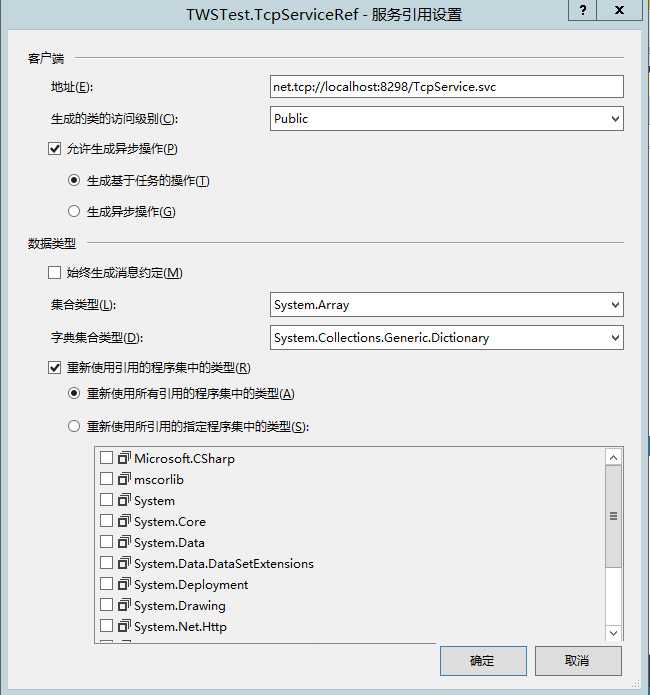
string serviceUri = "net.tcp://localhost:8298/TcpService.svc";
NetTcpBinding tcpbinding = new NetTcpBinding(SecurityMode.None);
tcpbinding.MaxReceivedMessageSize = int.MaxValue;
tcpbinding.ReaderQuotas.MaxDepth = 32;
tcpbinding.ReaderQuotas.MaxStringContentLength = int.MaxValue;
tcpbinding.SendTimeout = TimeSpan.MaxValue;
tcpbinding.ReceiveTimeout = new TimeSpan(0, 10, 10);
EndpointAddress endpoing = new EndpointAddress(serviceUri);
using (ChannelFactory<ITcpService> chf = new ChannelFactory<ITcpService>(tcpbinding,endpoing)) {
ITcpService proxy = chf.CreateChannel();
string result=proxy.GetData(10000);
MessageBox.Show(result);
}
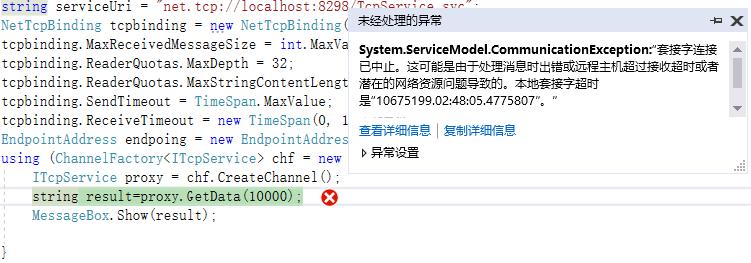
注意安全模式需要客户端与服务端匹配,否则会报错
System.ServiceModel.CommunicationException:“套接字连接已中止。这可能是由于处理消息时出错或远程主机超过接收超时或者潜在的网络资源问题导致的....
WCF NetTcpBinding的更多相关文章
- WCF NetTcpBinding 由于系统缓冲区空间不足或队列已满,不能执行套接字上的操作
背景:WindowsService + WCF + NetTcpBinding 之前一直使用http协议模式,改为net.tcp之后隔段时间出现:由于系统缓冲区空间不足或队列已满,不能执行套接字上的操 ...
- 如何在IIS中承载WCF NetTcpBinding 服务
这篇博客将介绍如何在IIS中承载NetTcpBinding的服务. 1. 首先准备服务代码. Contract namespace Contract { [ServiceContract] publi ...
- WCF : 如何将NetTcpBinding寄宿在IIS7上
摘要 : 从IIS 7 开始, IIS增加了对非HTTP协议的支持. 因此, 自IIS 7之后, 可以将NetTcpBinding等非HTTP协议的Bindings直接寄宿在IIS上面. 本文将介绍如 ...
- WCF 非http寄宿IIS
摘要 从IIS 7 开始, IIS增加了对非HTTP协议的支持. 因此, 自IIS 7之后, 可以将NetTcpBinding等非HTTP协议的Bindings直接寄宿在IIS上面. 本文将介绍如何在 ...
- 我(webabcd)的文章索引
[最后更新:2014.08.28] 重新想象 Windows Store Apps 系列文章 重新想象 Windows 8 Store Apps 系列文章 重新想象 Windows 8 Store A ...
- WCF 用netTcpbinding,basicHttpBinding 传输大文件
问题:WCF如何传输大文件 方案:主要有几种绑定方式netTcpbinding,basicHttpBinding,wsHttpbinding,设置相关的传输max消息选项,服务端和客户端都要设置,tr ...
- 使用NetTcpBinding,WCF服务未能被激活
我的WCF采用的是NetTcpBinding,使用时就会报错,换成BasicHttpBinding,就一切正常 The requested service, 'net.tcp://wcf.xxxxx. ...
- WCF绑定netTcpBinding寄宿到IIS
继续沿用上一篇随笔中WCF服务类库 Wettery.WcfContract.Services WCF绑定netTcpBinding寄宿到控制台应用程序 服务端 添加WCF服务应用程序 Wettery. ...
- WCF绑定netTcpBinding寄宿到控制台应用程序
契约 新建一个WCF服务类库项目,在其中添加两个WCF服务:GameService,PlayerService 代码如下: [ServiceContract] public interface IGa ...
随机推荐
- SpringSecurity的简单入门
以下是大体思路 1.导入坐标 <properties> <spring.version>4.2.4.RELEASE</spring.version> </pr ...
- location 浅解析
https://www.baidu.com/s?ie=UTF-8&wd=sdasds location.href // 'https://www.baidu.com/s?ie=UTF-8&am ...
- intellij ide调用一个对象所有的set方法
1.下载地址:https://github.com/yoke233/genSets/releases/download/1.1/genSets.jar 2.plugin 从本地磁盘安装找到jar,并重 ...
- NoSql数据库Redis系列(5)——Redis主从复制
前面介绍Redis,我们都在一台服务器上进行操作的,也就是说读和写以及备份操作都是在一台Redis服务器上进行的,那么随着项目访问量的增加,对Redis服务器的操作也越加频繁,虽然Redis读写速度都 ...
- Use of Time-series Based Forecasting Technique for Balancing Load and Reducing Consumption of Energy in a Cloud Data Center
年份:2017 摘要: 由于工作负载分配不均,一些服务器变得过载,而另一些服务器仍处于欠载状态. 为了实现负载平衡,需要从过度使用的节点迁移一些虚拟机. 但是与此不同的是,本文提出了一种负载预测算法, ...
- pyqt5设置背景图片出现问题
在使用pyqt5时,用qtdesign设置好背景图片,如何设置自行百度,预览没问题,用ptuic5转换为代码却发现显示不了: 首先:我在qtdesign中导入的是pic.qrc,但是转换的代码最后一句 ...
- 查询优化 In Oracle
Cost-based query transformation in Oracle Enhanced Subquery Optimizations in Oracle Cost-based query ...
- Win10 cmd控制台程序会被鼠标单击暂停的解决办法
右键单击顶部白框,选择属性或默认值,将快速编辑模式的勾取消就可以了,最后记得点击确定
- Python高级笔记(十一)装饰器【面试】
1. 需求 开发封闭原则:虽然在这个原则是用的面向对象开发,但是也适用于函数式编程,简单来说,它规定已经实现的功能代码不允许被修改,但可以被拓展,即: 封闭:已实现的功能代码块 开发:对拓展开发 2. ...
- 流程图软件Microsoft Visio
简介 Visio是一款能处理复杂信息.系统和流程进行可视化.分析和交流的软件,从“office 2003”以后,Visio作为一个单独软件发行,不再集成于office办公软件. 下载安装 官方下载最新 ...