
WCF NetTcpBinding
服务端:
<system.serviceModel>
<bindings>
<netTcpBinding>
<binding portSharingEnabled="true" name="tcpbindingConfig">
<security mode="None"/>
</binding>
</netTcpBinding>
</bindings>
<behaviors>
<serviceBehaviors>
<behavior name="serviceBehavior">
<!-- 为避免泄漏元数据信息,请在部署前将以下值设置为 false -->
<!--<serviceMetadata httpGetEnabled="True" httpGetUrl ="http://localhost:8300/myEndpoint"/>-->
<serviceMetadata httpGetEnabled="false" httpsGetEnabled="false"/>
<!-- 要接收故障异常详细信息以进行调试,请将以下值设置为 true。在部署前设置为 false 以避免泄漏异常信息 -->
<serviceDebug includeExceptionDetailInFaults="false"/>
<!--<serviceThrottling maxConcurrentCalls="1000" maxConcurrentSessions="1000" maxConcurrentInstances="1000"/>-->
</behavior>
</serviceBehaviors>
</behaviors>
<protocolMapping>
<add binding="basicHttpsBinding" scheme="https" />
</protocolMapping>
<serviceHostingEnvironment aspNetCompatibilityEnabled="true" multipleSiteBindingsEnabled="true"/>
<services>
<service name="TWS.TcpService" behaviorConfiguration="serviceBehavior">
<endpoint address="" binding="netTcpBinding" contract="TWS.ITcpService" bindingConfiguration="tcpbindingConfig"/>
<endpoint address="mex" binding="mexTcpBinding" bindingConfiguration="" contract="IMetadataExchange"/>
<host>
<baseAddresses>
<add baseAddress="net.tcp://localhost:8299/TcpService"/>
</baseAddresses>
</host>
</service>
</services>
</system.serviceModel>
宿主:
http://www.bubuko.com/infodetail-325542.html
客户端:
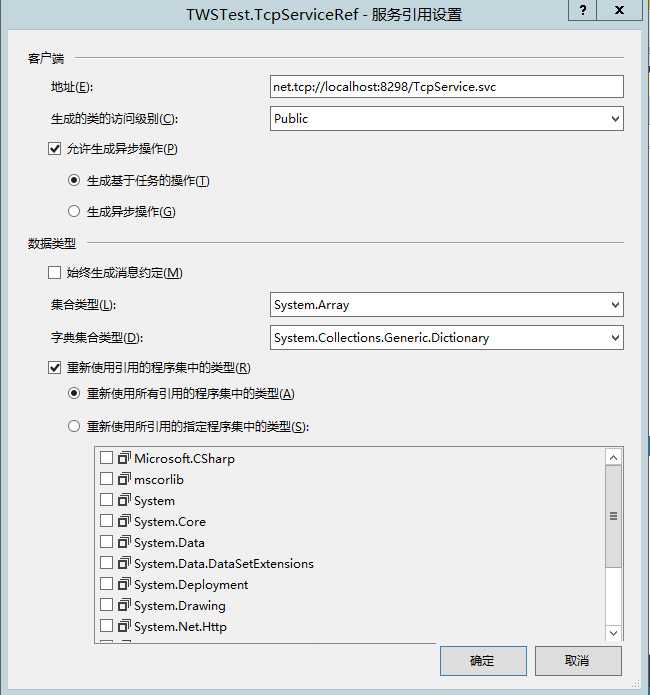
string serviceUri = "net.tcp://localhost:8298/TcpService.svc";
NetTcpBinding tcpbinding = new NetTcpBinding(SecurityMode.None);
tcpbinding.MaxReceivedMessageSize = int.MaxValue;
tcpbinding.ReaderQuotas.MaxDepth = 32;
tcpbinding.ReaderQuotas.MaxStringContentLength = int.MaxValue;
tcpbinding.SendTimeout = TimeSpan.MaxValue;
tcpbinding.ReceiveTimeout = new TimeSpan(0, 10, 10);
EndpointAddress endpoing = new EndpointAddress(serviceUri);
using (ChannelFactory<ITcpService> chf = new ChannelFactory<ITcpService>(tcpbinding,endpoing)) {
ITcpService proxy = chf.CreateChannel();
string result=proxy.GetData(10000);
MessageBox.Show(result);
}
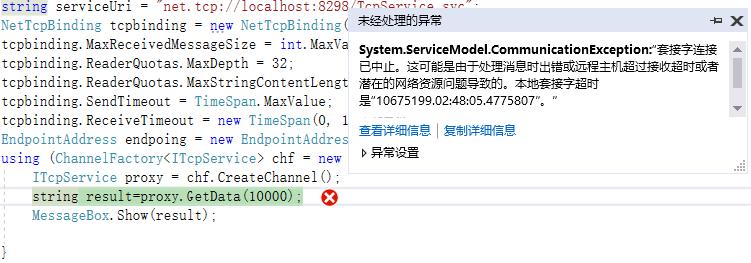
注意安全模式需要客户端与服务端匹配,否则会报错
System.ServiceModel.CommunicationException:“套接字连接已中止。这可能是由于处理消息时出错或远程主机超过接收超时或者潜在的网络资源问题导致的....
WCF NetTcpBinding的更多相关文章
- WCF NetTcpBinding 由于系统缓冲区空间不足或队列已满,不能执行套接字上的操作
背景:WindowsService + WCF + NetTcpBinding 之前一直使用http协议模式,改为net.tcp之后隔段时间出现:由于系统缓冲区空间不足或队列已满,不能执行套接字上的操 ...
- 如何在IIS中承载WCF NetTcpBinding 服务
这篇博客将介绍如何在IIS中承载NetTcpBinding的服务. 1. 首先准备服务代码. Contract namespace Contract { [ServiceContract] publi ...
- WCF : 如何将NetTcpBinding寄宿在IIS7上
摘要 : 从IIS 7 开始, IIS增加了对非HTTP协议的支持. 因此, 自IIS 7之后, 可以将NetTcpBinding等非HTTP协议的Bindings直接寄宿在IIS上面. 本文将介绍如 ...
- WCF 非http寄宿IIS
摘要 从IIS 7 开始, IIS增加了对非HTTP协议的支持. 因此, 自IIS 7之后, 可以将NetTcpBinding等非HTTP协议的Bindings直接寄宿在IIS上面. 本文将介绍如何在 ...
- 我(webabcd)的文章索引
[最后更新:2014.08.28] 重新想象 Windows Store Apps 系列文章 重新想象 Windows 8 Store Apps 系列文章 重新想象 Windows 8 Store A ...
- WCF 用netTcpbinding,basicHttpBinding 传输大文件
问题:WCF如何传输大文件 方案:主要有几种绑定方式netTcpbinding,basicHttpBinding,wsHttpbinding,设置相关的传输max消息选项,服务端和客户端都要设置,tr ...
- 使用NetTcpBinding,WCF服务未能被激活
我的WCF采用的是NetTcpBinding,使用时就会报错,换成BasicHttpBinding,就一切正常 The requested service, 'net.tcp://wcf.xxxxx. ...
- WCF绑定netTcpBinding寄宿到IIS
继续沿用上一篇随笔中WCF服务类库 Wettery.WcfContract.Services WCF绑定netTcpBinding寄宿到控制台应用程序 服务端 添加WCF服务应用程序 Wettery. ...
- WCF绑定netTcpBinding寄宿到控制台应用程序
契约 新建一个WCF服务类库项目,在其中添加两个WCF服务:GameService,PlayerService 代码如下: [ServiceContract] public interface IGa ...
随机推荐
- 「ZJOI2019」麻将
传送门 Solution 对于条件一:记录一个\(cnt\)表示牌个数\(≥2\)的个数 设\(dp_{i,0/1,j,k}\)表示考虑了\(1...i\),当前是否有对子,以\(i-1\),\(i ...
- Stringbuilde方法的用法以及其作用
Stringbuilde的方法有以下几种(常用的):(java中的语法) 在程序开发过程中,我们常常碰到字符串连接的情况,方便和直接的方式是通过"+"符号来实现,但是这种方式达到目 ...
- csp退役前的做题计划1(真)
csp退役前的做题计划1(真) 因为我太菜了,所以在第一次月考就会退役,还是记录一下每天做了什么题目吧. 任务计划 [ ] Z算法(Z Algorithm) 9.28 [x] ARC061C たくさん ...
- 配置docker阿里云加速器
1. 安装/升级Docker客户端 推荐安装1.10.0以上版本的Docker客户端,参考文档 docker-ce 2. 配置镜像加速器 针对Docker客户端版本大于 1.10.0 的用户 您可以通 ...
- 基于Hive的对BiliBili用户信息进行数据分析
用户表字段信息: 1.查出前1000位用户的用户名,关注数和粉丝数. 2.查询关注数大于100的用户的用户名和关注数. 3.查询粉丝数大于100的用户的用户名,粉丝数. 4.查询id为1000的用户的 ...
- 关于java nio的channel读写的一个困惑
这里提的需求基本都是IM的,IM的解决方案是怎么样的? 网上的需求: 1. 某一用户发了一条信息, 需要服务器反回一个信息(这种最简单) 2. 某一用户发了一条信息,需要服务器广播给所有客户端 3. ...
- 每天有300W的pv,我们单台机器的QPS为58,大概需要部署几台这样机器?
每天有300W的pv,我们单台机器的QPS为58,大概需要部署几台这样机器? 一.总结 一句话总结: ( 3000000 * 0.8 ) / (86400 * 0.2 ) = 139 (QPS) 13 ...
- Android: VIVO手机setSpeakerphoneOn p无效,无法切换speaker的问题
setSpeakerphoneOn 方法可以使语音和通话能够强制从手机的扬声器输出,不过在测试了众多手机在调用了这个API之后都可以,唯独有一款VIVO手机不可以: .小米6X(9.0) .Samsu ...
- 转 zabbix debug and zabbix使用percona插件监控mysql
########## https://www.cnblogs.com/keithtt/p/8542987.html zabbix使用percona插件监控mysql 1.添加percona仓库. ...
- ---iOS开发 截取字符串中两个指定字符串中间的字符串---
例如,要截取一个字符串中,两个指定字符串中间的字符串,OC截取方法如下: // 要截取 "> 和 </ 之间的汉字内容: @implementationViewControlle ...