
CentOS7安装Prometheus(二进制)
一、概述
Prometheus是由SoundCloud开发的开源监控报警系统和时序列数据库(TSDB)。Prometheus使用Go语言开发,是Google BorgMon监控系统的开源版本。
环境说明
操作系统:centos 7.6
ip地址:192.168.31.150
下载包
https://prometheus.io/download/
目前最新版是:2.14.0
下载链接:
https://github.com/prometheus/prometheus/releases/download/v2.14.0/prometheus-2.14.0.linux-amd64.tar.gz
二、安装
useradd prometheus -s /sbin/nologin

tar zxvf prometheus-2.14..linux-amd64.tar.gz -C /data

mv /data/prometheus-2.14..linux-amd64 /data/prometheus

chown prometheus:prometheus -R /data/prometheus
封装service
vi /etc/systemd/system/prometheus.service
内容如下:
[Unit]

Description=Prometheus

After=network.target

[Service]

ExecStart=/data/prometheus/prometheus --config.file=/data/prometheus/prometheus.yml --storage.tsdb.path=/data/prometheus/data

User=prometheus

[Install]

WantedBy=multi-user.target
注意:主要修改ExecStart和User
设置开机自启动
systemctl daemon-reload

systemctl enable prometheus

systemctl start prometheus
查看端口
# ss -tunlp|grep prometheus

tcp    LISTEN                 :::                 :::*                   users:(("prometheus",pid=,fd=))
如果是centos 6.x系统,需要自己写一个启动脚本。
vi /etc/init.d/prometheus
内容如下:
#!/bin/bash

# auditd        Start jar package

# chkconfig: 2345 14 87

# description: This is admin project

#define var

PROJECT_SERVICE="prometheus"

PORT=""

. /etc/init.d/functions

export START="nohup /data/prometheus/prometheus --config.file=/data/prometheus/prometheus.yml --storage.tsdb.path=/data/prometheus/data &"

#服务脚本

start(){

    echo "${PROJECT_SERVICE} starting....."

    cd /data/${PROJECT_SERVICE} && eval $START

    if [ $? -eq 0 ];then

            action "$PROJECT_SERVICE is starting" /bin/true

    else

            action "$PROJECT_SERVICE is starting" /bin/false

    fi

}

stop(){

    kill -9 `lsof -t -i:${PORT}`

    if [ $? -eq 0 ];then

        action "$PROJECT_SERVICE is stoping" /bin/true

    else

        action "$PROJECT_SERVICE is stoping" /bin/false

    fi

}

status(){

    if [ `ss -tunlp|grep ${PROJECT_SERVICE}|awk '{print $5}'|cut -d: -f4` = ${PORT} ];then

            echo "${PROJECT_SERVICE} is running....."

    else

            echo "${PROJECT_SERVICE} is stopping....."

    fi

}

case $1 in

start)

    start

    ;;

stop)

    stop

    ;;

restart)

    stop

    start

    ;;

status)

    status

    ;;

*)

   echo "$0 <start|stop|restart>"

esac
添加权限,并启动
chmod 755 /etc/init.d/prometheus

/etc/init.d/prometheus start
三、访问页面
访问targets
http://192.168.31.150:9090/targets
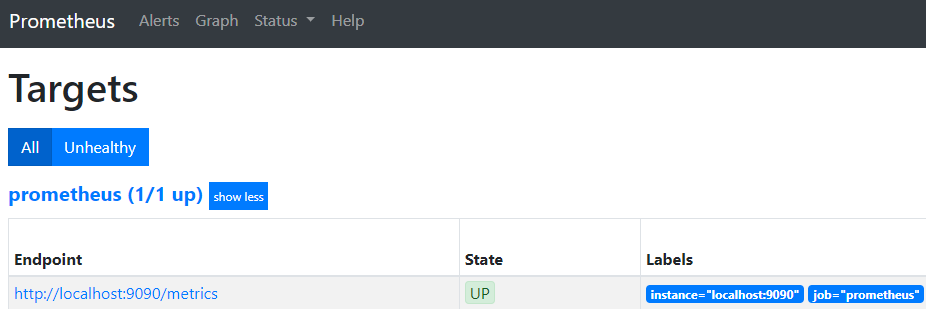
到这里,安装就结束了。
CentOS7安装Prometheus(二进制)的更多相关文章
- CentOS7安装Node_exporter(二进制)
一.概述 Node_exporter是可以在* Nix和Linux系统上运行的计算机度量标准的导出器.Node_exporter 主要用于暴露 metrics 给 Prometheus,其中 metr ...
- CentOS7安装MySQL的方法之通用二进制格式
CentOS7安装MySQL的方法之通用二进制格式
- centos7下docker二进制安装
问题描述: 内网离线环境下,安装docker.二进制来的还是快点,或者内网搭建yum的epel仓库! 环境: centos7.x docker-18.9.0 x86_64 static //二进制 ...
- CentOS7安装部署Prometheus+Grafana (转)
转自:https://www.jianshu.com/p/967cb76cd5ca 作为监控系统的后起之秀,prometheus的安装可谓非常简单,不需要第三方的依赖(数据库.缓存.PHP之类的).下 ...
- [CentOs7]安装mysql(2)
摘要 之前安装过一次mysql,最后配置,发现在本地无法连接,重启服务的时候一直卡在那里不动,感觉是安装的过程出问题,最后没办法还是卸载了,然后重新安装一下. [CentOs7]安装mysql Mys ...
- centos7安装kubeadm
安装配置docker v1.9.0版本推荐使用docker v1.12, v1.11, v1.13, 17.03也可以使用,再高版本的docker可能无法正常使用. 测试发现17.09无法正常使用,不 ...
- centos7安装配置tomcat9
什么是Tomcat Tomcat是由Apache软件基金会下属的Jakarta项目开发的一个Servlet容器,按照Sun Microsystems提供的技术规范,实现了对Servlet和JavaSe ...
- CentOS7安装配置Bacula yum方法
参考: https://www.baidu.com/link?url=o2QIy2YZWjsJPAFJuYFhrH3nPvtyRkSe-o5Q_FqFZ5E1EMOsIOmGeKm0HAonwHOw8 ...
- Centos7 安装Nodejs
使用EPEL安装 EPEL(Extra Packages for Enterprise Linux)企业版Linux的额外软件包,是Fedora小组维护的一个软件仓库项目,为RHEL/CentOS提供 ...
随机推荐
- lg4820 书堆
题目链接 题意概述:n本书,在桌子边缘堆放,求最长长度. 首先……我们需要一点初中物理知识来推一下规律. 下图是一本书的情况,一本书时书伸出1/2处于临界状态,显然. 两本书时,把两本书看作整体,则有 ...
- nginx 正向代理配置
需求场景:从以下俩张图可以比较直观的理解正向代理的作用(在其他文章中会表示为“http代理”,注意当前文档的配置不支持https代理) Nginx正向代理配置文件: server{ listen de ...
- zabbix TCP 连接数监控
直接上配置: 1.修改配置 cat userparameter_tcp_connect.conf UserParameter=tcp_connect.established,/opt/app/zabb ...
- Logback的基本使用方法
一.Logback简介 Logback是由log4j创始人设计的又一个开源日志组件. 1.logback当前分成三个模块:logback-core,logback- classic和logback-a ...
- 【Gamma】Scrum Meeting 1 & 与助教谈话
前言 Gamma阶段第1次会议在5月26日22:00由PM在大运村一公寓三层召开, 时长30min. 任务分配 姓名 今日任务 明日任务 困难 周博闻 用户控制器解耦和注释 用户控制器解耦和注释 周国 ...
- 冰多多团队-第五次Scrum会议
冰多多团队-第五次Scrum会议 工作情况 团队成员 已完成任务 待完成任务 zpj 部分Action整合, 接入语音接口,整合项目解决兼容性问题 ASR bug修复 牛雅哲 跑通了科大讯飞语法识别的 ...
- js正则表达式提取汉字和去掉汉字
//只提取汉字 function GetChinese(strValue) { if(strValue!= null && strValue!= "" ...
- 【Eclipse】Eclipse如何导出java项目为jar包
1.首先确定要导出的项目 从项目结构可以看出,笔者的项目是一个Dynamic Java Project.com/db下面有一个config的数据库配置文件.WEB-INF/lib文件夹下面有依赖的ja ...
- Annotation-based argument resolution 部分2
HandlerMethodArgumentResolver的抽象實現AbstractNamedValueMethodArgumentResolver下的子类 部分1 RequestParamMapM ...
- Q-Dir – 布局灵活的文件管理,强烈推荐
Q-dir 是轻量的文件管理器,特点鲜明,各种布局视图切换灵活,默认四个小窗口组成一个大窗口,操作快捷.软件虽小,却非常好用 下载地址: https://www.softwareok.com/?Dow ...