
JS框架_(JQuery.js)动画效果鼠标跟随
百度云盘 传送门 密码 :4n9u
火狐浏览器上纯CSS_动画效果鼠标跟随效果:
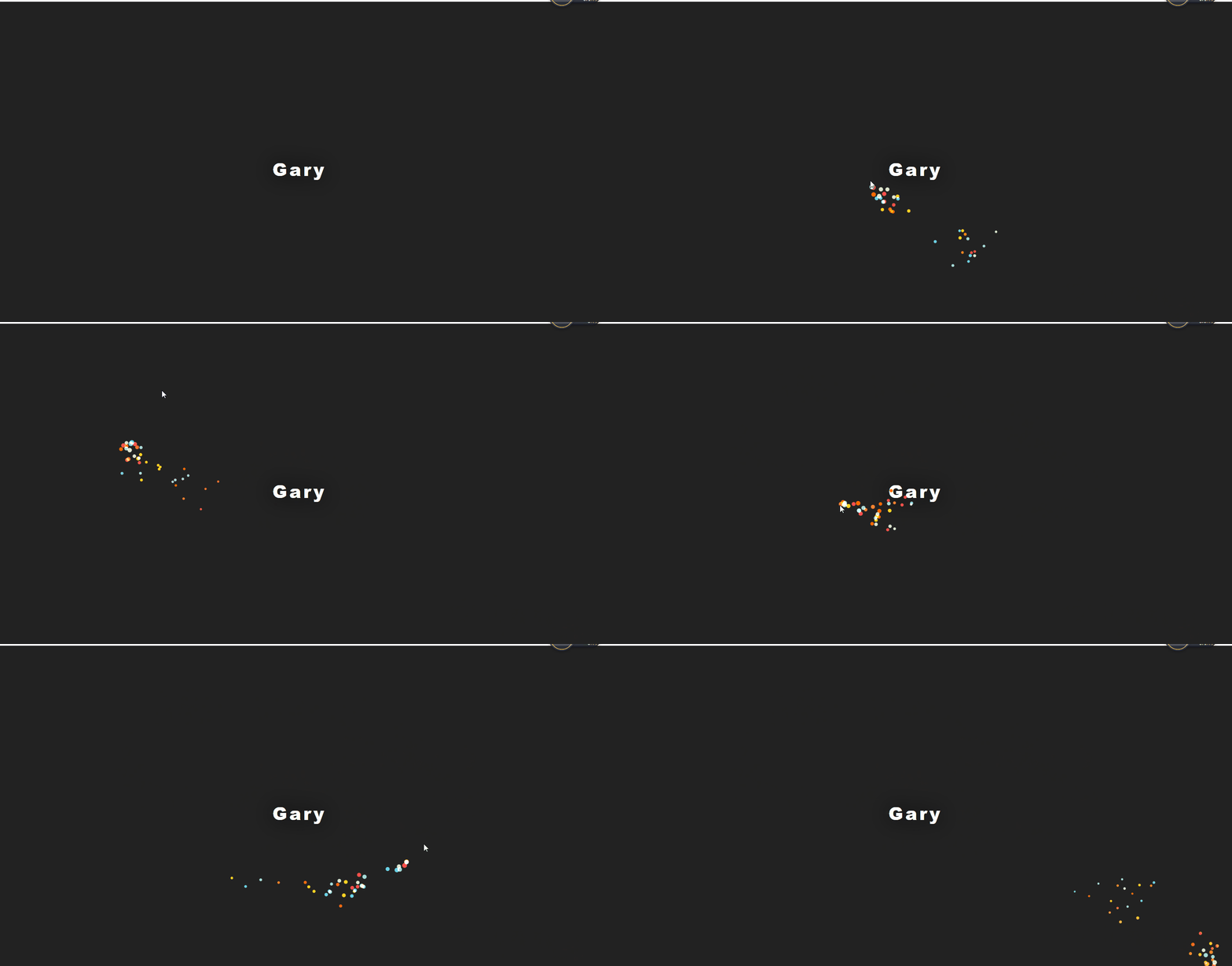
(作者:lily_lcj 传送门)
<!DOCTYPE html PUBLIC "-//W3C//DTD XHTML 1.0 Transitional//EN" "http://www.w3.org/TR/xhtml1/DTD/xhtml1-transitional.dtd">

<html xmlns="http://www.w3.org/1999/xhtml">

<head>

<meta http-equiv="Content-Type" content="text/html; charset=utf-8" />

<title>动画效果鼠标跟随</title>

<link rel="stylesheet" href="css/public.css" />

<link rel="stylesheet" href="css/style.css" />

<script type="text/javascript" src="scripts/respond.js"></script><!-- IE下兼容@media screen -->

<script type="text/javascript" src="scripts/jquery-1.9.1.min.js"></script>

<script type="text/javascript" src="scripts/sketch.min.js"></script>

</head>

<body>

<p>Gary</p>

<!-- 鼠标跟随DIV -->

<div id="test" style="position:fixed;top:0px;z-index:20;"></div>

<script language="JavaScript">

function getOs(){

   var OsObject = "";

   if(navigator.userAgent.indexOf("MSIE")>0) {

        return "MSIE";

   }

   if(isFirefox=navigator.userAgent.indexOf("Firefox")>0){

       $.getScript('scripts/mousefollow.js');

        return "Firefox";

   }

   if(isSafari=navigator.userAgent.indexOf("Safari")>0) {

       $.getScript('scripts/mousefollow.js');

       return "Safari";

   }

   if(isCamino=navigator.userAgent.indexOf("Camino")>0){

       $.getScript('scripts/mousefollow.js');

        return "Camino";

   }

   if(isMozilla=navigator.userAgent.indexOf("Gecko/")>0){

       $.getScript('scripts/mousefollow.js');

        return "Gecko";

   }

}

getOs();

</script>

</body>

</html>
index.html
@charset "utf-8";

/* CSS Document */

/*==============================

    CSS RESET

================================= */

html, body, div, span, applet, object, iframe, h1, h2, h3, h4, h5, h6, p, blockquote, pre, a, abbr, acronym, address, big, cite, code, del, dfn, em, font, img, ins, kbd, q, s, samp, small, strike, strong, sub, sup, tt, var, b, u, i, center, dl, dt, dd, ol, ul, li, fieldset, form, label, legend, table, caption, tbody, tfoot, thead, tr, th, td{

    margin: 0;

    padding: 0;

    outline: 0;

    font-size: 100%;

    vertical-align: baseline;

    background: transparent;

}

body {

    line-height: 1;

    font-family:"Microsoft YaHei","SimHei";

    font-size:12px;

}

ol, ul {

    list-style: none;

}

blockquote, q {

    quotes: none;

}

blockquote:before, blockquote:after, q:before, q:after {

    content: '';

    content: none;

}

:focus {

    outline: 0;

}

ins {

    text-decoration: none;

}

del {

    text-decoration: line-through;

}

table {

    border-collapse: collapse;

    border-spacing: 0;

}

.clearfix:after {

    content: ".";

    display: block;

    height: 0;

    clear: both;

    visibility: hidden;

}

.clearfix {

    display: inline-block;

}

/* Hide from IE Mac \*/

.clearfix{

    display: block;

}

/* End hide from IE Mac */

.none {

    display: none;

}

a{text-decoration:none;}

input{    -webkit-box-sizing:border-box;

        -webkit-appearance: none;

}

/* End Clearfix */
public.css
@charset "utf-8";

/* CSS Document */

body{background:#222;}

.border_left_none{border-left:0px!important;}

#index_top img{

    float:left;

    height:15px;

    margin-top:10px;

    /*border-top:1px solid yellow;

    border-bottom:1px solid yellow;*/

    padding:5px;

    margin-right:20px;

    }

#index_top p{

    color:#fff;

    line-height:15px;

    margin-top:15px;

    float:left;

    font-size:14px;

    font-weight:700;

    padding-left:20px;

    padding-right:20px;

    border-left:1px solid #fff;

    }

@media screen and (min-width: 1200px){

.top_wrap{

    width:1180px;

    height:45px;

    margin:0 auto;

    }

}

@media screen and (min-width: 960px) and (max-width: 1199px){

.top_wrap{

    width:960px;

    height:45px;

    margin:0 auto;

    }

}

p {

  position: fixed;

  top: 50%;

  left: 0;

  right: 0;

  text-align: center;

  transform: translateY(-50%);

  font-size: 40px;

  font-weight: 900;

  color: white;

  text-shadow: 0 0 50px black;

  text-transform: capitalize;

  font-family: 'Roboto','Helvetica','Arial',sans-serif;

  letter-spacing: 5px;

}
style.css
实现效果
getOs()获取浏览器种类,绑定js
<script language="JavaScript">

function getOs(){

   var OsObject = "";

   if(navigator.userAgent.indexOf("MSIE")>0) {

        return "MSIE";

   }

   if(isFirefox=navigator.userAgent.indexOf("Firefox")>0){

       $.getScript('scripts/mousefollow.js');

        return "Firefox";

   }

   if(isSafari=navigator.userAgent.indexOf("Safari")>0) {

       $.getScript('scripts/mousefollow.js');

       return "Safari";

   }

   if(isCamino=navigator.userAgent.indexOf("Camino")>0){

       $.getScript('scripts/mousefollow.js');

        return "Camino";

   }

   if(isMozilla=navigator.userAgent.indexOf("Gecko/")>0){

       $.getScript('scripts/mousefollow.js');

        return "Gecko";

   }

}

getOs();

</script>
window.navigator.userAgent.indexOf()获取浏览器类型和版本号的
支持:MSIE、Firefox、Safari、Camino、Gecko类型浏览器
以后等我厉害了一定要弄个兼容全部浏览器的O(∩_∩)O~
JS框架_(JQuery.js)动画效果鼠标跟随的更多相关文章
- JS框架_(JQuery.js)绚丽的3D星空动画
百度云盘: 传送门 密码:8ft8 绚丽的3D星空动画效果(纯CSS) (3D星空动画可以用作网页背景,Gary为文本文字) <!doctype html> <html lang=& ...
- JS框架_(JQuery.js)文章全屏动画切换
百度云盘 传送门 密码:anap 文章全屏动画切换效果 <!doctype html> <html lang="zh"> <head> < ...
- JS框架_(JQuery.js)夜晚天空满天星星闪烁动画
百度云盘 传送门 密码:xftr 满天星星闪烁动画效果: (可用星空动画来作为页面背景,白色文字改为文章或者其他的O(∩_∩)O) <!doctype html> <html> ...
- JS框架_(JQuery.js)点赞按钮动画
百度云盘 传送门 密码: 0ihy 点赞按钮动画效果: (点击一次随机生成一颗小爱心,作为点赞动画~) <!doctype html> <html lang="en&quo ...
- JS框架_(JQuery.js)纯css3进度条动画
百度云盘 传送门 密码:wirc 进度条动画效果: <!DOCTYPE html> <html lang="zh"> <head> <me ...
- JS框架_(JQuery.js)圆形多选菜单选项
百度云盘 传送门 密码:zb1c 圆形多选菜单选项效果: <!DOCTYPE html> <html lang="en" > <head> &l ...
- JS框架_(JQuery.js)网页文字评论弹幕
百度云盘 传送门 密码:3azl jQuery网页右下角文字评论弹幕效果 <!DOCTYPE html> <html> <head> <title>jQ ...
- JS框架_(JQuery.js)上传进度条
百度云盘 传送门 密码: 1pou 纯CSS上传进度条效果: <!DOCTYPE html PUBLIC "-//W3C//DTD XHTML 1.0 Transitional//EN ...
- JS框架_(JQuery.js)Tooltip弹出式按钮插件
百度云盘 传送门 密码:7eh5 弹出式按钮效果 <!DOCTYPE html> <html > <head> <meta charset="UTF ...
随机推荐
- Python 入门 之 类的三大关系(依赖 / 组合/ 继承关系)
Python 入门 之 类的三大关系(依赖 / 组合/ 继承关系) 在面向对象的中,类与类之间存在三种关系:依赖关系.组合关系.继承关系. 1.依赖关系:将一个类的类名或对象当做参数传递给另一个函数被 ...
- 为什么说Python采用的是基于值的内存管理模式?
Python中的变量并不直接存储值,而是存储了值的内存地址或者引用,假如为不同变量赋值为相同值,这个值在内存中只有一份,多个变量指向同一块内存地址.
- 2019-2020Nowcoder Girl初赛题解
写了一天计算几何,心态崩了,水一篇题解休息休息. emmmm,如果您是一名现役OIer/CSPer,那看这篇文章也许并不能在你的生命中留下些什么(潮子语录),因为相比NOIP/CSP这个比赛其实比较简 ...
- Codeforces 1201C. Maximum Median
传送门 看到中位数考虑先把数排序一下 然后有个显然的贪心,一个数增加后一定不能比下一个数大,不然我们直接增加下一个数显然更优 所以初始时的中位数操作后也是中位数 那么我们只要考虑中间再往后怎么加使得答 ...
- Maven将java打包成jar并且运行笔记
Maven项目打包成jar并且运行笔记 首先创建一个maven项目 运行成功后,有两种方式将项目进行打包. 第一种方式: 在IDEA编辑器中maven项目进行打包: 这里显示jar包中没有主清单属性, ...
- Spark运行时的内核架构以及架构思考
一: Spark内核架构 1,Drive是运行程序的时候有main方法,并且会创建SparkContext对象,是程序运行调度的中心,向Master注册程序,然后Master分配资源. 应用程序: A ...
- 21 Python之反射
1.反射 主要是用到了4个函数( 用的最多的就是getattr()和 hasattr() ): getattr() 从xxx对象中获取到xxx属性值 hasattr() 判断xxx对象中是否 ...
- 11 Python之初识函数
---恢复内容开始--- 1. 什么是函数? f(x) = x + 1 y = x + 1 函数是对功能或者动作的封装 2. 函数的语法和定义 def 函数名(): 函数体 调用: 函数名() 3. ...
- 企业QQ在线咨询接入
普通QQ在线咨询接入 http://wpa.qq.com/msgrd?v=3&uin=4009603616&site=qq&menu=yes; 企业QQ在线咨询接入 ...
- 写两个线程,一个线程打印1-52,另一个线程打印A-Z,打印顺序为12A34B56C......5152Z
题目: 写两个线程,一个线程打印1-52,另一个线程打印A-Z,打印顺序为12A34B56C......5152Z.要求用线程间的通信. /** * 写两个线程,第一个线程打印1-52,第二个线程打印 ...