
System.Reflection 获取描述
我们需要获取类,属性,方法的描述。这个跟获取枚举的描述一样,需要我们通过反射来做。这还需要我们的利用System.ComponentModel:Description 的属性来完成。
新建一个类:使用的是: System.ComponentModel:Description
 [Description("类的描述")]

    public class TestDes

    {

        [Description("id值")]

        public int Id { get; set; }

        [Description("名称")]

        public string Name { get; set; }

        /// <summary>

        /// 方法描述

        /// </summary>

        [Description("方法描述2")]

        public void Eat()

        {

            string d = "";

        }

        /// <summary>

        /// 得到方法重载

        /// </summary>

        [Description("方法描述3")]

        public void Eat(string aa)

        {

            string d = "";

        }

    }
三个扩展方法:
   public static class Exl

    {

        /// <summary>

        /// 获取类的描述

        /// </summary>

        /// <param name="t">类型</param>

        /// <returns></returns>

        public static string GetDescription(this Type t)

        {

            DescriptionAttribute[] attributes =

                   (DescriptionAttribute[])t.GetCustomAttributes(

                       typeof(DescriptionAttribute), false);

            return attributes.Length >  ? attributes[].Description : "";

        }

        /// <summary>

        /// 根据方法名获取描述

        /// </summary>

        /// <param name="method">方法名</param>

        /// <param name="t">类型</param>

        /// <param name="types">参数类型</param>

        /// <returns></returns>

        public static string GetDescriptionByMethod(this string method, Type t, params Type[] types)

        {

            System.Reflection.MethodInfo fi = t.GetMethod(method, types);

            if (fi != null)

            {

                DescriptionAttribute[] attributes =

                    (DescriptionAttribute[])fi.GetCustomAttributes(

                        typeof(DescriptionAttribute), false);

                return attributes.Length >  ? attributes[].Description : "";

            }

            return "";

        }

        /// <summary>

        /// 根据属性获取描述

        /// </summary>

        /// <param name="method">属性名称</param>

        /// <param name="t">类型</param>

        /// <returns></returns>

        public static string GetDescriptionByProperty(this string property, Type t)

        {

            System.Reflection.PropertyInfo fi = t.GetProperty(property);

            if (fi != null)

            {

                DescriptionAttribute[] attributes =

                    (DescriptionAttribute[])fi.GetCustomAttributes(

                        typeof(DescriptionAttribute), false);

                return attributes.Length >  ? attributes[].Description : "";

            }

            return "";

        }

    }
控制台:
 //获取类 需要命名空间+类名

            Type t = Type.GetType("ReflectionDemo.TestDes");

            //Attribute[] dd = (Attribute[])t.GetCustomAttributes(typeof(Attribute), false);

            string classDes = t.GetDescription();

            string proDes = "Name".GetDescriptionByProperty(t);

            string meDes = "Eat".GetDescriptionByMethod(t);

            string meDes2 = "Eat".GetDescriptionByMethod(t, new Type[] { typeof(string) });

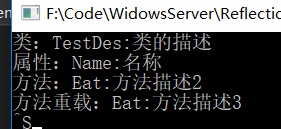
            Console.WriteLine($"类:TestDes:{classDes}");

            Console.WriteLine($"属性:Name:{proDes}");

            Console.WriteLine($"方法:Eat:{meDes}");

            Console.WriteLine($"方法重载:Eat:{meDes2}");

            Console.ReadLine();
webapi中的异常过滤器:
 public class MyErrorFilter : ExceptionFilterAttribute

    {

        public override void OnException(HttpActionExecutedContext actionExecutedContext)

        {

            HttpActionContext context = actionExecutedContext.ActionContext;

            Type t = context.ControllerContext.Controller.GetType(); //得到控制器的类型

            string controllerDes = t.GetDescription(); //控制器的描述

            string controllerName = context.ActionDescriptor.ControllerDescriptor.ControllerName;//控制器的名称

            string actionName = context.ActionDescriptor.ActionName;//方法名

            string actionDes = actionName.GetDescriptionByMethod(t);//方法描述

            object obj = new

            {

                errcode = -,

                errmsg = actionExecutedContext.Exception

            };

            actionExecutedContext.Response = new HttpResponseMessage(HttpStatusCode.NotImplemented)

            {

                Content = new StringContent(JsonConvert.SerializeObject(obj), Encoding.UTF8, "application/json")

            };

            ////2.返回调用方具体的异常信息

            //if (actionExecutedContext.Exception is NotImplementedException)

            //{

            //    actionExecutedContext.Response = new HttpResponseMessage(HttpStatusCode.NotImplemented);

            //}

            //else if (actionExecutedContext.Exception is TimeoutException)

            //{

            //    actionExecutedContext.Response = new HttpResponseMessage(HttpStatusCode.RequestTimeout);

            //}

            ////.....这里可以根据项目需要返回到客户端特定的状态码。如果找不到相应的异常,统一返回服务端错误500

            //else

            //{

            //    actionExecutedContext.Response = new HttpResponseMessage(HttpStatusCode.InternalServerError);

            //}

            base.OnException(actionExecutedContext);

        }

    }
System.Reflection 获取描述的更多相关文章
- System.Reflection.Assembly.GetEntryAssembly()获取的为当前已加载的程序集
今天在使用System.Reflection.Assembly.GetEntryAssembly()获取程序集时,发现获取的程序集不全.原来是因为C#的程序集为延迟加载,此方法只获取当前已加载的,未加 ...
- 【C#基础】System.Reflection (反射)
在使用.NET创建的程序或组件时,元数据(metadata)和代码(code)都存储于"自成一体"的单元中,这个单元称为装配件.我们可以在程序运行期间访问这些信息.在System. ...
- 基础命名空间:反射 using System.Reflection
反射概念: .Net的应用程序由几个部分:‘程序集(Assembly)’.‘模块(Module)’.‘类型(class)’组成,程序集包含模块 模块包含类型,类型又包含 成员,而反射提供一 ...
- System.Reflection.Emit学习
C#反射发出System.Reflection.Emit学习 分享: 1 一.System.Reflection.Emit概述 Emit,可以称为发出或者产生.与Emit相关的类基本都存在于Syste ...
- System.Reflection.Emit摘记
动态类型在.net中都是用什么类型来表示的.程序集:System.Reflection.Emit.AssemblyBuilder(定义并表示动态程序集)构造函数:System.Reflection.E ...
- 利用system.reflection遍历一个类的变量成员
假设有下面一个类,在程序中已初始化,如何获取里面的变量成员name,age,onduty及其值呢? public class Employee { public string name; public ...
- C#反射发出System.Reflection.Emit学习
一.System.Reflection.Emit概述 Emit,可以称为发出或者产生.与Emit相关的类基本都存在于System.Reflection.Emit命名空间下.反射,我们可以取得形如程序集 ...
- C# System.Reflection.Assembly动态加载资源文件
需求:需要做甘特图的显示,并且在甘特中加载图片.图片太多,写判断代码太多.用反射吧. 核心代码: try { if (stateColour < 0) return null; System.R ...
- 反射基础 System.Reflection
一.获取程序集Assembly 1.获取当前运行的程序集 System.Reflection.Assembly[] asm = AppDomain.CurrentDomain.GetAssemblie ...
随机推荐
- [转]Tips——Chrome DevTools - 25 Tips and Tricks
Chrome DevTools - 25 Tips and Tricks 原文地址:https://www.keycdn.com/blog/chrome-devtools 如何打开? 1.从浏览器菜单 ...
- [Code+#4]最短路
考虑xor运算的自反性 我们可以直接枚举二进制位异或来进行转移 这样边数大约是\(n \log n\)级别的 总复杂度\(\Theta((n\log n+m)\log n)\) #include&qu ...
- HDU P2222 Keywords Search
In the modern time, Search engine came into the life of everybody like Google, Baidu, etc.Wiskey als ...
- C# Task.FromResult的用法
Task.FromResult用来创建一个带返回值的.已完成的Task. 场景一:以同步的方式实现一个异步接口方法比如有一个接口包含异步方法. interface IMyInterface { Tas ...
- plan,idea,and dream
自学机器学习/数据分析/前端 目前想法是从前端入手,学会写/分析网页及其内容/数据,然后使用爬虫爬取数据,然后用机器学习算法对数据进行处理.哈哈,想法是不是太天真了. 学习都从网上的资料入手,因此发现 ...
- Unable to update index for central http://repo1.maven.org/maven2/ 解决方法
不知道什么原因 MyEclipse(eclipse) 中的 maven 插件突然不能用了,修改 pom.xml 无任何反应 控制台报 Unable to update index for centra ...
- 命令行下运行 java someClass.class出现 “错误:找不到或无法加载主类someClass ” 的解决方案
假设在C:\Java\code\目录下建立了如下 Test.java文件: package code; public class Test { public static void main(Stri ...
- Qt Quick程序的发布
要将程序发布出去,首先需要使用release方式编译程序,然后将生成的.exe可执行文件和需要的库文件发在一起打包进行发布. 要确定需要哪些动态库文件,可以直接双击.exe文件,提示缺少那个dll文件 ...
- (WPF) Textbox 每次输入触发事件处理
1. Code behind. protected void TextBox1_TextChanged(object sender, EventArgs e) { Label1.Text = Ser ...
- restframework类继承图