
2D游戏编程3—GDI
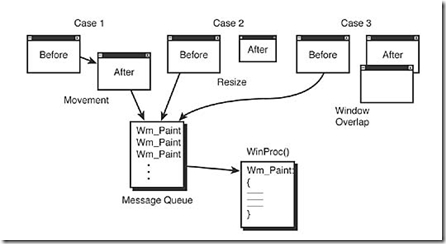
WM_PAINT消息触发程序重新绘制界面,过程如下:
PAINTSTRUCT ps; // used in WM_PAINT
HDC hdc; // handle to a device context
case WM_PAINT:
{
hdc = BeginPaint(hwnd,&ps);
EndPaint(hwnd,&ps);
return(0);
} break;
beginpaint将需要重绘的区域存入ps的rcpaint中,ps定义结构如下:
typedef struct tagPAINTSTRUCT
{
HDC hdc; // graphics device context
BOOL fErase; // if TRUE then you must draw background
RECT rcPaint; // the RECT containing invalid region
BOOL fRestore; // internal
BOOL fIncUpdate; // internal
BYTE rgbReserved[32]; // internal
} PAINTSTRUCT;
其中RECT结构如下:
typedef struct _RECT
{
LONG left; // left edge if rectangle
LONG top; // upper edge of rectangle
LONG right; // right edge of rectangle
LONG bottom; // bottom edge of rectangle
} RECT;
GDI文字输出依靠DrawText和TextOut两个函数
例子:
#define WIN32_LEAN_AND_MEAN  // just say no to MFC

#include <windows.h>   // include all the windows headers

#include <windowsx.h>  // include useful macros

#include <mmsystem.h>  // very important and include WINMM.LIB too!

#include <stdio.h>

#include <stdlib.h>

#include <math.h>

// DEFINES ////////////////////////////////////////////////

// defines for windows

#define WINDOW_CLASS_NAME "WINCLASS1"

// GLOBALS ////////////////////////////////////////////////

HWND      main_window_handle = NULL; // globally track main window

HINSTANCE hinstance_app      = NULL; // globally track hinstance

// FUNCTIONS //////////////////////////////////////////////

LRESULT CALLBACK WindowProc(HWND hwnd,

                            UINT msg,

                            WPARAM wparam,

                            LPARAM lparam)

{

// this is the main message handler of the system

PAINTSTRUCT        ps;        // used in WM_PAINT

HDC                hdc;    // handle to a device context

// what is the message

switch(msg)

    {

    case WM_CREATE:

        {

        // do initialization stuff here

        // return success

        return(0);

        } break;

    case WM_PAINT:

        {

        // simply validate the window

        hdc = BeginPaint(hwnd,&ps);

        // you would do all your painting here

        EndPaint(hwnd,&ps);

        // return success

        return(0);

           } break;

    case WM_DESTROY:

        {

        // kill the application, this sends a WM_QUIT message

        PostQuitMessage(0);

        // return success

        return(0);

        } break;

    default:break;

    } // end switch

// process any messages that we didn't take care of

return (DefWindowProc(hwnd, msg, wparam, lparam));

} // end WinProc

// WINMAIN ////////////////////////////////////////////////

int WINAPI WinMain(    HINSTANCE hinstance,

                    HINSTANCE hprevinstance,

                    LPSTR lpcmdline,

                    int ncmdshow)

{

WNDCLASSEX winclass; // this will hold the class we create

HWND       hwnd;     // generic window handle

MSG           msg;         // generic message

// first fill in the window class stucture

winclass.cbSize         = sizeof(WNDCLASSEX);

winclass.style            = CS_DBLCLKS | CS_OWNDC |

                          CS_HREDRAW | CS_VREDRAW;

winclass.lpfnWndProc    = WindowProc;

winclass.cbClsExtra        = 0;

winclass.cbWndExtra        = 0;

winclass.hInstance        = hinstance;

winclass.hIcon            = LoadIcon(NULL, IDI_APPLICATION);

winclass.hCursor        = LoadCursor(NULL, IDC_ARROW);

winclass.hbrBackground    = (HBRUSH)GetStockObject(BLACK_BRUSH);

winclass.lpszMenuName    = NULL;

winclass.lpszClassName    = WINDOW_CLASS_NAME;

winclass.hIconSm        = LoadIcon(NULL, IDI_APPLICATION);

// save hinstance in global

hinstance_app = hinstance;

// register the window class

if (!RegisterClassEx(&winclass))

    return(0);

// create the window

if (!(hwnd = CreateWindowEx(NULL,                  // extended style

                            WINDOW_CLASS_NAME,     // class

                            "GDI Text Printing Demo", // title

                            WS_OVERLAPPEDWINDOW | WS_VISIBLE,

                             0,0,      // initial x,y

                            400,400,  // initial width, height

                            NULL,      // handle to parent

                            NULL,      // handle to menu

                            hinstance,// instance of this application

                            NULL)))    // extra creation parms

return(0);

// save main window handle

main_window_handle = hwnd;

// get the dc and hold it

HDC hdc = GetDC(hwnd);

// enter main event loop, but this time we use PeekMessage()

// instead of GetMessage() to retrieve messages

while(TRUE)

    {

    // test if there is a message in queue, if so get it

    if (PeekMessage(&msg,NULL,0,0,PM_REMOVE))

       {

       // test if this is a quit

       if (msg.message == WM_QUIT)

           break;

       // translate any accelerator keys

       TranslateMessage(&msg);

       // send the message to the window proc

       DispatchMessage(&msg);

       } // end if

    // main game processing goes here

    // set the foreground color to random

    SetTextColor(hdc, RGB(rand()%256,rand()%256,rand()%256));

    // set the background color to black

    SetBkColor(hdc, RGB(11,11,11));

    // finally set the transparency mode to transparent

    SetBkMode(hdc, TRANSPARENT);

    // draw some text at a random location

    TextOut(hdc,rand()%400,rand()%400, "GDI Text Demo!", strlen("GDI Text Demo!"));

    Sleep(10);

    } // end while

// release the dc

ReleaseDC(hwnd,hdc);

// return to Windows like this

return(msg.wParam);

} // end WinMain

///////////////////////////////////////////////////////////
2D游戏编程3—GDI的更多相关文章
- 2D游戏编程7—星空案例
// INCLUDES /////////////////////////////////////////////// #define WIN32_LEAN_AND_MEAN // just say ...
- 2D游戏编程6—windows程序模板
// INCLUDES /////////////////////////////////////////////// #define WIN32_LEAN_AND_MEAN // just say ...
- 2D游戏编程5—锁定频率
核心利用win心跳函数GetTickCount利用差量锁定fps,如下代码锁定30fps,缺点为如果计算机不能以30fps运行,程序将低于30fps #define WIN32_LEAN_AND_ME ...
- 2D游戏编程4—Windows事件
windows消息传来的参数分解: Message: WM_ACTIVATE Parameterization: fActive = LOWORD(wParam); // act ...
- 2D游戏编程2--windows高级编程
windows应用程序布局 编译流程 响应菜单事件消息 菜单消息处理实例: LRESULT CALLBACK WindowProc(HWND hwnd, UINT msg, WPARAM wpar ...
- 2D游戏编程1--windows编程模型
一.创建一个windows程序步骤 1.创建一个windows类 2.创建一个事件处理程序 3.注册windows类 4.用之前创建的windows类创建一个窗口 5.创建一个主事件循环 二.存储 ...
- Windows游戏编程之从零开始d
Windows游戏编程之从零开始d I'm back~~恩,几个月不见,大家还好吗? 这段时间真的好多童鞋在博客里留言说或者发邮件说浅墨你回来继续更新博客吧. woxiangnifrr童鞋说每天都在来 ...
- 3D游戏编程大师技巧──2D引擎的编译问题
接上一篇文章,这里将介绍2D引擎的编译,从现在开始才真正进入<3D游戏编程大师技巧>的学习.本书的第一.二章只是简介了游戏编程和windows编程,从第三章开始才是介绍<window ...
- 《逐梦旅程 WINDOWS游戏编程之从零开始》笔记4——Direct3D编程基础
第11章 Direct3D编程基础 2D游戏是贴图的艺术,3D游戏是渲染的艺术.这句话在我学过了之前的GDI编程之后,前一句算是有所体会,现在是来理解后一句的时候了. 安装DirectX SDK配置啥 ...
随机推荐
- EntityClient 介绍
System.Data.EntityClient 命名空间是 实体框架的 .NET Framework 数据提供程序.EntityClient 提供程序使用存储特定的 ADO.NET 数据提供程序类和 ...
- js微博发布框
<!DOCTYPE html PUBLIC "-//W3C//DTD XHTML 1.0 Transitional//EN" "http://www.w3.org/ ...
- wap开发之滑动事件(swipe、tap、swipeleft、swiperight)等
最近一直找在wap端可以实现的swipe等滑动事件的方法,开始研究了jquery-mobile,zepto,结果由于jqm太大.zepto有不少缺陷.为此研究了zepto,想把里面的swipe事件独立 ...
- SqlServer日期(convert函数,getdate函数)
SqlServer日期(convert函数,getdate函数) 函数GETDATE()的返回值在显示时只显示到秒.实际上,SQL Sever内部时间可以精确到毫秒级(确切地说,可以精确到3.33毫秒 ...
- tp中调用PHP系统扩展类
例如使用Redis扩展类: use Reids; $redis = new Redis();
- js 验证输入框金额
$("#ipt1").keyup(function () { var reg = $(this).val().match(/\d+\.?\d{0,2}/); var txt = ' ...
- HHVM简介(译)
原文链接:http://coderoncode.com/2013/07/24/introduction-hhvm.html “HHVM(HIpHop Virtual Machina)把PHP代码转换成 ...
- TDirectory.GetCreationTime、TDirectory.SetCreationTime获取和设置文件夹创建时间
使用函数: System.IOUtils.TDirectory.GetCreationTime//获取创建时间 System.IOUtils.TDirectory.SetCreationTime//设 ...
- 双系统格式化硬盘后装XP遇到grub rescue的问题
好奇于深度的Deepin系统,给老电脑装了xp和deepin双系统.无奈07年的机子带Deepin,实在是太卡了.正好想给硬盘重新分区,直接将硬盘格式化,重装了xp.于是,问题来了,开机显示: GRU ...
- lua方法点(.)调用和冒号(:)调用区别:
用.定义方法时object.func_name(arg1,arg2...),方法真正的函数签名形式为: object.func_name(arg1, arg2...) 用:定义方法时object:fu ...