
2D游戏编程6—windows程序模板
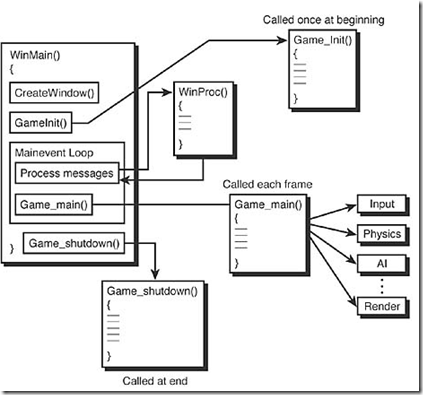
// INCLUDES ///////////////////////////////////////////////

#define WIN32_LEAN_AND_MEAN  // just say no to MFC

#include <windows.h>   // include important windows stuff

#include <windowsx.h>

#include <mmsystem.h>

#include <iostream.h> // include important C/C++ stuff

#include <conio.h>

#include <stdlib.h>

#include <malloc.h>

#include <memory.h>

#include <string.h>

#include <stdarg.h>

#include <stdio.h>

#include <math.h>

#include <io.h>

#include <fcntl.h>

// DEFINES ////////////////////////////////////////////////

// defines for windows

#define WINDOW_CLASS_NAME "WINCLASS1"

// MACROS /////////////////////////////////////////////////

#define KEYDOWN(vk_code) ((GetAsyncKeyState(vk_code) & 0x8000) ? 1 : 0)

#define KEYUP(vk_code)   ((GetAsyncKeyState(vk_code) & 0x8000) ? 0 : 1)

// GLOBALS ////////////////////////////////////////////////

HWND      main_window_handle = NULL; // globally track main window

HINSTANCE hinstance_app      = NULL; // globally track hinstance

char buffer[80];                     // general printing buffer

// FUNCTIONS //////////////////////////////////////////////

LRESULT CALLBACK WindowProc(HWND hwnd,

                            UINT msg,

                            WPARAM wparam,

                            LPARAM lparam)

{

// this is the main message handler of the system

PAINTSTRUCT        ps;        // used in WM_PAINT

HDC                hdc;    // handle to a device context

char buffer[80];        // used to print strings

// what is the message

switch(msg)

    {

    case WM_CREATE:

        {

        // do initialization stuff here

        // return success

        return(0);

        } break;

    case WM_PAINT:

        {

        // simply validate the window

           hdc = BeginPaint(hwnd,&ps);

        // end painting

        EndPaint(hwnd,&ps);

        // return success

        return(0);

           } break;

    case WM_DESTROY:

        {

        // kill the application, this sends a WM_QUIT message

        PostQuitMessage(0);

        // return success

        return(0);

        } break;

    default:break;

    } // end switch

// process any messages that we didn't take care of

return (DefWindowProc(hwnd, msg, wparam, lparam));

} // end WinProc

///////////////////////////////////////////////////////////

int Game_Main(void *parms = NULL, int num_parms = 0)

{

// this is the main loop of the game, do all your processing

// here

// for now test if user is hitting ESC and send WM_CLOSE

if (KEYDOWN(VK_ESCAPE))

   SendMessage(main_window_handle,WM_CLOSE,0,0);

// return success or failure or your own return code here

return(1);

} // end Game_Main

////////////////////////////////////////////////////////////

int Game_Init(void *parms = NULL, int num_parms = 0)

{

// this is called once after the initial window is created and

// before the main event loop is entered, do all your initialization

// here

// return success or failure or your own return code here

return(1);

} // end Game_Init

/////////////////////////////////////////////////////////////

int Game_Shutdown(void *parms = NULL, int num_parms = 0)

{

// this is called after the game is exited and the main event

// loop while is exited, do all you cleanup and shutdown here

// return success or failure or your own return code here

return(1);

} // end Game_Shutdown

// WINMAIN ////////////////////////////////////////////////

int WINAPI WinMain(    HINSTANCE hinstance,

                    HINSTANCE hprevinstance,

                    LPSTR lpcmdline,

                    int ncmdshow)

{

WNDCLASSEX winclass; // this will hold the class we create

HWND       hwnd;     // generic window handle

MSG           msg;         // generic message

HDC        hdc;      // graphics device context

// first fill in the window class stucture

winclass.cbSize         = sizeof(WNDCLASSEX);

winclass.style            = CS_DBLCLKS | CS_OWNDC |

                          CS_HREDRAW | CS_VREDRAW;

winclass.lpfnWndProc    = WindowProc;

winclass.cbClsExtra        = 0;

winclass.cbWndExtra        = 0;

winclass.hInstance        = hinstance;

winclass.hIcon            = LoadIcon(NULL, IDI_APPLICATION);

winclass.hCursor        = LoadCursor(NULL, IDC_ARROW);

winclass.hbrBackground    = (HBRUSH)GetStockObject(BLACK_BRUSH);

winclass.lpszMenuName    = NULL;

winclass.lpszClassName    = WINDOW_CLASS_NAME;

winclass.hIconSm        = LoadIcon(NULL, IDI_APPLICATION);

// save hinstance in global

hinstance_app = hinstance;

// register the window class

if (!RegisterClassEx(&winclass))

    return(0);

// create the window

if (!(hwnd = CreateWindowEx(NULL,                  // extended style

                            WINDOW_CLASS_NAME,     // class

                            "T3D Game Console Version 1.0", // title

                            WS_OVERLAPPEDWINDOW | WS_VISIBLE,

                             0,0,      // initial x,y

                            400,300,  // initial width, height

                            NULL,      // handle to parent

                            NULL,      // handle to menu

                            hinstance,// instance of this application

                            NULL)))    // extra creation parms

return(0);

// save main window handle

main_window_handle = hwnd;

// initialize game here

Game_Init();

// enter main event loop

while(TRUE)

    {

    // test if there is a message in queue, if so get it

    if (PeekMessage(&msg,NULL,0,0,PM_REMOVE))

       {

       // test if this is a quit

       if (msg.message == WM_QUIT)

           break;

       // translate any accelerator keys

       TranslateMessage(&msg);

       // send the message to the window proc

       DispatchMessage(&msg);

       } // end if

       // main game processing goes here

       Game_Main();

    } // end while

// closedown game here

Game_Shutdown();

// return to Windows like this

return(msg.wParam);

} // end WinMain
2D游戏编程6—windows程序模板的更多相关文章
- 2D游戏编程4—Windows事件
windows消息传来的参数分解: Message: WM_ACTIVATE Parameterization: fActive = LOWORD(wParam); // act ...
- 2D游戏编程1--windows编程模型
一.创建一个windows程序步骤 1.创建一个windows类 2.创建一个事件处理程序 3.注册windows类 4.用之前创建的windows类创建一个窗口 5.创建一个主事件循环 二.存储 ...
- 2D游戏编程5—锁定频率
核心利用win心跳函数GetTickCount利用差量锁定fps,如下代码锁定30fps,缺点为如果计算机不能以30fps运行,程序将低于30fps #define WIN32_LEAN_AND_ME ...
- 2D游戏编程3—GDI
WM_PAINT消息触发程序重新绘制界面,过程如下: PAINTSTRUCT ps; // used in WM_PAINT HDC hdc; // handle to ...
- 2D游戏编程2--windows高级编程
windows应用程序布局 编译流程 响应菜单事件消息 菜单消息处理实例: LRESULT CALLBACK WindowProc(HWND hwnd, UINT msg, WPARAM wpar ...
- 2D游戏编程7—星空案例
// INCLUDES /////////////////////////////////////////////// #define WIN32_LEAN_AND_MEAN // just say ...
- Windows游戏编程之从零开始d
Windows游戏编程之从零开始d I'm back~~恩,几个月不见,大家还好吗? 这段时间真的好多童鞋在博客里留言说或者发邮件说浅墨你回来继续更新博客吧. woxiangnifrr童鞋说每天都在来 ...
- 3D游戏编程大师技巧──2D引擎的编译问题
接上一篇文章,这里将介绍2D引擎的编译,从现在开始才真正进入<3D游戏编程大师技巧>的学习.本书的第一.二章只是简介了游戏编程和windows编程,从第三章开始才是介绍<window ...
- C++游戏编程(一开篇)
本系列文章由zhmxy555(毛星云)编写,转载请注明出处. http://blog.csdn.net/zhmxy555/article/details/7318264 作者:毛星云 邮箱: h ...
随机推荐
- GitHub Windows客户端部署
下载网址:https://windows.github.com 点击下载按钮即可下载一个小程序,这个小程序会去服务器端下载完整的Windows版客户端,然后自动安装. 如果安装出错的话,那就打开IE浏 ...
- 【实习记】2014-08-27堆排序理解总结+使用typedef指代函数指针
过程记录 4个月前C语言版的七大排序算法实践让我在写C++版时轻车熟路.特别是冒泡,插入,希尔,选择这四种排序不用调试即运行成功.输出的效果与C语言做的版本完全一样,其中令我印象深刻的是,co ...
- jQuery DataTables 插件使用笔记
初始化 在页面中 <!DOCTYPE html> <html> <head> <link rel="stylesheet" type=&q ...
- ci 多个文件同时上传
// 单个文件请手册,这里多个文件中,参数设置可参考手册 view 视图 <form...> <input type="file" name="user ...
- php ini_set('display_errors', $value)
正常情况下,在开发模式中,把错误显示出来,方便纠正,但在布署模式中,就得把错误关闭: ini_set('display_errors', 1); // 开启 ini_set('display_erro ...
- 防止apche列出目录以及下载文件
1.修改httpd.conf,将override none改为override all 2.在需要设置权限的目录上传.htaccess文件,.htaccess文件内容如下: <FilesMatc ...
- 阻止CSS样式被缓存
<link href="/stylesheet.css?<?php echo time(); ?>" rel="stylesheet" typ ...
- WPF 得一些问题汇总
1.CallMethodAction <TextBox Height="30" Name="txtUserName" Width="160&qu ...
- 安卓手机无法连接VPN的解决办法
这篇不能算是技术博客吧,但是在网上很难找到解决方案,至少我找了好久也没弄好.. 三种方案,因机而异,我就长话短说了: 一. "/system/xbin" 和 "/syst ...
- 集合 ArrayList 向下转型 遍历
List list=new ArrayList(); Person p1=new Person("lisi1",21); Person p2=new Person("l ...