
/dev/tty 与 /dev/pts
打开3个bash会话窗口
[root@server1 fd]# cd /proc/7489/fd
[root@server1 fd]# ll
总用量 0
lrwx------ 1 root root 64 6月 5 23:55 0 -> /dev/pts/2
lrwx------ 1 root root 64 6月 5 23:55 1 -> /dev/pts/2
lrwx------ 1 root root 64 6月 5 23:55 2 -> /dev/pts/2
lrwx------ 1 root root 64 6月 5 23:55 255 -> /dev/pts/2
[root@server1 fd]# cd /proc/7508/fd
[root@server1 fd]# ll
总用量 0
lrwx------ 1 root root 64 6月 5 23:55 0 -> /dev/pts/3
lrwx------ 1 root root 64 6月 5 23:55 1 -> /dev/pts/3
lrwx------ 1 root root 64 6月 5 23:55 2 -> /dev/pts/3
lrwx------ 1 root root 64 6月 5 23:55 255 -> /dev/pts/3
[root@server1 fd]# cd /proc/6734/fd
[root@server1 fd]# ll
总用量 0
lrwx------ 1 root root 64 6月 5 23:56 0 -> /dev/pts/0
lrwx------ 1 root root 64 6月 5 23:56 1 -> /dev/pts/0
lrwx------ 1 root root 64 6月 5 23:56 2 -> /dev/pts/0
lrwx------ 1 root root 64 6月 5 23:56 255 -> /dev/pts/0
[root@server1 fd]# cd /dev/pts
[root@server1 pts]# ll
总用量 0
crw--w---- 1 root tty 136, 0 6月 5 18:26 0
crw--w---- 1 root tty 136, 1 6月 5 23:57 1
crw--w---- 1 root tty 136, 2 6月 5 23:54 2
crw--w---- 1 root tty 136, 3 6月 5 23:55 3
c--------- 1 root root 5, 2 5月 16 16:23 ptmx
[root@server1 pts]# tty
/dev/pts/1
[root@server1 ~]# tty
/dev/pts/2
[root@server1 ~]# tty
/dev/pts/3
tty:命令
tty - print the file name of the terminal connected to standard input
创健6个可切换终端:
root 1019 1 0 May16 tty1 00:00:00 /sbin/mingetty /dev/tty1
root 1021 1 0 May16 tty2 00:00:00 /sbin/mingetty /dev/tty2
root 1023 1 0 May16 tty3 00:00:00 /sbin/mingetty /dev/tty3
root 1025 1 0 May16 tty4 00:00:00 /sbin/mingetty /dev/tty4
root 1027 1 0 May16 tty5 00:00:00 /sbin/mingetty /dev/tty5
root 1029 1 0 May16 tty6 00:00:00 /sbin/mingetty /dev/tty6
ALT +F[1-6]切换,
[root@localhost dev]# tty
/dev/pts/1
[root@localhost dev]# echo "0" > /dev/tty0
所有的tty[1-6]都显示 0
1 当前控制终端(/dev/tty)
/dev/tty指的是当前所处的终端,输出到此的内容只会显示在当前工作的终端显示器上;可以使用命令”ps –ax”来查看进程与哪个控制终端相连.对于你登录的shell,
/dev/tty就是你使用的终端,设备号是(5,0).
使用命令”tty”可以查看自己具体对应哪个实际终端设备./dev/tty有些类似于到实际所使用终端设备的一个联接

2./dev/pts
/dev/pts是远程登陆(telnet,ssh等)后创建的控制台设备文件所在的目录。由于可能有好几千个用户登陆,所以/dev/pts其实是动态生成的,不象其他设备文件是构建系统时就已经产生的硬盘节点.

3.控制台终端-系统控制台(/dev/console 和 /dev/tty*)
在Linux系统中,计算机显示器通常被称为控制台终端(Console).它仿真了类型为Linux的一种终端(TERM=Linux),并且有一些设备特殊文件与之相关联:
tty0、tty1、tty2等.当你在控制台上登录时,使用的是tty1.使用Alt+[F1—F6]组合键时,我们就可以切换到tty2、tty3等上面去.tty1–tty6等称为虚拟终端,
而tty0则是当前所使用虚拟终端的一个别名,系统所产生的信息会发送到该终端上.因此不管当前正在使用哪个虚拟终端,系统信息都会发送到控制台终端上.
你可以登录到不同的虚拟终端上去,因而可以让系统同时有几个不同的会话期存在.只有系统或超级用户root可以向/dev/tty0进行写操作.
root 4665 925 0 13:53 ? 00:00:00 sshd: root@pts/0
root 4667 4665 0 13:53 pts/0 00:00:00 -bash
root 4744 925 0 14:53 ? 00:00:00 sshd: root@pts/1
root 4746 4744 0 14:53 pts/1 00:00:00 -bash
root 4843 925 0 16:24 ? 00:00:00 sshd: root@pts/2
root 4845 4843 0 16:24 pts/2 00:00:00 -bash
root 4860 925 0 16:24 ? 00:00:00 sshd: root@pts/3
root 4862 4860 0 16:24 pts/3 00:00:00 -bash
root 4877 925 0 16:24 ? 00:00:00 sshd: root@pts/4
root 4879 4877 0 16:24 pts/4 00:00:00 -bash
root 4894 925 0 16:24 ? 00:00:00 sshd: root@pts/5
root 4896 4894 0 16:24 pts/5 00:00:00 -bash
root 4911 925 0 16:25 ? 00:00:00 sshd: root@pts/6
root 4913 4911 0 16:25 pts/6 00:00:00 -bash
root 4935 925 0 16:25 ? 00:00:00 sshd: root@pts/7
root 4937 4935 0 16:25 pts/7 00:00:00 -bash
root 4954 925 0 16:25 ? 00:00:00 sshd: root@pts/8
[root@server1 ~]# cd /dev/pts
[root@server1 pts]# ll
总用量 0
crw--w---- 1 root tty 136, 0 6月 4 16:25 0
crw--w---- 1 root tty 136, 1 6月 4 16:25 1
crw--w---- 1 root tty 136, 2 6月 4 16:25 2
crw--w---- 1 root tty 136, 3 6月 4 16:25 3
crw--w---- 1 root tty 136, 4 6月 4 16:25 4
crw--w---- 1 root tty 136, 5 6月 4 16:25 5
crw--w---- 1 root tty 136, 6 6月 4 16:25 6
crw--w---- 1 root tty 136, 7 6月 4 16:25 7
crw--w---- 1 root tty 136, 8 6月 4 16:28 8
c--------- 1 root root 5, 2 5月 16 16:23 ptmx
linux下看到的控制台(console)是由几个设备完成的。分别是/dev/ttyN(其中tty0就是/dev/console,tty1,tty2就是不同的虚拟终端(virtual console))
通常使用热键alt+Fn来在这些虚拟终端之间进行切换。所有的这些tty设备都是由linux/drivers/char /console.c和vt.c对应。
ALT+F7切回到GUI桌面
动态创健/dev/pts:

root@server1 ~]# cd /dev/pts

[root@server1 pts]# ll

总用量

crw--w----  root tty ,  6月  :

crw--w----  root tty ,  6月  :

c---------  root root ,  5月  : ptmx

[root@server1 pts]# ll

总用量

crw--w----  root tty ,  6月  :

c---------  root root ,  5月  : ptmx
alt+[F1-F6] 进行切换 :当前切换为:alt+F5
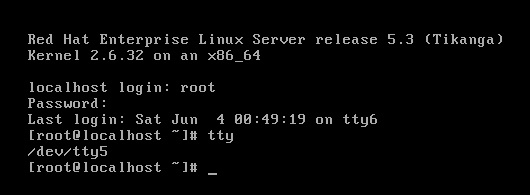
[root@server1 dev]# cd pts

[root@server1 pts]# ll

总用量

crw--w----  root tty  ,  6月    :

crw--w----  root tty  ,  6月    :

c---------  root root   ,  5月   : ptmx

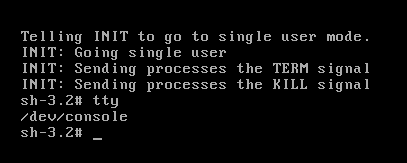
pts+ptmx 实现tty登陆
init 1进入单用户: tty为 /dev/console
/dev/tty 与 /dev/pts的更多相关文章
- linux – tty,ttyS,pts,ptmx,vcs,vcsa设备文件之间的区别?(/dev/tty等)
linux – tty,ttyS,pts,ptmx,vcs,vcsa设备文件之间的区别? 终端有字符终端和图形终端两种模式.在linux的图形环境下,我们可以通过鼠标点击来完成所有的管理任务,这是图形 ...
- /dev/console,/dev/null,/dev/tty
UNIX和Linux中比较重要的三个设备文件是:/dev/console,/dev/tty和/dev/null. 0 : /dev/console 这个设备代表的是系统控制台,错误信息和诊断信息通常 ...
- centos单用户 救援 运行级别 yum,单用户模式,救援模式,inittab :启动级别 e2fsck wetty mingetty 物理终端 /dev/console 虚拟终端 /dev/tty(0,6) 模拟终端 /dev/pts/# grub-md5-crypt 给grub加密码 initrd 第二节课
centos单用户 救援 运行级别 yum,单用户模式,救援模式,inittab :启动级别 e2fsck wetty mingetty 物理终端 /dev/console 虚拟终端 /d ...
- /dev/tty /dev/ttyS0 /dev/tty0,/dev/null区别
1./dev/tty表示控制终端如果当前进程有控制终端(Controlling Terminal)的话,那么/dev/tty就是当前进程的控制终端的设备特殊文件.可以使用命令”ps –ax”来查看进程 ...
- 特殊文件: /dev/null和/dev/tty
转自:http://www.cnblogs.com/stephen-liu74/archive/2011/11/10/2240461.html Linux系统提供了两个对Shell编程非常有用的特殊文 ...
- /dev/tty /dev/ttyS0 /dev/tty0区别 (转载)
1.串行端口终端(/dev/ttySn) 串行端口终端(Serial Port Terminal)是使用计算机串行端口连接的终端设备. 计算机把每个串行端口都看作是一个字符设备.有段时间 ...
- What is special about /dev/tty?
ls -la /dev/tty shows the output: crw-rw-rw- 1 root tty 5, 0 Dec 14 22:21 /dev/tty The 'c' means it' ...
- 2.5.5.2 特殊文件:/dev/null 与 /dev/tty
UNIX 系统提供了两个对Shell编程特别有用的特殊文件. 第一个文件 /dev/null ,就是大家所熟知的位桶(bit bucket).传送到此文件的数据都会被丢掉.换句话说 ...
- hostapd、/dev/random、/dev/urandom
在使用hostapd做软ap时,出现了random熵不够的问题,导致节点连接不上这个ap. 下面先解释一下/dev/random和/dev/urandom 先让我们从一个工程中遇到的实际问题开始,先上 ...
随机推荐
- Python连接Redis连接配置
1. 测试连接: Python 2.7.8 (default, Oct 20 2014, 15:05:19) [GCC 4.9.1] on linux2 Type "help", ...
- python学习之---生成器
通过列表生成式,我们可以直接创建一个列表.但是,受到内存限制,列表容量肯定是有限的.而且,创建一个包含1000万个元素的列表,不仅占用很大的存储空间,如果我们仅仅需要访问前面几个元素,那后面绝大多数元 ...
- [原博客] POJ 2484 A Funny Game
题目链接题意:有n个硬币排成一圈,两个人轮流操作,每次可以取走一个或者相邻的连个硬币(只算最开始相邻的,取之后才相邻的不算),问先手必胜还是必败. 这个题可以证明若n>=3,则先手必败.对称博弈 ...
- Mysql Partition 理论知识总结
简述: 本文内容主要 Giuseppe Maxia 曾在Mysql Conference & Expo 2010发表关于 <Mysql Partition in Mysql 5.1 &a ...
- java学习多线程之创建多线程一
现在我们有这么一个需求,就是在主线程在运行的同时,我们想做其他的任务,这个时候我们就用到了多线程.那么如何创建多线程,我们知道在系统当中qq的多线程创建是由操作系统来完成的,那么如果我们想在java当 ...
- USACO3.43Electric Fence(pick定理)
忘记pick定理是什么了 想枚举来着 ..没枚出来 有篇pick定理的证明 貌似挺好 也没太看懂 /* ID: shangca2 LANG: C++ TASK: fence9 */ #include ...
- BZOJ_3224_普通平衡树_(Treap)
描述 http://www.lydsy.com/JudgeOnline/problem.php?id=3224 Treap模板题.支持如下几种操作: 1.插入; 2.删除; 3.rank(x); 4. ...
- 外部exe窗体嵌入winform
using System; using System.Collections.Generic; using System.ComponentModel; using System.Drawing; u ...
- Colour your Log4Net events in your RichTextBox zz
You’re most probably here because you have already read my article How to watch your log through you ...
- IIS 7.0, ASP.NET, pipelines, modules, handlers, and preconditions
1.0 What is the IIS Pipeline Conceptually, the IIS pipeline is a state machine with the following st ...