
数据库 - Navicat与pymysql模块
一、Nabicat
 在生产环境中操作MySQL数据库还是推荐使用命令行工具mysql,但在我们自己开发测试时,
 可以使用可视化工具Navicat,以图形界面的形式操作MySQL数据库

 官网下载:https://www.navicat.com/en/products/navicat-for-mysql
 网盘下载:https://pan.baidu.com/s/1bpo5mqj
 链接:https://pan.baidu.com/s/1Hu-x0mPuSW3g9CxNFlnAng 密码:pqe5

 # 打开 双击:
 # D:\navicatformysql\Navicat for MySQL\navicat

 需要掌握的基本操作
 掌握:
     #1. 测试+链接数据库
     #2. 新建库
     #3. 新建表,新增字段+类型+约束
     #4. 设计表:外键
     #5. 新建查询
     #6. 备份库/表

 注意:
     批量加注释:ctrl+?键
     批量去注释:ctrl+shift+?键
二、pymysql模块
介绍:
- 在python程序中操作数据库呢?这就用到了pymysql模块,
- 该模块本质就是一个套接字客户端软件,使用前需要事先安装
- pip3 install pymysql
前提:
- 授权加创建
- grant all on *.* to 'root'@'%' identified by '123';
- flush privileges;
# -*- coding:utf-8 -*-

"""

端口:3306

ip: 10.10.32.107

mysql -uroot -p123 -h 10.10.32.107

"""

import pymysql

name = input('user>>>:').strip()           # egon1

password = input('password>>>:').strip()  #

# 建连接

conn = pymysql.connect(

    host = '10.10.32.107',

    port = 3306,

    user = 'root',

    password = '',

    db = 'egon',

    charset = 'utf8'

)

# 拿游标

cursor = conn.cursor()

# 执行sql语句

sql = 'select * from userinfo where name= "%s" and password = "%s"'%(name,password)

rows = cursor.execute(sql)

print(rows)

# 关闭

cursor.close()

conn.close()

# 进行判断

if rows:

    print('登录成功')

else:

    print('登录失败')
Pymysql的使用方法
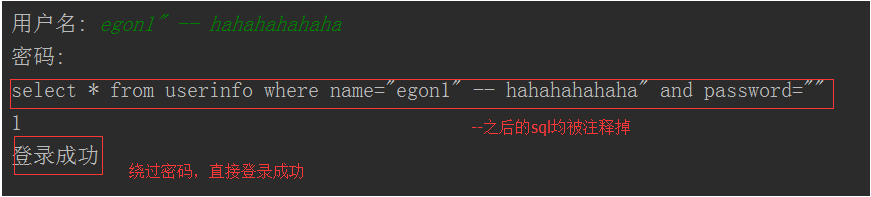
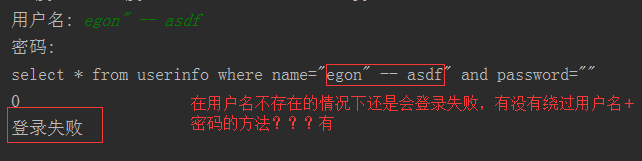
SQL注入:
注意:符号--会注释掉它之后的sql,正确的语法:--后至少有一个任意字符
1、sql注入之:用户存在,绕过密码
egon' -- 任意字符
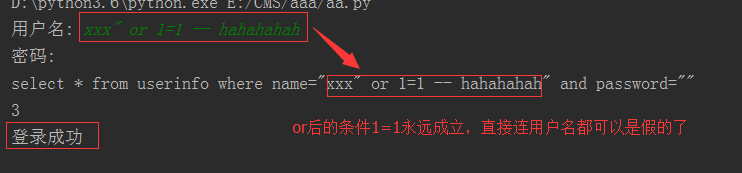
2、sql注入之:用户不存在,绕过用户与密码
xxx' or 1=1 -- 任意字符
解决方法
# 原来是我们对sql进行字符串拼接
# sql="select * from userinfo where name='%s' and password='%s'" %(user,pwd)
# print(sql)
# res=cursor.execute(sql)
#改写为(execute帮我们做字符串拼接,我们无需且一定不能再为%s加引号了)
sql="select * from userinfo where name=%s and password=%s" #!!!注意%s需要去掉引号,因为pymysql会自动为我们加上
res=cursor.execute(sql,[user,pwd]) #pymysql模块自动帮我们解决sql注入的问题,只要我们按照pymysql的规矩来。
# -*- coding:utf-8 -*-

import pymysql

name = input('name>>>:').strip()

password = input('password>>>:').strip()

conn = pymysql.connect(

    host = '10.10.32.107',

    port = 3306,

    user = 'root',

    password = '',

    db = 'egon',

    charset = 'utf8'

)

cursor = conn.cursor()

# sql = 'select * from userinfo where name = "%s" and password = "%s"'%(name,password)

# rows = cursor.execute(sql)

sql = 'select * from userinfo where name=%s and password = %s'

rows = cursor.execute(sql,(name,password))   #执行sql语句,返回sql影响成功的行数

print(sql)

print(rows)

cursor.close()

conn.close()

if rows:

    print('登录成功')

else:

    print('登录失败')

"""

name>>>:egon1" -- x          #需要帐号,sql注入 -- 表示 注释掉 只需要判断user 不需要判断password

password>>>:

select * from userinfo where name = "egon1" -- x" and password = ""

1

登录成功

"""

"""

name>>>:xxx" or 1=1 -- xxx   #不需要帐号密码,sql注入 太恐怖!!

password>>>:

select * from userinfo where name = "xxx" or 1=1 -- xxx" and password = ""

3

登录成功

"""

"""

解决办法:

    sql = 'select * from userinfo where name=%s and password = %s'

    rows = cursor.execute(sql,(name,password))

"""

sql注入
SQL代码注入
三、pymysql模块中增删改查
增:

sql = 'insert into userinfo(name,password) values(%s,%s)'

rows = cursor.execute(sql,('lily',''))

conn.commit() # 注意只有执行了commit() 才会更新到数据库中

批量:

rows = cursor.executemany(sql,[('alice4',''),('alice5',''),('alice6','')])

print(cursor.lastrowid) # 显示插入数据前的id 走到哪

删:

sql = 'delete from userinfo where name = %s'

rows = cursor.execute(sql,('alice5'))

conn.commit()

改:

sql = 'update userinfo set name = %s where id = %s '

rows = cursor.execute(sql,('abcd',2))

conn.commit()

查:

# 元祖形式

cursor = conn.cursor()

rows = cursor.execute(sql)

print(cursor.fetchone())

print(cursor.fetchmany(3))

print(cursor.fetchall())

print(cursor.fetchone()) # None 没有数据了!

((1, 'aaabbb', ''), (2, 'abcd', ''), (3, 'egon3', ''))

# 字典形式

cursor = conn.cursor(pymysql.cursors.DictCursor)

cursor.fetchone() cursor.fetchmany(2) cursor.fetchall()

[{'id': 3, 'name': 'egon3', 'password': ''}, {'id': 6, 'name': 'alice', 'password': ''}]

# 相对 绝对 移动游标

print(cursor.fetchone())

cursor.scroll(5,'absolute')

# cursor.scroll(5,'relative')

print(cursor.fetchmany(2))
import  pymysql

#建立连接

conn = pymysql.connect(

    host='10.10.32.107',

    port=3306,

    user='root',

    password='',

    db='db9',

    charset='utf8'

)

#拿到游标

cursor=conn.cursor()

#执行sql

# 增、删、改

#增

sql = 'insert into userinfo(user, pwd) values(%s, %s)'

# rows = cursor.execute(sql,('wxx','123'))

# print(rows)

# rows = cursor.executemany(sql,[('yxx','123'),('egon1','111')]) #插入多行

# print(rows)

rows = cursor.executemany(sql,[('egon2',''),('egon3','')])

print(cursor.lastrowid) #查看id字段走到哪了

#删

# sql = 'truncate table userinfo'

# rows = cursor.execute(sql)

#改

sql = 'update  userinfo set user = "yxw" where pwd =123'

rows = cursor.execute(sql)

conn.commit() #提交操作

#关闭

cursor.close()

conn.close()

"""查"""

import pymysql

conn = pymysql.connect(

    host = '192.168.1.102',

    port = 3306,

    user = "root",

    password = '',

    db = 'egon',

    charset = 'utf8'

)

cursor = conn.cursor()

# cursor = conn.cursor(pymysql.cursors.DictCursor)

sql = 'select * from userinfo'

rows = cursor.execute(sql)  #执行sql语句,返回sql影响成功的行数rows,将结果放入一个集合,等待被查询

print(rows)

# print(cursor.fetchone())

# print(cursor.fetchone())

# print(cursor.fetchmany(2))

# print(cursor.fetchall())

# print(cursor.fetchone())  # None

print(cursor.fetchone())

cursor.scroll(5,'absolute')

# cursor.scroll(5,'relative')

print(cursor.fetchmany(2))

cursor.close()

conn.close()

if rows:

    print('操作成功')

else:

    print('失败')
具体操作代码
数据库 - Navicat与pymysql模块的更多相关文章
- 数据库——可视化工具Navicat、pymysql模块、sql注入问题
数据库--可视化工具Navicat.pymysql模块.sql注入问题 Navicat可视化工具 Navicat是数据库的一个可视化工具,可直接在百度搜索下载安装,它可以通过鼠标"点点点&q ...
- navicat工具 pymysql模块
目录 一 IDE工具介绍(Navicat) 二 pymysql模块 一 IDE工具介绍(Navicat) 生产环境还是推荐使用mysql命令行,但为了方便我们测试,可以使用IDE工具,我们使用Navi ...
- MySQL多表查询,Navicat使用,pymysql模块,sql注入问题
一.多表查询 #建表 create table dep( id int, name varchar(20) ); create table emp( id int primary key auto_i ...
- navicat 使用 pymysql模块
新健库 ,新增字段+类型+约束 设计表:外键(自增) 新建查询 建立表模型 /* 数据导入: Navicat Premium Data Transfer Source Server : localho ...
- MySQL数据库篇之pymysql模块的使用
主要内容: 一.pymysql模块的使用 二.pymysq模块增删改查 1️⃣ pymsql模块的使用 1.前言:之前我们都是通过MySQL自带的命令行客户端工具mysql来操作数据库, 那如何在p ...
- python数据库操作之pymysql模块和sqlalchemy模块(项目必备)
pymysql pymsql是Python中操作MySQL的模块,其使用方法和MySQLdb几乎相同. 1.下载安装 pip3 install pymysql 2.操作数据库 (1).执行sql #! ...
- python操作MySQL数据库的三个模块
python使用MySQL主要有两个模块,pymysql(MySQLdb)和SQLAchemy. pymysql(MySQLdb)为原生模块,直接执行sql语句,其中pymysql模块支持python ...
- 第八章| 3. MyAQL数据库|Navicat工具与pymysql模块 | 内置功能 | 索引原理
1.Navicat工具与pymysql模块 在生产环境中操作MySQL数据库还是推荐使用命令行工具mysql,但在我们自己开发测试时,可以使用可视化工具Navicat,以图形界面的形式操作MySQL数 ...
- 数据库 --- 4 多表查询 ,Navicat工具 , pymysql模块
一.多表查询 1.笛卡儿积 查询 2.连接 语法: ①inner 显示可构成连接的数据 mysql> select employee.id,employee.name,department ...
随机推荐
- Kafka 2.0 ConsumerGroupCommand新功能
一直觉得kafka-consumer-groups.sh的输出信息有点少,总算在2.0中得到了改善.新版本ConsumerGroupCommand增加了查看成员信息.组状态信息,算是弥补了之前的不足. ...
- js添加事件处理程序
<!DOCTYPE html> <html lang="en"> <head> <meta charset="UTF-8&quo ...
- Java基础学习(一)---Java初识
一.Java介绍 关于Java的诞生和发展网上比较多,在此就不再赘述了,可以参考http://i.cnblogs.com/EditArticles.aspx?postid=4050233. 1.1 J ...
- MVC的ViewData自动给Razor写的input赋值
问题: 写编辑的时候,突然发现,没有值的model,突然出现了值,而且值是ViewData中值. 后台: this.ViewData["test"] = "测试" ...
- day_6.9py网络编程
.路由器:能够链接不同的网络使他们之间能够通信 mac就是手拉手传输数据用的
- B - Pie
My birthday is coming up and traditionally I'm serving pie. Not just one pie, no, I have a number N ...
- linux_check
linux_check echo "********CPU****************" echo 总核数 = 物理CPU个数 X 每颗物理CPU的核数 echo " ...
- Google、微软、Linkedln、Uber、亚马逊等15+海外技术专家聚首2018TOP100Summit
11月30日-12月3日,由msup主办的第七届全球软件案例研究峰会(以下简称为TOP100Summit)将在北京国家会议中心举办.本届峰会以“释放AI生产力,让组织向智能化演进”作为开幕式主题, 4 ...
- 12.4 hdfs总结
启动hdfs 需要在namenode 节点 上 s11 启动yarn 需要在resourceManager 节点上 namenode, resourceManager 都需要在整个集群中都是可以无密登 ...
- CH #46A - 磁力块 - [分块]
题目链接:传送门 描述在一片广袤无垠的原野上,散落着N块磁石.每个磁石的性质可以用一个五元组(x,y,m,p,r)描述,其中x,y表示其坐标,m是磁石的质量,p是磁力,r是吸引半径.若磁石A与磁石B的 ...