
Centos7限速和测速
限速
wondershaper是国外人开发的一款在Linux内核下基于TC工具的对整块网卡的限度工具。
第一种安装方法
首先下载wondershaper的rpm安装包:wondershaper-1.1a-7.noarch.rpm
安装wondershaper:
[root@localhost ~]# rpm -ivh wondershaper-1.1a-7.noarch.rpm
第二种安装方法
由于Centos7第三方库内才有这个软件,先安装第三方库
yum install epel-release -y

yum install wondershaper -y
限速命令:
第一个参数为网卡接口名,后面两个数字分别代表上行和下行的速度(单位Kb)
[root@localhost ~]# wondershaper eth0 5000 500
取消限速:
[root@localhost ~]# wondershaper clear eth0
测速
此程序是基于Python开发的脚本程序,利用了speedtest.net的服务来测量出上下行的宽带。Speedtest-cli能根据机房离测速服务器的物理距离来列出测速服务器,或者针对某一服务器进行测速,同时还能为你生成一个URL以便你分享你的测速结果。要在Linux上安装最新版本的speedtest-cli,你必须安装2.4-3.4或者更高版本的Python。
安装:
[root@localhost ~]# wget https://github.com/sivel/speedtest-cli/archive/master.zip
[root@localhost ~]# unzip master.zip
[root@localhost ~]# python speedtest.py (--bytes,以字节计算)
[root@localhost ~]# python speedtest.py --sahre 下载由你的宽带测试结果生成的图片
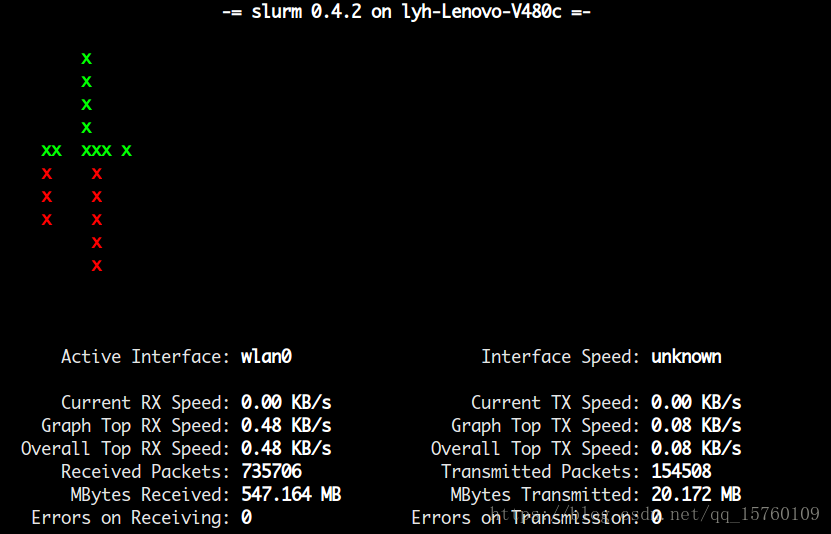
监控网络流量-1
安装:
[root@localhost ~]# yum install -y slurm
[root@localhost ~]# slurm -i wlan0
监控网络流量-2
在类Unix系统中可以使用top查看系统资源,进程,内存占用等信息。查看网络状态可以使用netstat、nmap等工具。
若要查看实时的网络流量,监控TCP/IP连接,反向解析IP,显示端口信息等,则可以使用iftop。
1、安装
由于使用yum install命令,无法进行直接安装。
- # yum install iftop //用命令直接安装
- Loaded plugins: fastestmirror
- Loading mirror speeds from cached hostfile
- * base: mirrors.skyshe.cn
- * extras: centos.ustc.edu.cn
- * updates: mirrors.skyshe.cn
- Setting up Install Process
- No package iftop available. //没有可用的安装包
- Error: Nothing to do //什么都没干
那么,就必须使用第二种安装方式,即下载,解压,配置,并编译安装。
从其官网(http://www.ex-parrot.com/pdw/iftop/download/)上,选择一个最新版本(iftop-1.0pre4.tar.gz)
- 1,
- [root@localhost nginx]# yum install flex byacc libpcap ncurses ncurses-devel libpcap-devel
- Loaded plugins: fastestmirror
- Loading mirror speeds from cached hostfile
- * base: centos.ustc.edu.cn
- * extras: centos.ustc.edu.cn
- * updates: mirrors.163.com
- Package ncurses-5.9-13.20130511.el7.x86_64 already installed and latest version
- Resolving Dependencies
- --> Running transaction check
- ---> Package byacc.x86_64 0:1.9.20130304-3.el7 will be installed
- ---> Package flex.x86_64 0:2.5.37-
- 2,
- [root@localhost soft]# wget wget http://www.ex-parrot.com/pdw/iftop/download/iftop-0.17.tar.gz
- --2015-06-09 17:30:41-- http://wget/
- Resolving wget (wget)... failed: Name or service not known.
- wget: unable to resolve host address ‘wget’
- --2015-06-09 17:30:43-- http://www.ex-parrot.com/pdw/iftop/download/iftop-0.17.tar.gz
- Resolving www.ex-parrot.com (www.ex-parrot.com)... 93.93.130.44
- Connecting to www.ex-parrot.com (www.ex-parrot.com)|93.93.130.44|:80... connected.
- HTTP request sent, awaiting response... 200 OK
- Length: 160381 (157K) [application/gzip]
- Saving to: ‘iftop-0.17.tar.gz’
- 100%[=========================================================================================================================================>] 160,381 97.3KB/s in 1.6s
- 2015-06-09 17:30:47 (97.3 KB/s) - ‘iftop-0.17.tar.gz’ saved [160381/160381]
- 3,
- [root@localhost soft]# tar -zxvf iftop-0.17.tar.gz
- iftop-0.17/
- iftop-0.17/aclocal.m4
- iftop-0.17/addr_hash.c
- iftop-0.17/addr_hash.h
- iftop-0.17/addrs_dlpi.c
- iftop-0.17/addrs_ioctl.c
- iftop-0.17/AUTHORS
- iftop-0.17/bootstrap
- iftop-0.17/cfgfile.c
- 4,
- [root@localhost iftop-0.17]# ./configure
- checking build system type... x86_64-unknown-linux-gnu
- checking host system type... x86_64-unknown-linux-gnu
- checking target system type... x86_64-unknown-linux-gnu
- checking for a BSD-compatible install... /usr/bin/install -c
- checking whether build environment is sane... yes
- checking for gawk... gawk
- checking whether make sets ${MAKE}... yes
- checking for gcc... gcc
- checking for C compiler default output... a.out
- checking whether the C compiler works... yes
- 6,
- [root@localhost iftop-0.17]# make && make install
- make all-recursive
- make[1]: Entering directory `/root/soft/iftop-0.17'
- Making all in config
- make[2]: Entering directory `/root/soft/iftop-
我们使用服务器环境是centos7,centos下通常使用iftop,或者nethogs来进行网络流量监控。这2个工具都需要先安装epel,因为这个库通常操作系统是不自带的。
那么就先安装epel,使用的命令是:
rpm -Uvh https://dl.fedoraproject.org/pub/epel/epel-release-latest-7.noarch.rpm
yum install -y iftop
2、命令说明
- 语法: iftop -h | [-npblNBP] [-i interface] [-f filter code] [-F net/mask] [-G net6/mask6]
- -h 显示本帮助(Help)信息
- -n 不进行主机名(hostName)查找
- -N 不将端口号(port Number)转换成对应的服务 to services
- -p 混合(Promiscuous)模式(显示网络相关的其他主机信息)
- -b 不显示流量图形条(Bar)
- -B 以字节(Byte)为单位,显示带宽(Bandwidth);默认以比特(bit)显示的
- -i interface 监控的网卡接口(interface)
- -f filter code 包统计时,使用过滤码;默认:无,只统计IP包
- -F net/mask 显示特定IPv4网段的进出流量(Flow);如# iftop -F 10.10.1.0/24
- -G net6/mask6 显示特定IPv6网段的进出流量(Flow)
- -l 显示并统计IPv6本地(Local)链接的流量(默认:关)
- -P 显示端口(Port)
- -m limit 设置显示界面上侧的带宽刻度(liMit)
- -c config file 指定配置(Config)文件
- -t 使用不带窗口菜单的文本(text)接口
- 排序:
- -o 2s Sort by first column (2s traffic average)
- -o 10s Sort by second column (10s traffic average) [default]
- -o 40s Sort by third column (40s traffic average)
- -o source Sort by source address
- -o destination Sort by destination address
- The following options are only available in combination with -t
- -s num print one single text output afer num seconds, then quit
- -L num number of lines to print
3、界面说明
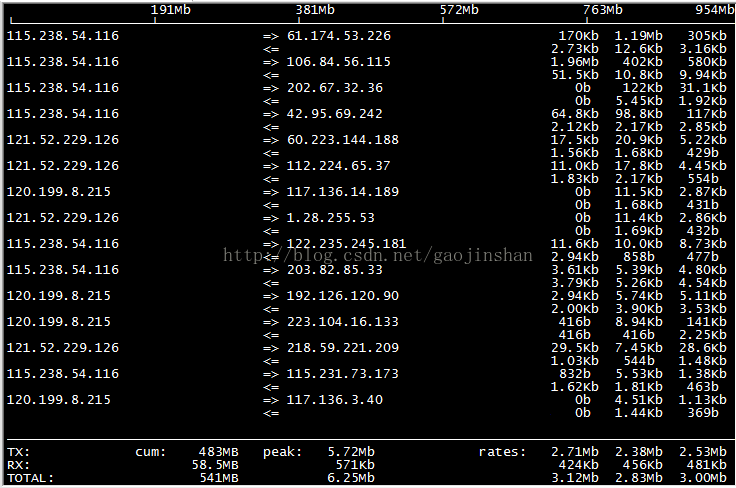
界面上面显示的是类似刻度尺的刻度范围,为显示流量图形的长条作标尺用的。
前面IP是本机的(Source),后面IP远程主机的(Dest);
中间的<= =>这两个左右箭头,表示的是流量的方向。
右侧的三列数值:
第一列是:在此次刷新之前2s或10s或40s的平均流量(按B设置秒数);
第二列是:在此次刷新之前10秒钟的总流量的一半;
第三列是:在此次刷新之前40秒钟的总流量的1/5;
TX:发送(Transmit)流量;RX:接收(Receive)流量;TOTAL:总流量;
cum:运行iftop到目前时间的总和(Cum);peak:流量峰(Peak)值;
rates:分别表示过去 2s 10s 40s 的平均流量;
界面显示时的交互命令:
- 主机显示:
- n - DNS主机解析的开关
- s - 源(Source)主机显示的开关
- d - 目标(Dest)主机显示的开关
- t - 循环切换行显示模式
- 端口显示:
- N - toggle service resolution
- S - toggle show source port
- D - toggle show destination port
- p - toggle port display
- 排序:
- 1/2/3 - sort by 1st/2nd/3rd column
- < - sort by source name
- > - sort by dest name
- o - freeze current order
- 普通:
- P - 暂停(Pause)显示
- h - 本帮助(Help)的显示或隐藏
- b - 图形条(Bar)的显示或隐藏
- B - cycle bar graph average
- T - toggle cumulative line totals
- j/k - scroll display
- f - edit filter code
- l - set screen filter
- L - lin/log scales
- ! - shell command
- q - quit
linux内网服务器之间测速(iperf3)
下载rpm
[root@xiexianbin-cn ~]# rpm -ivh iperf3-3.1.3-1.fc24.x86_64.rpm
Preparing... ################################# [100%]
Updating / installing...
1:iperf3-3.1.3-1.fc24 ################################# [100%]
[root@xiexianbin-cn ~]# 服务器端:[root@xiexianbin-cn ~]# iperf3 -s 客户端:[root@xiexianbin-cn ~]# iperf3 -c 192.168.8.80
解释: 默认情况客户端使用TCP协议
- -s:指明是服务器端
- -c: 指明是客户端
- 192.168.8.80: 为服务端IP地址
- -u:指定是udp报文
- -b:指定发送带宽大小。
- -p:指定端口
- iperf3 –h 查看所有参数含义:
Centos7限速和测速的更多相关文章
- 网络测速神器:SpeedTest深度指南
最近在测试一个项目,里面涉及到一个测试case:在linux服务器上,当网络带宽较差时,观察服务的消息处理能力和表现.限制网卡带宽有许多方法,比如Wondershaper或者ethtool.那验证限速 ...
- [ Arch Linux ] Arch更新源高速源整理之测速并自动排序高速源 加快更新效率
方法一: 工具:rankmirrors 0x01 备份原来的源,并创建一个测试源 cd /etc/pacman.d cp mirrorlist mirrorlist.bakcp mirrorlist ...
- C# Ping的例子,可用于测试网络,延迟xx毫秒 C#编写网站测速
C#编写网站测速 WebClient wcl = new WebClient(); Stopwatch spwatch = new Stopwatch(); spwatch.Start(); byte ...
- linux测速软件speedtest-cli
linux测速软件: https://github.com/sivel/speedtest-cli 以下是我在gentoo上测的
- 网址测速JS
/*.route_nav li a:hover{background: #3c7f84 url(title.png) no-repeat;border-color:#84a3a5;}*/ .route ...
- LINUX利用Speedtest测速
那么远程服务器呢?要知道大多数远程服务器是没有浏览器可以打开web页面的.用浏览器打开网页测速的瓶颈就在此,你不能按计划的对服务器进行定期的常规测试.这时需要到一个名为Speedtest-cli的软件 ...
- stm32直流电机驱动与测速代码配套视频资料
说实话就现在的市场应用中stm32已经占到了绝对住到的地位,51已经成为过去式,32的功能更加强大,虽然相应的难度有所增加,但是依然阻止不了大家学习32的脚步,不说大话了这些大家都懂要不然也不会学习s ...
- RAMOS测速
WIN7X64-DDR31600-RAMOS测速,连续读取17GB/S,连续写入10GB/S,4K读写都是1GB/S左右.不错哦.
- 【pygame游戏编程】第四篇-----打字测速游戏
下面我们一起用pygame编写一个打字测速游戏 这是一个很实用的有趣的小游戏: 开始之前先来学习几个小函数: 1. ord(ch) python内置函数,传入一个字符,返回字符的ascii码 2.ch ...
随机推荐
- Jenkins Docker安装及Docker build step插件部署配置
生产部署环境:A:192.168.1.2 B:192.168.1.3 两台服务器系统均是Centos 7.3 , Docker版本都1.12.6 Jenkins安装操作步骤: 1.在A服务器上使用命 ...
- Java 文件读写操作
1[1]按字节读写,一次只读取一个字节,效率比较低 package bk1; import java.io.File; import java.io.FileInputStream; import j ...
- python数据类型之字典(二)
字典的基本操作 键值查找: >>> aInfo = {'Wangdachui':3000,'Niuyun':2000,'Linling':4500,'Tianqi':8000} &g ...
- [No0000179]改善C#程序的建议2:C#中dynamic的正确用法
dynamic是FrameWork4.0的新特性.dynamic的出现让C#具有了弱语言类型的特性.编译器在编译的时候不再对类型进行检查,编译期默认dynamic对象支持你想要的任何特性.比如,即使你 ...
- A little issue in Mathematical Thought from Ancient to Modern Times, Vol. 3
At P985 of the book, says But there are cuts that are not determined by rational numbers. If we put ...
- role="navigation"
HTML5的标签属性,可以用于标识一个普通的标签,使之语义化,方便浏览器对其具体功能进行识别. 例如div容器制作的导航栏,加上role="navigation",就可以让浏览器知 ...
- RabbitMQ 分布式设置和高可用性讨论
abbitMQ的集群主要有配置方式,分别是:本地局域网Cluster,federation,shovel. RabbitMQ Cluster主要是用于同一个网段内的局域网. federation和sh ...
- android 平台签名
特定程序为了获取平台的权限,需要用平台签名 可以用 build/target/product 下的私钥来签名 bat代码如下: java -jar signapk.jar emt100d\platfo ...
- Cookie映射
Cookie映射 第 5 章 Cookie映射 http://amp.ad.sina.com.cn/sax/doc/zh-CN/xhtml/bk01pt02ch05.xhtml 第 5 章 Cooki ...
- static的含义
static的含义:(1)设置变量的存储域,函数体内static变量的作用范围为该函数体,不同于auto变量,该变量的内存只被分配一次,因此其值在下次调用时仍持上次的值:(2)限制变量的作用域,在模块 ...