
Java 文件读写操作
1【1】按字节读写,一次只读取一个字节,效率比较低
 package bk1;

 import java.io.File;

 import java.io.FileInputStream;

 import java.io.IOException;

 import java.io.InputStream;

 public class Dx1 {

     public void display() //按字节读取文件内容,每次只能读取一个字节

     {

         File file =new File("课表.txt");//用来传文件的名字

         InputStream in = null;

         try{

         in=new FileInputStream(file);

         int zijie;

         System.out.println("按字节读出的结果");

         while((zijie=in.read())!=-1)

         {

             System.out.write(zijie);

         }

         in.close();

         }

         catch (IOException e) {

             // TODO: handle exception

             System.out.println(e.getMessage());

             return;//退出程序

         }

     }

     public static void main(String[] args) throws IOException {

         // TODO Auto-generated method stub

         Dx1 D=new Dx1();

         D.display();

     }

 }
【2】按字节读写,一次可以读写多个字节
 package bk1;

 import java.io.File;

 import java.io.FileInputStream;

 import java.io.IOException;

 import java.io.InputStream;

 public class Dx2 {

     public void display()

     {

         File file =new File("课表.txt");

         InputStream in = null;

         try {

             System.out.println("以字节为单位读取文件内容,一次读多个字节:");

             // 一次读多个字节

             byte[] tempbytes = new byte[100];

             int byteread = 0;

             in = new FileInputStream("课表.txt");

             Dx2.showAvailableBytes(in);

             // 读入多个字节到字节数组中,byteread为一次读入的字节数

             while ((byteread = in.read(tempbytes)) != -1) {

                 System.out.write(tempbytes, 0, byteread);

             }

         } catch (Exception e1) {

             e1.printStackTrace();

         } finally {

             if (in != null) {

                 try {

                     in.close();

                 } catch (IOException e1) {

                 }

             }

         }

     }

     static void showAvailableBytes(InputStream in) {

         try {

             System.out.println("当前字节输入流中的字节数为:" + in.available());

         } catch (IOException e) {

             e.printStackTrace();

         }

     }

     public static void main(String[] args) {

         // TODO Auto-generated method stub

         Dx2 D=new Dx2();

         D.display();

     }

 }
2【1】以字符为单位读取文件内容,一次读一个字符
【2】以字符为单位读取文件内容,一次读多个字符
 package bk1;

 import java.io.File;

 import java.io.FileInputStream;

 import java.io.IOException;

 import java.io.InputStreamReader;

 import java.io.Reader;

 public class Dx3 {

     public static void readFileByChars(String fileName) {

         File file = new File("课表.txt");

         Reader reader = null;

         try {

             System.out.println("以字符为单位读取文件内容,一次读一个字符:");

             // 一次读一个字符

             reader=new InputStreamReader(new FileInputStream(file));

             int tempchar;

             while ((tempchar = reader.read()) != -1) {

                 // 对于windows下,rn这两个字符在一起时,表示一个换行。

                 // 但如果这两个字符分开显示时,会换两次行。

                 // 因此,屏蔽掉r,或者屏蔽n。否则,将会多出很多空行。

                 if (((char) tempchar) != 'r') {

                     System.out.print((char) tempchar);

                 }

             }

             reader.close();

         } catch (Exception e) {

             e.printStackTrace();

         }

         try {

             System.out.println("以字符为单位读取文件内容,一次读多个字符:");

             // 一次读多个字符

             char[] tempchars = new char[30];

             int charread = 0;

             reader = new InputStreamReader(new FileInputStream("课表.txt"));

             // 读入多个字符到字符数组中,charread为一次读取字符数

             while ((charread = reader.read(tempchars)) != -1) {

                 // 同样屏蔽掉r不显示

                 if ((charread == tempchars.length)

                         && (tempchars[tempchars.length - 1] != 'r')) {

                     System.out.print(tempchars);

                 } else {

                     for (int i = 0; i < charread; i++) {

                         if (tempchars[i] == 'r') {

                             continue;

                         } else {

                             System.out.print(tempchars[i]);

                         }

                     }

                 }

             }

         } catch (Exception e1) {

             e1.printStackTrace();

         } finally {

             if (reader != null) {

                 try {

                     reader.close();

                 } catch (IOException e1) {

                 }

             }

         }

     }

     public static void main(String[] args) {

         // TODO Auto-generated method stub

         Dx3.readFileByChars("课表.txt");

     }

 }
截图:
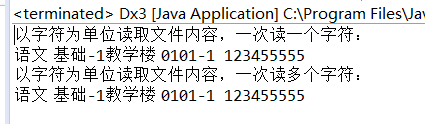
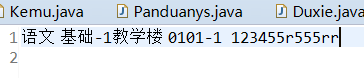
文件中的r字符无法读出。
3以行为单位读取文件内容,一次读一整行
 package bk1;

 import java.io.BufferedReader;

 import java.io.File;

 import java.io.FileReader;

 import java.io.IOException;

 public class Dx4 {

     public static void readFileByLines(String fileName) {

         File file = new File("课表.txt");

         BufferedReader reader = null;

         try {

             System.out.println("以行为单位读取文件内容,一次读一整行:");

             reader = new BufferedReader(new FileReader(file));

             String tempString = null;

             int line = 1;

             // 一次读入一行,直到读入null为文件结束

             while ((tempString = reader.readLine()) != null) {

                 // 显示行号

                 System.out.println("line " + line + ": " + tempString);

                 line++;

             }

             reader.close();

         } catch (IOException e) {

             e.printStackTrace();

         } finally {

             if (reader != null) {

                 try {

                     reader.close();

                 } catch (IOException e1) {

                 }

             }

         }

     }

     public static void main(String[] args) {

         // TODO Auto-generated method stub

         Dx4.readFileByLines("课表.txt");

     }

 }
4随机读取一段文件内容
package bk1;

import java.io.IOException;

import java.io.RandomAccessFile;

public class Dx5 {

    public static void readFileByRandomAccess(String fileName) {

        RandomAccessFile randomFile = null;

        try {

            System.out.println("随机读取一段文件内容:");

            // 打开一个随机访问文件流,按只读方式

            randomFile = new RandomAccessFile("课表.txt", "r");

            // 文件长度,字节数

            long fileLength = randomFile.length();

            // 读文件的起始位置

            int beginIndex = (fileLength > 4) ? 4 : 0;

            // 将读文件的开始位置移到beginIndex位置。

            randomFile.seek(beginIndex);

            byte[] bytes = new byte[10];

            int byteread = 0;

            // 一次读10个字节,如果文件内容不足10个字节,则读剩下的字节。

            // 将一次读取的字节数赋给byteread

            while ((byteread = randomFile.read(bytes)) != -1) {

                System.out.write(bytes, 0, byteread);

            }

        } catch (IOException e) {

            e.printStackTrace();

        } finally {

            if (randomFile != null) {

                try {

                    randomFile.close();

                } catch (IOException e1) {

                }

            }

        }

    }

    public static void main(String[] args) {

        // TODO Auto-generated method stub

        Dx5.readFileByRandomAccess("课表.txt");

    }

}
Java 文件读写操作的更多相关文章
- java文件读写操作类
借鉴了项目以前的文件写入功能,实现了对文件读写操作的封装 仅仅需要在读写方法传入路径即可(可以是绝对或相对路径) 以后使用时,可以在此基础上改进,比如: 写操作: 1,对java GUI中文本框中的内 ...
- java文件读写操作
Java IO系统里读写文件使用Reader和Writer两个抽象类,Reader中read()和close()方法都是抽象方法.Writer中 write(),flush()和close()方法为抽 ...
- Java文件读写操作指定编码方式防乱码
读文件:BufferedReader 从字符输入流中读取文本,缓冲各个字符,从而提供字符.数组和行的高效读取. 可以指定缓冲区的大小,或者可使用默认的大小.大多数情况下,默认值就足够大了. 通常,Re ...
- java文件读写操作指定编码格式
读文件: BufferedReader 从字符输入流中读取文本,缓冲各个字符,从而提供字符.数组和行的高效读取. 可以指定缓冲区的大小,或者可使用默认的大小.大多数情况下,默认值就足够大了. 通常,R ...
- java文件读写操作大全
转自:http://hi.baidu.com/0_net/blog/item/8566fc2bb730c293033bf63e.html一.获得控制台用户输入的信息 public String get ...
- [Java] java文件读写操作大全
一.获得控制台用户输入的信息 //可以返回用户输入的信息,不足之处在于不支持中文输入,有待进一步改进 public String getInputMessage() throws IOExceptio ...
- Java文件读写操作指定编码方式。。。。。
读: File file=new File(this.filePath);BufferedReader br=new BufferedReader(new InputStreamReader(new ...
- Java 字节流实现文件读写操作(InputStream-OutputStream)
Java 字节流实现文件读写操作(InputStream-OutputStream) 备注:字节流比字符流底层,但是效率底下. 字符流地址:http://pengyan5945.iteye.com/b ...
- Java 字符流实现文件读写操作(FileReader-FileWriter)
Java 字符流实现文件读写操作(FileReader-FileWriter) 备注:字符流效率高,但是没有字节流底层 字节流地址:http://pengyan5945.iteye.com/blog/ ...
随机推荐
- 启动vmware虚拟机报错:“无法获得VMCI驱动程序的版本:句柄无效”
启动vmware虚拟机的时候报错: 找到对应虚拟机的文件夹路径: 用记事本打开CentOS 64位.vmx,找到这么一行: vmci0.present = "TRUE" 把TRUE ...
- HTML解析库Gumbo简单使用记录
目录 Gumbo简介 使用记录 1.GumboNode的类型 2.简单的使用 Gumbo简介 Gumbo是谷歌开源的一个纯C编写的HTML解析库,性能很好,就是用起来比较麻烦. github地址htt ...
- void java.lang.System.gc()
void java.lang.System.gc() Runs the garbage collector. Calling the gc method suggests that the Java ...
- Android Data Recovery for Mac(安卓数据恢复软件)破解版安装
1.软件简介 Android Data Recovery 是 macOS 系统上一款 Android 设备数据恢复软件,能够帮助我们在 mac 电脑上对 Android 设备进行数据恢复,文档. ...
- 10.1.翻译系列:EF 6中的实体映射【EF 6 Code-First系列】
原文链接:https://www.entityframeworktutorial.net/code-first/configure-entity-mappings-using-fluent-api.a ...
- 在Thinkphp中【自动加载自定义扩展配置文件】!
/Conf/config.php为正式的扩展文件 /Conf/verify.php为扩展的自定义配置文件 /Conf/sendmail.php为扩展的自定义配置文件 如果要自动加载 verify和se ...
- VMware Workstation Pro 14.1.1 正式版
VMware是功能最强大的虚拟机软件,用户可以在虚拟机同时运行各种操作系统,进行开发.测试.演示和部署软件,虚拟机中复制服务器.台式机和平板环境,每个虚拟机可分配多个处理器核心.主内存和显存. 更新日 ...
- rabbitmq启动异常table_attributes_mismatch
rabbitmq启动异常table_attributes_mismatch 2017年01月09日 16:57:50 growithus 阅读数:18 [root@localhost rabb ...
- 关于Unity中NGUI的帧动画和Tween动画
帧动画 1.把三张帧动画的贴图png制作成图集,NGUI---->Open---->Atlas Maker,生成一个预制体,一个材质球,一个大图 2.创建一个Sprite类型的Sprite ...
- jquery 选择对象随心所欲,遍历数组更是易如反掌
jquery只要研究总结透彻了,那选择对象就会随心所欲,遍历数组更是易如反掌.选对对象,才能“娶妻生子”,才能有后续的数据处理.呵呵遍历对很关键. 怕只怕,学东西浅尝辄止一知半解.本篇特别研究总结jq ...