
linux cron计划任务、chkconfig 命令、systemd命令、unit 相关、target 相关
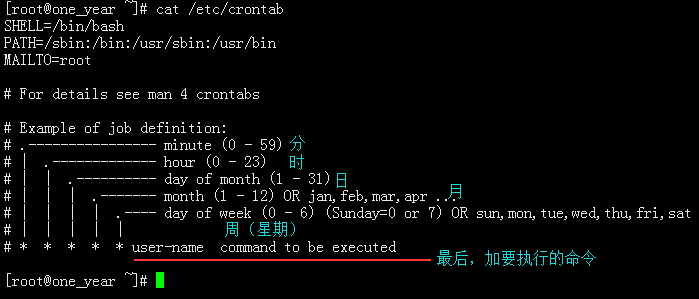
1、设置说明位置 : cat /etc/crontab
# Example of job definition:
# .---------------- minute (0 - 59)
# | .------------- hour (0 - 23)
# | | .---------- day of month (1 - 31)
# | | | .------- month (1 - 12) OR jan,feb,mar,apr ...
# | | | | .---- day of week (0 - 6) (Sunday=0 or 7) OR sun,mon,tue,wed,thu,fri,sat
# | | | | |
# * * * * * user-name command to be executed
分别所表示的时间用法:
编辑计划任务的命令: crontab -e
0 0 * * * /bin/bash /usr/loacal/sbin/aa.sh >> /var/log/aa.log 2>>/var/log/aa.log
0 0 1-10 */3 * 4,5 /bin/bash /usr/local/sbin/bb.sh >> /var/log/bb.log 2>>/var/log/bb.log

查看有哪些计划任务:crontab -l (当前用户的计划任务); crontab -u root -l (查看指定用户的计划任务)

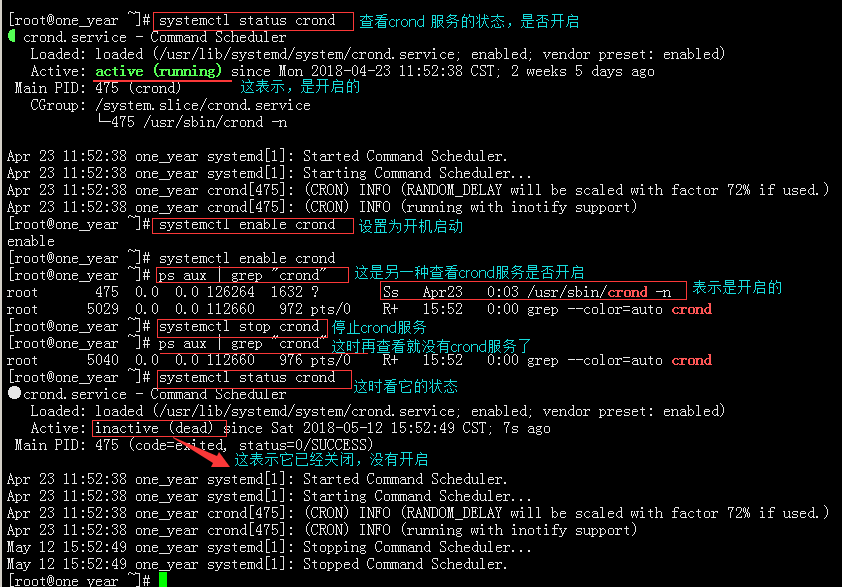
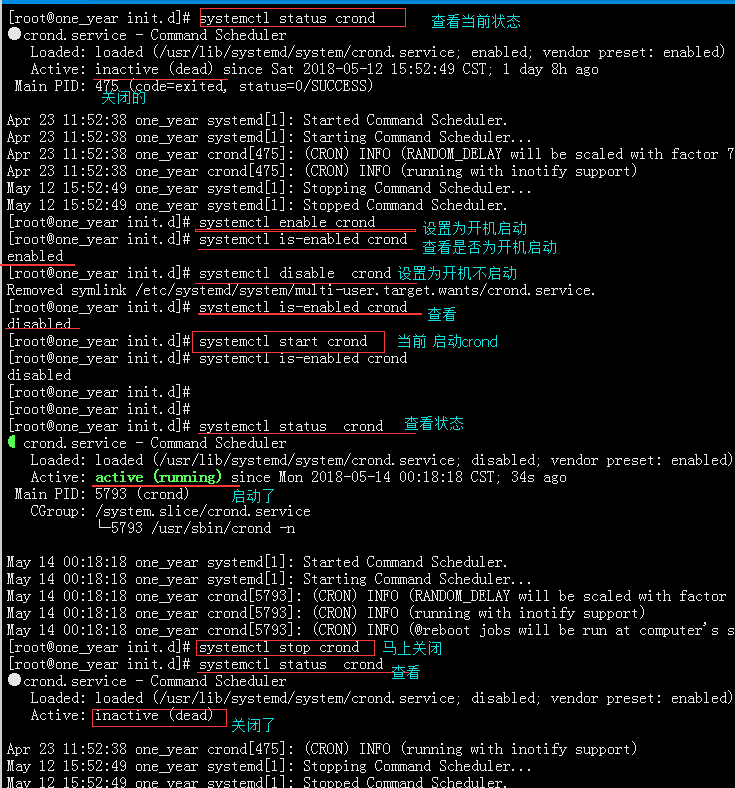
若要真正能执行,还需要启动crond 服务: systemctl start crond (systemctl enable crond 设置为开机启动)
查看是否启动:sytemctl status crond 或 ps -aux | grep "crond"
关闭这个服务:systemctl stop crond
特别注意命令中,最好写命令的绝对路径!
计划任务文件所存放的位置:/etc/var/spool/cron/
若要备份,选择相关的,进行复制就可以了
删除计划任务:crontab -r (删除当前用户的计划任务); crontab -u root -r (删除指定用户的计划任务)

2、chkconfig 命令:
查看系统里有哪些服务: chkconfig 或 chkconfig --list
设置默认开启某个服务: chkconfig name_service on
设置默认关闭某个服务: chkconfig name_service off
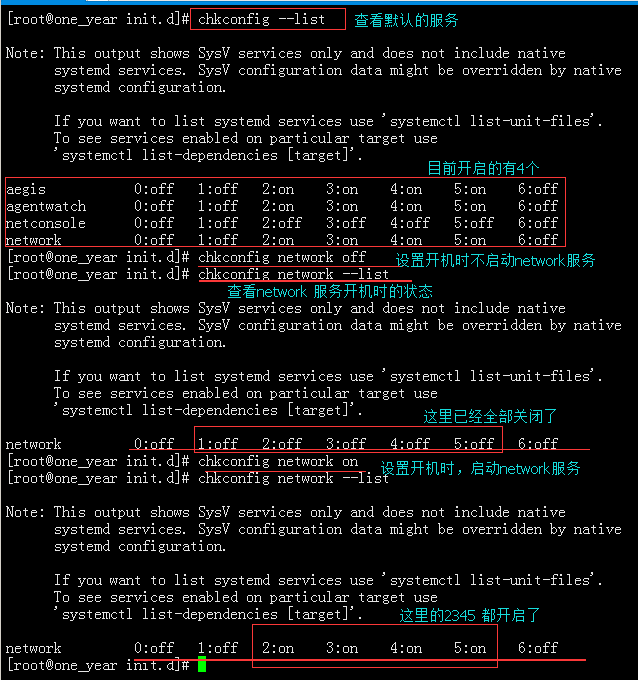
这里的0-6分别表示的是:0 关机; 1 单用户; 2多用户没有(nfs文件系统,网络); 3 多用户(包含nfs) 4保留;
5 图形桌面模式;6 重启。 (一般默认为3)
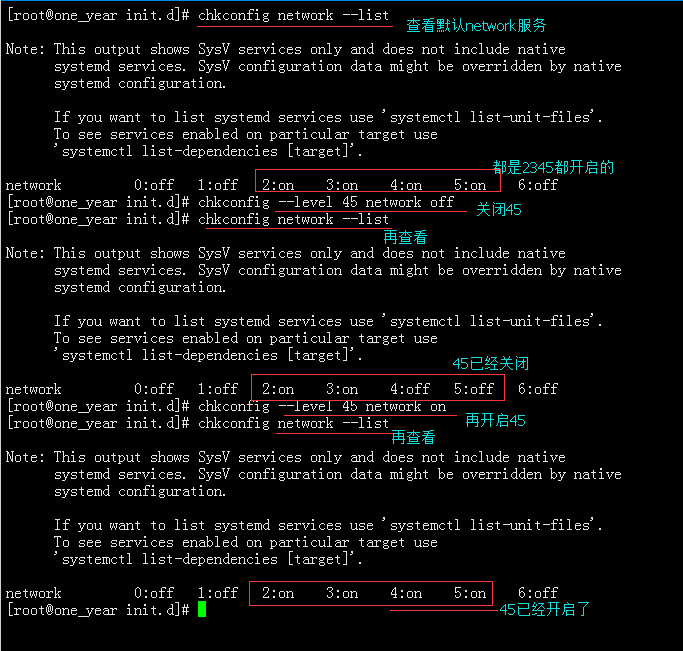
若需要指定某个支行级别下关闭或开启某个服务:
chkconfig --level # name_service off (指定在某个级别关闭某服务,--level # 表示某级别、name_service 表示某个服务的名字)
chkconfig --level # name_servcie on (指定在某个级别开启某服务)
增加一个服务到启动列表,或删除一个服务到启动列表:
chkconfig --add name_service (增加一个服务)
chkconfig --del name_service (删除一个服务)
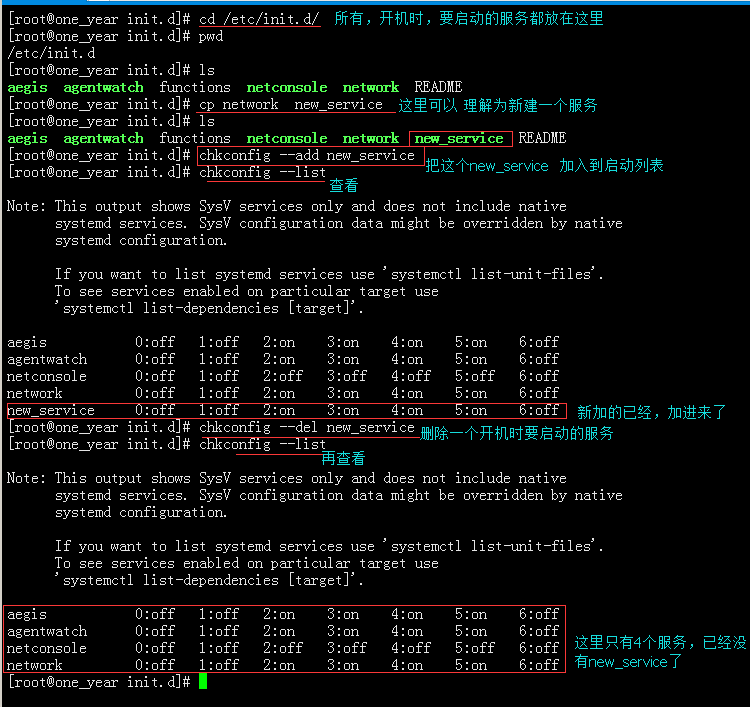
扩展:
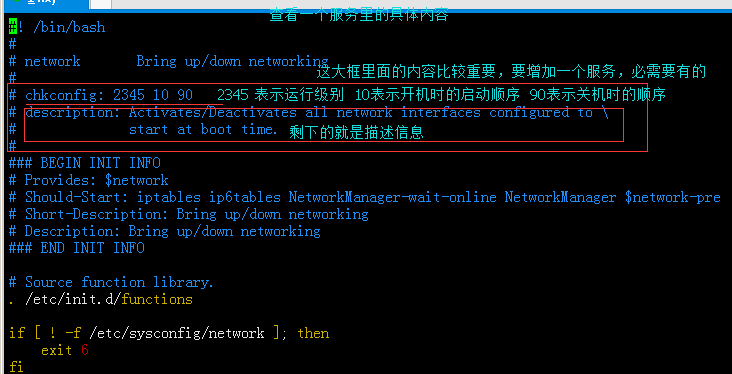
chkconfig : ### ## ## (这个是必需需要的)
###: 表示运行级别
##: 开机时的启动顺序
##: 关机时的关闭顺序
3、systemd命令:
查看所有类型(target servcie)的:systemctl list-unit-files
查看所有服务类型的:systemctl list-units --all --type=service
查看只有启动了的服务类型的:systemctl list-units --type=service (包含启动失败的服务)
systemctl enable name_servcie.servcie (或 systemctl enable name_service) (设置为开机启动)
systemctl disable name_servcie.servcie (或 systemctl disable name_service) (设置为开机关闭)
systemctl start name_servcie.servcie (开启某服务)
systemctl stop name_servcie.servcie (关闭某服务)
systemctl status name_service systemctl is-active name_servcie(查看某服务现在的状态)
systemctl is-enabled name_service (查看某服务是否开机启动)
4、unit 相关命令:
在这个路径下的: /usr/lib/systemd/system 所以文件都是unit文件
service 系统服务
target 多个unit组成的组
device 硬件设备
mount 文件系统的挂载点
automount 自动挂载
path 文件路径相关
scope 非systemd 启动的 外部进程
slice 进程组
snapshot systemd systemd 的快照
socket 套接字
swap swap文件
timer 定时器
具体的几个相关命令:(这个在之前systemd 里提到过)
查看所有类型(target servcie)的文件:systemctl list-unit-files
查看所有服务类型的:systemctl list-units --all --type=service
查看只有启动了的服务类型的:systemctl list-units --type=service (包含启动失败的服务)
systemctl list-units 查看所有unit
systemctl list-units --all --state=inactvie /active
systemctl status name_service systemctl is-active name_servcie(查看某服务现在的状态)
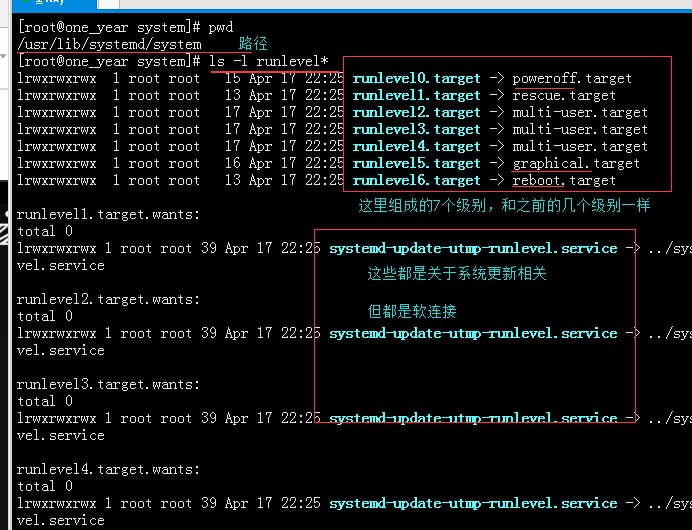
5、target 相关(target是多个unit的组合):
target 就是unit 的组合 (target 文件可以理解为(多个unit)的快捷方式 或是软连接,然后组合在一起的)
systemctl list-unit-files --type=target (查看所有的target)
systemctl list-dependencies multi-user.target (查看target是由哪些unit 组合成的)
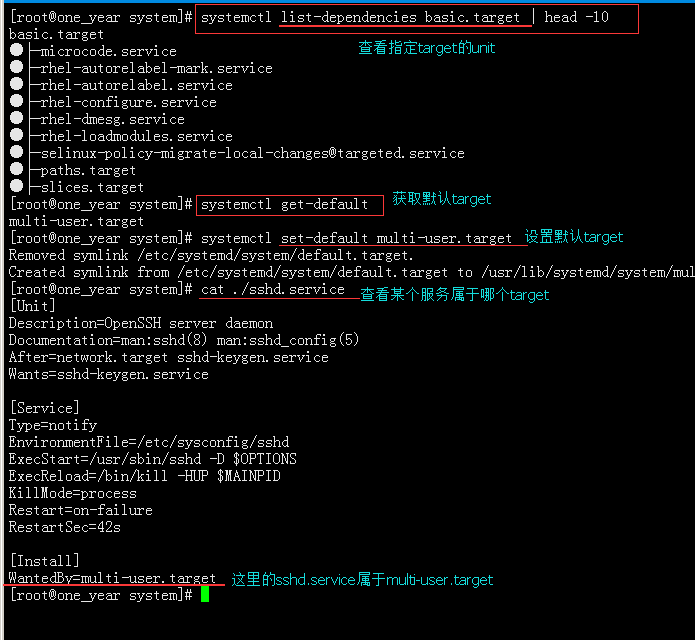
systemctl list-dependencies basic.target (查看指定target 由哪些unit组成)
systemctl get-default (查看默认target)
systemctl set-default multi-user.target (设置默认的target)
cat /user/lib/systemd/system/name_service.service (查看某个服务属于哪个target)
··
linux cron计划任务、chkconfig 命令、systemd命令、unit 相关、target 相关的更多相关文章
- linux cron计划任务
说明:Crontab是Linux系统中在固定时间执行某一个程序的工具,类似于Windows系统中的任务计划程序 下面通过详细实例来说明在Linux系统中如何使用Crontab 操作系统:CentOS ...
- linux cron计划任务防止多个任务同时运行
使用linux flock 文件锁实现任务锁定,解决冲突格式:flock [-sxun][-w #] fd#flock [-sxon][-w #] file [-c] command选项-s, --s ...
- Linux 初始化系统(init)- systemd
wikipedia 浅析 Linux 初始化 init 系统 systemd 中文手册 fedoraproject - systemd 1. Systemd 简介 Systemd 是 Linux 系统 ...
- linux任务计划cron、chkconfig工具、systemd管理服务、unit和target介绍
第8周第1次课(5月14日) 课程内容: 10.23 linux任务计划cron10.24 chkconfig工具10.25 systemd管理服务10.26 unit介绍10.27 target介绍 ...
- Linux centos7 linux任务计划cron、chkconfig工具、systemd管理服务、unit介绍、 target介绍
一.linux任务计划cron crontab -u -e -l -r 格式;分 时 日 月 周 user command 文件/var/spool/corn/username 分范围0-59,时范 ...
- 网卡配置文件详解 用户管理与文件权限篇 文件与目录权限 软连接 tar解压命令 killall命令 linux防火墙 dns解析设置 计划任务crond服务 软件包安装 阿里云 yum源 安装
Linux系统基础优化及常用命令 Linux基础系统优化 引言没有,只有一张图. Linux的网络功能相当强悍,一时之间我们无法了解所有的网络命令,在配置服务器基础环境时,先了解下网络参数设定命令. ...
- linux任务计划 chkconfig工具 systemd管理服务 unit介绍 target介绍
linux任务计划 任务计划:特定时间备份数据,重启服务,shell脚本,单独的命令等等. 任务计划配置文件:cat /etc/crontab [root@centos7 ~]# cat /etc/c ...
- Linux任务计划命令 :crontab -e
crond是linux下用来周期性的执行某种任务或等待处理某些事件的一个守护进程,与windows下的计划任务类似,当安装完成操作系统后,默认会安装此服务工具,并且会自动启动crond进程,crond ...
- Linux下计划任务:crontab 命令的权限说明
Linux下的计划任务: 使用crontab命令来执行调度,在 Linux 下可以通过创建文件 /etc/cron.allow 或者 /etc/cron.deny 来控制权限,如果 /etc/cron ...
随机推荐
- Ubuntu云服务器下mysql授权远程登陆
1)首先以 root 帐户登陆 MySQL(在授权之前要确保3306端口开放)2)创建远程登陆用户并授权 > grant all PRIVILEGES on discuz.* to zhan@' ...
- CSS3 的box-shadow进阶之 - 动画篇 - 制作辐射动画
本篇文章是上一篇讲box-shadow基础知识的延伸,建议先花几分钟阅读那篇文章,点击阅读,再来看这篇. 除了box-shadow属性知识外,制作动画,还需要对CSS3的animation, @key ...
- 逆袭之旅DAY09.东软实训.接口
2018年7月5日 package day0705.teacher.test1usb; /** * 测试类 * @author Administrator * */ public class UsbI ...
- java 数据溢出和编译错误的差别
int a=100000000000;编译错误,超出int范围 int a=2100000000; int b=a*12020200;数据溢出,a并未溢出,但b在通过a计算后的数据溢出 long e= ...
- CCF关于对NOIP2018复赛违规处罚的公告
NOIP2018复赛于11月10-11日在全国31个赛区同时举行,现已结束.总体有序,但也有赛区出现违规现象.现将复赛中违规情况进行通报. 一.数据提交情况 CCF要求NOI各省组织单位在考试结束后在 ...
- 架构之路:nginx与IIS服务器搭建集群实现负载均衡(一)
最近亮亮在研究IIS的负载均衡!本人由于初出茅庐,防骗意识薄弱,一不小心被亮亮坑上了IIS负载均衡之路(亮亮是真黑哈!).前车之鉴啊!小伙伴们要小心.不过既上了贼船,便决定一条道走到黑.于是乎从大前天 ...
- bzoj2330
题解: 差分约束系统 要我们求最小值 显然就是转化为最长路 然后spfa一下即可 代码: #include<bits/stdc++.h> using namespace std; ; lo ...
- 软件设计基础-C/S系统
在软件设计开发过程中,逐渐形成了一些针对特定应用领域的软件系统组织方式的惯用模式 如经典的C/S(client/server,客户/服务器)模式和B/S(browser/server,浏览器/服务器) ...
- 1449 - The user specified as a definer('xxx'@'%') does not exist
指定的用户不存在,创建相应的账户即可,注意主机那里填的内容,我的这个是@'%'所以不用填任何内容.
- 利用node,跑项目。
(前提是已经安装了node) 一.简单介绍 Vue开发|文件目录结构部署 目录结构 ├── index.html 入口页面 ├── build 构建脚本目录 │ ├── build-server.j ...