
linux cron计划任务
说明:Crontab是Linux系统中在固定时间执行某一个程序的工具,类似于Windows系统中的任务计划程序
下面通过详细实例来说明在Linux系统中如何使用Crontab
操作系统:CentOS
一、安装crontab
yum install vixie-cron #安装
chkconfig crond on #设为开机启动,先要安装chkconfig(yum install chkconfig)
service crond start #启动
service crond stop #停止
/etc/rc.d/init.d/crond restart #重启
/etc/rc.d/init.d/crond reload #不中断服务,重新载入配置
二、设置任务计划
/home/www.osyunwei.com/osyunwei.sh #要自动执行的脚本程序路径
chmod +x /home/www.osyunwei.com/osyunwei.sh #对脚本文件添加执行权限,否则不能执行
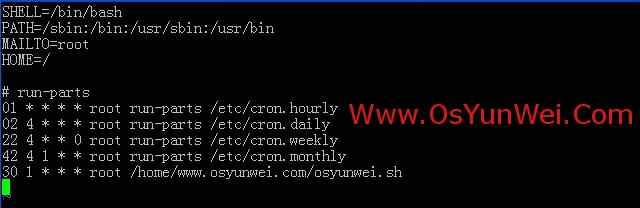
vi /etc/crontab #编辑配置文件,在最后一行添加内容
30 1 * * * root /home/www.osyunwei.com/osyunwei.sh #表示每天凌晨1点30执行备份
:wq! #保存退出
系统运维 www.osyunwei.com 温馨提醒:qihang01原创内容版权所有,转载请注明出处及原文链接
/etc/rc.d/init.d/crond restart #重启
备注:
系统运维 www.osyunwei.com 温馨提醒:qihang01原创内容版权所有,转载请注明出处及原文链接
crontab文件的格式:
minute hour day month weekday username command
minute:分,值为0-59
hour:小时,值为1-23
day:天,值为1-31
month:月,值为1-12
weekday:星期,值为0-6(0代表星期天,1代表星期一,以此类推)
username:要执行程序的用户,一般设置为root
command:要执行的程序路径(设置为绝对路径)例如:/home/www.osyunwei.com/osyunwei.sh
附:crontab规则详细实例
1、每天6:00执行
0 6 * * * root /home/www.osyunwei.com/osyunwei.sh
2、每周六凌晨4:00执行
0 4 * * 6 root /home/www.osyunwei.com/osyunwei.sh
3、每周六凌晨4:05执行
5 4 * * 6 root /home/www.osyunwei.com/osyunwei.sh
4、每周六凌晨4:15执行
15 4 * * 6 root /home/www.osyunwei.com/osyunwei.sh
5、每周六凌晨4:25执行
25 4 * * 6 root /home/www.osyunwei.com/osyunwei.sh
6、每周六凌晨4:35执行
35 4 * * 6 root /home/www.osyunwei.com/osyunwei.sh
7、每周六凌晨5:00执行
5 * * 6 root /home/www.osyunwei.com/osyunwei.sh
8、每天8:40执行
40 8 * * * root /home/www.osyunwei.com/osyunwei.sh
9、每天8:30执行
30 8 * * * root /home/www.osyunwei.com/osyunwei.sh
10、每周一到周五的11:41开始,每隔10分钟执行一次
41,51 11 * * 1-5 root /home/www.osyunwei.com/osyunwei.sh
1-59/10 12-23 * * 1-5 root /home/www.osyunwei.com/osyunwei.sh
11、在每天的10:31开始,每隔2小时重复一次
31 10-23/2 * * * root /home/www.osyunwei.com/osyunwei.sh
12、每天15:00执行
0 15 * * * root /home/www.osyunwei.com/osyunwei.sh
13、每天的10:30开始,每隔2小时重复一次
30 10-23/2 * * * root /home/www.osyunwei.com/osyunwei.sh
14、每天15:30执行
30 15 * * * root /home/www.osyunwei.com/osyunwei.sh
15、每天17:50执行
50 17 * * * root /home/www.osyunwei.com/osyunwei.sh
16、每天8:00执行
0 8 * * * root /home/www.osyunwei.com/osyunwei.sh
17、每天18:00执行
0 18 * * * root /home/www.osyunwei.com/osyunwei.sh
18、每天8:30执行
系统运维 www.osyunwei.com 温馨提醒:qihang01原创内容版权所有,转载请注明出处及原文链接
30 8 * * * root /home/www.osyunwei.com/osyunwei.sh
19、每天20:30
30 20 * * * root /home/www.osyunwei.com/osyunwei.sh
20、每周一到周五2:00
0 2 * * 1-5 root /home/www.osyunwei.com/osyunwei.sh
21、每周一到周五9:30
30 9 * * 1-5 root /home/www.osyunwei.com/osyunwei.sh
22、每周一到周五8:00,每周一到周五9:00
0 8,9 * * 1-5 root /home/www.osyunwei.com/osyunwei.sh
23、每天23:59
59 23 * * * root /home/www.osyunwei.com/osyunwei.sh
24、每周六23:59
59 23 * * 6 root /home/www.osyunwei.com/osyunwei.sh
25、每天0:30
30 0 * * * root /home/www.osyunwei.com/osyunwei.sh
26、每周一到周五9:25到11:35之间、13:00到15:00之间,每隔10分钟运行一次
25,35,45,55 9 * * 1-5 root /home/www.osyunwei.com/osyunwei.sh
5-59/10 10 * * 1-5 root /home/www.osyunwei.com/osyunwei.sh
5,15,25,35 11 * * 1-5 root /home/www.osyunwei.com/osyunwei.sh
*/10 13-15 * * 1-5 root /home/www.osyunwei.com/osyunwei.sh
27、每周一到周五8:30、8:50、9:30、10:00、10:30、11:00、11:30、13:30、14:00、14:30、5:00分别执行一次
30,50 8 * * 1-5 root /home/www.osyunwei.com/osyunwei.sh
30 9 * * 1-5 root /home/www.osyunwei.com/osyunwei.sh
*/30 10-11 * * 1-5 root /home/www.osyunwei.com/osyunwei.sh
30 13 * * 1-5 root /home/www.osyunwei.com/osyunwei.sh
0,30 14-15 * * 1-5 root /home/www.osyunwei.com/osyunwei.sh
28、每天23:50执行
50 23 * * * root /home/www.osyunwei.com/osyunwei.sh
29、每天10:00、16:00执行
0 10,16 * * * root /home/www.osyunwei.com/osyunwei.sh
30、每天5:30执行
30 5 * * * root /home/www.osyunwei.com/osyunwei.sh
31、每周一到周五9:30执行
30 9 * * 1-5 root /home/www.osyunwei.com/osyunwei.sh
32、每周一到周五13:00执行
0 13 * * 1-5 root /home/www.osyunwei.com/osyunwei.sh
33、每天7:51执行
51 7 * * * root /home/www.osyunwei.com/osyunwei.sh
34、每天7:53、12:40分别执行一次
53 7 * * * root /home/www.osyunwei.com/osyunwei.sh
40 12 * * * root /home/www.osyunwei.com/osyunwei.sh
35、每天7:55执行
55 7 * * * root /home/www.osyunwei.com/osyunwei.sh
36、每天8:10、16:00、20:00分别执行一次
10 8 * * * root /home/www.osyunwei.com/osyunwei.sh
0 16 * * * root /home/www.osyunwei.com/osyunwei.sh
0 20 * * * root /home/www.osyunwei.com/osyunwei.sh
37、每天7:57、8:00分别执行一次
57 7 * * * root /home/www.osyunwei.com/osyunwei.sh
0 8 * * * root /home/www.osyunwei.com/osyunwei.sh
至此,Linux计划任务Crontab实例详解教程完成
转载自系统运维 » Linux计划任务Crontab实例详解教程
linux cron计划任务的更多相关文章
- linux cron计划任务、chkconfig 命令、systemd命令、unit 相关、target 相关
1.设置说明位置 : cat /etc/crontab # Example of job definition:# .---------------- minute (0 - 59)# | .---- ...
- linux cron计划任务防止多个任务同时运行
使用linux flock 文件锁实现任务锁定,解决冲突格式:flock [-sxun][-w #] fd#flock [-sxon][-w #] file [-c] command选项-s, --s ...
- linux任务计划cron
linux任务计划cron 1.crontab命令任务计划配置文件 [root@bogon ~]# cat /etc/crontab SHELL=/bin/bash PATH=/sbin:/bin:/ ...
- linux任务计划cron、chkconfig工具、systemd管理服务、unit和target介绍
第8周第1次课(5月14日) 课程内容: 10.23 linux任务计划cron10.24 chkconfig工具10.25 systemd管理服务10.26 unit介绍10.27 target介绍 ...
- Linux centos7 linux任务计划cron、chkconfig工具、systemd管理服务、unit介绍、 target介绍
一.linux任务计划cron crontab -u -e -l -r 格式;分 时 日 月 周 user command 文件/var/spool/corn/username 分范围0-59,时范 ...
- Linux任务计划
Linux任务计划: 一次性任务执行(at.batch): at:定时任务,指定一个时间执行一个任务,只能执行一次. at使用方式: 交互式:让用户在at>提示符输入多个要执行的命令: 批处理: ...
- 配置Linux任务计划
Linux有三种计划任务: at:指定一个时间执行一个任务 (适用一个或多个任务,执行一次后就不用) cron:根据一个时间表自动执行任务 (使用一个或多个任务,周期性执行) 系统级别的计划任务及其扩 ...
- linux crontab 计划任务 atd和windows下的计划任务
crontab 命令 如果发现您的系统里没有这个命令,请安装下面两个软件包. vixie-cron crontabs crontab 是用来让使用者在固定时间或固定间隔执行程序之用,换句话说,也就是类 ...
- linux周期性计划任务 进程管理
周期性计划任务crontab命令系统服务:/etc/init.d/crond(crond必须启动才会生效)用户计划:/var/spool/cron/用户名默认的计划任务全局配置:/etc/cronta ...
随机推荐
- 在JSP中上传图片到数据库中
第一步:建立数据库 create table test_img(id number(4),name varchar(20),img long raw); 第二步:(NewImg.html) <h ...
- [转] 微软源代码管理工具TFS2013安装与使用详细图文教程(Vs2013)
这篇文章联合软件小编主要介绍了微软源代码管理工具TFS2013安装与使用图文教程,本文详细的给出了TFS2013的安装配置过程.使用教程,需要的朋友可以参考下 最近公司新开发一个项目要用微软的TFS2 ...
- Get Script Path in Shell
#!/usr/bin/bashdir_old=$(pwd)absolute_script_path=$(cd $(dirname $0) && pwd)relative_script_ ...
- 汽车驱动之家 http://bmw360.cn
汽车驱动之家 http://bmw360.cn
- My Game --文件读取数据
My Game --线段数据 中说到背景的绘制由贝赛尔曲线生成线段,用 DrawNode 画多边形,同时一张背景有两座山,一座山有两条以上贝赛尔曲线保存,用了嵌套的数据类:Bezier,LineLay ...
- 深入理解JQuery插件开发
如果你看到这篇文章,我确信你毫无疑问会认为jQuery是一个使用简便的库.jQuery可能使用起来很简单,但是它仍然有一些奇怪的地方,对它基本功能和概念不熟悉的人可能会难以掌握.但是不用担心,我下面已 ...
- 最近用到js筛选一个url的域名部分(草创)
var TLD = ['com','net','org','gov','edu','mil','biz','name','info','mobi','cn','hk']; var host = ''; ...
- 尝试利用CentOS环境安装LiteSpeed WEB服务环境的过程
对于普通的网站搭建的环境虚拟主机就足够使用,不过近期公司的网站需要上线VPS主机,于是采用到LNMP(http://lnmp.org/)一键包安装的,运行还是比较好的,这不最近我也开始尝试接触VPS方 ...
- 第三篇bootstrap 网格基础
Bootstrap 提供了一套响应式.移动设备优先的流式网格系统,随着屏幕或视口(viewport)尺寸的增加,系统会自动分为最多12列. 网格系统类似一个表格,有行和列,它必须放置在一个类型设置为c ...
- 测试数学公式latex
\( J_\alpha(x) = \sum\limits_{m=0}^\infty \frac{(-1)^m}{m! + 1)}{\left({\frac{x}{2}}\right)}^{2 m + ...