
springboot外置的Servlet容器
嵌入式Servlet容器:应用打成可执行的jar
优点:简单、便携;
缺点:默认不支持JSP、优化定制比较复杂(使用定制器【ServerProperties、自定义EmbeddedServletContainerCustomizer】,自己编写嵌入式Servlet容器的创建工厂【EmbeddedServletContainerFactory】);
外置的Servlet容器:外面安装Tomcat---应用war包的方式打包;
步骤:
1)、必须创建一个war项目;(利用idea创建好目录结构)
2)、将嵌入式的Tomcat指定为provided;
<dependency>

<groupId>org.springframework.boot</groupId>

<artifactId>spring-boot-starter-tomcat</artifactId>

<scope>provided</scope>

</dependency>
3)、必须编写一个SpringBootServletInitializer的子类,并调用configure方法
public class ServletInitializer extends SpringBootServletInitializer {

 @Override

protected SpringApplicationBuilder configure(SpringApplicationBuilder application) {

//传入SpringBoot应用的主程序

return application.sources(SpringBoot04WebJspApplication.class);

 }

}
4)、启动服务器就可以使用;
原理
jar包:执行SpringBoot主类的main方法,启动ioc容器,创建嵌入式的Servlet容器;
war包:启动服务器,服务器启动SpringBoot应用【SpringBootServletInitializer】,启动ioc容器;
servlet3.0(Spring注解版):
8.2.4 Shared libraries / runtimes pluggability:
规则:
1)、服务器启动(web应用启动)会创建当前web应用里面每一个jar包里面ServletContainerInitializer实例:
2)、ServletContainerInitializer的实现放在jar包的META-INF/services文件夹下,有一个名为javax.servlet.ServletContainerInitializer的文件,内容就是ServletContainerInitializer的实现类的全类名
3)、还可以使用@ , 在应用启动的时候加载我们感兴趣的类;
流程:
1)、启动Tomcat
2)、org\springframework\spring-web\4.3.14.RELEASE\spring-web-4.3.14.RELEASE.jar!\META-INF\services\javax.servlet.ServletContainerInitializer:
Spring的web模块里面有这个文件:org.springframework.web.SpringServletContainerInitializer
3)、SpringServletContainerInitializer将@HandlesTypes(WebApplicationInitializer.class)标注的所有这个类型的类都传入到onStartup方法的Set<Class<?>>;为这些WebApplicationInitializer类型的类创建实例;
4)、每一个WebApplicationInitializer都调用自己的onStartup;
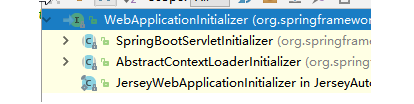
5)、相当于我们的SpringBootServletInitializer的类会被创建对象,并执行onStartup方法
6)、SpringBootServletInitializer实例执行onStartup的时候会createRootApplicationContext;创建容器
protected WebApplicationContext createRootApplicationContext(

      ServletContext servletContext) {

    //1、创建SpringApplicationBuilder

   SpringApplicationBuilder builder = createSpringApplicationBuilder();

   StandardServletEnvironment environment = new StandardServletEnvironment();

   environment.initPropertySources(servletContext, null);

   builder.environment(environment);

   builder.main(getClass());

   ApplicationContext parent = getExistingRootWebApplicationContext(servletContext);

   if (parent != null) {

      this.logger.info("Root context already created (using as parent).");

      servletContext.setAttribute(

            WebApplicationContext.ROOT_WEB_APPLICATION_CONTEXT_ATTRIBUTE, null);

      builder.initializers(new ParentContextApplicationContextInitializer(parent));

   }

   builder.initializers(

         new ServletContextApplicationContextInitializer(servletContext));

   builder.contextClass(AnnotationConfigEmbeddedWebApplicationContext.class);

    //调用configure方法,子类重写了这个方法,将SpringBoot的主程序类传入了进来

   builder = configure(builder);

    //使用builder创建一个Spring应用

   SpringApplication application = builder.build();

   if (application.getSources().isEmpty() && AnnotationUtils

         .findAnnotation(getClass(), Configuration.class) != null) {

      application.getSources().add(getClass());

   }

   Assert.state(!application.getSources().isEmpty(),

         "No SpringApplication sources have been defined. Either override the "

               + "configure method or add an @Configuration annotation");

   // Ensure error pages are registered

   if (this.registerErrorPageFilter) {

      application.getSources().add(ErrorPageFilterConfiguration.class);

   }

    //启动Spring应用

   return run(application);

}
7)、Spring的应用就启动并且创建IOC容器
public ConfigurableApplicationContext run(String... args) {

StopWatch stopWatch = new StopWatch();

stopWatch.start();

ConfigurableApplicationContext context = null;

FailureAnalyzers analyzers = null;

configureHeadlessProperty();

SpringApplicationRunListeners listeners = getRunListeners(args);

listeners.starting();

try {

ApplicationArguments applicationArguments = new DefaultApplicationArguments(

args);

ConfigurableEnvironment environment = prepareEnvironment(listeners,

applicationArguments);

Banner printedBanner = printBanner(environment);

context = createApplicationContext();

analyzers = new FailureAnalyzers(context);

prepareContext(context, environment, listeners, applicationArguments,

printedBanner);

//刷新IOC容器

refreshContext(context);

afterRefresh(context, applicationArguments);

listeners.finished(context, null);

stopWatch.stop();

if (this.logStartupInfo) {

new StartupInfoLogger(this.mainApplicationClass)

.logStarted(getApplicationLog(), stopWatch);

}

return context;

}

catch (Throwable ex) {

handleRunFailure(context, listeners, analyzers, ex);

throw new IllegalStateException(ex);

}

}
==启动Servlet容器,再启动SpringBoot应用==
springboot外置的Servlet容器的更多相关文章
- SpringBoot使用外置的Servlet容器
SpringBoot默认使用嵌入式的Servlet容器,应用打包成可执行的jar包 优点:简单.便携 缺点:默认不支持jsp,优化定制比较复杂(使用定制器serverProperties.自定义Emb ...
- 使用外置的Servlet容器
嵌入式Servlet容器: 优点:简单.便捷 缺点:默认不支持JSP.优化定制比较复杂(使用定制器[ServerProperties.自定义EmbeddedServletContainerCustom ...
- 【串线篇】spring boot使用外置的Servlet容器
嵌入式Servlet容器:应用打成可执行的jar 优点:简单.便携: 缺点:默认不支持JSP.优化定制比较复杂 (使用定制器[ServerProperties/自定义EmbeddedServletCo ...
- SpringBoot(七) -- 嵌入式Servlet容器
一.嵌入式Servlet容器 在传统的开发中,我们在完成开发后需要将项目打成war包,在外部配置好TomCat容器,而这个TomCat就是Servlet容器.在使用SpringBoot开发时,我们无需 ...
- SpringBoot配置嵌入式Servlet容器
1).如何定制和修改Servlet容器的相关配置: 1.修改和server有关的配置(ServerProperties[也是EmbeddedServletContainerCustomizer]): ...
- java框架之SpringBoot(8)-嵌入式Servlet容器
前言 SpringBoot 默认使用的嵌入式 Servlet 容器为 Tomcat,通过依赖关系就可以看到: 问题: 如何定制和修改 Servlet 容器相关配置? SpringBoot 能否支持其它 ...
- springboot(八) 嵌入式Servlet容器自动配置原理和容器启动原理
1.嵌入式Servlet容器自动配置原理 1.1 在spring-boot-autoconfigure-1.5.9.RELEASE.jar => springboot自动配置依赖 jar包下,E ...
- SpringBoot定制修改Servlet容器
1.如何修改Servlet容器的相关配置: 第一种:在application.properties中修改和server有关的配置(ServerProperties提供): server.port=80 ...
- 尚硅谷springboot学习27-使用外置servlet容器
嵌入式Servlet容器:应用打成可执行的jar 优点:简单.便携: 缺点:默认不支持JSP.优化定制比较复杂(使用定制器[ServerProperties.自定义EmbeddedServle ...
随机推荐
- phpstudy手动把mysql数据库从5.5.56升级到5.6.41
查看mysql版本: mysql> select version(); 1.关闭mysql,把原来的D:/phpStudy/PHPTutorial/mysql改名为MySQL_5.5.53作为备 ...
- 回归Android之Android基础和小常识
Activity ,Service,Content Provider,BroadcastReceiver, Intent SQLite,Http,Fragement,Handle 1,Activity ...
- 学习dart从这里开始
void main() { ; i < ; i++) { print('hello ${i + 1}'); } } // 定义个方法. printNumber(num aNumber) { pr ...
- vi中如何使用cscope来查找函数的定义
答:进入命令行模式输入:cs f g <function_name>
- bzoj1497 [NOI2006]最大获利 最大权闭合子图
链接 https://www.lydsy.com/JudgeOnline/problem.php?id=1497 思路 最大权闭合子图的裸题 一开始知道是这个最大权闭合子图(虽然我不知道名字),但是我 ...
- centos7重新调整分区大小
As others have pointed out, XFS filesystem cannot be shrunk. So your best bet is to backup /home, re ...
- P3810 【模板】三维偏序(陌上花开)(cdq分治)
思路 看到这种偏序类的题目,而且不要求强制在线,可以立刻想到cdq分治 注意这题有一个问题,就是询问的是小于等于而不是小于,如果相等的话两个元素会相互贡献,而cdq的特点是右区间不能对左边有影响,所以 ...
- vue.js精讲02
2017-09-17 笔记及源码地址 : https://github.com/wll8/vue_note vue 中的事件深入. 事件: @click/mouseover…事件简写: @ 如 @cl ...
- 操作 frames 框架下的 dom 内容。
2016-12-30 框架名: var obj=$(window.frames["wangpan"].document).find("a[menu=download_on ...
- .NET下使用 Seq结构化日志系统
前言 我们公司在日志管理方面一直没有统一,主要痛点有: 每个开发人员都是各用各的,存储日志的形式也是五花八门,如:本地文件,数据库,Redis,MongoDB 由于公司访问服务器要通过堡垒机,所以本机 ...