
【串线篇】spring boot使用外置的Servlet容器
嵌入式Servlet容器:应用打成可执行的jar 优点:简单、便携;
缺点:默认不支持JSP、优化定制比较复杂
(使用定制器【ServerProperties/自定义EmbeddedServletContainerCustomizer】)
(自己编写嵌入式Servlet容器的创建工厂【EmbeddedServletContainerFactory】);
那么如果要使用外置的servlet呢?
应用war包的方式打包;
外置的Servlet容器:外面安装Tomcat---
步骤
一、必须创建一个war项目;(利用idea创建好目录结构)
二、将嵌入式的Tomcat指定为provided;
|
<dependency> <groupId>org.springframework.boot</groupId> <artifactId>spring‐boot‐starter‐tomcat</artifactId> <scope>provided</scope> </dependency> |
三、必须编写一个SpringBootServletInitializer的子类,并调用configure方法
public  class  ServletInitializer  extends  SpringBootServletInitializer  {

@Override

protected  SpringApplicationBuilder  configure(SpringApplicationBuilder  application)  {

//传入SpringBoot应用的主程序

return  application.sources(SpringBoot04WebJspApplication.class);

}

}
四、启动服务器就可以使用;
原理
jar包:执行SpringBoot主类的main方法,启动ioc容器,创建嵌入式的Servlet容器;
war包:启动服务器,服务器启动SpringBoot应用【SpringBootServletInitializer】,启动ioc容器;
servlet3.0(Spring注解版):
8.2.4 Shared libraries / runtimes pluggability: 规则:
1)、服务器启动(web应用启动)会创建当前web应用里面每一个jar包里面ServletContainerInitializer实例:
2)、ServletContainerInitializer的实现放在jar包的META-INF/services文件夹下,有一个名为
javax.servlet.ServletContainerInitializer的文件,内容就是ServletContainerInitializer的实现类的全类名
3)、还可以使用@HandlesTypes,在应用启动的时候加载我们感兴趣的类;
流程:
1)、启动Tomcat
2)、org\springframework\spring-web\4.3.14.RELEASE\spring-web-4.3.14.RELEASE.jar!\META- INF\services\javax.servlet.ServletContainerInitializer:
Spring的web模块里面有这个文件:org.springframework.web.SpringServletContainerInitializer
3)、SpringServletContainerInitializer将@HandlesTypes(WebApplicationInitializer.class)标注的所有这个类型的类都传入到onStartup方法的Set>;为这些WebApplicationInitializer类型的类创建实例;
4)、每一个WebApplicationInitializer都调用自己的onStartup;
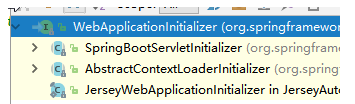
五、相当于我们的SpringBootServletInitializer的类会被创建对象,并执行onStartup方法
六、SpringBootServletInitializer实例执行onStartup的时候会createRootApplicationContext;创建容器
protected  WebApplicationContext  createRootApplicationContext(

    ServletContext  servletContext)  {

    //1、创建SpringApplicationBuilder

    SpringApplicationBuilder  builder  =  createSpringApplicationBuilder();

    StandardServletEnvironment  environment  =  new  StandardServletEnvironment();

    environment.initPropertySources(servletContext,  null);

    builder.environment(environment);

    builder.main(getClass());

    ApplicationContext  parent  =  getExistingRootWebApplicationContext(servletContext);

    if (parent != null) {

    this.logger.info("Root  context  already  created  (using  as  parent).");

    servletContext.setAttribute(

    WebApplicationContext.ROOT_WEB_APPLICATION_CONTEXT_ATTRIBUTE,  null);

    builder.initializers(new  ParentContextApplicationContextInitializer(parent)); 15    }

    builder.initializers(

    new  ServletContextApplicationContextInitializer(servletContext));

    builder.contextClass(AnnotationConfigEmbeddedWebApplicationContext.class);

    //调用configure方法,子类重写了这个方法,将SpringBoot的主程序类传入了进来

    builder = configure(builder); 22

        //使用builder创建一个Spring应用

        SpringApplication  application  =  builder.build();

        if  (application.getSources().isEmpty()  &&  AnnotationUtils

        .findAnnotation(getClass(),  Configuration.class)  !=  null)  {

        application.getSources().add(getClass());

        }

        Assert.state(!application.getSources().isEmpty(),

        "No  SpringApplication  sources  have  been  defined.  Either  override  the  "

        +  "configure  method  or  add  an  @Configuration  annotation");

        // Ensure error pages are registered

        if (this.registerErrorPageFilter) {

        application.getSources().add(ErrorPageFilterConfiguration.class);

        }

        //启动Spring应用

        return run(application);

    }
七、Spring的应用就启动并且创建IOC容器
    public  ConfigurableApplicationContext  run(String...  args)  {

    StopWatch  stopWatch  =  new  StopWatch();

    stopWatch.start();

    ConfigurableApplicationContext  context  =  null;

    FailureAnalyzers  analyzers  =  null;

    configureHeadlessProperty();

    SpringApplicationRunListeners  listeners  =  getRunListeners(args);

    listeners.starting();

try {

ApplicationArguments  applicationArguments  =  new  DefaultApplicationArguments(

args);

ConfigurableEnvironment  environment  =  prepareEnvironment(listeners, applicationArguments);

Banner  printedBanner  =  printBanner(environment); context  =  createApplicationContext();

analyzers  =  new  FailureAnalyzers(context);

prepareContext(context,  environment,  listeners,  applicationArguments, printedBanner);

//刷新IOC容器 refreshContext(context);

afterRefresh(context,  applicationArguments); listeners.finished(context, null); stopWatch.stop();

if  (this.logStartupInfo)  {

new  StartupInfoLogger(this.mainApplicationClass)

.logStarted(getApplicationLog(),  stopWatch);

}

return context;

}

catch  (Throwable  ex)  {

handleRunFailure(context,  listeners,  analyzers,  ex); throw  new  IllegalStateException(ex);

}

}
启动Servlet容器,再启动SpringBoot应用
【串线篇】spring boot使用外置的Servlet容器的更多相关文章
- Spring Boot → 08:嵌入式Servlet容器自定义
Spring Boot → 08:嵌入式Servlet容器自定义
- SpringBoot 源码解析 (七)----- Spring Boot的核心能力 - 自定义Servlet、Filter、Listener是如何注册到Tomcat容器中的?(SpringBoot实现SpringMvc的原理)
上一篇我们讲了SpringBoot中Tomcat的启动过程,本篇我们接着讲在SpringBoot中如何向Tomcat中添加Servlet.Filter.Listener 自定义Servlet.Filt ...
- SpringBoot使用外置的Servlet容器
SpringBoot默认使用嵌入式的Servlet容器,应用打包成可执行的jar包 优点:简单.便携 缺点:默认不支持jsp,优化定制比较复杂(使用定制器serverProperties.自定义Emb ...
- springboot外置的Servlet容器
嵌入式Servlet容器:应用打成可执行的jar 优点:简单.便携: 缺点:默认不支持JSP.优化定制比较复杂(使用定制器[ServerProperties.自定义EmbeddedServle ...
- 使用外置的Servlet容器
嵌入式Servlet容器: 优点:简单.便捷 缺点:默认不支持JSP.优化定制比较复杂(使用定制器[ServerProperties.自定义EmbeddedServletContainerCustom ...
- 从零开始通过idea插件将一个spring boot项目部署到docker容器里运行
实操:将一个spring boot项目部署到docker容器里运行 实验需要的环境: 腾讯云+Ubuntu 16.04 x64+idea+插件docker integration+daocloud 第 ...
- spring boot本地开发与docker容器化部署的差异
spring boot本地开发与docker容器化部署的差异: 1. 文件路径及文件名区别大小写: 本地开发环境为windows操作系统,是忽略大小写的,但容器中区分大小写 2. docker中的容器 ...
- 从.Net到Java学习第四篇——spring boot+redis
从.Net到Java学习系列目录 “学习java已经十天,有时也怀念当初.net的经典,让这语言将你我相连,怀念你......”接上一篇,本篇使用到的框架redis.FastJSON. 环境准备 安装 ...
- 从.Net到Java学习第三篇——spring boot+mybatis+mysql
从.Net到Java学习第一篇——开篇 环境:mysql5.7 新建mysql数据库demo,然后执行如下sql脚本进行数据表创建和数据初始化: -- ------------------------ ...
随机推荐
- Linux 下ThinkPHP项目出现_STORAGE_WRITE_ERROR_:./Application/Runtime/Cache/Admin/0dfec61edd66f450033aa87c28a760f4.php
在Linux中部署了ThinkPHP项目,访问时却出现了_STORAGE_WRITE_ERROR_:./Application/Runtime/Cache/Admin/0dfec61edd66f450 ...
- EasyHook
EasyHook实用指南 所谓实用指南就是全是干货,没那么多虚头巴脑的东西,真正要用的人会发现对自己有用的东西,浅尝辄止的人看起来会不知所云. FileMon自己实做的过程中遇到的问题: 1. exe ...
- Selenium IDE安装及环境搭建教程
摘自https://blog.csdn.net/ywyxb/article/details/59103683 Selenium IDE环境部署- Firefox浏览器Firefox-ESR版本下载(推 ...
- Vue知识整理12:事件绑定
采用v-on命令进行事件的绑定操作,通过单击按钮,实现按钮文字上数值的增加 带参数的事件过程 可以添加$event事件,实现事件信息的获取
- 为什么我上传了flv或MP4文件到服务器,可输入正确地址通过http协议来访问总是出现“无法找到该页”的404错误呢
常用MIME类型(Flv,Mp4的mime类型设置) 也许你会在纳闷,为什么我上传了flv或MP4文件到服务器,可输入正确地址通过http协议来访问总是出现“无法找到该页”的404错误呢?这就表明mp ...
- 【HANA系列】SAP HANA SQL获取当前日期加若干天后的日期
公众号:SAP Technical 本文作者:matinal 原文出处:http://www.cnblogs.com/SAPmatinal/ 原文链接:[HANA系列]SAP HANA SQL获取当前 ...
- RabbitMQ 安装步骤
RabbitMQ安装步骤 一.安装erlang 1.下载erlang wget https://packages.erlang-solutions.com/erlang-solutions-1.0-1 ...
- 关于E980
1. 浪商官网上面的内容貌似有点问题 来源: https://www.inspurpower.com/product/others.php?f=E980 但是wiki 里面的东西: 其实只有12cor ...
- Windows系统里Oracle 11g R2 Client(64bit)的下载与安装
环境: windows10系统(64位) 最好先安装jre或jdk(此软件用来打开oracle自带的可视化操作界面,不装也没关系:可以安装plsql,或者直接用命令行操作) Oracle 11g 是仅 ...
- RabbitMq学习5-路由(Routing)
一.路由(Routing) 在前面的教程中,我们实现了一个简单的日志系统.可以把日志消息广播给多个接收者. 本篇教程中我们打算新增一个功能——使得它能够只订阅消息的一个字集.例如,我们只需要把严重的错 ...