
【Dalston】【第二章】客户端负载均衡(Ribbon)
对于大型应用系统负载均衡(LB:Load Balancing)是首要被解决一个问题。在微服务之前LB方案主要是集中式负载均衡方案,在服务消费者和服务提供者之间又一个独立的LB,LB通常是专门的硬件,如F5,或者是基于软件的,如VS、HAproxy等。LB上有所有服务的地址映射表,当服务消费者调用某个目标服务时,它先向LB发起请求,由LB以某种策略(比如:Round-Robin)做负载均衡后将请求转发到目标服务。
而微服务的出现,则为LB的实现提供了另外一种思路:把LB的功能以库的方式集成到服务消费方的进程内,而不是由一个集中的设备或服务器提供。这种方案称为软负载均衡(Soft Load Balancing)或者客户端负载均衡。在Spring Cloud中配合Eureka的服务注册功能,Ribbon子项目则为REST客户端实现了负载均衡。
接下来我们将通过扩展上一篇中的示例代码来搭建一个基于Ribbon的客户端负载均衡示例。
1. 示例代码
保持上一篇中的代码不变。
2. 如何启用Ribbon
在上一篇中的consumer-hello工程(也就是我们的服务消费方)的pom的依赖中声明了:
<dependency>
    <groupId>org.springframework.cloud</groupId>
    <artifactId>spring-cloud-starter-ribbon</artifactId>
</dependency>
也就是说在本项目中将会启动Ribbon。
2.1 启动类
package com.product;

import org.springframework.boot.SpringApplication;
import org.springframework.boot.autoconfigure.SpringBootApplication;
import org.springframework.cloud.client.discovery.EnableDiscoveryClient;
import org.springframework.cloud.client.loadbalancer.LoadBalanced;
import org.springframework.context.annotation.Bean;
import org.springframework.web.client.RestTemplate;

@EnableDiscoveryClient
@SpringBootApplication
public class Application {

    @Bean
    @LoadBalanced
    RestTemplate restTemplate() {
        return new RestTemplate();
    }

    public static void main(String[] args) {
        SpringApplication.run(Application.class, args);
    }

}
在该启动类中:
@EnableDiscoveryClient注解,说明这是一个Eureka客户端,同时也可以获取到Eureka服务器中所注册的服务列表;- 在
RestTemplate中我们增加了一个@LoadBalanced注解,该注解就是能够让RestTemplate启用客户端负载均衡。
3. 负载均衡测试
1) 启动Eureka服务器;
2) 启动多个服务提供者:SERVICE-HELLO,即打包2个Client,这里我启动了两个:

java -jar EurekaClient-0.0.1-SNAPSHOT1.jar

java -jar EurekaClient-0.0.1-SNAPSHOT2.jar
通过Maven将Service-Hello打包成一个FatJar,可以使用上面的命令启动多个实例。这里SERVICE-HELLO的两个实例服务器端口分别为:2100和2200。
3) 启动服务消费者:consumer-hello;
4) 打开Eureka服务器管理页面:http://localhost:8260,可以看到已经有两个SERVICE-HELLO服务和一个CONSUMER-HELLO服务注册进来了。

5) 打开Consumer-Hello:http://localhost:8800/hello,多次刷新,在页面中我们可以看到下面两个输出交替出现:


说明了consumer-hello在交替访问SERVICE-HELLO的两个服务实例,也就是说我们的负载均衡测试是成功的。
4. 直接使用Ribbon的API
另外,除了使用@LoadBalanced注解外,我们还可以直接使用Ribbon所提供的LoadBalancerClient来实现负载均衡:
package com.product;

import org.springframework.boot.SpringApplication;
import org.springframework.boot.autoconfigure.SpringBootApplication;
import org.springframework.cloud.client.discovery.EnableDiscoveryClient;
import org.springframework.cloud.client.loadbalancer.LoadBalanced;
import org.springframework.context.annotation.Bean;
import org.springframework.web.client.RestTemplate;

@EnableDiscoveryClient
@SpringBootApplication
public class Application {

//    @Bean
//    @LoadBalanced
//    RestTemplate restTemplate() {
//        return new RestTemplate();
//    }

    public static void main(String[] args) {
        SpringApplication.run(Application.class, args);
    }

}
package com.product.controller;

import java.net.URI;

import org.slf4j.Logger;
import org.slf4j.LoggerFactory;
import org.springframework.beans.factory.annotation.Autowired;
import org.springframework.cloud.client.ServiceInstance;
import org.springframework.cloud.client.loadbalancer.LoadBalancerClient;
import org.springframework.web.bind.annotation.RequestMapping;
import org.springframework.web.bind.annotation.RequestMethod;
import org.springframework.web.bind.annotation.RestController;
import org.springframework.web.client.RestTemplate;

@RestController
public class HelloController {
    protected Logger logger = LoggerFactory.getLogger(HelloController.class);
//    @Autowired
//    private RestTemplate restTemplate;
    @Autowired
    private LoadBalancerClient loadBalancerClient;

//    @RequestMapping(value = "/hello", method = RequestMethod.GET)
//    public String hello() {
//        return restTemplate.getForEntity("http://SERVICE-HELLO/hello", String.class).getBody();
//    }

    @RequestMapping(value = "/helloEx", method = RequestMethod.GET)
    public String helloEx() {
        ServiceInstance instance = this.loadBalancerClient.choose("SERVICE-HELLO");
        URI helloUri = URI.create(String.format("http://%s:%s/hello", instance.getHost(), instance.getPort()));
        logger.info("Target service uri = {}. ", helloUri.toString());
        return new RestTemplate().getForEntity(helloUri, String.class).getBody();
    }
}
同样多次访问http://localhost:8800/helloEx后,在控制台中将会输出以下日志:
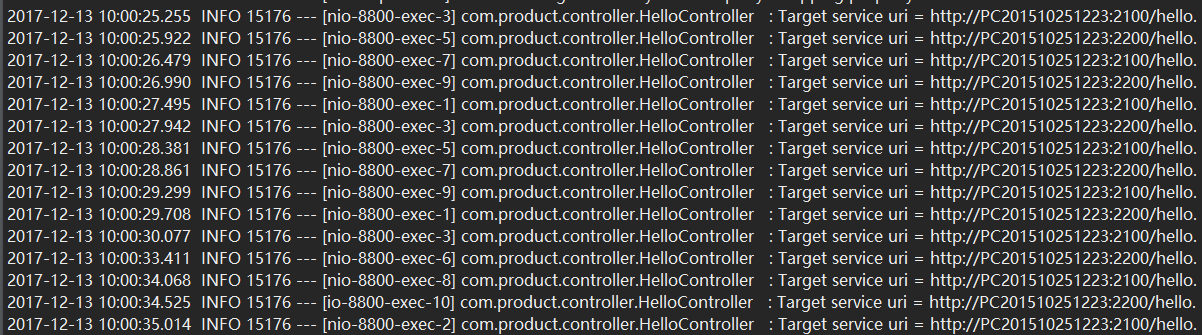
说明负载均衡是一样启作用的。
注意:在helloEx方法中不能够使用之前自动织入的restTemplate,否则会报以下错误:
java.lang.IllegalStateException: No instances available for cd826dembp.lan
这个是因为自动织入的restTemplate会把服务器的逻辑名称当作服务名称来使用,造成找不到相应的服务实例,从而报错。
另外,我们还可以采用下面的方式:
@Primary
@Bean(name="lbcRestTemplate")
RestTemplate lbcRestTemplate() {
    return new RestTemplate();
}
上面的类更改为:
@RestController
public class HelloController {
    protected Logger logger = LoggerFactory.getLogger(HelloController.class);

    @Autowired
    @Qualifier(value = "restTemplate")
    private RestTemplate restTemplate;

    @Autowired
    @Qualifier(value = "lbcRestTemplate")
    private RestTemplate lbcRestTemplate;

    @Autowired
    private LoadBalancerClient loadBalancerClient;

    @RequestMapping(value = "/hello", method = RequestMethod.GET)
    public String hello() {
        return restTemplate.getForEntity("http://SERVICE-HELLO/hello", String.class).getBody();
    }

    @RequestMapping(value = "/helloEx", method = RequestMethod.GET)
    public String helloEx() {
        ServiceInstance instance = this.loadBalancerClient.choose("SERVICE-HELLO");
        URI helloUri = URI.create(String.format("http://%s:%s/hello", instance.getHost(), instance.getPort()));
        logger.info("Target service uri = {}. ", helloUri.toString());
        return this.lbcRestTemplate.getForEntity(helloUri, String.class).getBody();
    }
}
5. Ribbon负载均衡策略
Ribbon本身提供了下面几种负载均衡策略:
- RoundRobinRule: 轮询策略,Ribbon以轮询的方式选择服务器,这个是默认值。所以示例中所启动的两个服务会被循环访问;
- RandomRule: 随机选择,也就是说Ribbon会随机从服务器列表中选择一个进行访问;
- BestAvailableRule: 最大可用策略,即先过滤出故障服务器后,选择一个当前并发请求数最小的;
- WeightedResponseTimeRule: 带有加权的轮询策略,对各个服务器响应时间进行加权处理,然后在采用轮询的方式来获取相应的服务器;
- AvailabilityFilteringRule: 可用过滤策略,先过滤出故障的或并发请求大于阈值一部分服务实例,然后再以线性轮询的方式从过滤后的实例清单中选出一个;
- ZoneAvoidanceRule: 区域感知策略,先使用主过滤条件(区域负载器,选择最优区域)对所有实例过滤并返回过滤后的实例清单,依次使用次过滤条件列表中的过滤条件对主过滤条件的结果进行过滤,判断最小过滤数(默认1)和最小过滤百分比(默认0),最后对满足条件的服务器则使用RoundRobinRule(轮询方式)选择一个服务器实例。
我们可以通过继承
ClientConfigEnabledRoundRobinRule,来实现自己负载均衡策略。
这里,大家先对Ribbon提供的负载均衡有一个概念,后续我们再详细分析各个负载均衡策略的具体处理逻辑及配置方式。
6. 小结
Ribbon的主要功能是为REST客户端实现负载均衡,其工作原理可以概括为下面四个步骤:
- Ribbon首先根据其所在Zone优先选择一个负载较少的Eureka Server;
- 定期从Eureka Server更新并过滤服务实例列表;
- 根据指定的负载均衡策略,从可用的服务器列表中选择一个服务实例的地址;
- 然后通过RestClient进行服务调用。
这时我们系统的架构变成为:

原文地址:http://www.jianshu.com/p/df9393755a05
【Dalston】【第二章】客户端负载均衡(Ribbon)的更多相关文章
- 客户端负载均衡Ribbon
客户端负载均衡Ribbon 一.Ribbon是什么 二.Ribbon实现客户端负载均衡 三.Ribbon负载均衡策略 四.Rest请求模板类解读 4.1 RestTemplate的GET请求 第一种: ...
- 第四章 客户端负载均衡:Spring Cloud Ribbon
spring cloud ribbon 是一个基于 HTTP 和 TCP 的客户端负载均衡工具,它基于Netflix Ribbon 实现.通过Spring Cloud 的封装,可以轻松的将面向服务的R ...
- 客户端负载均衡Ribbon之一:Spring Cloud Netflix负载均衡组件Ribbon介绍
Netflix:['netfliːks] ribbon:英[ˈrɪbən]美[ˈrɪbən]n. 带; 绶带; (打印机的) 色带; 带状物;v. 把…撕成条带; 用缎带装饰; 形成带状; L ...
- 服务注册发现Eureka之三:Spring Cloud Ribbon实现客户端负载均衡(客户端负载均衡Ribbon之三:使用Ribbon实现客户端的均衡负载)
在使用RestTemplate来消费spring boot的Restful服务示例中,我们提到,调用spring boot服务的时候,需要将服务的URL写死或者是写在配置文件中,但这两种方式,无论哪一 ...
- 003客户端负载均衡Ribbon & 短路器Hystrix
1.POM配置 和普通Spring Boot工程相比,仅仅添加了Eureka.Ribbon.Hystrix依赖和Spring Cloud依赖管理 <dependencies> <!- ...
- 0403-服务注册与发现-客户端负载均衡-Ribbon的基本使用
一.概述 问题1.上一篇文章已说明如何注册微服务,但是调用方如何调用,以及如何防止硬编码.即电影微服务调用用户微服务 问题2.用户微服务多个节点,调用服务方如何负载均衡 二.实现负载均衡方式 2.1. ...
- SpringCloud开发学习总结(四)—— 客户端负载均衡Ribbon
通过上一章<SpringCloud开发学习总结(三)—— 服务治理Eureka>,我们已经搭建起微服务架构中的核心组件——服务注册中心(包括单点模式和高可用模式).同时还注册了一个服务,命 ...
- Spring Cloud第四篇 | 客户端负载均衡Ribbon
本文是Spring Cloud专栏的第四篇文章,了解前三篇文章内容有助于更好的理解本文: Spring Cloud第一篇 | Spring Cloud前言及其常用组件介绍概览 Spring Cl ...
- 【springcloud】客户端负载均衡(Ribbon)
转自:https://blog.csdn.net/pengjunlee/article/details/86594934 服务器端负载均衡负载均衡是我们处理高并发.缓解网络压力和进行服务器扩容的重要手 ...
随机推荐
- Rpgmakermv(38)MOG_Theatrhythm
1.============================葡萄牙语=================================================+++ MOG - Theatrh ...
- Rpgmakermv(32) Yep_mainmenumanager
============================================================================ Introduction ========== ...
- Rpgmakermv(24 )yep_coreengine
==左部为原文,右边我做了简要翻译=================================== Introduction and Instructions ================= ...
- uva 10163 Storage Keepers
题意: 有n个仓库,m个人,一个仓库只能由一个人托管,每个人可以托管多个仓库. 每个人有一个能力值a,如果说他托管了k个仓库,那么这些仓库的安全值都是a/k. 雇佣一个人的花费也是a. 如果一个仓库没 ...
- 【Linux学习八】脚本编程
环境 虚拟机:VMware 10 Linux版本:CentOS-6.5-x86_64 客户端:Xshell4 FTP:Xftp4 一.多层bash#.和source都是当前bash [root@nod ...
- JavaScript <script>标签的位置、延迟脚本(defer属性)与 异步脚本(async属性)
一.<script>标签的位置 传统的做法是将<script>元素放在<head>元素中,例如: <!DOCTYPE html><html > ...
- vue-i18n国际化插件
vue-i18n国际化插件 安装,到项目目录下执行:npm install vue-i18n 配置在src\main.js里面引入vue-i18n // 语言包插件import VueI18n fro ...
- php中生成标准uuid(guid)的方法
);// "}" return $uuid; }}echo guid();?>
- linux的错误码error
在程序出错时,我们通过全局变量错误号errno和perror函数能够很快的定位到错误原因. Linux错误代码及其含义 C Name Value Description 含义Success 0 Suc ...
- glog日志库移植Android平台
1.在linux平台下使用ndk交叉编译链编译glog生成libglog.a静态库. 2.将生成的库文件与头文件放到Android项目中,使用JNI方法调用. 3.编译遇到错误“stderr.stdo ...