
3、树莓派的配置:改静态IP、连接ssh、安装中文字体、安装谷歌输入法、增加USB电流、修改触摸屏分辨率、扩展sd卡空间、修复vi和vim乱码问题、安装配置远程桌面vnc
本博文仅作本人操作过程的记录,留作备忘。自强不息 QQ1222698
1、连接上HDMI线,插上触摸屏,插上键盘,鼠标,网线,启动。系统正常启动,但是一直闪烁,不停的黑屏,是由于触摸屏的usb口供电不足,等会再处理这个问题,先把触摸屏的usb插到另外的一个电源(手机充电器或电脑USB)上就行了,系统启动后,是桌面。

3、第一个工作,启用root用户,修改密码,打开命令行,运行下面的命令
命令:sudo passwd root
输入密码:123
重复输入:123
启用账号:sudo passwd --unlock root
切换root:su
输入密码:123
修改pi的密码:passwd pi
输入密码:123
重复输入:123
pi@raspberrypi:~$ sudo passwd root
Enter new UNIX password:
Retype new UNIX password:
passwd: password updated successfully
pi@raspberrypi:~$ sudo passwd --unlock root
passwd: password expiry information changed.
pi@raspberrypi:~$ su
y^H^HPassword:
root@raspberrypi:/home/pi# passwd pi
Enter new UNIX password:
Retype new UNIX password:
passwd: password updated successfully
root@raspberrypi:/home/pi#
4、修改IP地址,打开命令行,先su到root下,输入leafpad /etc/network/interfaces,打开网络配置文件。
auto eth0
iface eth0 inet static
address 192.168.0.10
netmask 255.255.255.0
gateway 192.168.0.1
5、修改DNS配置
/etc/resolv.conf
nameserver 192.168.0.1
,也可以不改,好像会自动更新(我猜的)。
6、运行命令reboot,系统重启后,IP就可以用了。
使用ssh连接到树莓派上。SecureCRT,地址http://www.xdowns.com/soft/softdown.asp?softid=23625
a、刚连接的时候会出现乱码,等安装完中文就可以了。
b、如果执行完下面的步骤,还是乱码,就SecureCRT,选项,会话选项,终端,外观,字符编码,选择UTF-8,就显示中文了。

7、安装中文字体
sudo apt-get install fonts-arphic-gbsn00lp fonts-arphic-gkai00mp fonts-arphic-bsmi00lp fonts-arphic-bkai00mp(是L,不是1)
8、在/etc/profile文件最后添加,export LC_ALL="zh_CN.UTF-8"
9、命令sudo raspi-config,修改系统默认字体,选择第5项,internationalisation options,回车,选择I1 change locale,回车,往下翻(最下面),找到zh_CN.UTF-8,回车。等半天后,重启后就可以了。
10、下载输入法
sudo apt-get install fcitx-googlepinyin fcitx-module-cloudpinyin fcitx-sunpinyin libsunpinyin3 sunpinyin-data
11、触摸屏的USB插在树莓派上,触摸屏就不停的闪烁,是因为树莓派的USB口输出电流不够,需要调整参数。
root后,修改/boot/config.txt
修改usb的最大输出电流为1A,max_usb_current=1
修改分辨率为
disable_overscan=1
hdmi_cvt 800 480 60 6 0 0 0
hdmi_group=2
hdmi_mode=87
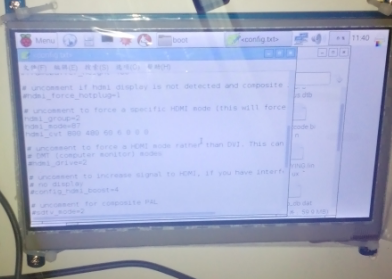
重启,填满屏幕。
和上面的图片对比一下,就明白了。
12、(我又找到了新的办法。下面的操作,也是可以的。看下面的第10操作步骤。)
由于树莓派默认无法使用所有SD卡所有空间,很快就会系统空间不足,无法运行,所有需要尽快把sd的空间扩展起来。
pi@raspberrypi:~$ df -h
文件系统 容量 已用 可用 已用% 挂载点
/dev/root 3.5G 3.3G 0 100% /
devtmpfs 459M 0 459M 0% /dev
tmpfs 463M 0 463M 0% /dev/shm
tmpfs 463M 6.4M 457M 2% /run
tmpfs 5.0M 4.0K 5.0M 1% /run/lock
tmpfs 463M 0 463M 0% /sys/fs/cgroup
/dev/mmcblk0p1 60M 20M 41M 34% /boot
tmpfs 93M 0 93M 0% /run/user/1000
tmpfs 93M 0 93M 0% /run/user/109
pi@raspberrypi:~$ cat /sy-bash: 无法为立即文档创建临时文件: 设备上没有空间
-bash: 无法为立即文档创建临时文件: 设备上没有空间
pi@raspberrypi:/sys/block/mmcblk0/mmcblk0p2$ cat start
pi@raspberrypi:/sys/block/mmcblk0/mmcblk0p2$ cd ..
pi@raspberrypi:/sys/block/mmcblk0$ sudo fdisk /dev/mmcblk0
Welcome to fdisk (util-linux 2.25.2).
Changes will remain in memory only, until you decide to write them.
Be careful before using the write command.
Command (m for help): d
Partition number (1,2, default 2):
Partition 2 has been deleted.
Command (m for help): n
Partition type
p primary (1 primary, 0 extended, 3 free)
e extended (container for logical partitions)
Select (default p): p
Partition number (2-4, default 2):
First sector (2048-15278079, default 2048):
Last sector, +sectors or +size{K,M,G,T,P} (131072-15278079, default 15278079):回车
Created a new partition 2 of type 'Linux' and of size 7.2 GiB.
Command (m for help): w
The partition table has been altered.
Calling ioctl() to re-read partition table.
Re-reading the partition table failed.: 设备或资源忙
The kernel still uses the old table. The new table will be used at the next reboot or after you run partprobe(8) or kpartx(8).
pi@raspberrypi:/sys/block/mmcblk0$ df -h
文件系统 容量 已用 可用 已用% 挂载点
/dev/root 3.5G 3.3G 976K 100% /
devtmpfs 459M 0 459M 0% /dev
tmpfs 463M 0 463M 0% /dev/shm
tmpfs 463M 13M 451M 3% /run
tmpfs 5.0M 4.0K 5.0M 1% /run/lock
tmpfs 463M 0 463M 0% /sys/fs/cgroup
/dev/mmcblk0p1 60M 20M 41M 34% /boot
tmpfs 93M 0 93M 0% /run/user/1000
此时,系统的空间还没有变化,重启系统:reboot
重启后,空间还是没有变化,需要执行一个命令才行。
pi@raspberrypi:~$ df -h
文件系统 容量 已用 可用 已用% 挂载点
/dev/root 3.5G 3.3G 840K 100% /
devtmpfs 459M 0 459M 0% /dev
tmpfs 463M 0 463M 0% /dev/shm
tmpfs 463M 6.3M 457M 2% /run
tmpfs 5.0M 4.0K 5.0M 1% /run/lock
tmpfs 463M 0 463M 0% /sys/fs/cgroup
/dev/mmcblk0p1 60M 20M 41M 34% /boot
tmpfs 93M 0 93M 0% /run/user/1000
pi@raspberrypi:~$ sudo resize2fs /dev/mmcblk0p2
resize2fs 1.42.12 (29-Aug-2014)
Filesystem at /dev/mmcblk0p2 is mounted on /; on-line resizing required
old_desc_blocks = 1, new_desc_blocks = 1
The filesystem on /dev/mmcblk0p2 is now 1893376 (4k) blocks long.
pi@raspberrypi:~$ df -h
文件系统 容量 已用 可用 已用% 挂载点
/dev/root 7.1G 3.3G 3.5G 50% /
devtmpfs 459M 0 459M 0% /dev
tmpfs 463M 0 463M 0% /dev/shm
tmpfs 463M 6.3M 457M 2% /run
tmpfs 5.0M 4.0K 5.0M 1% /run/lock
tmpfs 463M 0 463M 0% /sys/fs/cgroup
/dev/mmcblk0p1 60M 20M 41M 34% /boot
tmpfs 93M 0 93M 0% /run/user/1000
pi@raspberrypi:~$
空间已经扩展开了。
13、新办法,我没做实验,不知道能不能行。sudo raspi-config,选择第1、expand filesystem,回车,再回车。
14、使用vi的时候,按方向键会出现字母,而不是移动光标,是因为vi不是完整版,我们先卸载vi,再安装vim;
sudo apt-get remove vim-common
sudo apt-get install vim
15、安装vnc,sudo apt-get install tightvncserver,安装完毕后,运行tightvncserver,输入控制密码,重复输入;选择是否设置查看密码,输入n;
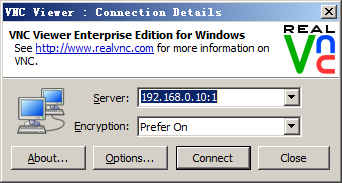
16、win7上安装vnc客户端,我用的是http://www.realvnc.com/,输入密码,就能连接上去。

a、修改密码vncpasswd
b、查看远程列表,ps ax | grep Xtightvnc | grep -v grep
c、关闭一个连接,vncserver -kill :1(注意:前面的空格)。1是桌面编号。
d、启动一个桌面:vncserver,会显示出桌面编号。用客户端连接的时候输入:192.168.0.10:1 192.168.0.10:2 这种格式。
e、系统重启后,无法连接到vnc,网上提供的自启动方法(我测试的无效,还是无法启动,那就算球了,老子用ssh连上去再手工启动不就行了!)
网上抄来的方法,先登陆root用户,新建启动文件 /etc/init.d/tightvncserver
#!/bin/sh
### BEGIN INIT INFO
# Provides: tightvncserver
# Required-Start: $syslog $remote_fs $network
# Required-Stop: $syslog $remote_fs $network
# Default-Start: 2 3 4 5
# Default-Stop: 0 1 6
# Short-Description: Starts VNC Server on system start.
# Description: Starts tight VNC Server. Script written by James Swineson.
### END INIT INFO
# /etc/init.d/tightvncserver
VNCUSER='pi'
case "$1" in
start)
su $VNCUSER -c '/usr/bin/tightvncserver :1'
echo "Starting TightVNC Server for $VNCUSER"
;;
stop)
pkill Xtightvnc
echo "TightVNC Server stopped"
;;
*)
echo "Usage: /etc/init.d/tightvncserver {start|stop}"
exit 1
;;
esac
exit 0
然后运行:
sudo chmod 755 /etc/init.d/tightvncserver
sudo update-rc.d tightvncserver defaults
重启看效果吧。
取消开机启动也很简单,就一行代码: sudo update-rc.d -f tightvncserver remove
备注:
1、查看服务列表 service --status-all
2、更新软件源
deb http://mirrors.tuna.tsinghua.edu.cn/raspbian/raspbian/ wheezy main contrib non-free rpi
deb-src http://mirrors.tuna.tsinghua.edu.cn/raspbian/raspbian/ wheezy main contrib non-free rpi
deb http://mirrors.neusoft.edu.cn/raspbian/raspbian/ wheezy main contrib non-free rpi
deb-src http://mirrors.neusoft.edu.cn/raspbian/raspbian/ wheezy main contrib non-free rpi
deb http://mirrors.ustc.edu.cn/raspbian/raspbian/ wheezy main contrib non-free rpi
deb-src http://mirrors.ustc.edu.cn/raspbian/raspbian/ wheezy main contrib non-free rpi
3、树莓派的配置:改静态IP、连接ssh、安装中文字体、安装谷歌输入法、增加USB电流、修改触摸屏分辨率、扩展sd卡空间、修复vi和vim乱码问题、安装配置远程桌面vnc的更多相关文章
- 【树莓派】树莓派网络配置:静态IP、无线网络、服务等
一.网络配置之静态IP: 树莓派的默认网络为: haochuang@raspberrypi:~ $ vi /etc/network/interfaces # interfaces() file use ...
- VirtualBox配置centos7静态ip(详解)
VirtualBox安装centos7配置静态ip地址可以本机访问,可以联网. 在开始之前先说一下,不知道为什么,我在网上百度的大多数是不能用的,或者只能主机访问,或者只能联网. 我的配置文件为ifc ...
- 虚拟机桥接网卡下配置centOS静态IP
前面我们讲了怎么去配置asterisk,但是配置完了,是没有什么效果出现的,因为asterisk相当于一个服务器,我们需要一个客户端去给它连接起来,如果你是在自己的机子上装了虚拟机,那最好配一下cen ...
- VMware Fusion配置NAT静态IP
前言 本主机 CentOS8.2 Mac VMware Fusion 我们在使用虚拟机的时候,经常遇到这样的问题,我们会换地方,IP 会变化,如果虚拟机使用桥接的方式,那么很多与 IP 相关的服务都会 ...
- Centos7远程桌面 vnc/vnc-server的设置
Centos7与Centos6.x有了很大的不同. 为了给一台服务器装上远程桌面,走了不少弯路.写这篇博文,纯粹为了记录,以后如果遇到相同问题,可以追溯. 1.假定你的系统没有安装vnc的任何软件,那 ...
- centos中NAT模式下静态IP连接外网
使用linux虚拟机时,通常会用到yum命令来安装软件,然而这个命令需要连外网下载软件,用maven下载jar包也需要外网.虚拟机在内网可以互相ping通,然而ping不了外网,于是通过试验,终于找到 ...
- VMware虚拟机 安装centos7并设置静态ip 连接外网
首先下载VMware虚拟机:http://xzc.197746.com/VMware-Workstation-12.5.9.zip 然后下载centos7镜像:http://vault.centos. ...
- (11)树莓派3 有线网卡静态IP设置
https://www.cnblogs.com/10e-6/p/5778355.html 树莓派设置静态IP地址 首先终端输入: ifconfig 查看树莓派默认分配的动态IP地址. 图 1-4 配置 ...
- 设置树莓派3 B+的静态IP
修改/etc/dhcpcd.conf 文件 sudo vim /etc/dhcpcd.conf interface eth0 static ip_address= static routers=192 ...
随机推荐
- Unity3D手机斗地主游戏开发实战(04)_出牌判断大小(已完结)
之前我们实现了叫地主.玩家和电脑自动出牌主要功能,但是还有个问题,出牌的时候,没有有效性检查和比较牌力大小.比如说,出牌3,4,5,目前是可以出牌的,然后下家可以出任何牌如3,6,9. 问题1:出牌检 ...
- Python入门 - 生成随机数
生成随机数是编程中经常用到的功能,下面讲几种常用的随机函数randint,uniform, randrange: 一.生成随机整数 randint import random a = random. ...
- Webapi调用
C# webapi 路由名称不能跟area名称相同,否则出现404 action找不到的问题???
- PHP生成 uuid
// 生成UUID,并去掉分割符 function guid() { if (function_exists('com_create_guid')){ $uuid = com_create_guid( ...
- Python的Web应用框架--Django
一:简介 python的web框架有很多,个人查了一下,有Django.Pylons. Tornado.Bottle和Flask等,其中使用人数最多的是Django,而我学习Django也是因为ope ...
- JAVA读取、写入Excel表格(含03版)
引言 工作中可能会遇到对Excel读取和写入,如果我们自己手动写的话,会很麻烦,但是Apache中有poi工具类.poi工具类封装好了对于Excel读取和写入,我们需要用的时候,直接调用该方法就好了. ...
- 一个js的动画,以前以为只有flash可以实现
11年刚干这行的时候,看到这种什么百叶窗的动画,以为都是flash实现的,最近突然灵光一闪,想到了用js实现(虽然我不是做前端的,本人做.net).代码虽然实现了,但是比较乱,先上个图: 代码主要就是 ...
- es6+require混合开发,兼容es6 module,import,export
近一年,一直很忙,做了不少的项目,不过都不是太满意,毕竟是别人的作品,不好意思写出来.最近打算开发一个es6的项目,项目中用到require,本文主要讲解es6的module规范怎么与require的 ...
- 修改Mac系统的文件权限
修改Mac系统的文件权限 有时候,因为各种各样的需求Mac OS系统使用者需要修改某个系统文件,但是很多时候Mac OS系统会提示你"没有足够的权限".所以往往会无法保侟.编辑甚至 ...
- Amicable numbers -- Javascript 实现
问题描写叙述: Let d(n) be defined as the sum of proper divisors of n (numbers less than n which divide eve ...