
LINQ之LINQ to Objects(上)
LINQ概述
LINQ,语言集成查询(Language Integrated Query),它允许使用C#或VB代码以查询数据库相同的方式来操作不同的数据源。
LINQ体系结构
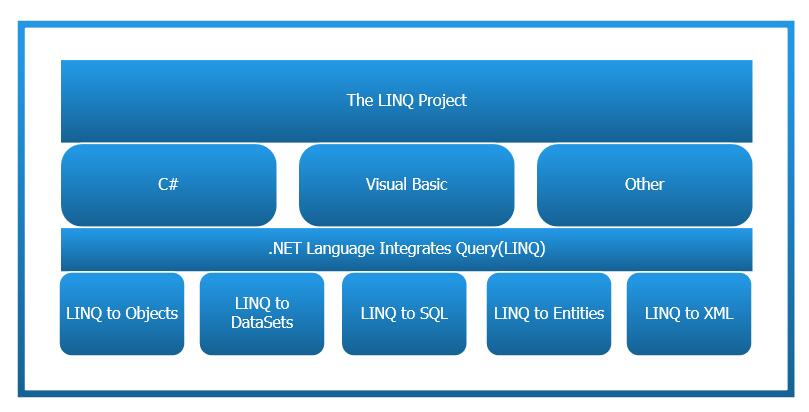
从上图可以看出,LINQ总共包括五个部分:LINQ to Objects、LINQ to DataSets、LINQ to SQL、LINQ to Entities、LINQ to XML。
LINQ to Objects:对内存中集合的操作
LINQ to DataSets:对数据集Datatable的操作
LINQ to SQL:对SQL Server数据源的操作,微软把开发的重点从LINQ to SQL转移到了LINQ to Entities并且宣布LINQ to SQL不再提供更新
LINQ to Entities:是 Entity Framework的一部分并且取代LINQ to SQL作为在数据库上使用 LINQ的标准机制
LINQ to XML:对XML数据源的操作
LINQ的语法
下面是一个简单的示例,查询一个int数组中小于5的元素,并按照从小到大的顺序排列:
		int[] arr = new int[] { 1, 4, 2, 6, 7, 9, 5, 1, 2, 4 };

        var query = from r in arr

                    where r < 5

                    orderby r

                    select r;

        foreach (var item in query)

        {

            Console.WriteLine(item);

        }

        Console.ReadLine();
由此示例可以看出:LINQ查询表达式以from子句开头,以select子句结束。在两个子句之间,可以使用where、orderby等查询操作符。
LINQ有两种语法:Lambda语法和Query语法,编译器会在程序编译时转换LINQ查询,以调用相应的扩展方法。
以下是LINQ表达式结构示意图:
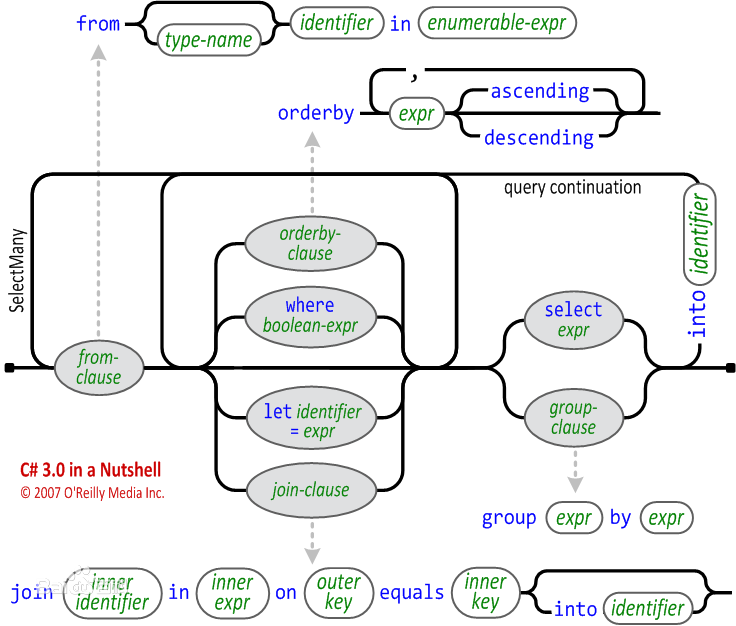
引用自百度百科
LINQ to Objects
LINQ to Objects中的扩展方法在System.Core程序集的System.Linq命名空间中定义。
Enumerable类定义的标准查询操作符:
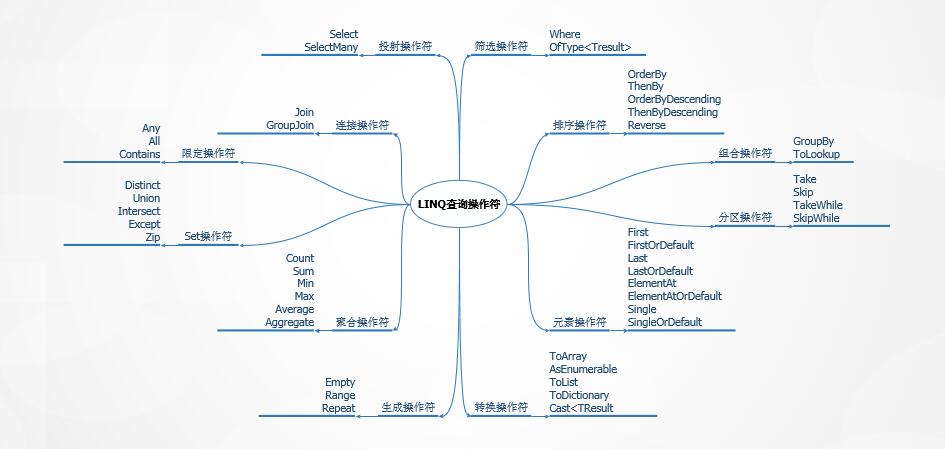
下面介绍使用这些操作符的示例:
首先,我们需要创建基本的实体类Employee:
/// <summary>

/// 员工类

/// </summary>

public class Employee

{

    //员工编号

    public string EmployeeId { get; private set; }

    //员工姓名

    public string EmployeeName { get; private set; }

    //年龄

    public int Age { get; private set; }

    //入职日期

    public DateTime EntryDate { get; private set; }

    //性别

    public Sex Sex { get; private set; }

    //部门

    public string Department { get; private set; }

    //薪水

    public int Salary { get; private set; }

	//爱好

    public IEnumerable<string> Hobby { get; private set; }

     public Employee(string employeeId, string employeeName, int age, DateTime entryDate, Sex sex, Department department, int salary, IEnumerable<string> hobby)

    {

        this.EmployeeId = employeeId;

        this.EmployeeName = employeeName;

        this.Age = age;

        this.EntryDate = entryDate;

        this.Sex = sex;

        this.Department = department.ToString();

        this.Salary = salary;

        this.Hobby = hobby;

    }

}

//性别

public enum Sex

{

    Male,

    Female

}

//部门

public enum Department

{

    HR,

    IT,

    PD,

    FD,

    QC,

    MD

}
然后,创建列表employees保存10名员工的基本信息:
		 List<Employee> employees = new List<Employee>()

        {

            new Employee("001","Mike",32,new DateTime(2016,2,20),Sex.Male,Department.IT,200000,new string[] { "swimming","shopping"}),

            new Employee("002","Jack",38,new DateTime(2007,5,12),Sex.Male,Department.HR,409989,new string[] { "reading"}),

            new Employee("003","Adolph",25,new DateTime(2017,3,23),Sex.Male,Department.IT,100000,new string[] { "play computer games","watch TV","listen to music"}),

            new Employee("004","Antony",30,new DateTime(2010,11,20),Sex.Male,Department.FD,320000, new string[] { "play chess","run"}),

            new Employee("005","Asa",28,new DateTime(2014,10,10),Sex.Female,Department.FD,120000,new string[] { "shopping"}),

            new Employee("006","Bernie",31,new DateTime(2008,4,5),Sex.Male,Department.PD,220000,new string[] { "play basketball"}),

            new Employee("007","Carl",26,new DateTime(2015,1,30),Sex.Male,Department.QC,100000,new string[] { "play chess","go fishing"}),

            new Employee("008","Duncan",30,new DateTime(2009,6,9),Sex.Male,Department.MD,250000,new string[] { "play computer games"}),

            new Employee("009","Aimee",24,new DateTime(2017,1,20),Sex.Female,Department.HR,80000,new string[] { "reading","run"}),

            new Employee("010","Cassie",31,new DateTime(2014,3,3),Sex.Female,Department.IT,350000,new string[] { "watch TV" })

        };
1)筛选操作符(Where、OfType<TResult>)
Where:根据表达式函数过滤元素
		//查询年龄大于30岁,IT或HR部门所有员工的编号及姓名

		var filter = from r in employees

                    where r.Age > 30 && (r.Department == Department.IT.ToString() || r.Department == Department.HR.ToString())

                    select r;

        foreach (var item in filter)

        {

            Console.WriteLine("EmployId: " +item.EmployeeId + " EmployeeName: " + item.EmployeeName);

        }

		//******************************Output*******************************

        //EmployId: 001 EmployeeName: Mike

        //EmployId: 002 EmployeeName: Jack

        //EmployId: 010 EmployeeName: Cassie

        //*******************************************************************
OfType<TResult>:类型筛选
		//筛选出指定数组中所有int类型的元素

		object[] data = { "One", 2, 3, "Four", "Five", 6 };

        var typeFilter = data.OfType<int>();

        foreach (var item in typeFilter)

        {

            Console.WriteLine(item);

        }

        //******************************Output*******************************

        //2

        //3

        //6

        //*******************************************************************
2)投射操作符(Select、SelectMany)
Select:根据选择器函数选择的结果值投射到新的类型元素上
SelectMany:C#编译器把复合的from子句和LINQ查询转换为SelectMany扩展方法,用于迭代序列的序列。
		//查找个人爱好中有reading的员工的姓名

		var doubleFrom = from r in employees

                         from h in r.Hobby

                         where h == "reading"

                         select r.EmployeeName;

        foreach (var item in doubleFrom)

        {

            Console.WriteLine(item);

        }

        //******************************Output*******************************

        //Jack

        //Aimee

        //*******************************************************************

		//--------------------------强势分隔符--------------------------------

		//使用SelectMany扩展方法返回个人爱好中有reading的员工的姓名

        var selectMany = employees.

            SelectMany(r => r.Hobby,

            (r, h) => new { Employee = r, Hobby = h }).

            Where(r => r.Hobby == "reading").

            Select(r => r.Employee.EmployeeName);

        foreach (var item in selectMany)

        {

            Console.WriteLine(item);

        }

		//******************************Output*******************************

        //Jack

        //Aimee

        //*******************************************************************
3)排序操作符(OrderBy、ThenBy、OrderByDescending、ThenByDescending、Reverse)
OrderBy、OrderByDescending:升序排序、降序排序
ThenBy、ThenByDescending:如果第一次排序有元素相同,进行第二次排序(使用LINQ查询时只需把需要排序的关键字用逗号隔开)
		//按照年龄从大到小排序,如果年龄相同,则按照员工编号正向排序,输出员工的编号、姓名、年龄,

        var orderBy = from o in employees

                      orderby o.Age descending, o.EmployeeId

                      select o;

        foreach (var item in orderBy)

        {

            Console.WriteLine("EmployeeId: " + item.EmployeeId + " EmployeeName:" + item.EmployeeName + " Age:" + item.Age);

        }

        //******************************Output*******************************

        //EmployeeId: 002 EmployeeName: Jack Age:38

        //EmployeeId: 001 EmployeeName: Mike Age:32

        //EmployeeId: 006 EmployeeName: Bernie Age:31

        //EmployeeId: 010 EmployeeName: Cassie Age:31

        //EmployeeId: 004 EmployeeName: Antony Age:30

        //EmployeeId: 008 EmployeeName: Duncan Age:30

        //EmployeeId: 005 EmployeeName: Asa Age:28

        //EmployeeId: 007 EmployeeName: Carl Age:26

        //EmployeeId: 003 EmployeeName: Adolph Age:25

        //EmployeeId: 009 EmployeeName: Aimee Age:24

        //*******************************************************************

        //--------------------------强势分隔符--------------------------------

        //使用ThenBy扩展方法实现年龄相同,按员工编号正向排序

        var thenBy = employees

                     .OrderByDescending(t => t.Age)

                     .ThenBy(t => t.EmployeeId)

                     .Select(t => "EmployeeId: " + t.EmployeeId + " EmployeeName:" + t.EmployeeName + " Age:" + t.Age);

        foreach (var item in thenBy)

        {

            Console.WriteLine(item);

        }

        //******************************Output*******************************

        //EmployeeId: 002 EmployeeName: Jack Age:38

        //EmployeeId: 001 EmployeeName: Mike Age:32

        //EmployeeId: 006 EmployeeName: Bernie Age:31

        //EmployeeId: 010 EmployeeName: Cassie Age:31

        //EmployeeId: 004 EmployeeName: Antony Age:30

        //EmployeeId: 008 EmployeeName: Duncan Age:30

        //EmployeeId: 005 EmployeeName: Asa Age:28

        //EmployeeId: 007 EmployeeName: Carl Age:26

        //EmployeeId: 003 EmployeeName: Adolph Age:25

        //EmployeeId: 009 EmployeeName: Aimee Age:24

        //*******************************************************************
Revise:使用扩展方法反转集合中的元素顺序
		//按照年龄从大到小排序后再反转元素的顺序

        var reverse = employees

            .OrderByDescending(r => r.Age)

            .Reverse()

            .Select(r => "EmployeeId: " + r.EmployeeId + " EmployeeName:" + r.EmployeeName + " Age:" + r.Age);

        foreach (var item in reverse)

        {

            Console.WriteLine(item);

        }

        //******************************Output*******************************

        //EmployeeId: 009 EmployeeName: Aimee Age:24

        //EmployeeId: 003 EmployeeName: Adolph Age:25

        //EmployeeId: 007 EmployeeName: Carl Age:26

        //EmployeeId: 005 EmployeeName: Asa Age:28

        //EmployeeId: 008 EmployeeName: Duncan Age:30

        //EmployeeId: 004 EmployeeName: Antony Age:30

        //EmployeeId: 010 EmployeeName: Cassie Age:31

        //EmployeeId: 006 EmployeeName: Bernie Age:31

        //EmployeeId: 001 EmployeeName: Mike Age:32

        //EmployeeId: 002 EmployeeName: Jack Age:38

        //*******************************************************************
4)连接操作符(Join、GroupJoin)
为了完成这部分的示例,我们需要准备新的实体类和列表
/// <summary>

/// 部门信息

/// </summary>

public class DepartmentInfo

{

    //部门编号

    public string DepartmentId { get; private set; }

    //部门名称

    public string DepartmentName { get; private set; }

    //部门总监

    public string Director { get; private set; }

    public DepartmentInfo(string departmentId, string departmentName, string director)

    {

        this.DepartmentId = departmentId;

        this.DepartmentName = departmentName;

        this.Director = director;

    }

}

/// <summary>

/// 杰出团队

/// </summary>

public class OutstandingTeam

{

    public int Year { get; private set; }

    public string Department { get; private set; }

    public OutstandingTeam(int year, string department)

    {

        this.Year = year;

        this.Department = department;

    }

}
创建列表departmentInfo保存各部门的信息
		List<DepartmentInfo> deparmentInfo = new List<DepartmentInfo>()

        {

            new DepartmentInfo("001","HR","Oliver"),

            new DepartmentInfo("002","IT","Oscar"),

            new DepartmentInfo("003","PD","ELLA"),

            new DepartmentInfo("004","FD","Alice"),

            new DepartmentInfo("005","QC","Kai")

        };
创建列表outstandingTeams保存2010年起获得杰出团队的部门
 		List<OutstandingTeam> outstandingTeams = new List<OutstandingTeam>()

        {

            new OutstandingTeam(2010,"IT"),

            new OutstandingTeam(2011,"FD"),

            new OutstandingTeam(2012,"HR"),

            new OutstandingTeam(2013,"IT"),

            new OutstandingTeam(2014,"QC"),

            new OutstandingTeam(2015,"HR"),

            new OutstandingTeam(2016,"HR"),

            new OutstandingTeam(2017,"MD")

        };
Join:根据特定的条件合并两个数据源
		//查询员工的姓名,部门以及该部门的总监

        var join = from j in employees

                   join d in deparmentInfo

                   on j.Department equals d.DepartmentName

                   select new

                   {

                       j.EmployeeName,

                       j.Department,

                       d.Director

                   };

        foreach (var item in join)

        {

            Console.WriteLine("EmployeeName: " + item.EmployeeName + " Department:" + item.Department + " Director:" + item.Director);

        }

        //******************************Output*******************************

        //EmployeeName: Mike Department:IT Director:Oscar

        //EmployeeName: Jack Department:HR Director:Oliver

        //EmployeeName: Adolph Department:IT Director:Oscar

        //EmployeeName: Antony Department:FD Director:Alice

        //EmployeeName: Asa Department:FD Director:Alice

        //EmployeeName: Bernie Department:PD Director:ELLA

        //EmployeeName: Carl Department:QC Director:Kai

        //EmployeeName: Aimee Department:HR Director:Oliver

        //EmployeeName: Cassie Department:IT Director:Oscar

        //*******************************************************************
这时候我们会发现,输出的内容里面少了员工Duncan的信息,检查后发现,原来deparmentInfo没有添加MD部门的相关信息,此时希望查询所有员工,若匹配不到该部门信息,Director返回N/A。
		//查询员工的姓名,部门以及该部门的总监,若匹配不到该部门信息,Director返回N/A

        var leftjoin = from j in employees

                       join d in deparmentInfo

                       on j.Department equals d.DepartmentName into jd

                       from d in jd.DefaultIfEmpty()

                       select new

                       {

                           j.EmployeeName,

                           j.Department,

                           Director = d == null ? "N/A" : d.Director

                       };

        foreach (var item in leftjoin)

        {

            Console.WriteLine("EmployeeName: " + item.EmployeeName + " Department:" + item.Department + " Director:" + item.Director);

        }

        //******************************Output*******************************

        //EmployeeName: Mike Department:IT Director:Oscar

        //EmployeeName: Jack Department:HR Director:Oliver

        //EmployeeName: Adolph Department:IT Director:Oscar

        //EmployeeName: Antony Department:FD Director:Alice

        //EmployeeName: Asa Department:FD Director:Alice

        //EmployeeName: Bernie Department:PD Director:ELLA

        //EmployeeName: Carl Department:QC Director:Kai

        //EmployeeName: Duncan Department:MD Director:N/A

        //EmployeeName: Aimee Department:HR Director:Oliver

        //EmployeeName: Cassie Department:IT Director:Oscar

        //*******************************************************************
GroupJoin:基于键相等对两个序列的元素进行关联并对结果进行分组。
		//查找每个部门获得杰出团队的年份

        var groupJoin = from d in deparmentInfo

                        join o in outstandingTeams on d.DepartmentName equals o.Department into g

                        select new

                        {

                            DepartmentName = d.DepartmentName,

                            Years = g

                        };

        foreach (var item in groupJoin)

        {

            Console.WriteLine("Department:" + item.DepartmentName);

            if (item.Years.Count() == 0)

            {

                Console.WriteLine("Never won the award");

            }

            foreach (var champions in item.Years)

            {

                Console.WriteLine(champions.Year);

            }

        }

        //******************************Output*******************************

        //Department: HR

        //2012

        //2015

        //2016

        //Department: IT

        //2010

        //2013

        //Department: PD

        // Never won the award

        // Department:FD

        //2011

        //Department: QC

        //2014

        //*******************************************************************
5)组合操作符(GroupBy、ToLookup)
GroupBy:根据关键字值对查询结果进行分组。
		//查询每个部门及人数

 		var groupBy = from e in employees

                      group e by e.Department into g

                      select new

                      {

                          g.Key,

                          Count = g.Count()

                      };

        foreach (var item in groupBy)

        {

            Console.WriteLine("Department: " + item.Key + " Count: " + item.Count);

        }

        //******************************Output*******************************

        //Department: IT Count: 3

        //Department: HR Count: 2

        //Department: FD Count: 2

        //Department: PD Count: 1

        //Department: QC Count: 1

        //Department: MD Count: 1

        //*******************************************************************
ToLookup:通过创建一对多的字典来组合元素
		//使用ToLookup实现爱好阅读的员工姓名

        var toLookup = (from e in employees

                        from h in e.Hobby

                        select new

                        {

                            Hobby = h,

                            Name = e.EmployeeName

                        }).ToLookup(he => he.Hobby, he => he.Name);

        if (toLookup.Contains("reading"))

        {

            foreach (var item in toLookup["reading"])

            {

                Console.WriteLine(item);

            }

        }

        //******************************Output*******************************

        //Jack

        //Aimee

        //*******************************************************************
6)限定操作符(Any、All、Contains)
Any:是否包含满足条件的元素
		//是否有小于20岁的员工

        bool any = employees.Any(r => r.Age < 20);

        Console.WriteLine(any);

        //******************************Output*******************************

        //False

        //*******************************************************************
ALL:是否所有元素都满足条件
		//是否所有员工都大于20岁

        bool all = employees.All(r => r.Age > 20);

        Console.WriteLine(all);

        //******************************Output*******************************

        //True

        //*******************************************************************
Contains:检索某个元素是否在集合中
        //员工列表中是否包含david

        Employee david = new Employee("011", "David", 28, new DateTime(2017, 5, 21), Sex.Male, Department.IT, 100000, new string[] { "run" });

        employees.Add(david);

        bool contains = employees.Contains(david);

        Console.WriteLine(contains);

        //******************************Output*******************************

        //True

        //*******************************************************************
7)分区操作符(Take、Skip、TakeWhile、SkipWhile)
Take:从集合中提取指定数量的元素
Skip:跳过集合中指定数量的元素
 		//忽略薪水最高的5位,查询剩余部分薪水最高的员工姓名及薪水

        var skip = (from e in employees

                    orderby e.Salary descending

                    select e).Skip(5).Take(1);

        foreach (var item in skip)

        {

            Console.WriteLine("EmployeeName: " + item.EmployeeName + " Salary: " + item.Salary);

        }

        //******************************Output*******************************

        //EmployeeName: Mike Salary: 200000

        //*******************************************************************
TakeWhile:提取条件为真时的元素
		//取集合中满足条件salary大于1000000之前的所有员工的姓名和薪水

        var takeWhile = (from e in employees

                         select e).TakeWhile(r => r.Salary > 100000);

        foreach (var item in takeWhile)

        {

            Console.WriteLine("EmployeeName: " + item.EmployeeName + " Salary: " + item.Salary);

        }

        //******************************Output*******************************

        //EmployeeName: Mike Salary: 200000

        //EmployeeName: Jack Salary: 409989

        //*******************************************************************
SkipWhere:跳过集合中满足条件的元素,当条件不成立时返回剩余的所有元素
		//跳过集合中满足条件salary大于100000的元素,当条件不成立时返回剩余的所有元素

        var skipWhile = (from e in employees

                         select e).SkipWhile(r => r.Salary > 100000);

        foreach (var item in skipWhile)

        {

            Console.WriteLine("EmployeeName: " + item.EmployeeName + " Salary: " + item.Salary);

        }

        //******************************Output*******************************

        //EmployeeName: Adolph Salary: 100000

        //EmployeeName: Antony Salary: 320000

        //EmployeeName: Asa Salary: 120000

        //EmployeeName: Bernie Salary: 220000

        //EmployeeName: Carl Salary: 100000

        //EmployeeName: Duncan Salary: 250000

        //EmployeeName: Aimee Salary: 80000

        //EmployeeName: Cassie Salary: 350000

        //*******************************************************************
8)Set操作符(Distinct、Union、Intersect、Except、Zip)
Distinct:从集合中删掉重复的元素
		//给所有员工的薪水排序,去掉重复的

        var distinct = (from e in employees

                        orderby e.Salary

                        select e.Salary).Distinct();

        foreach (var item in distinct)

        {

            Console.WriteLine(item);

        }

        //******************************Output*******************************

        //80000

        //100000

        //120000

        //200000

        //220000

        //250000

        //320000

        //350000

        //409989

        //*******************************************************************
Union、Intersect、Except:并集、交集、差集
首先,我们准备两个集合:员工姓名以A开头和员工姓名以E结尾
		var startWithA = (from e in employees

                          where e.EmployeeName.StartsWith("A")

                          select e).ToList();

        var endWithE = (from e in employees

                        where e.EmployeeName.ToUpper().EndsWith("E")

                        select e).ToList();
以下分别取两个集合的并集、交集、差集:
		//查询两个集合的并集

        var union = startWithA.Union(endWithE);

        foreach (var item in union)

        {

            Console.WriteLine(item.EmployeeName);

        }

        //******************************Output*******************************

        //Adolph

        //Antony

        //Asa

        //Aimee

        //Mike

        //Bernie

        //Cassie

        //*******************************************************************

        //--------------------------强势分隔符--------------------------------

        //查询两个集合的交集

        var intersect = startWithA.Intersect(endWithE);

        foreach (var item in intersect)

        {

            Console.WriteLine(item.EmployeeName);

        }

        //******************************Output*******************************

        //Aimee

        //*******************************************************************

        //--------------------------强势分隔符--------------------------------

        //查询两个集合的差集

        var except = startWithA.Except(endWithE);

        foreach (var item in except)

        {

            Console.WriteLine(item.EmployeeName);

        }

        //******************************Output*******************************

        //Adolph

        //Antony

        //Asa

        //*******************************************************************
Zip:把两个集合中对应的项目合并起来,在到大较小集合的末尾时停止
		//把两个集合中对应的项的姓名合并起来

        var zip = startWithA.Zip(endWithE, (first, second) => first.EmployeeName + "+" + second.EmployeeName);

        foreach (var item in zip)

        {

            Console.WriteLine(item);

        }

        //******************************Output*******************************

        //Adolph+Mike

        //Antony+Bernie

        //Asa+Aimee

        //Aimee+Cassie

        //*******************************************************************
9)元素操作符(First、FirstOrDefault、Last、LastOrDefault、ElementAt、ElementAtOrDefault、Single、SingleOrDefault)
First:返回第一个满足条件的元素;若不存在,则引发异常。
FirstOrDefault:返回第一个满足条件的元素;若不存在,则返回默认值。
 		//查询年龄大于30岁的第一位员工的姓名

        var first = (from e in employees

                     orderby e.Age

                     select e).First(r => r.Age > 30);

        Console.WriteLine(first.EmployeeName);

        //******************************Output*******************************

        //Bernie

        //*******************************************************************
假设需查询年龄大于50岁的第一位员工的姓名,我们将上述代码中年龄修改为50
		var first = (from e in employees

                     orderby e.Age

                     select e).First(r => r.Age > 50);

        Console.WriteLine(first.EmployeeName);
执行后发现异常
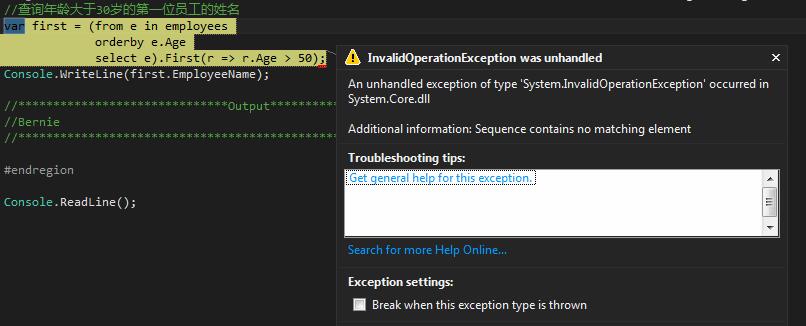
此时使用FirstOrDefault操作符:
		//查询年龄大于50岁的第一位员工的姓名,若不存在,则返回N/A

        var firstOrDefault = (from e in employees

                              orderby e.Age

                              select e).FirstOrDefault(r => r.Age > 50);

        Console.WriteLine(firstOrDefault == null ? "N/A" : firstOrDefault.EmployeeName);

        //******************************Output*******************************

        //N/A

        //*******************************************************************
Last:返回最后一个满足条件的元素;若不存在,则引发异常。
LastOrDefault:返回最后一个满足条件的元素;若不存在,则返回默认值。
ElementAt:返回指定索引位置的元素;若不存在,则引发异常。
ElementAtOrDefault:返回指定索引位置的元素;若不存在,则返回默认值。
Single:只返回一个满足条件的元素;若不存在或多个元素都满足条件,则引发异常。
SingleOrDefault:只返回一个满足条件的元素;若不存在或多个元素都满足条件,则返回默认值。
10)聚合操作符(Count、Sum、Min、Max、Average、Aggregate)
Count:返回集合中的项数
		//查找有一个以上爱好的员工的姓名、爱好的数量及部门

        var count = from e in employees

                    let numberHobby = e.Hobby.Count()

                    where numberHobby > 1

                    select new

                    {

                        e.EmployeeName,

                        numberHobby,

                        e.Department

                    };

        foreach (var item in count)

        {

            Console.WriteLine("EmployeeName: " + item.EmployeeName + " NumberHobby: " + item.numberHobby + " Department: " + item.Department);

        }

        //******************************Output*******************************

        //EmployeeName: Mike NumberHobby: 2 Department: IT

        //EmployeeName: Adolph NumberHobby: 3 Department: IT

        //EmployeeName: Antony NumberHobby: 2 Department: FD

        //EmployeeName: Carl NumberHobby: 2 Department: QC

        //EmployeeName: Aimee NumberHobby: 2 Department: HR

        //*******************************************************************
Sum:计算所有值的总和
Min、Max、Average:最小值、最大值、平均值
		//计算所有员工薪水的总和

        var sum = (from e in employees

                   select e.Salary).Sum/*Min、Max、Average*/();

        Console.WriteLine(sum.ToString("N0"));

        //******************************Output*******************************

        //2,149,989

        //*******************************************************************
Aggregate:对序列进行累加
		//初始值为50000000,依次累加所有员工的薪水

        var aggregate = (from e in employees

                         select e.Salary).Aggregate(5000000, (x, y) => x + y, r => r * 2);

        Console.WriteLine(aggregate.ToString("N0"));

        //******************************Output*******************************

        //14,299,978

        //*******************************************************************
说明:Aggregate扩展方法的第一个参数为初始值。第二个参数是一个表达式,用来对每个元素进行计算(第一个参数是累加变量,第二个参数是当前值)。第三个参数是一个表达式,用来对最终结果进行计算。
11)转换操作符(ToArray、AsEnumerable、ToList、ToDictionary、Cast<TResult>)
使用转换操作符会立即执行查询,将查询结果放在数组、列表、字典中。
		//将年龄大于30岁的元素放入list中再循环输出。

        List<Employee> employeeList = (from e in employees

                                       where e.Age > 30

                                       select e).ToList();

        foreach (var item in employeeList)

        {

            Console.WriteLine("EmployeeName: " + item.EmployeeName + " Age:" + item.Age);

        }

        //******************************Output*******************************

        //EmployeeName: Mike Age:32

        //EmployeeName: Jack Age:38

        //EmployeeName: Bernie Age:31

        //EmployeeName: Cassie Age:31

        //*******************************************************************
12)生成操作符(Empty、Range、Repeat)
生成操作符不是扩展方法,而是返回序列的静态方法。在LINQ to Objects中,这些方法可用于Enumerable类。
Empty:生成空集合
		//生成一个int类型的空序列

        var empty = Enumerable.Empty<int>();

        Console.WriteLine(empty.Count());

        //******************************Output*******************************

        //0

        //*******************************************************************
Range:生成一系列数字的集合
		//生成一个从1开始,10个元素的序列

        var range = Enumerable.Range(1, 10);

        foreach (var item in range)

        {

            Console.WriteLine(item);

        }

        //******************************Output*******************************

        //1

        //2

        //3

        //4

        //5

        //6

        //7

        //8

        //9

        //10

        //*******************************************************************
Repeat:返回始终重复一个值的集合
		//生成一个10个元素,每个元素都是5的序列

        var repeat = Enumerable.Repeat(5, 10);

        foreach (var item in repeat)

        {

            Console.WriteLine(item);

        }

        //******************************Output*******************************

        //5

        //5

        //5

        //5

        //5

        //5

        //5

        //5

        //5

        //5

        //*******************************************************************
本篇就此结束,主要介绍了LINQ的体系结构、基本语法以及LINQ to Obejcts中标准查询操作符的使用方法。
示例代码下载:https://github.com/Answer-Geng/LINQ
LINQ之LINQ to Objects(上)的更多相关文章
- C# ~ 从 XML 到 Linq 到 Linq to XML
.XML 可扩展标记语言 (Extensible Markup Language), 标记 (markup) 是关键部分,是标准通用标记语言 (Standard Generalized Markup ...
- Linq之Linq to XML
目录 写在前面 系列文章 linq to xml 总结 写在前面 在很多情况下,都可以见到使用xml的影子.例如,在 Web 上,在配置文件.Microsoft Office Word 文件(将wor ...
- Linq之Linq to Sql
目录 写在前面 系列文章 Linq to sql 总结 写在前面 上篇文章介绍了linq to xml的相关内容,linq to xml提供一种更便捷的创建xml树,及查询的途径.这篇文章将继续介绍l ...
- C#5.0之后推荐使用TPL(Task Parallel Libray 任务并行库) 和PLINQ(Parallel LINQ, 并行Linq). 其次是TAP(Task-based Asynchronous Pattern, 基于任务的异步模式)
学习书籍: <C#本质论> 1--C#5.0之后推荐使用TPL(Task Parallel Libray 任务并行库) 和PLINQ(Parallel LINQ, 并行Linq). 其次是 ...
- Linq技术四:动态Linq技术 -- Linq.Expressions
前面介绍了Linq的三个方面应用:Linq to SQL, Linq to XML和Linq to Object,这篇介绍一下动态Linq的实现方式及应用场景. 命名空间: System.Linq; ...
- Linq之Linq to Objects
目录 写在前面 系列文章 linq to objects 总结 写在前面 上篇文章介绍了linq的延迟加载特性的相关内容,从这篇文章开始将陆续介绍linq to Objects,linq to xml ...
- LINQ(LINQ to Entities)
LINQ to Entities 是 LINQ 中最吸引人的部分.它让你可以使用标准的 C# 对象与数据库的结构和数据打交道.使用 LINQ to Entities 时,LINQ 查询在后台转换为 S ...
- LINQ(LINQ to DataSet)
http://www.cnblogs.com/SkySoot/archive/2012/08/21/2649471.html DataTable.Select()方法使用和 SQL 相似的过滤语法从 ...
- LINQ以及LINQ to Object 和LINQ to Entities
LINQ的全称是Language Integrated Query,中文译成“语言集成查询”,是一种查询技术. LINQ查询通过提供一种跨各种数据源和数据格式使用数据的一致模型,简化了查询过程.LIN ...
随机推荐
- 转接IC整理汇总 转接芯片大全
转接口IC大全,信号转换大全EDP输出信号NCS8801 LVDS转EDP.RGB转EDP 封装QFN56 最大分辨率2560*1600用于手机.平板.转接板.液晶驱动板.广告机.可视门铃等等控制器到 ...
- smartgit试用到期不用序列号怎么继续使用
方法1 1:进入C盘,搜索SmartGit,出现\AppData\Roaming\syntevo: 2:进入文件7.1和8,这个有不同的版本可以使用,上次里面的setting.xml文件 3:重新打开 ...
- This Handler class should be static or leaks might occur Android
首先解释下这句话This Handler class should be static or leaks might occur,大致意思就是说:Handler类应该定义成静态类,否则可能导致内存泄露 ...
- 《完全用Linux工作》
<完全用Linux工作>作者:王垠 完全用 GNU/Linux 工作 理解 GNU/Linux 更多精彩请直接访问SkySeraph个人站点:www.skyseraph.com 注:本文是 ...
- 将1、2、3、……、n这n个连续自然数分成g组,使每组的和相等。g组中个数最多的一组有几个?
<style type="text/css"> #content { width: 600px; margin: 150px auto 0 auto; } dl dd ...
- kafka分布式消息队列介绍以及集群安装
简介 首先简单说下对kafka的理解: 1.kafka是一个分布式的消息缓存系统: 2.kafka集群中的服务器节点都被称作broker 3.kafka的客户端分为:一是producer(消息生产者) ...
- 解决failed to push some refs to
由于github我使用了dev和feature分支,团队合作合并到dev,个人开发都是feature....今天在本地feature中git pull origin dev 出现 在使用git 对源代 ...
- 光场相机重聚焦之二——Lytro Illum记录光场
上一节中大概讲述了光场相机和光场的参数化表示,这一节就说一下光场相机内部是如何记录光场以及实现重聚焦的. 博主用的是Lytro Illum,所以就以Illum为例来说了,Illum的功能还是挺多的,上 ...
- css3实现checkbox变按钮
css3实现checkbox变按钮 .search_checkbox { margin: 0; padding: 0; margin-left: 15px; display: inline-block ...
- edge animate从入门到放弃
一.什么是edge animate edge animate这是一款方便网页设计师和前端工程师实现动画交互的一款工具,虽然是adobe出品的,但是属于Flash和H5时代的过渡产物,这一款产品在201 ...