
5.request对象详解

可以通过request对象获取表单提交的值,get或者post方式都是可以得
例子:login.jsp表单
<%@ page language="java" import="java.util.*"

    contentType="text/html; charset=utf-8"%>

<%

    String path = request.getContextPath();

    String basePath = request.getScheme() + "://"

            + request.getServerName() + ":" + request.getServerPort()

            + path + "/";

%>

<!DOCTYPE HTML PUBLIC "-//W3C//DTD HTML 4.01 Transitional//EN">

<html>

<head>

<base href="<%=basePath%>">

<title>My JSP 'login.jsp' starting page</title>

<meta http-equiv="pragma" content="no-cache">

<meta http-equiv="cache-control" content="no-cache">

<meta http-equiv="expires" content="0">

<meta http-equiv="keywords" content="keyword1,keyword2,keyword3">

<meta http-equiv="description" content="This is my page">

<!--

    <link rel="stylesheet" type="text/css" href="styles.css">

    -->

</head>

<body>

    <h1>用户注册</h1>

    <hr>

    <form action="request.jsp" name="regForm" method="post">

        <table>

            <tr>

                <td>用户名:</td>

                <td><input type="text" name="username" />

                </td>

            </tr>

            <tr>

                <td>爱好:</td>

                <td>

                <input type="checkbox" name="favorite" value="read" />读书

                <input type="checkbox" name="favorite" value="music" />音乐

                <input type="checkbox" name="favorite" value="movie" />电影

                <input type="checkbox" name="favorite" value="internet" />上网

                </td>

            </tr>

            <tr>

                <td colspan="2"><input type="submit" value="注册"></td>

            </tr>

        </table>

    </form>

</body>

</html>
2.request.jsp接收表单的内容并且打印出来
<%@ page language="java" import="java.util.*" contentType="text/html; charset=utf-8" %>
<%
String path = request.getContextPath();
String basePath = request.getScheme()+"://"+request.getServerName()+":"+request.getServerPort()+path+"/";
%> <!DOCTYPE HTML PUBLIC "-//W3C//DTD HTML 4.01 Transitional//EN">
<html>
<head>
<base href="<%=basePath%>"> <title>My JSP 'login.jsp' starting page</title> <meta http-equiv="pragma" content="no-cache">
<meta http-equiv="cache-control" content="no-cache">
<meta http-equiv="expires" content="0">
<meta http-equiv="keywords" content="keyword1,keyword2,keyword3">
<meta http-equiv="description" content="This is my page">
<!--
<link rel="stylesheet" type="text/css" href="styles.css">
--> </head> <body>
<h1>request内置对象</h1>
<%
request.setCharacterEncoding("utf-8");
%>
用户名<%=request.getParameter("username") %><br>
爱好<%
String[] favorites = request.getParameterValues("favorite");
for(int i = 0;i<favorites.length;i++){
out.println(favorites[i]+"  ");
}
%>
<hr>
</body>
</html>
3.效果如下:


注意编码的问题:在request接收的时候需要设置编码,否则中文会乱码
request.setCharacterEncoding("utf-8");
4.也可以通过简单的url传递参数而不通过提交表单的方式
<a href = "request.jsp?username=cai" >URL传参</a>
获取的时候一样通过request的方法
<%=request.getParameter("username") %>
但是url传递参数会出现中文乱码的问题,要解决需要打开tomcat目录下的conf的server.xml
在这里添加一句,改成这样子
   <Connector port="8080" protocol="HTTP/1.1"

               connectionTimeout="20000"

               redirectPort="8443" URIEncoding="utf-8"/>
重启tomcat服务器即可
5.可以在request对象中保存一些属性,以键值对的形式存在
设置password的值是123456
<% request.setAttribute("password","123465");%>
获取password的值
<%=request.getAttribute("password")%>
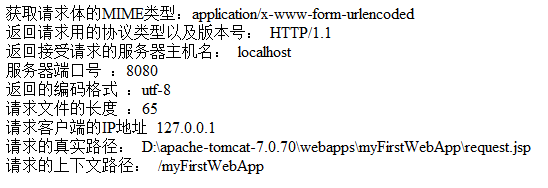
6.其他的函数
 获取请求体的MIME类型:<%=request.getContentType()%><br>

   返回请求用的协议类型以及版本号: <%=request.getProtocol()%><br>

   返回接受请求的服务器主机名:  <%=request.getServerName()%><br>

   服务器端口号 :<%=request.getServerPort()%><br>

  返回的编码格式 :<%=request.getCharacterEncoding()%><br>

  请求文件的长度 :<%=request.getContentLength()%><br>

  请求客户端的IP地址 <%=request.getRemoteAddr()%><br>

  请求的真实路径: <%=request.getRealPath("request.jsp")%><br>

  请求的上下文路径: <%=request.getContextPath()%><br>
结果:
5.request对象详解的更多相关文章
- django中request对象详解(转载)
django中的request对象详解 Request 我们知道当URLconf文件匹配到用户输入的路径后,会调用对应的view函数,并将 HttpRequest对象 作为第一个参数传入该函数. ...
- request对象详解
先来了解一下Request的主要方法: setAttribute(String name,Object):设置名字为name的request的参数值getAttribute(String name): ...
- jsp request 对象详解
转自:http://www.cnblogs.com/qqnnhhbb/archive/2007/10/16/926234.html 1.request对象 客户端的请求信息被封装在request对象中 ...
- JSP中Out和Request对象详解
内置表示不需要new便可直接使用. 一.基础知识 1.缓冲区:IO最原始是一个一个字节的读取,这就像吃米饭的时候一粒一粒的吃,很没有效率,这时候就有了碗,一碗一碗的吃,岂不痛快. 2.Get提交不能超 ...
- django的views里面的request对象详解大全
简介 HTTP 应用的信息是通过 请求报文 和 响应报文 传递的,关于更多的相关知识,可以阅读<HTTP权威指南>获得. 其中 请求报文 由客户端发送,其中包含和许多的信息,而 djang ...
- django中的request对象详解
Request 我们知道当URLconf文件匹配到用户输入的路径后,会调用对应的view函数,并将 HttpRequest对象 作为第一个参数传入该函数. 我们来看一看这个HttpRequest对 ...
- Django_视图中的request对象详解(八)
本文参考:http://www.cnblogs.com/MnCu8261/p/5871085.html Request 我们知道当URLconf文件匹配到用户输入的路径后,会调用对应的view函数,并 ...
- response对象和request对象详解
request方法列举:request.getAuthType() // 获取保护servlet的认证方案名(BASIC或SSL),未受保护的servlet返回的就是nullrequest.getCh ...
- mvc-servlet---ServletConfig与ServletContext对象详解(转载)
ServletConfig与ServletContext对象详解 一.ServletConfig对象 在Servlet的配置文件中,可以使用一个或多个<init-param>标签为s ...
随机推荐
- 透过 Delphi 使用二进位金钥做 AES 加密.
从 1994 年开始,笔者就开始接触加密与网路安全的世界,从鲁立忠老师的指导当中获益良多,后来在台湾的元智大学就读研究所的时候,也以此为研究主题. 在当时,电子商务是显学,Visa跟 Master C ...
- 深入理解Java虚拟机 - 学习笔记 1
Java内存区域 程序计数器 (Program Counter Register) 是一块较小的内存空间,可以看作是当前线程所执行的字节码的行号指示器.在虚拟机的概念模型里,字节码解释器工作时就是通过 ...
- CF219C hoosing Capital for Treeland
D. Choosing Capital for Treeland time limit per test 3 seconds memory limit per test 256 megabytes i ...
- 【.net 深呼吸】通过标准输入/输出流来完成进程间通信
实现进程之间煲电话粥的方式,有好几种,比如,你可以用这些方案: 1.使用socket来传递.这个好像很无聊,本地进程之间也用socket?不过,通过本机回环网络确实可以进程之间通信. 2.WCF,与上 ...
- 移动端页面以rem为单位设置字体大小不生效解决方法
这个问题在前端H5页面开发可以说是一个老生常谈的问题了.由于以前所有遇到的问题以及解决方法都会以文档的形式记录在电脑里,而非github或者blog,所以现在才一点一滴的整理上来,就当是一个心路历程吧 ...
- VR全景智慧城市搭建掀起实体市场潮流
在互联网时代的今天,用户体验至上,全景智慧城市搭建作为一个新型的科技展示技术,通过新颖的广告方式更能吸引用户眼球,足不出户,观看现场实景,达到沉浸式体验.在这样的大环境下,全景智慧城市搭建开启了VR全 ...
- css3中强大的filter(滤镜)属性
CSS3中强大的filter(滤镜)属性 博主最近在做网站的过程中发现了一个非常强大的CSS3属性,就是filter(滤镜)属性,喜欢p图的朋友看名字都应该知道这是什么神器了吧.当然,这个属性的效果肯 ...
- Java对于内存的需要知道的知识
内存 内存大家都知道(当然不是硬盘啊).与c.c++相比呢,Java在内存管理的方面一个优越之处就是我们不用显式的去对对象进行内存的分配和内存的回收,可能有人会着迷于对内存使用分配的这种快感,但是随着 ...
- python之matplotlib绘图基础
Python之matplotlib基础 matplotlib是Python优秀的数据可视化第三方库 matplotlib库的效果可参考 http://matplotlib.org/gallery.ht ...
- ajax 动态添加商品列表
<!DOCTYPE html><html> <head> <meta charset="utf-8" /> <title> ...