
Source Routing
Source routing
Followed by book_Principles and Practices of Interconnection Networks, p204.
With source routing, all routing decisions for a packet are made entirely in the source terminal by table lookup of a precomputed route.
Each source node contains a table of routes, at least one per destination.
To route a packet, the table is indexed using the packet destination to look up the appropriate route or set of routes.
This route is then prepended to the packet and used to rapidly steer the packet through the network along the selected path with no further computation.
Source routing has several advantages:
1.The foremost advantage is speed. After the initial table lookup and route selection in the source, no further time is spent on routing.
As each packet arrives at a router, it can immediately select its output port without any computation or memory reference. The routing delay component of per-hop latency is zero.
2.In addition to being fast, source routing results in a simple router design. There is no need for any routing logic or tables in each router.
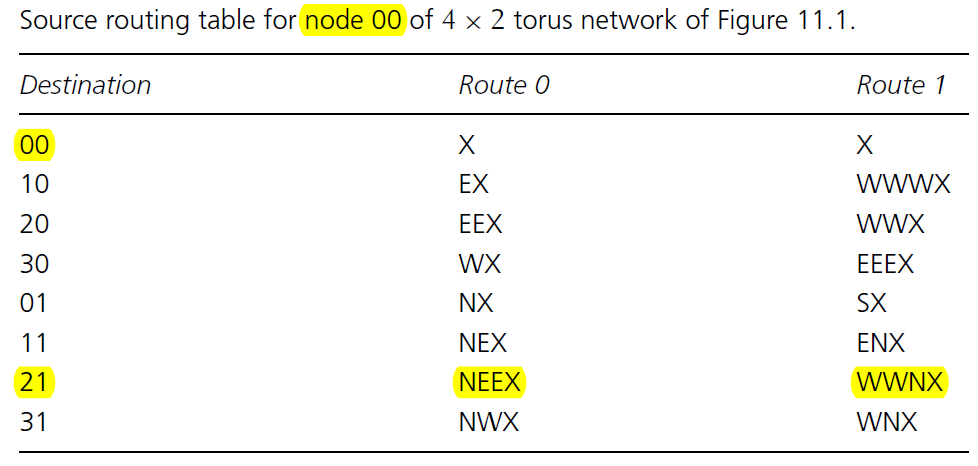
比如这个表,source node(00)->destination node(21), 期间经过的路由器个数为|2-0|+|1-0|=3。
若选择Route 0, 路径上经过的output port依次为north, east, east, exit port (core),output port选择由port selectors来完成。
eg. adopt source routing and encode the route in 2 bits for each router.
At the source router, the 2-bit corresponds to East, South, West and North output ports, while at all other routers, the bits correspond to Left, Right, Straight and Core.
The direction Left, Right and Straight are relative to the input port of the flit.
Source Routing的更多相关文章
- A Quick Introduction to Linux Policy Routing
A Quick Introduction to Linux Policy Routing 29 May 2013 In this post, I’m going to introduce you to ...
- Troubleshooting routing topology based on a reference topology
In one embodiment, a computing device (e.g., border router or network management server) transmits a ...
- Fast-tracking approach for building routing topologies in fast-moving networks
In one embodiment, a local node in a communication network determines a set of its neighbor nodes, a ...
- IP报头
位字段的值设置为二进制的0100表示IP版本4(IPv4).设置为0110表示IP版本6(IPv6) 位,它表示32位字长的IP报头长度,设计报头长度的原因是数据包可选字段大小会发生变化.IP ...
- 从C++实现Ping开始说起
在C++中实现ping功能,并不难.但真正了解ping是需要花费一番功夫的. Ping功能是在ICMP基础上实现的.IP协议并不是一个可靠的协议,它不保证数据被送达,那么,保证数据送达的工作应该由其他 ...
- 温故知新--计算机网络 iso/osi七层模型 tcp/ip四层模型
ISO七层模型由下至上为1至7层,分别为: 应用层(Application layer) 表示层(Presentation layer) 会话层(Session layer) 传输层(Transpor ...
- Run P4 without P4factory - A Simple Example In Tutorials.
前言 本文是我运行P4社区于Github开源教程Tutorials中的P4 SIGCOMM 2015 Tutorial一些实战小结,Github链接: Github. 测试的例子:P4 SIGCOMM ...
- LINUX安全加固规范
1 概述 近几年来Internet变得更加不安全了.网络的通信量日益加大,越来越多的重要交易正在通过网络完成,与此同时数据被损坏.截取和修改的风险也在增加. 只要有值得偷窃的东西就会有想办法窃取它的人 ...
- AIX上通过IPSEC进行IP包过滤
AIX上的IPSEC 在AIX可以通过以下步骤打开IP Security smitty ipsec4 --> Start/Stop IP Security --> Start IP Sec ...
随机推荐
- python 库安装方法及常用库
python 库安装方法及常用库 python库安装方法: 方法一:setpu.py 1.下载库压缩包,解压,记录下路径:*:/**/……/ 2.运行cmd,切换到*:/**/……/目录下 3.运行s ...
- linux 备忘录
1. ps aux|grep 程序 -------->查看当前程序是否运行 ps aux|grep nginx 2. tar -zxvf 压缩包 ---------> 解压缩 tar -z ...
- Linux系统不能解析域名
问题:正在使用的Linux系统突然有一天不能解析域名gus.xxxxxxxx.com? # ping gus.xxxxxxxx.com ping: unknown host gus-xxxxxxxx. ...
- php7下安装event扩展
有效安排I/O,时间和信号的扩展 使用可用于特定平台的最佳I/O通知机制的事件,是PHP基础设施的libevent端口. 下载地址:http://pecl.php.net/package/event ...
- maven项目打包发布到私有仓库
在项目开发中通常会引用其他的jar,怎样把自己的项目做为一个jar包的形式发布到私服仓库中,主要有以下三个步骤 (怎样配置maven私服仓库,就不再这里说明了,可以参考以前的文章)1.在maven的s ...
- sFlow-rt安装部署
sFlow技术是一种以设备端口为基本单元的数据流随机采样的流量监控技术,不仅可以提供完整的第二层到第四层甚至全网范围内的实时流量信息,而且可以适应超大网络流量(如大于10Gbit/s)环境下的流量 ...
- iOS.UI.UIWindow
UIWindow 1. UIWindow 2. UIWindow的使用场景 2.1 额外添加的Window需要手动进行旋转 最近有遇到一个UIWindow的使用场景:在ApplicationDeleg ...
- Java.WeakReference-SoftReference-PhantomReference
Weak Reference, Soft Reference, Phantom Reference 1. Introduction "Weak reference objects, whic ...
- Oracle Linux下数据库操作的相关问题
1.su - oracle 切换到oracle用户 lsnrctl status 查看数据库监听状态 lsnrctl start 打开数据库监听 2.Connected to an idle inst ...
- IOS 将图片转换为圆角图
UIImage+wiRoundedRectImage.h #import <UIKit/UIKit.h> @interface UIImage (wiRoundedRectImage) + ...