
SpringBoot用@ConfigurationProperties获取配置文件值
SpringBoot的配置文件有yml和properties两种,看一些文章说yml以数据为中心,比较好。个人觉得properties更好用,所以这里以properties格式为例来说。
我们都知道@Value 注解可以从配置文件读取一个配置,如果只是配置某个值,比如 某一个域名,配置为xxx.domain = www.xxx.com ,这样直接在代码里用@Value获取,比较方便。
但是如果是一组相关的配置,比如验证码相关的配置,有图片验证码、手机验证码、邮箱验证码,如果想把验证码的长度做成可配置。是否能像springboot的配置,
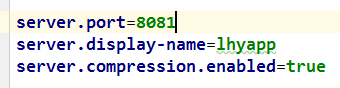
参照着写成:
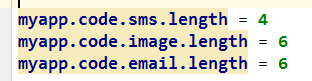
肯定是可以的!
参照源码是最好的学习方式,下面来看springboot是怎么做的
server对应着一个配置类:ServerProperties(只粘贴出了部分成员变量,来说明问题)
@ConfigurationProperties(prefix = "server", ignoreUnknownFields = true)

public class ServerProperties

        implements EmbeddedServletContainerCustomizer, EnvironmentAware, Ordered {

    /**

     * Server HTTP port.

     */

    private Integer port;

    @NestedConfigurationProperty

    private Compression compression = new Compression();

  //省略其他成员变量、getter 、setter
Compression类部分代码:
public class Compression {

    /**

     * If response compression is enabled.

     */

    private boolean enabled = false;
看过后应该很明白了,之所以能写成server.port=8081,server.display-name=lhyapp,server.compression.enabled=true ,是因为 ServerProperties 类上使用了
@ConfigurationProperties(prefix = "server", ignoreUnknownFields = true) 注解,其中prefix 指定配置文件里的前缀, 如果想弄成这样式的 server.compression.enabled = true ,就需要再声名一个类 Compression ,然后在ServerProperties 中引用这个类,属性名对应配置文件中的配置名。
@ConfigurationProperties:
告诉SpringBoot将本类中的所有属性和配置文件中相关的配置进行绑定;
prefix = "xxx":配置文件中哪个下面的所有属性进行一一映射
只有这个组件是容器中的组件,才能容器提供的@ConfigurationProperties功能;
@ConfigurationProperties(prefix = "xxx")默认从全局配置文件中获取值;
下边实现上面说的验证码配置,需要的类:

代码:
CoreConfiguration.java
@Configuration

@EnableConfigurationProperties(SecurityProperties.class)

public class CoreConfiguration {

    //配置一些bean

    //@Bean

    //public XXXX xxxx(){}

}
SecurityProperties.java
@ConfigurationProperties(prefix = "myapp")

public class SecurityProperties {

    private ValidateCodeProperties code = new ValidateCodeProperties();

    public ValidateCodeProperties getCode() {

        return code;

    }

    public void setCode(ValidateCodeProperties code) {

        this.code = code;

    }

}
ValidateCodeProperties.java
public class ValidateCodeProperties {

    private SmsCodeProperties sms = new SmsCodeProperties();

    private ImageCodeProperties image = new ImageCodeProperties();

    public SmsCodeProperties getSms() {

        return sms;

    }

    public void setSms(SmsCodeProperties sms) {

        this.sms = sms;

    }

    public ImageCodeProperties getImage() {

        return image;

    }

    public void setImage(ImageCodeProperties image) {

        this.image = image;

    }

}
SmsCodeProperties.java
public class SmsCodeProperties {

    private int length = 4;

    public int getLength() {

        return length;

    }

    public void setLength(int length) {

        this.length = length;

    }

}
在application.properties 里配置
myapp.code.sms.length = 10
使用配置:
  @Autowired

    private SecurityProperties securityProperties;

    @RequestMapping("/length")

    public @ResponseBody String length(){

        int length = securityProperties.getCode().getSms().getLength();

        return String.valueOf(length);

    }
SpringBoot用@ConfigurationProperties获取配置文件值的更多相关文章
- Spring Boot入门(二):使用Profile实现多环境配置管理&如何获取配置文件值
在上一篇博客Spring Boot入门(一):使用IDEA创建Spring Boot项目并使用yaml配置文件中,我们新建了一个最原始的Spring Boot项目,并使用了更为流行的yaml配置文件. ...
- Spring Boot入门(二):获取配置文件值
本篇博客主要讲解下在Spring Boot中如何获取配置文件的值. 1. 使用yaml配置文件 Spring Boot默认生成的配置文件为application.properties,不过它也支持ya ...
- springboot拦截器中获取配置文件值
package com.zhx.web.interceptor; import com.zhx.util.other.IpUtil; import org.slf4j.Logger; import o ...
- SpringBoot配置分析、获取到SpringBoot配置文件信息以及几种获取配置文件信息的方式
Spring入门篇:https://www.cnblogs.com/biehongli/p/10170241.html SpringBoot的默认的配置文件application.properties ...
- JAVAEE——SpringBoot配置篇:配置文件、YAML语法、文件值注入、加载位置与顺序、自动配置原理
转载 https://www.cnblogs.com/xieyupeng/p/9664104.html @Value获取值和@ConfigurationProperties获取值比较 @Confi ...
- SpringBoot获取配置文件,就这么简单。
在讲SpringBoot 获取配置文件之前我们需要对SpringBoot 的项目有一个整体的了解,如何创建SpringBoot 项目,项目结构等等知识点,我在这里就不一一讲述了,没有学过的小伙伴可以自 ...
- spring-boot -配置文件值注入
/** * 将配置文件中配置的每一个属性的值,映射到这个组件中 * @ConfigurationProperties:告诉SpringBoot将本类中的所有属性和配置文件中相关的配置进行绑定: 默认在 ...
- Spring Boot之配置文件值注入(@ConfigurationProperties)
前言:Spring Boot配置文件值的注入有两种方式,分别是 @ConfigurationProperties @Value 这里我们使用第一种 首先我们创建一个application.yml文件, ...
- @Profile使用及SpringBoot获取profile值
版权声明:本文为博主原创文章,遵循 CC 4.0 by-sa 版权协议,转载请附上原文出处链接和本声明.本文链接:https://blog.csdn.net/Fmuma/article/details ...
随机推荐
- vue的过渡和动画
简单过渡 .fade-enter-active, .fade-leave-active { transition: all .5s; } /*.fade-enter, .fade-leave-to { ...
- VirtualBox安装增强工具时:Unable to install guest additions: unknown filesystem type 'iso9660'
解决方法: sudo apt-get install --reinstall linux-image-$(uname -r) 参考:http://askubuntu.com/questions/596 ...
- Web模板引擎—Mustache
Web模板引擎——Mustache 2012年9月12日 BY BELL·12 COMMENTS Web 模板引擎是为了使用户界面与业务数据(内容)分离而产生的,它可以生成特定格式的文档,通常是标准的 ...
- LRU ,LRUW,CKPT-Q
原文出处:http://www.itpub.net/thread-1631537-1-1.html http://www.linuxidc.com/Linux/2012-07/66767.htm ...
- MapGis如何实现WebGIS分布式大数据存储的
作为解决方案厂商,MapGis是如何实现分布式大数据存储的呢? MapGIS在传统关系型空间数据库引擎MapGIS SDE的基础之上,针对地理大数据的特点,构建了MapGIS DataStore分布式 ...
- quartz之hello(java)
quartz 任务调度框架 简单的说:就是在特定的时间,干指定的事件,然后具体到某个对象去做 quartz初之体验: 1.pom.xml文件(导入jar包) <dependencies&g ...
- Protocol Buffer 序列化原理大揭秘 - 为什么Protocol Buffer性能这么好?
前言 习惯用 Json.XML 数据存储格式的你们,相信大多都没听过Protocol Buffer Protocol Buffer 其实 是 Google出品的一种轻量 & 高效的结构化数据存 ...
- Hdu4185 Oil Skimming
Oil Skimming Problem Description Thanks to a certain "green" resources company, there is a ...
- 10.DataGrid的特性
- 7.Layout布局(tabs、accordion、layout)
一.tabs选项卡: 二.accordion手风琴: 三.经由div标记创建layout布局: 注意:center不是定位得到的,而是通过其他的几个位置计算得到的,如果不写center整个布局就无法初 ...