
WPF中的Drawing
以前在用WinForm的时候,可以通过GDI+接口在窗体上动态绘制自定义的图形。在WPF中有没有对应的API呢,最近项目中用到了这个,在这里总结一下。
WPF中的Drawing主要提供了几类API:
1. Drawing类型
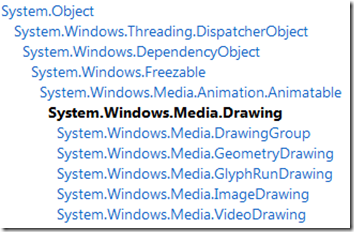
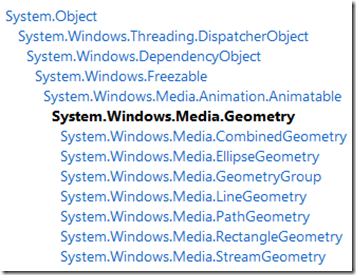
该组类型主要用来对绘制的对象的描述。比如GeometryDrawing是描述一个几何图形的Drawing,它的Geometry属性定义了它所描述的几何图形是什么样子。(它可以是如下Geometry类型的派生类型的任何一种,GeometryGroup是对多个Geometry的组合)
与GeometryGroup一样,DrawingGroup是对多个Drawing的组合。
2. DrawingContext类型
Drawing类型是以对象的形式来描述要绘制的图形,文字或视频。DrawingContext是通过存储绘制命令的形式来对要绘制的对象进行描述。这种方式更加简单。我们可以通过DrawingGroup.Open方法来得到一个DrawingContext,然后可以调用如下接口来进行操作。
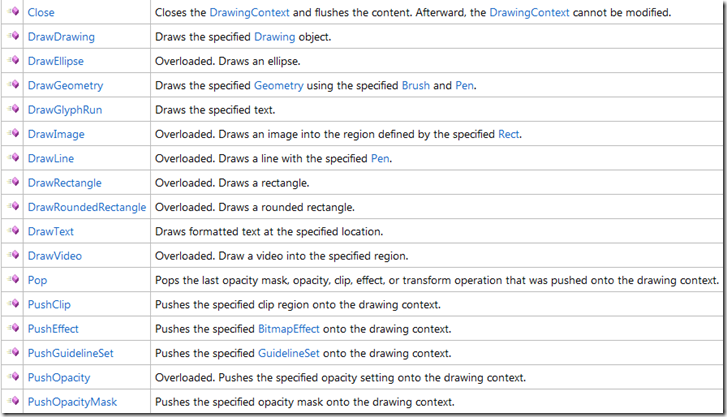
探其究竟,其实DrawingContext仅仅是将对Drawing对象的创建与管理进行了包装,然后提供了一组比较方便使用的接口而已。
看反编译出来的代码:
public override void DrawEllipse(Brush brush, Pen pen, Point center, AnimationClock centerAnimations, double radiusX, AnimationClock radiusXAnimations, double radiusY, AnimationClock radiusYAnimations)

    {

        this.VerifyApiNonstructuralChange();

        if ((brush != null) || (pen != null))

        {

            EllipseGeometry newFreezable = new EllipseGeometry(center, radiusX, radiusY) {

                CanBeInheritanceContext = this.CanBeInheritanceContext

            };

            this.SetupNewFreezable(newFreezable, ((centerAnimations == null) && (radiusXAnimations == null)) && (radiusYAnimations == null));

            if (centerAnimations != null)

            {

                newFreezable.ApplyAnimationClock(EllipseGeometry.CenterProperty, centerAnimations);

            }

            if (radiusXAnimations != null)

            {

                newFreezable.ApplyAnimationClock(EllipseGeometry.RadiusXProperty, radiusXAnimations);

            }

            if (radiusYAnimations != null)

            {

                newFreezable.ApplyAnimationClock(EllipseGeometry.RadiusYProperty, radiusYAnimations);

            }

            this.AddNewGeometryDrawing(brush, pen, newFreezable);

        }

    }

private void AddNewGeometryDrawing(Brush brush, Pen pen, Geometry geometry)

{

    GeometryDrawing newFreezable = new GeometryDrawing {

        CanBeInheritanceContext = this.CanBeInheritanceContext,

        Brush = brush,

        Pen = pen,

        Geometry = geometry

    };

    this.SetupNewFreezable(newFreezable, (((brush == null) || brush.IsFrozen) && ((pen == null) || pen.IsFrozen)) && geometry.IsFrozen);

    this.AddDrawing(newFreezable);

}

private void AddDrawing(Drawing newDrawing)

{

    if (this._rootDrawing == null)

    {

        this._rootDrawing = newDrawing;

    }

    else if (this._currentDrawingGroup == null)

    {

        this._currentDrawingGroup = new DrawingGroup();

        this._currentDrawingGroup.CanBeInheritanceContext = this.CanBeInheritanceContext;

        this.SetupNewFreezable(this._currentDrawingGroup, false);

        this._currentDrawingGroup.Children.Add(this._rootDrawing);

        this._currentDrawingGroup.Children.Add(newDrawing);

        this._rootDrawing = this._currentDrawingGroup;

    }

    else

    {

        this._currentDrawingGroup.Children.Add(newDrawing);

    }

}
3.接受Drawing作为Content的类型
可以通过这些类型来应用Drawing中描述的对象绘制。
主要有如下几种:
(1)DrawingImage,结合Image控件可以将Drawing显示在UI上
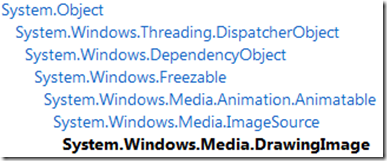
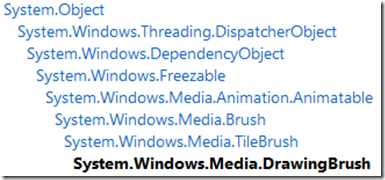
(2) DrawingBrush, 都有了Brush了,那就可以在仍何控件画了。比如说作为控件的Background.
(3) DrawingVisual类型
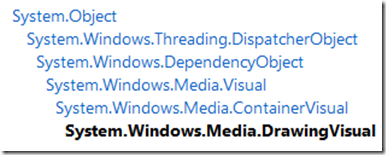
通过该类型,可以将Drawing创建为一个Visual.然后可以将Visual提供给一VisualContainer(可以自定义从FrameworkElement派生的类型,然后重写GetVisualChild与VisualChildrenCount方法作为VisualContainer)作为其UI呈现。
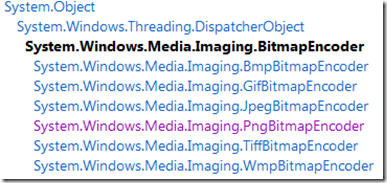
结合RenderTargetBitmap和BitmapEncoder, 我们可以将Drawing呈现到Bitmap图片文件中。
WPF中的Drawing的更多相关文章
- WPF中找不到Image或者Image不是Drawing系列
WPF中默认没有引用WinForm里面的一些东西,都是用它自带的那一套,但又不能完全脱离,所以有的时候比较蛋疼
- WPF中的image控件的Source赋值
WPF中的Image控件Source的设置 1.XAML中 简单的方式(Source="haha.png"); image控件的Source设置为相对路径后(Source=&quo ...
- WPF中实现验证码功能
其实和winform中的实现差不多,只是由于WPF中控件使用的库与winform中的有区别,大体上还是差不多的,直接看代码: 产生验证码的类:ValidCode.cs public class Val ...
- GMap.Net开发之在WinForm和WPF中使用GMap.Net地图插件
GMap.NET是什么? 来看看它的官方说明:GMap.NET is great and Powerful, Free, cross platform, open source .NET contro ...
- [转]在WPF中使用WinForm控件方法
本文转自:http://blog.csdn.net/lianchangshuai/article/details/6415241 下面以在Wpf中添加ZedGraph(用于创建任意数据的二维线型.条型 ...
- 在WPF中使用AForge.net控制摄像头拍照
原文:在WPF中使用AForge.net控制摄像头拍照 利用AForge.net控制摄像头拍照最方便的方法就是利用PictureBox显示摄像头画面,但在WPF中不能直接使用PictureBox.必须 ...
- 在WPF中自定义你的绘制(五)
原文:在WPF中自定义你的绘制(五) 在WPF中自定义你的绘制(五) ...
- 在WPF中自定义你的绘制(二)
原文:在WPF中自定义你的绘制(二) 在WPF中自定义你的绘制(二) ...
- 浏览器扩展系列————在WPF中定制WebBrowser快捷菜单
原文:浏览器扩展系列----在WPF中定制WebBrowser快捷菜单 关于如何定制菜单可以参考codeproject上的这篇文章:http://www.codeproject.com/KB/book ...
随机推荐
- c++ uuid生成法则
http://www.jb51.net/LINUXjishu/39614.html CentOS #include <uuid/uuid.h> 找不到文件解决方法: sudo yum in ...
- ASP.NET MVC 4 插件化架构简单实现-实例篇
先回顾一下上篇决定的做法: 1.定义程序集搜索目录(临时目录). 2.将要使用的各种程序集(插件)复制到该目录. 3.加载临时目录中的程序集. 4.定义模板引擎的搜索路径. 5.在模板引擎的查找页面方 ...
- 【BZOJ】【2768】【JLOI2010】冠军调查
网络流/最小割 我不会告诉你这题跟 BZOJ 1934 是一模一样的……包括数据范围…… /****************************************************** ...
- .net发送邮件代码示例
下面的代理已经调试过,用的是163的SMTP using System;using System.Collections.Generic;using System.Linq;using System. ...
- 【技术贴】解决MySql连接不上 ip远程连接Host is not allowed to conn
落雨 如果你想连接远程IP的mysql的时候发生这个错误: ERROR 1130: Host '192.168.1.3' is not allowed to connect to this MySQL ...
- 微软发布WP SDK8.0 新增语音、应用内支付等原生API
http://www.csdn.net/article/2012-10-31/2811338-windows-phone-8-sdk 京时间10月30日,微软在旧金山举行新一代手机操作系统Window ...
- Unity3D与iOS的交互设计<ViewController 的跳转>
原地址:http://www.aichengxu.com/article/%CF%B5%CD%B3%D3%C5%BB%AF/28797_12.html Unity3D与iOS的交互设计<View ...
- 【面试题012】打印1到最大的n位数
[面试题012]打印1到最大的n位数 大数问题 字符串中的每一个字符都是‘0’到‘9’之间的某一个字符,用来表示数字中的一位,因为数字最大是n位的,因此我们需要一个长度为n+1的字符串,字符串的最后 ...
- Javascript表格中搜索
<!DOCTYPE html> <html xmlns="http://www.w3.org/1999/xhtml"> <head> <m ...
- CSS 的命名和书写
CSS书写顺序 1.位置属性(position, top, right, z-index, display, float等) 2.大小(width, height, padding, margin) ...