
ASP.NET Core 中文文档 第三章 原理(14)服务器
原文:Servers
作者:Steve Smith
翻译:谢炀(Kiler)
校对:许登洋(Seay)、姚阿勇(Dr.Yao)
ASP.NET Core 已完全从承载应用程序的 Web 服务器环境中分离。ASP.NET Core 可以承载于 IIS 和 IIS Express ,以及使用 Kestrel 和 WebListener HTTP Server 的自承载环境中。此外,开发人员和第三方软件供应商可以创建自定义的服务器来承载 ASP.NET Core 应用程序。
服务器和命令
ASP.NET Core 旨在将 Web 应用程序从底层 HTTP 服务器分离出来。过去,ASP.NET 应用一直只在 Windows 中承载于 IIS 上。在 Windows 上运行 ASP.NET Core 应用程序的推荐方法是将 IIS 作为一个反向代理服务器来使用。IIS 中的 HttpPlatformHandler 模块管理并分发请求给一个进程外的HTTP 服务器。ASP.NET Core 附带两个不同的 HTTP 服务器:
- Microsoft.AspNetCore.Server.Kestrel (AKA Kestrel,跨平台)
- Microsoft.AspNetCore.Server.WebListener (AKA WebListener,仅 Windows,预览版)
ASP.NET Core 不直接监听请求,而是依靠 HTTP 服务器的实现将请求作为组成 HttpContext 的一组功能接口暴露给应用程序。尽管 WebListener 只是 Window 专用的,但 Kestrel 则是被设计为跨平台运行的。你可以通过在 project.json 文件中指定命令来配置你的应用程序承载于任何一个或全部的服务器。你甚至可以为应用程序指定程序入口点,作为一个可执行文件运行(使用 dotnet run),而不是承载到不同的进程。
用 Visual Studio 开发的 ASP.NET 应用程序默认的 Web 托管服务器采用了 Kestrel 做反向代理服务器的 IIS Express, project.json 文件默认包含 “Microsoft.AspNetCore.Server.Kestrel” 和 “Microsoft.AspNetCore.Server.IISIntegration” 依赖,即使采用空网站模板。Visual Studio 也提供了多种方式来把网站关联到 IISExpress。你可以在你的 web 应用程序项目的属性菜单的 Debug 选项卡中或者 launchSettings.json 文件中管理这些配置和参数。
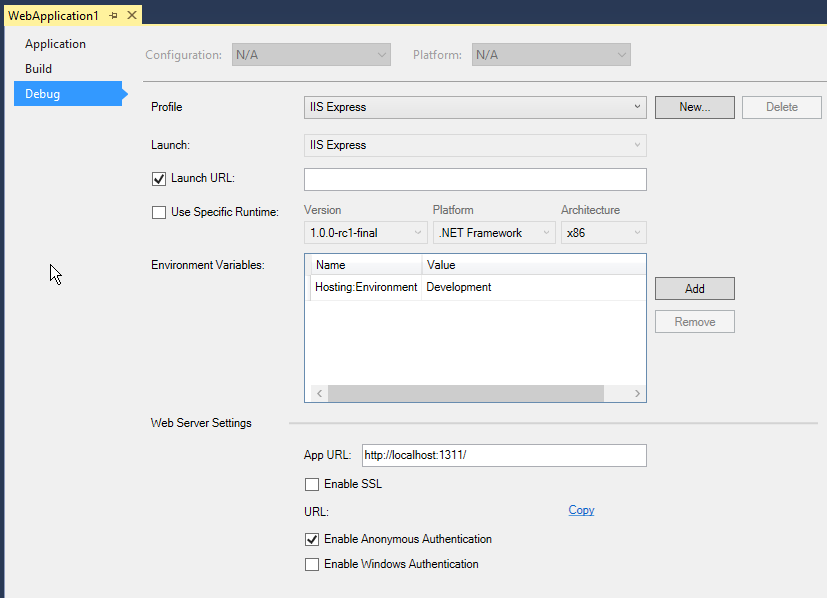
本文的示例项目被配置成支持每个服务器的选项在 project.json 文件中:
{

  "webroot": "wwwroot",

  "version": "1.0.0-*",

  "dependencies": {

    "Microsoft.AspNet.Server.Kestrel": "1.0.0-rc1-final",

    "Microsoft.AspNet.Server.WebListener": "1.0.0-rc1-final"

  },

  "commands": {

    "run": "run server.urls=http://localhost:5003",

    "web": "Microsoft.AspNet.Hosting --server Microsoft.AspNet.Server.Kestrel --server.urls http://localhost:5000",

    "weblistener": "Microsoft.AspNet.Hosting --server WebListener --server.urls http://localhost:5004"

  },

  "frameworks": {

    "dnx451": { },
run 命令会通过调用 void main 方法启动应用程序。 run 命令配置和启动一个 Kestrel 实例。
using System;

using System.Threading.Tasks;

using Microsoft.AspNet.Hosting;

using Microsoft.Extensions.Configuration;

using Microsoft.AspNet.Builder;

using Microsoft.Extensions.Logging;

using Microsoft.AspNet.Server.Kestrel;

namespace ServersDemo

{

    /// <summary>

    /// This demonstrates how the application can be launched in a console application.

    /// Executing the "dnx run" command in the application folder will run this app.

    /// </summary>

    public class Program

    {

        private readonly IServiceProvider _serviceProvider;

        public Program(IServiceProvider serviceProvider)

        {

            _serviceProvider = serviceProvider;

        }

        public Task<int> Main(string[] args)

        {

            //Add command line configuration source to read command line parameters.

            var builder = new ConfigurationBuilder();

            builder.AddCommandLine(args);

            var config = builder.Build();

            using (new WebHostBuilder(config)

                .UseServer("Microsoft.AspNet.Server.Kestrel")

                .Build()

                .Start())

            {

                Console.WriteLine("Started the server..");

                Console.WriteLine("Press any key to stop the server");

                Console.ReadLine();

            }

            return Task.FromResult(0);

        }

    }

}
服务支持的 Features
ASP.NET 定义了一系列 Request Features 。下表列出了所有 WebListener 和 Kestrel 支持 Features。
| Feature | WebListener | Kestrel |
|---|---|---|
| IHttpRequestFeature | 是 | 是 |
| IHttpResponseFeature | 是 | 是 |
| IHttpAuthenticationFeature | 是 | 否 |
| IHttpUpgradeFeature | 是(有限制) | 是 |
| IHttpBufferingFeature | 是 | 否 |
| IHttpConnectionFeature | 是 | 是 |
| IHttpRequestLifetimeFeature | 是 | 是 |
| IHttpSendFileFeature | 是 | 否 |
| IHttpWebSocketFeature | 否* | 否* |
| IRequestIdentifierFeature | 是 | 否 |
| ITlsConnectionFeature | 是 | 是 |
| ITlsTokenBindingFeature | 是 | 否 |
配置选项
在服务器启动时你可以提供可读取的配置选项(命令行参数或配置文件)。
Microsoft.AspNetCore.Hosting 命令支持服务器参数(例如 Kestrel 或 WebListener )还有 server.urls 配置项。 server.urls 配置键值是一系列以分号分隔的服务器必须处理 URL 前缀列表。
上面的 project.json 文件演示了如何直接传递 server.urls 参数:
"web": "Microsoft.AspNetCore.Kestrel --server.urls http://localhost:5004"
另外,也可以使用 JSON 配置文件。
"kestrel": "Microsoft.AspNetCore.Hosting"
hosting.json 可以作为服务器设置的参数使用(也可以包括服务器参数):
{

  "server": "Microsoft.AspNetCore.Server.Kestrel",

  "server.urls": "http://localhost:5004/"

}
编码化的配置
托管应用程序的服务器可以通过在 Startup 类的 Configure 方法中调用 IApplicationBuilder 接口来引用。 IApplicationBuilder 将服务器 Features 暴露为 IFeatureCollection 类型。IServerAddressesFeature 只公开了 Addresses 属性,但不同的服务器实现可能会暴露更多的 Features ,例如,WebListener 公开了可用于配置服务器的认证的 AuthenticationManager :
public void Configure(IApplicationBuilder app, IApplicationLifetime lifetime, ILoggerFactory loggerFactory)

{

    var webListenerInfo = app.ServerFeatures.Get<WebListener>();

    if (webListenerInfo != null)

    {

        webListenerInfo.AuthenticationManager.AuthenticationSchemes =

            AuthenticationSchemes.AllowAnonymous;

    }

    var serverAddress = app.ServerFeatures.Get<IServerAddressesFeature>()?.Addresses.FirstOrDefault();

    app.Run(async (context) =>

    {

        var message = String.Format("Hello World from {0}",

                                serverAddress);

        await context.Response.WriteAsync(message);

    });

}
IIS 与 IIS Express
IIS 是最功能丰富的应用服务器,包括 IIS 管理功能和访问其他 IIS 模块。托管 ASP.NET Core 不再使用由 ASP.NET 之前版本中使用的 System.Web 基础库。
ASP.NET Core 模块
Windows 上的 ASP.NET Core , Web 应用程序宿主在 IIS 以外的进程上的。ASP.NET Core 模块是一个原生的 IIS 模块用来代理请求到管理的进程,更多参考 ASP.NET Core Module Configuration Reference 。
WebListener
WebListener 是 ASP.NET Core 的 Windows 专用 HTTP 服务器。它直接运行在 Http.Sys kernel driver之上,并且具有非常小的开销。
你可以通过在 project.json 里面添加 “Microsoft.AspNetCore.Server.WebListener” 依赖以及下面的命令让你的 ASP.NET 应用程序支持 WebListener :
"web": "Microsoft.AspNetCore.Hosting --server Microsoft.AspNetCore.Server.WebListener --server.urls http://localhost:5000"
提示
WebListener 还处于预览版状态。
Kestrel
Kestrel 是一个基于 libuv 的 Web 服务器,一个跨平台的异步 I/O 库。你可以通过在 project.json 依赖列表中包含 Microsoft.AspNetCore.Server.Kestrel
依赖来支持 Kestrel 。
了解更多关于创建 Kestrel 的细节 用 Visual Studio Code 在 macOS 上创建首个 ASP.NET Core 应用程序 。
提示
Kestrel 是设计在反向代理服务器(例如 IIS 或者 Nginx )之后的,并且不是直接面向 Internet 部署的。
服务器的选择
如果你打算在 Windows 服务器上部署你的应用程序,你应该用 IIS 作为反向代理服务器来管理和代理发送到 Kestrel 的请求。如果在 Linux 上部署,你应该运行类似反向代理服务器,如 Apache 或 Nginx 的来代理发送到 Kestrel 的请求(更多参考 Publish to a Linux Production Environment )。
自定义服务器
你可以创建你自己的服务器中承载 ASP.NET 应用程序,或使用其他开源服务器。当你实现自己的服务器,你可以自由地实现只是你的应用程序的所需要 Feature 功能接口,不过至少需要支持IHttpRequestFeature 和 IHttpResponseFeature 。
因为 Kestrel 是开源的,如果你需要实现自己的自定义服务器,是一个不错的起点。像所有的 ASP.NET Core,欢迎你 贡献 自己的提交来回馈和改进这个项目。
Kestrel 当前支持有限数量的 Feature 接口,但是后续会增加更多 Features 支持。
附加阅读
ASP.NET Core 中文文档 第三章 原理(14)服务器的更多相关文章
- ASP.NET Core 中文文档 第三章 原理(6)全球化与本地化
原文:Globalization and localization 作者:Rick Anderson.Damien Bowden.Bart Calixto.Nadeem Afana 翻译:谢炀(Kil ...
- ASP.NET Core 中文文档 第三章 原理(1)应用程序启动
原文:Application Startup 作者:Steve Smith 翻译:刘怡(AlexLEWIS) 校对:谢炀(kiler398).许登洋(Seay) ASP.NET Core 为你的应用程 ...
- ASP.NET Core 中文文档 第三章 原理(12)托管
原文:Hosting 作者:Steve Smith 翻译:娄宇(Lyrics) 校对:何镇汐.许登洋(Seay) 为了运行 ASP.NET Core 应用程序,你需要使用 WebHostBuilder ...
- ASP.NET Core 中文文档 第三章 原理(13)管理应用程序状态
原文:Managing Application State 作者:Steve Smith 翻译:姚阿勇(Dr.Yao) 校对:高嵩 在 ASP.NET Core 中,有多种途径可以对应用程序的状态进行 ...
- ASP.NET Core 中文文档 第三章 原理(15)请求功能
作者:Steve Smith 翻译:谢炀(kiler398) 校对:姚阿勇(Dr.Yao).孟帅洋(书缘) 涉及到如何处理 HTTP 请求以及响应的独立 Web 服务器功能已经被分解成独立的接口,这些 ...
- ASP.NET Core 中文文档 第三章 原理(16).NET开放Web接口(OWIN)
原文:Open Web Interface for .NET (OWIN) 作者:Steve Smith. Rick Anderson 翻译:谢炀(kiler398) 校对:孟帅洋(书缘) ASP.N ...
- ASP.NET Core 中文文档 第三章 原理(2)中间件
原文:Middleware 作者:Steve Smith.Rick Anderson 翻译:刘怡(AlexLEWIS) 校对:许登洋(Seay) 章节: 什么是中间件 用 IApplicationBu ...
- ASP.NET Core 中文文档 第三章 原理(3)静态文件处理
原文:Working with Static Files 作者:Rick Anderson 翻译:刘怡(AlexLEWIS) 校对:谢炀(kiler398).许登洋(Seay).孟帅洋(书缘) 静态文 ...
- ASP.NET Core 中文文档 第三章 原理(10)依赖注入
原文:Dependency Injection 作者:Steve Smith 翻译:刘浩杨 校对:许登洋(Seay).高嵩 ASP.NET Core 的底层设计支持和使用依赖注入.ASP.NET Co ...
随机推荐
- HTTPS 互联网世界的安全基础
近一年公司在努力推进全站的 HTTPS 化,作为负责应用系统的我们,在配合这个趋势的过程中,顺便也就想去搞清楚 HTTP 后面的这个 S 到底是个什么含义?有什么作用?带来了哪些影响?毕竟以前也就只是 ...
- video.js
1.github地址 2.常用API: class : video-js: video-js应用视频所需的风格.js功能,比如全屏和字幕. vjs-default-skin: vjs-default- ...
- Matlab 高脚杯模型切片
前言:此文为去年我替人做的一个课题,觉得比较简洁,图形也比较美观,因此放在博文里 数据源我放到了百度云盘高脚杯数据源 有兴趣的可以下载数据,跑程序试一下.也可以单独看看代码,看下实现过程. 主函数 % ...
- 使用技术手段限制DBA的危险操作—Oracle Database Vault
概述 众所周知,在业务高峰期,某些针对Oracle数据库的操作具有很高的风险,比如修改表结构.修改实例参数等等,如果没有充分评估和了解这些操作所带来的影响,这些操作很可能会导致故障,轻则导致应用错误, ...
- .NET平台开源项目速览(16)C#写PDF文件类库PDF File Writer介绍
1年前,我在文章:这些.NET开源项目你知道吗?.NET平台开源文档与报表处理组件集合(三)中(第9个项目),给大家推荐了一个开源免费的PDF读写组件 PDFSharp,PDFSharp我2年前就看过 ...
- Android数据加密之SHA安全散列算法
前言: 对于SHA安全散列算法,以前没怎么使用过,仅仅是停留在听说过的阶段,今天在看图片缓存框架Glide源码时发现其缓存的Key采用的不是MD5加密算法,而是SHA-256加密算法,这才勾起了我的好 ...
- jquery插件的用法之cookie 插件
一.使用cookie 插件 插件官方网站下载地址:http://plugins.jquery.com/cookie/ cookie 插件的用法比较简单,直接粘贴下面代码示例: //生成一个cookie ...
- UWP开发必备以及常用知识点总结
一直在学UWP,一直在写Code,自己到达了什么水平?还有多少东西需要学习才能独挡一面?我想对刚接触UWP的开发者都有这种困惑,偶尔停下来总结分析一下还是很有收获的! 以下内容是自己开发中经常遇到的一 ...
- 如何在Elasticsearch中安装中文分词器(IK+pinyin)
如果直接使用Elasticsearch的朋友在处理中文内容的搜索时,肯定会遇到很尴尬的问题--中文词语被分成了一个一个的汉字,当用Kibana作图的时候,按照term来分组,结果一个汉字被分成了一组. ...
- 我理解的MVC
前言 前一阶段对MVC模式及其衍生模式做了一番比较深入的研究和实践,这篇文章也算是一个阶段性的回顾和总结. 经典MVC模式 经典MVC模式中,M是指业务模型,V是指用户界面,C则是控制器,使用MVC的 ...