
SpringBoot + SwaggerUI
后台写接口,由于要提供接口文档给前台使用,所有研究了一下swagger,看到网上有篇文章写得不错,就直接拿过来了。
swagger用于定义API文档。
好处:
- 前后端分离开发
- API文档非常明确
- 测试的时候不需要再使用URL输入浏览器的方式来访问Controller
- 传统的输入URL的测试方式对于post请求的传参比较麻烦(当然,可以使用postman这样的浏览器插件)
- spring-boot与swagger的集比较成简单
1、项目结构
和上一节一样,没有改变。
2、pom.xml
引入了两个jar。
        <dependency>

           <groupId>io.springfox</groupId>

           <artifactId>springfox-swagger2</artifactId>

           <version>2.2.2</version>

        </dependency>

        <dependency>

           <groupId>io.springfox</groupId>

           <artifactId>springfox-swagger-ui</artifactId>

           <version>2.2.2</version>

        </dependency>
3、Application.java
package com.xxx.firstboot;

import org.springframework.boot.SpringApplication;

import org.springframework.boot.autoconfigure.SpringBootApplication;

import springfox.documentation.swagger2.annotations.EnableSwagger2;

@SpringBootApplication        //same as @Configuration+@EnableAutoConfiguration+@ComponentScan

@EnableSwagger2             //启动swagger注解

public class Application {

    public static void main(String[] args) {

        SpringApplication.run(Application.class, args);

    }

}
说明:
引入了一个注解@EnableSwagger2来启动swagger注解。(启动该注解使得用在controller中的swagger注解生效,覆盖的范围由@ComponentScan的配置来指定,这里默认指定为根路径"com.xxx.firstboot"下的所有controller)
4、UserController.java
package com.xxx.firstboot.web;

import org.springframework.beans.factory.annotation.Autowired;

import org.springframework.web.bind.annotation.RequestHeader;

import org.springframework.web.bind.annotation.RequestMapping;

import org.springframework.web.bind.annotation.RequestMethod;

import org.springframework.web.bind.annotation.RequestParam;

import org.springframework.web.bind.annotation.RestController;

import com.xxx.firstboot.domain.User;

import com.xxx.firstboot.service.UserService;

import io.swagger.annotations.Api;

import io.swagger.annotations.ApiImplicitParam;

import io.swagger.annotations.ApiImplicitParams;

import io.swagger.annotations.ApiOperation;

import io.swagger.annotations.ApiResponse;

import io.swagger.annotations.ApiResponses;

@RestController

@RequestMapping("/user")

@Api("userController相关api")

public class UserController {

    @Autowired

    private UserService userService;

//    @Autowired

//    private MyRedisTemplate myRedisTemplate;

    @ApiOperation("获取用户信息")

    @ApiImplicitParams({

        @ApiImplicitParam(paramType="header",name="username",dataType="String",required=true,value="用户的姓名",defaultValue="zhaojigang"),

        @ApiImplicitParam(paramType="query",name="password",dataType="String",required=true,value="用户的密码",defaultValue="wangna")

    })

    @ApiResponses({

        @ApiResponse(code=400,message="请求参数没填好"),

        @ApiResponse(code=404,message="请求路径没有或页面跳转路径不对")

    })

    @RequestMapping(value="/getUser",method=RequestMethod.GET)

    public User getUser(@RequestHeader("username") String username, @RequestParam("password") String password) {

        return userService.getUser(username,password);

    }

//    @RequestMapping("/testJedisCluster")

//    public User testJedisCluster(@RequestParam("username") String username){

//        String value =  myRedisTemplate.get(MyConstants.USER_FORWARD_CACHE_PREFIX, username);

//        if(StringUtils.isBlank(value)){

//            myRedisTemplate.set(MyConstants.USER_FORWARD_CACHE_PREFIX, username, JSON.toJSONString(getUser()));

//            return null;

//        }

//        return JSON.parseObject(value, User.class);

//    }

}
说明:
- @Api:用在类上,说明该类的作用
- @ApiOperation:用在方法上,说明方法的作用
- @ApiImplicitParams:用在方法上包含一组参数说明
- @ApiImplicitParam:用在@ApiImplicitParams注解中,指定一个请求参数的各个方面
- paramType:参数放在哪个地方
- header-->请求参数的获取:@RequestHeader
- query-->请求参数的获取:@RequestParam
- path(用于restful接口)-->请求参数的获取:@PathVariable
- body(不常用)
- form(不常用)
- name:参数名
- dataType:参数类型
- required:参数是否必须传
- value:参数的意思
- defaultValue:参数的默认值
- paramType:参数放在哪个地方
- @ApiResponses:用于表示一组响应
- @ApiResponse:用在@ApiResponses中,一般用于表达一个错误的响应信息
- code:数字,例如400
- message:信息,例如"请求参数没填好"
- response:抛出异常的类
- @ApiModel:描述一个Model的信息(这种一般用在post创建的时候,使用@RequestBody这样的场景,请求参数无法使用@ApiImplicitParam注解进行描述的时候)
- @ApiModelProperty:描述一个model的属性
以上这些就是最常用的几个注解了。
需要注意的是:
- ApiImplicitParam这个注解不只是注解,还会影响运行期的程序,例子如下:
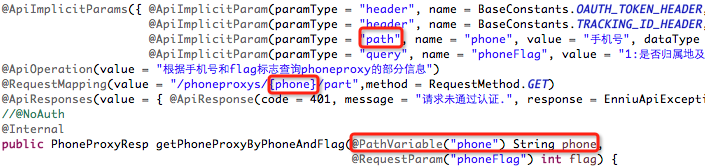
如果ApiImplicitParam中的phone的paramType是query的话,是无法注入到rest路径中的,而且如果是path的话,是不需要配置ApiImplicitParam的,即使配置了,其中的value="手机号"也不会在swagger-ui展示出来。
具体其他的注解,查看:
https://github.com/swagger-api/swagger-core/wiki/Annotations#apimodel
测试:
启动服务,浏览器输入"http://localhost:8080/swagger-ui.html"
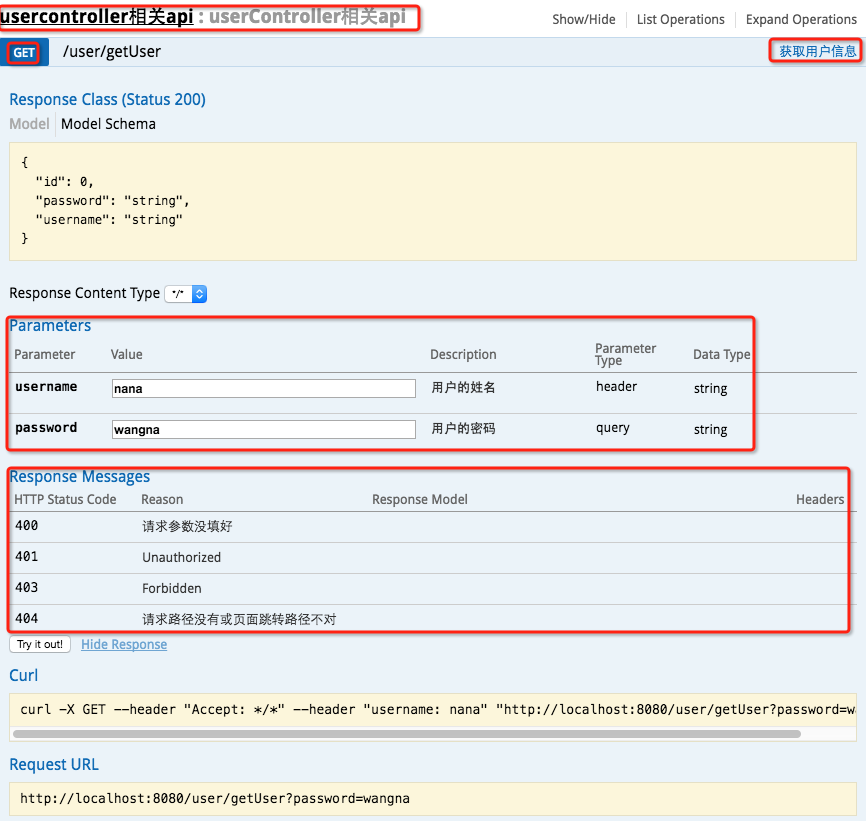
最上边一个红框:@Api
GET红框:method=RequestMethod.GET
右边红框:@ApiOperation
parameter红框:@ApiImplicitParams系列注解
response messages红框:@ApiResponses系列注解
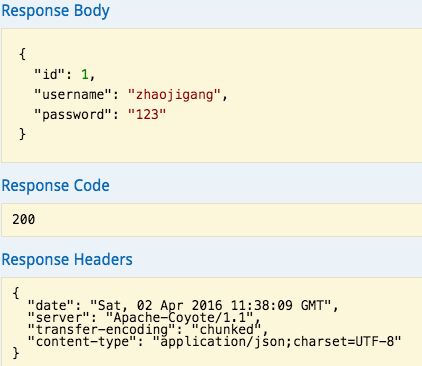
输入参数后,点击"try it out!",查看响应内容:
本文转载自:http://www.cnblogs.com/java-zhao/p/5348113.html
SpringBoot + SwaggerUI的更多相关文章
- SpringBoot swagger-ui.html 配置类继承 WebMvcConfigurationSupport 类后 请求404
1 .SpringBoot启动类加上 注解 @EnableWebMvc @SpringBootApplication@EnableWebMvc public class Application { ...
- springboot swagger-ui结合
随着移动互联的发展,前后端的分离已经是趋势.前后端已不是传统部门的划分,而是它们各有一套的生态系统,包括不同的开发语言.不同的开发流程.构建方式.测试流程等.做前端的不需要会maven作为构建工具,后 ...
- Spring Boot项目简单上手+swagger配置+项目发布(可能是史上最详细的)
Spring Boot项目简单上手+swagger配置 1.项目实践 项目结构图 项目整体分为四部分:1.source code 2.sql-mapper 3.application.properti ...
- springboot中swaggerUI的使用
demo地址:demo-swagger-springboot springboot中swaggerUI的使用 1.pom文件中添加swagger依赖 2.从github项目中下载swaggerUI 然 ...
- springboot项目中配置swagger-ui
Git官方地址:https://github.com/SpringForAll/spring-boot-starter-swagger Demo:https://github.com/dyc87112 ...
- Springboot 4.Springboot 集成SwaggerUi
SwaggerUi就是自动生成接口文档的这么一个类似于插件的工具,可以直接访问接口. 首先打开pom文件,将插件引进来,然后增加一个属性<properties>,用来设置版本号的,然后直接 ...
- springboot 整合swagger-ui
一.添加maven依赖 <dependency> <groupId>io.springfox</groupId> <artifactId>springf ...
- SpringBoot整合Swagger-ui
SpringBoot整合Swagger-ui 引入依赖 <dependency> <groupId>org.springframework.boot</groupId&g ...
- SpringBoot(十八):SpringBoot2.1.1引入SwaggerUI工具
Swagger是一个有用web界面的提供实体模型结构展示,接口展示,调测等的一个工具,使用它可以提高开发者开发效率,特别是前后端配合开发时,大大省去了沟通接口耗费的时间:服务端开发完接口发布后,UI端 ...
随机推荐
- Web开发者应当开始学习HTML5的新功能
据国外媒体报道,谷歌开发者业务部门高管马克·皮尔格雷姆(Mark Pilgrim)在WWW2010会议上表示,尽管还需要进一步完善,HTML5已经获得大多数平台支持,适合完成大多数任务. 但并非所有人 ...
- Assembly
Principles of Computer Organization and Assembly Language Using the JavaTM Virtual Machine http://it ...
- mysql调优 参数说明
原文地址:http://wenku.baidu.com/view/49087bbafd0a79563c1e72c8.html 关键字: mysql *1, 查看 MySQL 服务器配置信息 *1. m ...
- JSP userBean setProperty直接从request中获取参数
JSP userBean setProperty直接从request中获取参数: form表单Jsp: <%@ page language="java" import=&qu ...
- Flex之HTML5视频播放解决方案
Flex的video类对于视频播放在ios操作系统下表现出不兼容,采用调用ios源生播放器的思路,那么怎么调呢? 话说Html5 和Flex是竞争关系,这次利用Html5的video标签实现ios播放 ...
- POJ3728 LCA RMQ DP
题意简述:给定一个N个节点的树,1<=N<=50000 每个节点都有一个权值,代表商品在这个节点的价格.商人从某个节点a移动到节点b,且只能购买并出售一次商品,问最多可以产生多大的利润. ...
- vue.js中ajax请求
<div id="app"> <table style="border-collapse: collapse"> <thead&g ...
- A tutorial on Principal Components Analysis | 主成分分析(PCA)教程
A tutorial on Principal Components Analysis 原著:Lindsay I Smith, A tutorial on Principal Components A ...
- [个人翻译]GitHub指导文件(GitHub Guides[Hello World])
[个人翻译]GitHub指导文件(GitHub Guides[Hello World]) Mirage_j个人翻译,欢迎转载,最好标明出处http://www.cnblogs.com/mirageJ/ ...
- 模拟java的split函数,分割字符串,类似于java的split方法
/*自定义oracle的分割函数*//*定义一个type,用户接收返回的数据集合类型*/create or replace type splitType as table of varchar2(40 ...