
Android布局解析,图文(转)
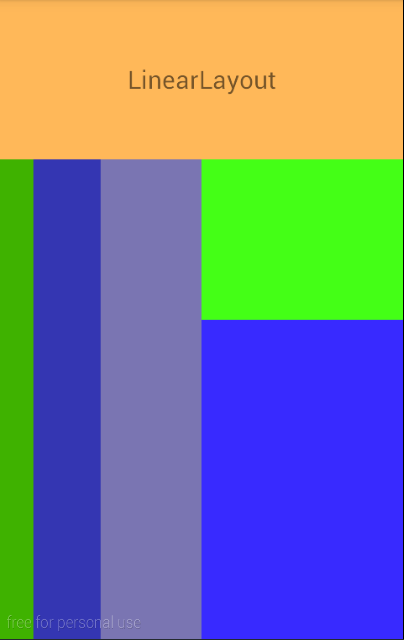
LinearLayout:相当于Java GUI中的FlowLayout(流式布局),就是说一个组件后边跟一个,挨着靠,一个组件把一行占满了,就靠到下一行。
linearlayoutdemo.xml

<LinearLayout xmlns:android="http://schemas.android.com/apk/res/android"

    xmlns:tools="http://schemas.android.com/tools"

    android:id="@+id/L1"

    android:layout_width="fill_parent"

    android:layout_height="fill_parent"

    android:orientation="vertical"

    tools:context=".MainActivity">

    <TextView

        android:id="@+id/tv"

        android:layout_width="fill_parent"

        android:layout_height="fill_parent"

        android:layout_weight="3"

        android:background="#ffffb859"

        android:gravity="center"

        android:text="@string/ll"

        android:textSize="20sp" />

    <LinearLayout

        android:id="@+id/L21"

        android:layout_width="fill_parent"

        android:layout_height="fill_parent"

        android:layout_weight="1"

        android:orientation="horizontal">

        <TextView

            android:id="@+id/tv2"

            android:layout_width="wrap_content"

            android:layout_height="fill_parent"

            android:layout_weight="1"

            android:background="#ff3fb200" />

        <TextView

            android:id="@+id/tv3"

            android:layout_width="wrap_content"

            android:layout_height="fill_parent"

            android:layout_weight="2"

            android:background="#ff3436b2" />

        <TextView

            android:id="@+id/tv5"

            android:layout_width="wrap_content"

            android:layout_height="fill_parent"

            android:layout_weight="3"

            android:background="#ff7a75b2" />

        <LinearLayout

            android:id="@+id/L27"

            android:layout_width="wrap_content"

            android:layout_height="fill_parent"

            android:layout_weight="6"

            android:orientation="vertical">

            <LinearLayout

                android:id="@+id/L37"

                android:layout_width="fill_parent"

                android:layout_height="fill_parent"

                android:layout_weight="2"

                android:background="#ff44ff16"

                android:orientation="horizontal">

            </LinearLayout>

            <LinearLayout

                android:id="@+id/L32"

                android:layout_width="fill_parent"

                android:layout_height="fill_parent"

                android:layout_weight="1"

                android:background="#ff382aff"

                android:gravity="center"

                android:orientation="horizontal">             </LinearLayout>

        </LinearLayout>

    </LinearLayout>

</LinearLayout>
效果:
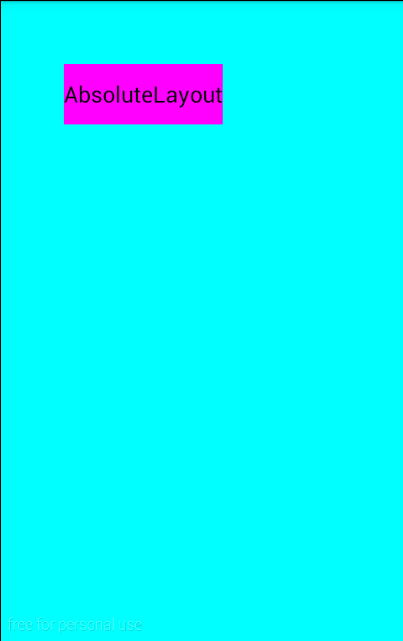
AbsolutelyLayout:绝对布局,相当于Java GUI中的空布局,就是啥也没有。组件的位置需要用坐标来显示。但是在android2.3之后已经弃用了,这种布局不能适应多种屏幕尺寸,局限性太大,但是对于独立开发者,单人单机来讲,用用也无妨。
absolutelayoutdemo.xml
<AbsoluteLayout xmlns:android="http://schemas.android.com/apk/res/android"

    android:layout_width="match_parent"

    android:layout_height="match_parent"

    android:background="#00ffff">

    <Button

        android:id="@+id/er"

        android:layout_width="wrap_content"

        android:layout_height="wrap_content"

        android:layout_x="50dp"

        android:layout_y="50dp"

        android:background="#ff00ff"

        android:text="@string/al" />

</AbsoluteLayout>
效果:
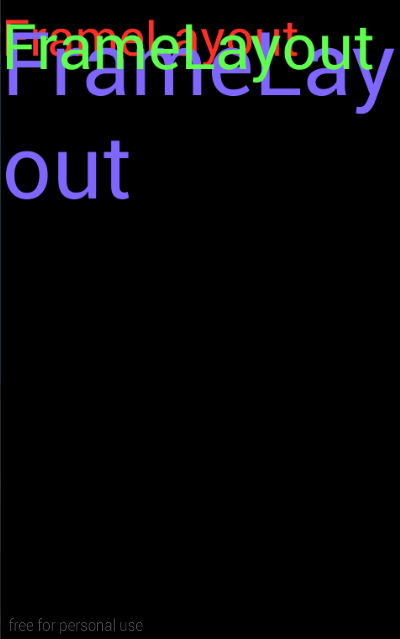
FrameLayout:这种布局是一层叠着一层,游戏类应用常会使用,涉及到NPC的构建视图等。
framelayoutdemo.xml
<FrameLayout xmlns:android="http://schemas.android.com/apk/res/android"

    android:layout_width="match_parent"

    android:layout_height="match_parent"

    android:background="#000000">

    <TextView

        android:layout_width="wrap_content"

        android:layout_height="wrap_content"

        android:text="@string/fl"

        android:textColor="#ffff2f25"

        android:textSize="40sp" />

    <TextView

        android:layout_width="wrap_content"

        android:layout_height="wrap_content"

        android:text="@string/fl"

        android:textColor="#ff7e66ff"

        android:textSize="70sp" />

    <TextView

        android:layout_width="wrap_content"

        android:layout_height="wrap_content"

        android:text="@string/fl"

        android:textColor="#ff5eff4f"

        android:textSize="50sp" />

</FrameLayout>
效果:
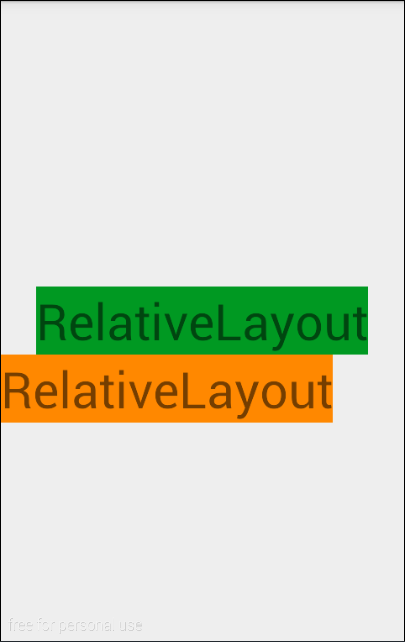
RelativeLayout:关系布局,顾名思义,就是靠关系,谁在谁的左边谁在谁的上边,谁前边和谁对其等等。属性这里就不赘述了,需要时查API即可。
relativelayoutdemo.xml
<RelativeLayout xmlns:android="http://schemas.android.com/apk/res/android"

    android:layout_width="match_parent"

    android:layout_height="match_parent">

    <TextView

        android:id="@+id/t1"

        android:layout_width="wrap_content"

        android:layout_height="wrap_content"

        android:layout_centerInParent="true"

        android:background="#009922"

        android:text="@string/rl"

        android:textSize="40sp" />

    <TextView

        android:id="@+id/t2"

        android:layout_width="wrap_content"

        android:layout_height="wrap_content"

        android:layout_below="@+id/t1"

        android:background="#ff8800"

        android:text="@string/rl"

        android:textSize="40sp" />

</RelativeLayout>
效果:
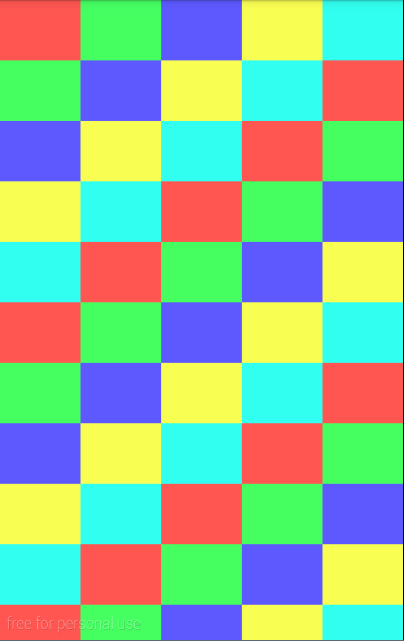
GridLayout:网格布局,自定义N x N,可拓展到屏幕外围,猜想:当某些游戏应用的地图大于手机屏幕时,可以使用此种布局,一张图片太大,可以用多张图片进行拼接,内嵌FrameLayout实现NPC在地图上。
gridlayoutdemo.xml
<?xml version="1.0" encoding="utf-8"?>

<GridLayout xmlns:android="http://schemas.android.com/apk/res/android"

    android:layout_width="wrap_content"

    android:layout_height="wrap_content"

    android:columnCount="6"

    android:orientation="horizontal"

    android:rowCount="10">


    <Button android:background="#ffff5651" />

    <Button android:background="#ff45ff61" />

    <Button android:background="#ff5d59ff" />

    <Button android:background="#fff9ff52" />

    <Button android:background="#ff31fff0" />

    <Button android:background="#ffff5651" />

    <Button android:background="#ff45ff61" />

    <Button android:background="#ff5d59ff" />

    <Button android:background="#fff9ff52" />

    <Button android:background="#ff31fff0" />

    <Button android:background="#ffff5651" />

    <Button android:background="#ff45ff61" />

    <Button android:background="#ff5d59ff" />

    <Button android:background="#fff9ff52" />

    <Button android:background="#ff31fff0" />

    <Button android:background="#ffff5651" />

    <Button android:background="#ff45ff61" />

    <Button android:background="#ff5d59ff" />

    <Button android:background="#fff9ff52" />

    <Button android:background="#ff31fff0" />

    <Button android:background="#ffff5651" />

    <Button android:background="#ff45ff61" />

    <Button android:background="#ff5d59ff" />

    <Button android:background="#fff9ff52" />

    <Button android:background="#ff31fff0" />

    <Button android:background="#ffff5651" />

    <Button android:background="#ff45ff61" />

    <Button android:background="#ff5d59ff" />

    <Button android:background="#fff9ff52" />

    <Button android:background="#ff31fff0" />

    <Button android:background="#ffff5651" />

    <Button android:background="#ff45ff61" />

    <Button android:background="#ff5d59ff" />

    <Button android:background="#fff9ff52" />

    <Button android:background="#ff31fff0" />

    <Button android:background="#ffff5651" />

    <Button android:background="#ff45ff61" />

    <Button android:background="#ff5d59ff" />

    <Button android:background="#fff9ff52" />

    <Button android:background="#ff31fff0" />

    <Button android:background="#ffff5651" />

    <Button android:background="#ff45ff61" />

    <Button android:background="#ff5d59ff" />

    <Button android:background="#fff9ff52" />

    <Button android:background="#ff31fff0" />

    <Button android:background="#ffff5651" />

    <Button android:background="#ff45ff61" />

    <Button android:background="#ff5d59ff" />

    <Button android:background="#fff9ff52" />

    <Button android:background="#ff31fff0" />

    <Button android:background="#ffff5651" />

    <Button android:background="#ff45ff61" />

    <Button android:background="#ff5d59ff" />

    <Button android:background="#fff9ff52" />

    <Button android:background="#ff31fff0" />

    <Button android:background="#ffff5651" />

    <Button android:background="#ff45ff61" />

    <Button android:background="#ff5d59ff" />

    <Button android:background="#fff9ff52" />

    <Button android:background="#ff31fff0" />

    <Button android:background="#ffff5651" />

    <Button android:background="#ff45ff61" />

    <Button android:background="#ff5d59ff" />

    <Button android:background="#fff9ff52" />

    <Button android:background="#ff31fff0" />

    <Button android:background="#ffff5651" />

    <Button android:background="#ff45ff61" />

    <Button android:background="#ff5d59ff" />

    <Button android:background="#fff9ff52" />

    <Button android:background="#ff31fff0" />

</GridLayout>
效果:
Android布局解析,图文(转)的更多相关文章
- Android成长日记-Android布局优化
Android常用布局 1. LinearLayout(线性布局) 2. RelativeLayout(相对布局) 3. TableLayout(表格布局) 4. AbsoluteLayou(绝对布局 ...
- 【转】Android布局优化之ViewStub
ViewStub是Android布局优化中一个很不错的标签/控件,直接继承自View.虽然Android开发人员基本上都听说过,但是真正用的可能不多. ViewStub可以理解成一个非常轻量级的Vie ...
- android 中解析XML的方法(转)
在XML解析和使用原始XML资源中都涉及过对XML的解析,之前使用的是 DOM4J和 XmlResourceParser 来解析的.本文中将使用XmlPullParser来解析,分别解析不同复杂度的t ...
- xml布局解析报错的可能原因
xml布局解析报如下的错11-15 16:55:21.425 17633-17633/com.hongfans.mobileconnect I/LogUtils_info: [CrashHandler ...
- 从LayoutInflater分析XML布局解析成View的树形结构的过程
上一篇博客分析了XML布局怎么载入到Activity上.不了解的能够參考 从setContentView方法分析Android载入布局流程 上一篇博客仅仅是分析了怎么讲XML布局加入到 Activit ...
- Android中解析XML格式数据的方法
XML介绍:Extensible Markup Language,即可扩展标记语言 一.概述 Android中解析XML格式数据大致有三种方法: SAX DOM PULL 二.详解 2.1 SAX S ...
- Android全面解析之Context机制
前言 很高兴遇见你~ 欢迎阅读我的文章. 在文章Android全面解析之由浅及深Handler消息机制中讨论到,Handler可以: 避免我们自己去手动写 死循环和输入阻塞 来不断获取用户的输入以及避 ...
- 【转】在Android布局中使用include和merge标签
内容转自:http://fengweipeng1208.blog.163.com/blog/static/21277318020138229754135/ 在我们开发android布局时,经常会有很多 ...
- Android 布局之LinearLayout
Android 布局之LinearLayout 1 LinearLayout简介 LinearLayout是线程布局.它包括2个方向(android:orientation):“水平”(horizon ...
随机推荐
- php-GD库函数(三)
<?php //imagefilledellipse — 画一椭圆并填充 /*bool imagefilledellipse ( resource $image , int $cx , int ...
- 很实用的FTP操作类
using System; using System.Net; using System.Net.Sockets; using System.Text; using System.IO; using ...
- NSOperation 的使用(下载相关) 图片和文件都是能够的 断点续传 图片逐渐显示
// // ImageDownloader.h // NSOperationTest // // Created by ydc on 11-10-29. // Copyright 2011年 __My ...
- acdream 1211 Reactor Cooling 【边界网络流量 + 输出流量】
称号:acdream 1211 Reactor Cooling 分类:无汇的有上下界网络流. 题意: 给n个点.及m根pipe,每根pipe用来流躺液体的.单向的.每时每刻每根pipe流进来的物质要等 ...
- VS2010程序打包操作
摘录:http://www.cnblogs.com/daban/archive/2012/06/27/2565449.html 1. 在vs2010 选择“新建项目”----“其他项目类型”-- ...
- 3Dmax+blend+WPF综合运用
原文:3Dmax+blend+WPF综合运用 赛后总结 本人小菜,WPF刚入门,只是写一下最近的项目心得.欢迎各位前辈们前来拍砖指正,感激不敬!先申明,小弟我入门仓促,很多东西也是一知半解,所以很多问 ...
- 重新想象 Windows 8 Store Apps (22) - 文件系统: 访问文件夹和文件, 通过 AQS 搜索本地文件
原文:重新想象 Windows 8 Store Apps (22) - 文件系统: 访问文件夹和文件, 通过 AQS 搜索本地文件 [源码下载] 重新想象 Windows 8 Store Apps ( ...
- 80x86汇编小站站长简单介绍-2014年08月23日
[序言] 旧版的"80x86汇编小站站长简单介绍"已经过时了, 因此于2013年10月01日花费1个小时又一次更新和排版一次. [人生格言] 1] 一生都用头脑而不是情绪解决这个 ...
- LoaderManager使用具体解释(二)---了解LoaderManager
了解LoaderManager 这篇文章将介绍LoaderManager类,这是该系列的第二篇文章. 一:Loaders之前世界 二:了解LoaderManager 三:实现Loaders 四:实例: ...
- 邮箱password复位图
blog宗旨:用图说话 辅助文字说明: 长处:用户系统完毕接口部分.界面留给业务自行设计. 缺点:邮箱发送邮件定制模板,没有完毕松耦合. 改进点:邮箱的准备发送邮件模板. 版权声明:本文博客原创文章, ...