
Android 布局之LinearLayout
Android 布局之LinearLayout
1 LinearLayout简介
LinearLayout是线程布局。它包括2个方向(android:orientation):“水平”(horizontal)和“竖值”(vertical)。
2 LinearLayout示例
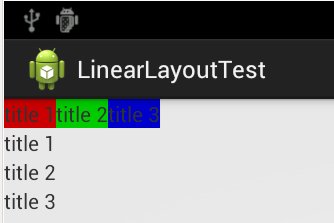
创建一个activity,包含2组LinearLayout:一组LinearLayout中包含3个文本,文本是水平排列;另一组LinearLayout中包含3个文本,文本是竖值排列。
layout文件
<LinearLayout xmlns:android="http://schemas.android.com/apk/res/android"

    xmlns:tooRelativeLayoutls="http://schemas.android.com/tools"

    android:layout_width="match_parent"

    android:layout_height="match_parent"

    android:orientation="vertical" >

    <LinearLayout

        android:layout_width="wrap_content"

        android:layout_height="wrap_content"

        android:orientation="horizontal"

        >

        <TextView

            android:layout_width="wrap_content"

            android:layout_height="wrap_content"

            android:background="#CC0000"

            android:text="@string/text_1" />

        <TextView

            android:layout_width="wrap_content"

            android:layout_height="wrap_content"

            android:background="#00CC00"

            android:text="@string/text_2" />

        <TextView

            android:layout_width="wrap_content"

            android:layout_height="wrap_content"

            android:background="#0000CC"

            android:text="@string/text_3" />

    </LinearLayout>

    <LinearLayout

        android:layout_width="wrap_content"

        android:layout_height="wrap_content"

        android:orientation="vertical"

        >

        <TextView

            android:layout_width="wrap_content"

            android:layout_height="wrap_content"

            android:text="@string/text_1" />

        <TextView

            android:layout_width="wrap_content"

            android:layout_height="wrap_content"

            android:text="@string/text_2" />

        <TextView

            android:layout_width="wrap_content"

            android:layout_height="wrap_content"

            android:text="@string/text_3" />

    </LinearLayout>

</LinearLayout>
点击下载:源代码
运行效果:
Android 布局之LinearLayout的更多相关文章
- Android布局之LinearLayout
LinearLayout 1.核心属性 高度:layout_height (基于内容 wrap_content:基于父控件:) 宽度:layout_width 方向:orientation (纵 ...
- Android 布局之LinearLayout 子控件weight权重的作用详析(转)
关于Android开发中的LinearLayout子控件权重android:layout_weigh参数的作用,网上关于其用法有两种截然相反说法: 说法一:值越大,重要性越高,所占用的空间越大: 说法 ...
- Android 布局之LinearLayout 子控件weight权重的作用详析
关于Android开发中的LinearLayout子控件权重android:layout_weigh参数的作用,网上关于其用法有两种截然相反说法: 说法一:值越大,重要性越高,所占用的空间越大: 说法 ...
- android 布局之LinearLayout(学习一)
一,View localView = mRadioGroup_content.getChildAt(i);指定自定义菜单栏的点击格,如child3 其中:mRadioGroup_content = ( ...
- Android布局管理详解(1)—— LinearLayout 线性布局
Android的布局方式共有6种,分别是LinearLayout(线性布局).TableLayout(表格布局).FrameLayout(帧布局).RelativeLayout(相对布局).GridL ...
- Android布局及属性归总(查询用)
常见布局 LinearLayout 线性布局 子元素任意,组织成一个单一的水平或垂直行,默认为水平方向TableLayout 表格布局 子元素为<Tabl ...
- Android中的LinearLayout布局
LinearLayout : 线性布局 在一般情况下,当有很多控件需要在一个界面列出来时,我们就可以使用线性布局(LinearLayout)了, 线性布局是按照垂直方向(vertical)或水平方向 ...
- Android的学习第六章(布局一LinearLayout)
今天我们来说一下Android五大布局-LinearLayout布局(线性布局) 含义:线性布局,顾名思义,指的是整个Android布局中的控件摆放方式是以线性的方式摆放的, 主要作用:主要对整个界面 ...
- android布局学习-使用FrameLayout和LinearLayout制作QQ空间底部导航栏
[声明:本博客通过学习“J灬叶小超 ”博客而写,链接:http://www.cnblogs.com/yc-755909659/p/4288260.html] --------------------- ...
随机推荐
- Azure Stack如何解决混合云的种种挑战
微软希望能够通过Azure Stack来帮助企业连接他们的私有云和公共云.但这仍然是一项进行中的工作. 大多数企业都不愿意将所有IT运营都放到公有云中.相反,他们希望可以灵活的在这两个共享的基础架构即 ...
- IOS中CocoaPods安装与使用
网上有很多文章关于 cocoaPods配置文章,其实cocoaPods配置并不难,只是比较繁琐而已,我也是照着网站文章一步步搭建配置成功.写这篇文章的目的就是像做笔记一样,便于以后用的时候好回忆.废话 ...
- 启动Eclipse 弹出“Failed to load the JNI shared library”错误的解决方法
原因1:eclipse的版本与jre或者jdk版本不一致 对策:要么两者都安装64位的,要么都安两个是32位一个是64位. 原因2:给定目录下jvm.dll不存在 对策:(1)重新安装jre或者jdk ...
- Ubuntu server解决不能访问外网问题
Ubuntu server解决不能访问外网问题 在Ubuntu Server上设置访问外网时,需要设置dns,通常是将dns添加到/etc/resolv.conf文件中. 但是将dns添加至/etc/ ...
- 更改chrome底色为护目色
找到chrome目录:C:\Documents and Settings\用户名\Local Settings\Application Data\Google\Chrome\User Data\Def ...
- ECshop导入淘宝数据包乱码问题解决方法
ECshop在导入淘宝数据包的时候出现数据乱码. 测试版本 ecshop2.73 利用淘宝助手导出一个数据包(.csv),不要一次全部商品导出,最好是将数据包控制在1M左右,因为ecshop对上传文件 ...
- Linux环境的PHP执行
/usr/local/php5/bin/php -c /var/spool/php.ini -q /var/spool/auto.php
- 自定义android RadioButton View,添加较为灵活的布局处理方式
android的RadioButton的使用历来都让人比较头疼,如在布局方面,图案.文字无法分别设置padding等,另外,低版本的android RadioGroup不支持换行排列的RadioBut ...
- 【原】Jqxgrid在Java服务器端分页
研究这个后台分页一天多,特此写个文章记录备忘 jsp页面中有两个需要注意的地方:一个是source中beforeprocessing,另一个是rendergridrows中数据的获取. 说明:grid ...
- 安装vim中文帮助vimcdoc
1. 下载: 下载页面:http://vimcdoc.sourceforge.net/ 选择“Latest platform independent tarball, including an Lin ...