
javascript-组合模式
组合模式笔记
组合模式又称部分-整体模式,将对象组合成树形结构以表示'部分整体'的层次结构
组合模式使得用户对单个对象和组合对象的使用具有一致性
demo实例 :表单模块
要调用到前面学习到的寄生组合继承方法
             //原型式继承

             function inheritobject(o){

                 //声明一个过渡函数对象

                 function F(){

                 }

                 //过渡原型对象继承父对象

                 F.prototype=o;

                 //返回过渡对象的一个实列,该实例的原型继承了父对象

                 return new F();

             }

             /*

              *寄生式继承 继承原型

              * 传递参数subclass 子类

              * 传递参数superclass 父类

              * */

             function inheritPrototype(subclass,superclass){

                 //复制一份父类的原型副本保存在变量中

                 var p=inheritobject(superclass.prototype);

                 //修正因为重写子类原型导致子类的constructor属性被修改

                 p.constructor=subclass;

                 //设置子类原型

                 subclass.prototype=p;

             }
表单 demo
1.表单虚拟父类 Base
            //表单虚拟父类 Base

            var Base = function(){

                this.children = [];

                this.element = null;

            };

            Base.prototype = {

                init : function(){

                    throw new Error("请重写你的方法");

                },

                add : function(){

                    throw new Error("请重写你的方法");

                },

                getElement : function(){

                    throw new Error("请重写你的方法");

                }

            };
2.FormItem容器类
           //FormItem

             var FormItem = function(id,parent){

                 Base.call(this);

                 this.id = id;

                 this.parent = parent;

                 this.init();

             };

             inheritPrototype(FormItem,Base);

             FormItem.prototype = {

                 init : function(){

                    this.element =document.createElement('form');

                    this.element.id=this.id;

                    this.element.className='new-form';

                 },

                 add : function(child){

                    this.children.push(child);

                    this.element.appendChild(child.getElement());

                    return this;

                 },

                 getElement : function(){

                    return this.element;

                 },

                 show : function(){

                    this.parent.appendChild(this.element);

                 }

             };
3.FieldsetItem类
             //FieldsetItem

             var FieldsetItem = function(classname,legend){

                 Base.call(this);

                 this.classname=classname || '';

                 this.legend=legend;

                 this.init();

             };

             inheritPrototype(FieldsetItem,Base);

             FieldsetItem.prototype = {

                 init : function(){

                     this.element = document.createElement('fieldset');

                     var legendname = document.createElement('legend');

                     legendname.innerHTML = this.legend;

                     this.element.appendChild(legendname);

                     this.element.className='new-fieldset';

                 },

                 add : function(child){

                     this.children.push(child);

                     this.element.appendChild(child.getElement());

                     return this;

                 },

                 getElement : function(){

                     return this.element;

                 },

             };
4.Group类
            var Group = function(){

                 Base.call(this);

                 this.init();

             };

             inheritPrototype(Group,Base);

             Group.prototype = {

                 init : function(){

                     this.element = document.createElement('div');

                     this.element.className='group';

                 },

                 add : function(child){

                     this.children.push(child);

                     this.element.appendChild(child.getElement());

                     return this;

                 },

                 getElement : function(){

                     return this.element;

                 }

             };
5.InputItem
             //InputItem

             var InputItem = function(name){

                 Base.call(this);

                 this.classname = name;

                 this.id = name;

                 this.init();

             };

             inheritPrototype(InputItem,Base);

             InputItem.prototype = {

                 init : function(){

                     this.element = document.createElement('input');

                     this.element.className=this.classname;

                     this.element.id=this.id;

                 },

                 add : function(){

                 },

                 getElement : function(){

                     return this.element;

                 }

             };
6.LabelItem类
             //LabelItem

             var LabelItem = function(name,nameText){

                 Base.call(this);

                 this.text = nameText;

                 this.name = name;

                 this.init();

             };

             inheritPrototype(LabelItem,Base);

             LabelItem.prototype = {

                 init : function(){

                     this.element = document.createElement('label');

                     this.element.name=this.name;

                     this.element.innerHTML=this.text;

                 },

                 add : function(){

                 },

                 getElement : function(){

                     return this.element;

                 }

             };
7.SpanItem类
             //SpanItem

             var SpanItem = function(warntext){

                 Base.call(this);

                 this.text = warntext;

                 this.init();

             };

             inheritPrototype(SpanItem,Base);

             SpanItem.prototype = {

                 init : function(){

                     this.element = document.createElement('span');

                     this.element.innerHTML=this.text;

                 },

                 add : function(){

                 },

                 getElement : function(){

                     return this.element;

                 }

             };
测试代码
var form =new FormItem('FormItem',document.body);
form.add(
new FieldsetItem('account','账号').add(
new Group().add(
new LabelItem('uname','用户名:')
).add(
new InputItem('uname')
).add(
new SpanItem('4到6位数字或字母')
)
).add(
new Group().add(
new LabelItem('pwd','密 码:')
).add(
new InputItem('pwd')
).add(
new SpanItem('6到12位数字或字母')
)
)
).add(
new FieldsetItem('info','信息').add(
new Group().add(
new LabelItem('name','昵称:')
).add(new InputItem('name'))
).add(
new Group().add(
new LabelItem('status','状态:')
).add(
new InputItem('status')
)
)
).show();
浏览器显示

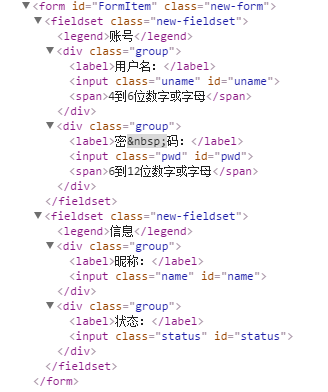
生成的html代码
javascript-组合模式的更多相关文章
- 轻松掌握:JavaScript组合模式
组合模式 组合模式:将一组对象组合成树形结构,并统一对待组合对象和叶对象,忽略它们之间的不同(因为叶对象也可以也可以包含叶对象而成为组合对象),组合模式中的对象只能是一对多的关系,不能出现多对一. 基 ...
- JavaScript组合模式---引入
首先:使用一个例子来引入组合模式,需求为(1)有一个学校有2个班(一班,二班)(2)每个班级分2个小组(一班一组,一班二组,二班一组,二班二组)(3)学校计算机教室有限,每一个小组分着来上课 然后:根 ...
- [设计模式] javascript 之 组合模式
组合模式说明 组合模式用于简单化,一致化对单组件和复合组件的使用:其实它就是一棵树: 这棵树有且只有一个根,访问入口,如果它不是一棵空树,那么由一个或几个树枝节点以及子叶节点组成,每个树枝节点还包含自 ...
- javascript设计模式学习之十——组合模式
一.组合模式定义及使用场景 组合模式将对象组合成树形结构,用以表示“部分—整体”的层次结构,除了用来表示树形结构之外,组合模式还可以利用对象的多态性表现,使得用户对单个对象和组合对象的使用具有一致性. ...
- javascript设计模式-组合模式
组合模式所要解决的问题: 可以使用简单的对象组合成复杂的对象,而这个复杂对象有可以组合成更大的对象.可以把简单这些对象定义成类,然后定义一些容器类来存储这些简单对象. 客户端代码必须区别对象简单对象和 ...
- JavaScript高级---组合模式设计
一.设计模式 javascript里面给我们提供了很多种设计模式: 工厂.桥.组合.门面.适配器.装饰者.享元.代理.观察者.命令.责任链 在前面我们实现了工厂模式和桥模式 工厂模式 : 核心:为了生 ...
- 读书笔记之 - javascript 设计模式 - 组合模式
组合模式是一种专为创建Web上的动态用户界面而量身定制的模式,使用这种模式,可以用一条命令在对各对象上激发复杂的或递归的行为. 在组合对象的层次体系中有俩种类型对象:叶对象和组合对象.这是一个递归定义 ...
- 再起航,我的学习笔记之JavaScript设计模式15(组合模式)
组合模式 组合模式(Composite): 又称部分-整体模式,将对象组合成树形结构以表示"部分整体"的层次结构.组合模式使得用户对单个对象和组合对象的使用具有一致性. 如果有一个 ...
- javascript设计模式——组合模式
前面的话 在程序设计中,有一些和“事物是由相似的子事物构成”类似的思想.组合模式就是用小的子对象来构建更大的对象,而这些小的子对象本身也许是由更小的“孙对象”构成的.本文将详细介绍组合模式 宏命令 宏 ...
- JavaScript设计模式(5)-组合模式
组合模式 1. 适合使用组合模式的条件: 存在一批组织成某种层次体系的对象,如树形结构(具体的结构在开发期间可能无法得知) 希望对这批对象或其中的一部分对象实施一个相同的操作 2. 注意点: 组合对象 ...
随机推荐
- MongoDB Java Driver操作指南
MongoDB为Java提供了非常丰富的API操作,相比关系型数据库,这种NoSQL本身的数据也有点面向对象的意思,所以对于Java来说,Mongo的数据结构更加友好. MongoDB在今年做了一次重 ...
- 【翻译】用AIML实现的Python人工智能聊天机器人
前言 用python的AIML包很容易就能写一个人工智能聊天机器人. AIML是Artificial Intelligence Markup Language的简写, 但它只是一个简单的XML. 下面 ...
- linux shell 中的sleep命令
开始还以为是这样的语法: sleep(1), 后面发现是: linux shell 中的sleep命令 分类: LINUX 在有的shell(比如linux中的bash)中sleep还支持睡眠(分,小 ...
- iOS 地图定位及大头针的基本使用
地图 Part1 - 定位及大头针的基本使用 一.MapKit 作用 : 用于地图展示 如大头针,路线,覆盖层展示等(着重界面展示) 使用步骤 导入头文件 #import <MapKit/Map ...
- Application Request Route实现IIS Server Farms集群负载详解
序言 随着公司业务的发展,后台业务就变的越来越多,然而服务器的故障又像月经一样,时不时的汹涌而至,让我们防不胜防.那么后台的高可用,以及服务器的处理能力就要做一个横向扩展的方案,以使后台业务持续的稳定 ...
- "Chinese_PRC_CI_AS" 和 "Chinese_PRC_90_CI_AI" 之间的排序规则冲突问题
这个错误真是太恶心了.不过有解决办法,你问我哪来的?当然百度的咯! 示例: select a.workTypeDes from A a,B b where a.workTypeCode=b.work ...
- word-break: break-all;、word-break: keep-all; 、word-wrap: break-word;和white-space:nowrap;都有什么作用
小颖最近心情不好,心情不好就容易做傻事,所以昨天就干了件傻事 小颖昨天脑子一抽去拔罐了,拔完我就~~~~~~~~~~~~疼死宝宝了,昨晚一晚都没睡好,都不敢平躺,难受一晚上,早上到公司后困得啊,也是傻 ...
- Beginners Guide To Web Development
Web Development Front End Development Back End Development
- C#多线程之基础篇2
在上一篇C#多线程之基础篇1中,我们主要讲述了如何创建线程.中止线程.线程等待以及终止线程的相关知识,在本篇中我们继续讲述有关线程的一些知识. 五.确定线程的状态 在这一节中,我们将讲述如何查看一个线 ...
- 读书笔记--SQL必知必会02--检索数据
2.1 SELECT语句 SELECT语句的用途是从一个或多个表中检索信息. 关键字(keyword) 作为SQL组成部分的保留字.关键字不能作为表或列的名字. 2.2 检索单个列 多条SQL语句必须 ...