
【python基础】 Tkinter小构件之canvas 画布
【python之tkinter画布】
本文代码来源于机械工业出版社的一本python书籍.
要画布就要使用tkinter的小构件,canvas(结构化的图形,用于绘制图形,创建图形编辑器以及实现自定制的小构件类)
我们先使用create_rectangle, create_oval, create_arc, create_polygon, create_line分别绘制矩形,椭圆,圆弧,多边形,线段。
创建CanvasDemo.py的文件,代码如下:
# -*- coding: utf-8 -*-

###################

#画布,使用Canvas小构件

###################

from Tkinter import *

class CanvasDemo:

    def __init__(self):

        window = Tk() #创建窗口

        window.title("Canvas Demo") #给窗口命名

        #在窗口画布

        self.canvas = Canvas(window, width = 200, height = 100, bg = "white")

        self.canvas.pack()

        #创建frame的框架,窗口window为这个框架的父容器

        frame = Frame(window)

        frame.pack()

        #frame框架作为Button的父容器

        btRectangle = Button(frame, text="rectangle", command = self.displayRect)

        btOval = Button(frame, text = "Oval", command = self.displayOval)

        btArc = Button(frame, text = "Arc", command = self.displayArc)

        btPolygon = Button(frame, text = "Polygon", command = self.displayPolygon)

        btLine = Button(frame, text = "Line", command = self.displayLine)

        btString = Button(frame, text = "String", command = self.displayString)

        btClear = Button(frame, text = "Clear", command = self.displayClear)

        #Button在画布上布局

        btRectangle.grid(row = 1, column = 1)

        btOval.grid(row = 1, column = 2)

        btArc.grid(row = 1, column = 3)

        btPolygon.grid(row = 1, column = 4)

        btLine.grid(row = 1, column = 5)

        btString.grid(row = 1, column = 6)

        btClear.grid(row = 1, column = 7)

        #创建事件循环直到关闭主窗口

        window.mainloop()

    def displayRect(self):

        self.canvas.create_rectangle(10,10,190,90,tags = "rect")

    #fill填充oval的颜色

    def displayOval(self):

        self.canvas.create_oval(10,10,190,90, fill = "red", tags = "oval")

    # start为开始的度数,extent为要转的度数.全部以逆时针为正方向,0为x轴正方向

    def displayArc(self):

        self.canvas.create_arc(10,10,190,90, start = 0, extent = 90, width = 8, fill = "red",tags = "arc")

    def displayPolygon(self):

        self.canvas.create_polygon(10,10,190,90,10,90,tags = "polygon")

    #arrow表示line指向,activefill:当鼠标在line上时出现的特定风格,本例中鼠标移动到第二个line上时line变蓝

    def displayLine(self):

        self.canvas.create_line(10,10,190,90,fill = "red",tags = "line")

        self.canvas.create_line(10,90,190,10,width = 9,arrow = "first",activefill = "blue", tags = "line")

    #font定义字体(字体名,大小,风格)

    def displayString(self):

        self.canvas.create_text(60,40,text= "hi, i am string", font = "time 10 bold underline", tags = "string")

    #delete方法通过tags参数从画布上删除图形

    def displayClear(self):

        self.canvas.delete("rect","oval","arc","polygon","line","string")

CanvasDemo()
运行程序即可。
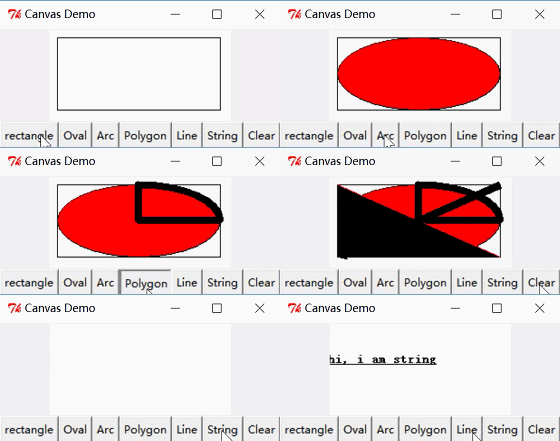
可能你不知道create_xx()里的数字意思,其实是坐标(x1,y1),(x2,y2),(x3,y3)create_xx(x1,y1,x2,y2,x3,y3)
Tkinter的坐标系是这样的:
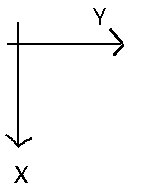
2018.4.25更新: 经过Pangolin2 的提醒上图错了, 在python3.6中x为横向(向右为正方向), y为纵向(向下为正方向), 偷个懒, 图就不改了哈.
【python基础】 Tkinter小构件之canvas 画布的更多相关文章
- 微信小程序 在canvas画布上划动,页面禁止滑动
要实现微信小程序 在canvas画布上划动,页面禁止滑动,不仅要设置disable-scroll="true",还要要给canvas绑定一个触摸事件才能生效. <canvas ...
- 小程序开发-Canvas画布组件
Canvas画布 基本使用方法: 在wxml中添加canvas组件 <canvas canvas-id='canvasDemo' class='demo'></canvas> ...
- python基础之小数据池、代码块、编码和字节之间换算
一.代码块.if True: print(333) print(666) while 1: a = 1 b = 2 print(a+b) for i in '12324354': print(i) 虽 ...
- python基础之小数据池、代码块、编码
一.代码块.if True: print(333) print(666) while 1: a = 1 b = 2 print(a+b) for i in '12324354': print(i) 虽 ...
- Python基础--01小项目体现的基础知识
part1:猜拳游戏 #coding=utf-8 #当有汉语时可能编译器不认识,需要定义代码 ''' 多行注释 写这个程序是为了熟悉python的基本语法 这是第一个小例子包含简单的if判断,循环和输 ...
- python基础语法小笔记
这几天看着python,然后就记下一些自己觉得需要注意以下的基础语法吧! 如下: for i in range(0,100)表示从0到99,不包括后边界 单引号(')和双引号("" ...
- python基础之小数据池
一,id,is,== 在Python中,id是什么?id是内存地址,比如你利用id()内置函数去查询一个数据的内存地址: name = '太白' print(id(name)) # 158583128 ...
- python基础之小数据池,is和==区别 编码问题
主要内容 小数据池,is和==区别 编码问题 小数据池 一种缓存机制,也称为驻留机制,是为了能更快提高一些字符串和整数的处理速度is 和 == 的区别 == 主要指对变量值是否相等的判断,只要数值相同 ...
- Python基础=== Tkinter Grid布局管理器详解
本文转自:https://www.cnblogs.com/ruo-li-suo-yi/p/7425307.html @ 箬笠蓑衣 Grid(网格)布局管理器会将控件放置到一个二维的表 ...
随机推荐
- PAT (Advanced Level) 1007. Maximum Subsequence Sum (25)
简单DP. 注意:If all the K numbers are negative, then its maximum sum is defined to be 0, and you are sup ...
- 2016"百度之星" - 资格赛(Astar Round1) Problem A
保存前缀乘,询问的时候输出c[ri]/c[li-1]即可,因为是除法,所以计算一下c[li-1]的逆元. #include <stdio.h> #include <math.h> ...
- CodeForces 662D International Olympiad
写出前几个找规律,然后直接输出. #include<cstdio> #include<cstring> #include<cmath> #include<al ...
- 攻入Javascript,究竟什么是AJAX
什么是AJAX 时隔半年,当AJAX再一次出现在我脑海中时,从最初的模糊到现在的越来越明确.那么究竟什么是AJAX?它和form表单提交有什么区别? 如果你使用过AJAX和表单提交的话,想必会发现一件 ...
- Pop框架简述
Facebook发布了Paper之后,进一步开源了其背后的动画引擎Pop,此框架并不满足于苹果自身的动画单调性,致力于给用户一种逼真的动画效果,可以减少用户对于苹果原生Core Animation 复 ...
- [Programming WCF Services]Chapter 1. WCF Essentials - Metadata Exchange
1.HTTP-GET WCF 方式 通过Http的方式提供metadata 1.1.配置文件方式 <system.serviceModel> <services> <se ...
- DNS服务器搭建(主、从、缓)
主dns服务器搭建 在本机上搭建一个管理hngd.com域名的域名服务器1. 确保安装好以下bind域名服务器 [root@主人 ~]# rpm -qa |grep ^bindbind-chroot- ...
- [Unity Physics] Physics - Raycast
Class Variables类变量 gravity The gravity applied to all rigid bodies in the scene.场景中应用到所有刚性物体的重力. min ...
- iOS友盟三方登陆
Umeng三方登陆个人总结 Demo地址:https://github.com/haozheMa/UmengThirdLoginDemo这里仅以微信.QQ和新浪微博作为例子首先根据官方文档 导入以下依 ...
- iOS给model排序
今天有朋友问我怎么给Model排序,我顺便写了一个例子, 以下是代码,很简洁可以直接用. Person *per = [[Person alloc] init]; per.name = @" ...