
gitlab-ci + k8s 之gitlab-ci(一)
目前常用的持续集成工具主要是jenkins与gitlab-ci ,我已在另一博文中详细记录了jenkins部署过程(其中包括gitlab的搭建),此篇介绍gitlab-ci的使用。
背景介绍
GitLab-Runner是配合GitLab-CI进行使用的。一般地,GitLab里面的每一个工程都会定义一个属于这个工程的软件集成脚本,用来自动化地完成一些软件集成工作。当这个工程的仓库代码发生变动时,比如有人push了代码,GitLab就会将这个变动通知GitLab-CI。这时GitLab-CI会找出与这个工程相关联的Runner,并通知这些Runner把代码更新到本地并执行预定义好的执行脚本。

已在线下机房安装好gitlab,之前jenkins项目博文有介绍详细安装方法,gitlab-runner端安装在阿里云ECS上,且还需安装maven在 runner所在服务器上,maven安装博客有教程,注册时通过gitlab的公网或域名方式的url注册。
我司防火墙的80端口被封了,需要将gitlab的默认80端口修改为8088:
vim /etc/gitlab/gitlab.rb

external_url 'http://gitlab.home.com:8088'  #添加上端口

nginx['listen_port'] = 8088   #添加

vim /var/opt/gitlab/nginx/conf/gitlab-http.conf 、

server {

listen *:8088;     #改其内置nginx监听端口

gitlab-ctl reconfigure  #重置配置文件

gitlab-ctl restart      #重启服务
本地gitlab 版本查看 cat /opt/gitlab/embedded/service/gitlab-rails/VERSION
版本选择
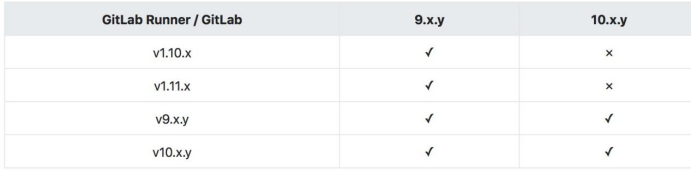
本文gitlab为10.5.2,runner为gitlab-ci-multi-runner-9.5.1-1.x86_64.rpm
添加gitlab的官方库
[root@localhost ~]# curl -L https://packages.gitlab.com/install/repositories/runner/gitlab-ci-multi-runner/script.rpm.sh | sudo bash
安装runner
[root@localhost ~]# yum -y install gitlab-ci-multi-runner
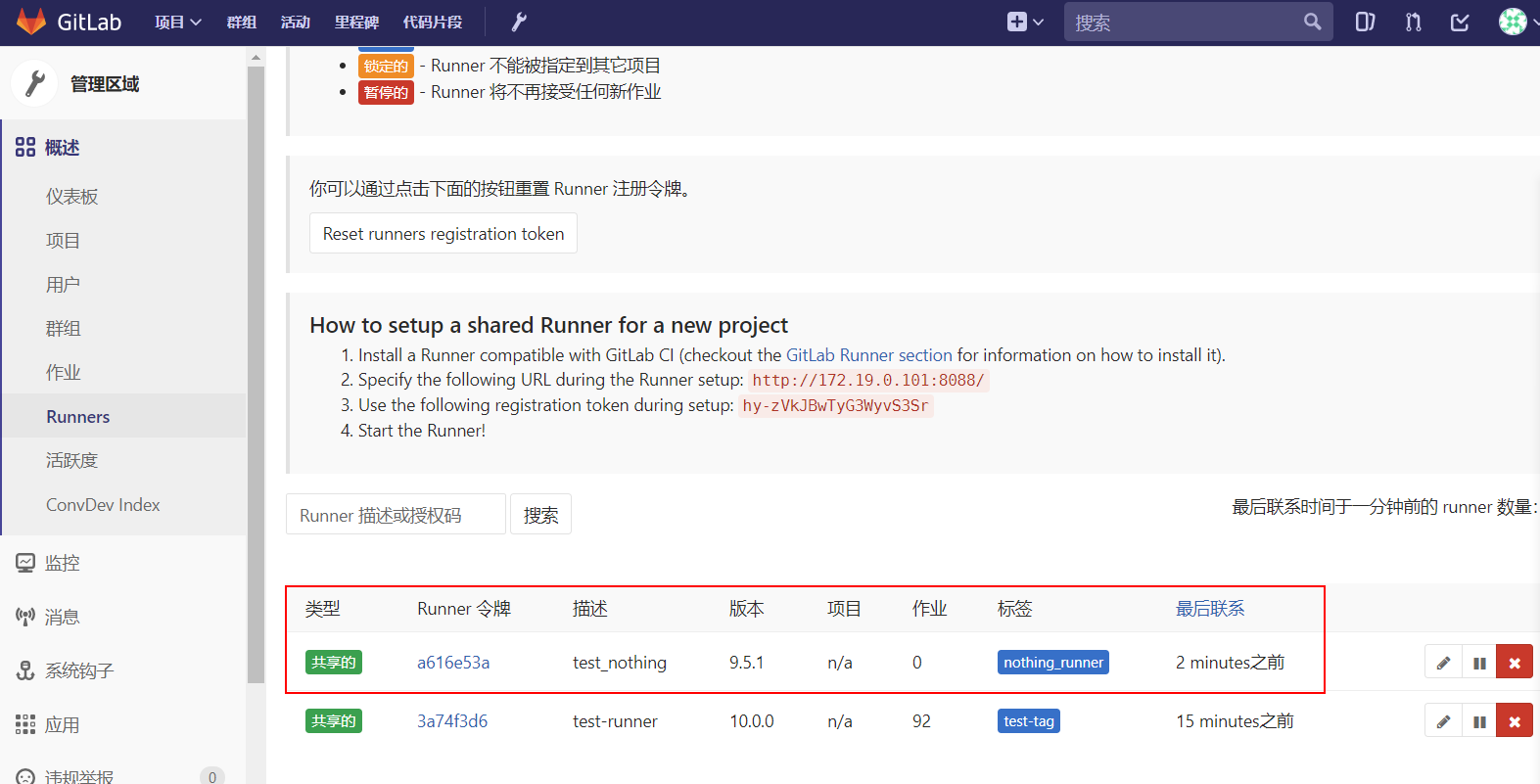
注册 runner ,其中 url与 token可以在gitlab的web界面工具的runner中找到
[root@localhost ~]# gitlab-ci-multi-runner register

Running in system-mode.

Please enter the gitlab-ci coordinator URL (e.g. https://gitlab.com/):

http://172.19.0.101:8088/

Please enter the gitlab-ci token for this runner:

hy-zVkJBwTyG3WyvS3Sr

Please enter the gitlab-ci description for this runner:

[localhost.localdomain]: test_nothing

Please enter the gitlab-ci tags for this runner (comma separated):

nothing_runner

Whether to run untagged builds [true/false]:

[false]: false

Whether to lock Runner to current project [true/false]:

[false]: false

Registering runner... succeeded                     runner=hy-zVkJB

Please enter the executor: docker+machine, docker-ssh+machine, docker-ssh, shell, ssh, virtualbox, kubernetes, docker, parallels:

    shell

Runner registered successfully. Feel free to start it, but if it's running already the config should be automatically reloaded!
启动 gitlab runner
[root@localhost ~]# gitlab-ci-multi-runner run

[root@localhost ~]# ps -ef|grep runner

root      9294     1  0 04:13 ?        00:00:00 /usr/bin/gitlab-ci-multi-runner run --working-directory /home/gitlab-runner --config /etc/gitlab-runner/config.toml --service gitlab-runner --syslog --user gitlab-runner

此时在gitlab的web界面可以看到本runner
在项目根目录添加 .gitlab-ci.yaml
runner会执行添加的命令,要注意pom.xml的路径,默认在项目根目录中,若不在,需要以项目根目录为相对路径加上该文件所在路径,如:mvn clean package -f libra/ ,以下脚本可以去掉before_script,打包命令改为 mvn clean package。在注册runner时,要根据提示,是否要执行不带tag的项目。

before_script:

  - mvn clean

stages:

  - deploy

deploy_job:

  stage: deploy

  only:

      - master

  script:

    - mvn package

    - sh /test_project/test-backend/runner_tomcat.sh

  tags:

    - test-tag
以上runner_tomcat.sh脚本定义了打包后的与应用相关的镜像处理与到阿里云的镜像推送。
vim /test_project/test-backend/runner_tomcat.sh

#!/bin/bash

namespace=testimage

project_name=aaa-a

war_name=aaa.war

image_name=registry-vpc.cn-shanghai.aliyuncs.com/$namespace/$project_name

old_version=`sudo docker images|grep $image_name|awk '{print $2}'|sort -r|awk 'NR==1{print}'`

new_version=$(expr $old_version + 1)

newimage=$image_name:$new_version

Dockerfile_path=/test_project/$project_name/

war_path=`find / -cmin -20 -name $war_name 2>/dev/null | grep -v "/var/lib/docker" | grep -v "/test_project/$project_name/"`

source /etc/profile

rm -rf /test_project/$project_name/$war_name &&

mv $war_path /test_project/$project_name/ &&

sudo docker login --username=ur_name --password=test1245\& registry-vpc.cn-shanghai.aliyuncs.com

sudo docker build -t $newimage  $Dockerfile_path &&

sudo docker push $newimage
测试runner是否生效
随意修改有 .gitlab-ci.yaml文件的项目的代码,提交。查看流水线,也可以看镜像仓库是否推送了该版本镜像
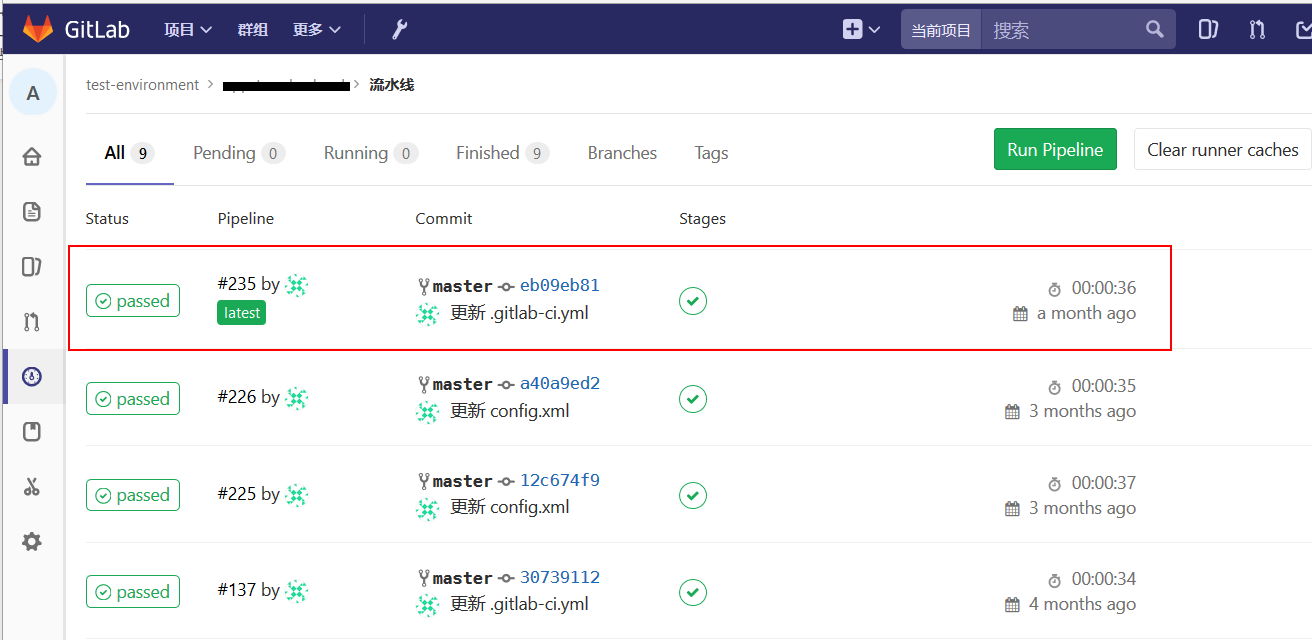
初次运行应该会报错,以下是我多次报错总结
gitlab上测试项目的流水线发现触发runner执行命令,有时候以root身份执行,项目放在/etc/gitlab-runner/builds/下,有时候以gitlab-runner身份执行,项目放在/home/gitlab-runner/build下。
原因:可以 ps -ef|grep runner 查看,有多个runner进程,分别属于gitlab-runner与root
解决方法:kill掉所有runner进程,以root身份执行 gitlab-ci-multi-runner start ,查看进程数,只有一个

当gitlab-runner用户执行runner时,对于一些操作没有权限,需要设置sudo权限,root用户不存在此问题,也要注意runner上脚本的执行权限。
解决方法:
vim /etc/sudoers

gitlab-runner ALL=(root)  /bin/docker,NOPASSWD: ALL  #加上NOPASSWD: ALL,执行命令时不用再输入passwd for gitlab-runner
gitlab-ci打包某个群组里的项目报错
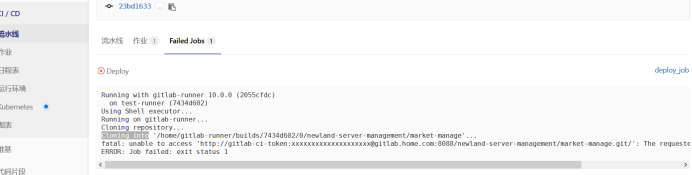
解决方法:对该群组没操作权限,将你登陆gitlab的此用户加到该群组成员中,访客身份无效。
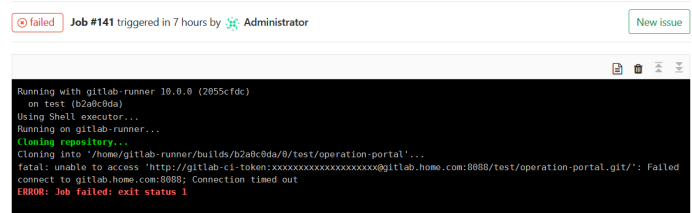
Runner跑流水线pull项目报连接超时,可能是不能解析gitlab.home.com。在gitlab-runner的/etc/hosts文件中加上域名解析,注意内网/公网ip,是否能ping通
gitlab-ci + k8s 之gitlab-ci(一)的更多相关文章
- 基于docker搭建Jenkins+Gitlab+Harbor+Rancher架构实现CI/CD操作
一.各个组件的功能描述: Docker 是一个开源的应用容器引擎. Jenkis 是一个开源自动化服务器. (1).负责监控gitlab代码.gitlab中配置文件的变动: (2).负责执行镜像文件的 ...
- [ci]gitlab安装配置(含gitlab邮件配置)
gitlab安装配置 参考: https://www.unixhot.com/article/48 原则:简单维护为准,故yum安装gitlab 1,gitlab安装 2,gitlab邮箱配置 1,g ...
- CI知识:GitLab
Gitlab简介 GitLab 是一个用于仓库管理系统的开源项目,使用Git作为代码管理工具,并在此基础上搭建起来的web服务. 可通过Web界面进行访问公开的或者私人项目.它拥有与Github类似的 ...
- gitlab在k8s上运行的一些优化
由 林坤创建,最终由 林坤修改于七月02,2020 gitlab组件图 gitlab在k8s上占用资源 kubectl top pods -n default | grep git* gitlab-g ...
- K8s 部署 Gitlab
K8s 版本:1.20.6 这里使用的镜像不是官方的,而是 Gitlab 容器化中使用非常多的一个第三方镜像:sameersbn/gitlab,基本上和官方保持同步更新.地址:http://www.d ...
- Jenkins+Ansible+Gitlab自动化部署三剑客-gitlab本地搭建
实际操作 准备linux初始环境 关闭防火墙 systemctl stop firewalld 开机自己关闭 systemctl disable firewalld 设置安全配置 为关闭 vim /e ...
- 【Gitlab】从Gitlab拉取项目+往Gitlab发布项目 【GitLab自定义端口】
1>GIt需要提前安装在本地,本机,自己的电脑,开发环境电脑,IDEA所在的电脑 2>代码仓库:gitlab 3>开发工具:IDEA 4>内网搭建gitlab,访问url: h ...
- gitlab 地址https://www.gitlab.com.cn/installation/#centos-7
https://www.gitlab.com.cn/installation/#centos-7 1.安装并配置必要的依赖关系 在CentOS 7(和RedHat / Oracle / Scienti ...
- GitLab - 安装并启动GitLab
1 - GitLab安装 1.1 信息确认 [Anliven@node102 ~]$ uname -a Linux node102 3.10.0-957.el7.x86_64 #1 SMP Thu N ...
- CentOS6.5 安装gitlab以及gitolite迁移gitlab
CentOS6.5 安装gitlab以及gitolite迁移gitlab gitlab 的安装使用以及数据结构 安装 环境: CentOS6.5 基于 nignx + unicorn 搭建的应用环境, ...
随机推荐
- C# Xamarin移动开发基础进修篇
一.课程介绍 英文原文:C# is the best language for mobile app development. Anything you can do in Objective-C, ...
- React组件间的通信
1.子组件调用父组件,采用props的方式进行调用和赋值,在父组件中设置相关属性值或者方法,子组件通过props的方式进行属性赋值或者方法调用: 2.父组件调用子组件,采用refs的方式进行调用,需要 ...
- jquery 多级联动下拉列表含(数据模型)
方法 /** * 级联 * 联动 * @param url:访问json数据的地址 * @param param:参数 * @param levelIds:页面下拉标签数组,为联动级数 * @priv ...
- 让Linux系统开机速度更快的方法
进行 Linux 内核与固件开发的时候,往往需要多次的重启,会浪费大把的时间. 在所有我拥有或使用过的电脑中,启动最快的那台是 20 世纪 80 年代的电脑.在你把手从电源键移到键盘上的时候,BASI ...
- mysql函数之SUBSTRING_INDEX(str,"/",-1)
SUBSTRING_INDEX的用法: •SUBSTRING_INDEX(str,delim,count) 在定界符 delim 以及count 出现前,从字符串str返回自字符串.若count为正值 ...
- 设置mysql 事务锁超时时间 innodb_lock_wait_timeout
Mysql数据库采用InnoDB模式,默认参数:innodb_lock_wait_timeout设置锁等待的时间是50s,一旦数据库锁超过这个时间就会报错. mysql> SHOW GLOBAL ...
- 阿里云物联网平台体验(NetGadgeteer+C#篇)
目前对接阿里云物联网平台有多种软件和硬件,可以有多种不同语言来实现对接,比如c/c++,Java,JS,Python,C#等等,不过C#版本只有PC对接云平台的代码,嵌入式的目前还没有看到,所以本篇文 ...
- std::nothrow 的使用心得
std::nothrow 意思是说,不要跑出异常,改为返回一个nullptr. 一般的使用场景是,建议new的时候使用,避免使用try-catch来捕捉异常. 比如: float m_words = ...
- mongodb连接配置实践
之前百度,google了很多,发现并没有介绍mongodb生产环境如何配置的文章, 当时想参考下都不行, 所以写篇文章,大家可以一块讨论下. 1. MongoClientOptions中的连接池配置: ...
- 理解 CI 和 CD 之间的区别(翻译)
博客搬迁至https://blog.wangjiegulu.com RSS订阅:https://blog.wangjiegulu.com/feed.xml 原文链接:https://blog.wang ...