
GoldenGate 12.3 MA架构介绍系列(5) - 静默安装
软件下载地址
http://www.oracle.com/technetwork/middleware/goldengate/downloads/index.html
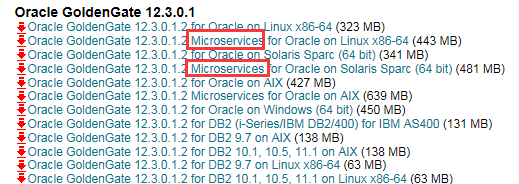
下载基于MicroService的介质后解压
创建 response file
以下是一个示例
$ more response/oggcore.rsp

####################################################################

## Copyright(c) Oracle Corporation 2016. All rights reserved.     ##

##                                                                ##

## Specify values for the variables listed below to customize     ##

## your installation.                                             ##

##                                                                ##

## Each variable is associated with a comment. The comment        ##

## can help to populate the variables with the appropriate        ##

## values.                                                        ##

##                                                                ##

## IMPORTANT NOTE: This file should be secured to have read       ##

## permission only by the oracle user or an administrator who     ##

## own this installation to protect any sensitive input values.   ##

##                                                                ##

####################################################################

#-------------------------------------------------------------------------------

# Do not change the following system generated value.

#-------------------------------------------------------------------------------

oracle.install.responseFileVersion=/oracle/install/rspfmt_ogginstall_response_schema_v1

2_1_2

################################################################################

##                                                                            ##

## Oracle GoldenGate installation option and details                          ##

##                                                                            ##

################################################################################

#-------------------------------------------------------------------------------

# Specify the installation option.

# Specify ORA12c for installing Oracle GoldenGate for Oracle Database 12c and

#         ORA11g for installing Oracle GoldenGate for Oracle Database 11g

#-------------------------------------------------------------------------------

INSTALL_OPTION=ORA12c

#-------------------------------------------------------------------------------

# Specify a location to install Oracle GoldenGate

#-------------------------------------------------------------------------------

SOFTWARE_LOCATION=/u01/app/oracle/product/12.3.0.1

################################################################################

##                                                                            ##

## Specify details to Create inventory for Oracle installs                    ##

## Required only for the first Oracle product install on a system.            ##

##                                                                            ##

################################################################################

#-------------------------------------------------------------------------------

# Specify the location which holds the install inventory files.

# This is an optional parameter if installing on

# Windows based Operating System.

#-------------------------------------------------------------------------------

INVENTORY_LOCATION=/u01/app/oraInventory

#-------------------------------------------------------------------------------

# Unix group to be set for the inventory directory.

# This parameter is not applicable if installing on

# Windows based Operating System.

#-------------------------------------------------------------------------------

UNIX_GROUP_NAME=oinstall
执行安装
基于resp file执行安装程序
./runInstaller -silent -nowait -responseFile /u01/app/software/fbo_ggs_Linux_x64_services_shiphome/Disk1/response/oggcore.rsp

Starting Oracle Universal Installer...

Checking Temp space: must be greater than 120 MB.   Actual 1831 MB    Passed

Checking swap space: must be greater than 150 MB.   Actual 4095 MB    Passed

Preparing to launch Oracle Universal Installer from /tmp/OraInstall2017-09-20_09-48-44PM. Please wait ...[oracle@ip-172-30-3-146 Disk1]$ You can find the log of this install session at:

 /u01/app/inventory/logs/installActions2017-09-20_09-48-44PM.log

The installation of Oracle GoldenGate Services was successful.

Please check '/u01/app/inventory/logs/silentInstall2017-09-20_09-48-44PM.log' for more details.

As a root user, execute the following script(s):

        1. /u01/app/inventory/orainstRoot.sh

Successfully Setup Software.
最后再执行
$ sudo sh /u01/app/inventory/orainstRoot.sh

Changing permissions of /u01/app/inventory.

Adding read,write permissions for group.

Removing read,write,execute permissions for world.

Changing groupname of /u01/app/inventory to oracle.

The execution of the script is complete.
后记
以上步骤只是将MA软件安装完成,针对MA中各项服务及配置,还需要使用oggca.sh进行安装和配置。
具体操作可参考: http://www.cnblogs.com/margiex/p/8071957.html
GoldenGate 12.3 MA架构介绍系列(5) - 静默安装的更多相关文章
- GoldenGate 12.3 MA架构介绍系列(4)–Restful API介绍
OGG 12.3 MA中最大的变化就是使用了restful api,在前面介绍的各个服务模块,其实就是引用restful api开发而来,这些API同时也提供对外的集成接口,详细接口可参考: http ...
- GoldenGate 12.3 MA架构介绍系列(1) - 安装
GoldenGate 12.3微服务架构与传统架构的区别可参考: http://www.cnblogs.com/margiex/p/7439574.html 下载地址:http://www.oracl ...
- GoldenGate 12.3 MA架构介绍系列(2) - 数据同步测试
安装配置可参考上一篇:http://www.cnblogs.com/margiex/p/8071957.html 安装完成之后,会自动启动ServiceManager服务,此时,可以通过浏览器访问. ...
- GoldenGate 12.3 MA架构介绍系列(3) - 各功能模块介绍
在新版的ogg 12.3 microservice architect中,提供了4个不同的服务模块和命令行模块. Admin Server: 负责连接用户.trandata, checkpoint的添 ...
- 剑指架构师系列-Nginx的安装与使用
Nginx可以干许多事情,在这里我们主要使用Nginx的反向代理与负载均衡功能. 1.Nginx的下载安装 在安装Nginx前需要安装如下软件: GCC Nginx是C写的,需要用GCC编译 PCR ...
- 剑指架构师系列-MySQL的安装及主从同步
1.安装数据库 wget http://dev.mysql.com/get/mysql-community-release-el7-5.noarch.rpm rpm -ivh mysql-commun ...
- LNMP架构介绍、MySQL和PHP安装、Nginx介绍
6月6日任务 12.1 LNMP架构介绍12.2 MySQL安装12.3/12.4 PHP安装12.5 Nginx介绍 扩展Nginx为什么比Apache Httpd高效:原理篇 http://w ...
- 【MySQL 高级】架构介绍
MySQL高级 架构介绍 MySQL 简介 MySQL 安装 Docker 安装 参考链接 Linux 安装 参考链接 MySQL 配置文件 log-bin:二进制日志文件.用于主从复制.它记录了用户 ...
- Oracle GoldenGate 12.3微服务架构指北
Microservices Architecture introduction Microservices Architecture is a method or approach to develo ...
随机推荐
- SpringBoot------连接MySQL报错:The server time zone value 'Öйú±ê׼ʱ¼ä' is unrecognized
报错提示: The server time zone value 'Öйú±ê׼ʱ¼ä' is unrecognized or represents more than one time zon ...
- Centos 下 JProfiler 9.1.1 安装 部署 及 使用
JProfiler[1] 是一个商业授权的Java剖析工具,由EJ技术有限公司,针对的Java EE和Java SE应用程序开发的.它把CPU.执行绪和内存的剖析组合在一个强大的应用中.JProfil ...
- Linux usb子系统(二) _usb-skeleton.c精析
"./drivers/usb/usb-skeleton.c"是内核提供给usb设备驱动开发者的海量存储usb设备的模板程序, 程序不长, 通用性却很强,十分经典, 深入理解这个文件 ...
- java 的访问权限控制
package test06; public class PermissionModel { private int age; public String name; public int getAg ...
- 深度学习入门之Mnist
参看Deep learning from scratch,学习到反向传播网络后,把网络调通了,但是训练后损失函数减小,准确率没有变化,和瞎猜一样,是为什么呢?只有在看看各层缺少什么,关键是我的参数和书 ...
- cf 1114E
为什么这道题我到现在才写题解... 题解: 因为是随机题吗,,好像对于我来说还是很新颖的,就写一下. rand()的范围是到32768?这个以前踩过坑 #include <bits/stdc++ ...
- linux 安装配置nexus以及maven私服应用
---------------------nexus---------------------- 1.编辑nexus脚本, 配置 RUN_AS_USER 参数vi /usr/local/src/nex ...
- 面向对象编程之Java多态
我相信从学习计算机面向对象编程起就很多人背下了继承.封装.多态三个特性,可是多态并不是那么好理解的.通常做几道题,背下几次多态的动态绑定规律,可是依旧在一段时间后忘记了多态的存在,为什么要多态,这个程 ...
- Python学习之旅(十四)
Python基础知识(13):函数(Ⅳ) Python内置函数 1.abs:取绝对值 abs(-1) 1 2.all:把序列中的每一个元素拿出来做布尔运算,都为真则返回True,如果序列中有None. ...
- currval &nextval的差异理解
--currval/nextval的区别 select * from 订单 delete --nextval INSERT INTO 订单(订单编号,单价) --nextval每执行一次,会在下列插入 ...